
 A question reached me asking what the relationship was between Network Load Balancing (NLB) and Exchange 2010 CAS Arrays and if CAS Arrays superseded NLB configuration of CAS servers.
To answer this question, first you have to know that the difference between CAS servers in Exchange 2007 and Exchange 2010 is that Exchange 2007 CAS servers only process IMAP, POP, Web and Web Services. With Exchange 2010, CAS servers will also handle MAPI traffic. So, besides balancing ports 80, 443 etc. you also need to balance ports 135 (TCP) and 6005-65535 (TCP/UDP) for MAPI RPC ports. Note that you can also use static ports when required, consult kb270836 (it’s an old article, but still valid).
Now on to the new CAS array. CAS array are built on top of load balanced configurations – being hard- or software based. Since the role of CAS servers is becoming more important because it handles all client traffic, it is important to create redundancy at this level. Here’s when Exchange 2010’s CAS array comes into play. With CAS arrays you can create one “virtual CAS server” where you can point all mailbox servers.
The process of creating a CAS array is as follows:
- Install CAS servers;
- Set up load balancing, either using NLB or hardware. Don’t forget to add the MAPI RPC ports (see above);
- Create a DNS record (A) for the virtual IP address of the CAS array, e.g. myarray.contoso.com;
- Create the CAS array object using the New-ClientAccessArray cmdlet, e.g.New-ClientAccessArray –Name “My Array” –Fqdn “myarray.contoso.com”
Note that there’s a limit of 1 CAS array per site and you can define the site for the CAS array using the Site parameter when required.
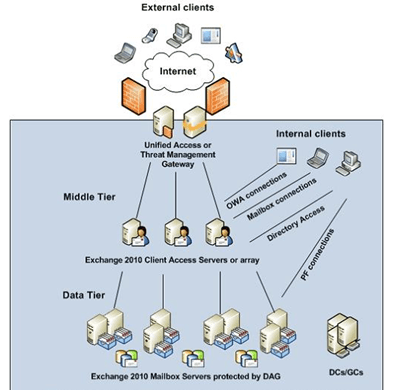 (image by Henrik Walter)
The final step depends on the overall installation sequence and if any Mailbox servers existed before the creation of the CAS array, you may need to correct Mailbox servers configuration. These will probably still point to the individual CAS servers, which we can correct using the Set-MailboxDatabase cmdlet like this:
Set-MailboxDatabase Mbx1 -RpcClientAccessServer “myarray.contoso.com”
Note that when a CAS array is present, Mailbox servers will be configured to use that instead of the first CAS server at installation time.
So the answer to the question is CAS Arrays are built on load balanced configurations, load balancing configuration (software or hardware) is still required. For more background information on Client Access Servers in Exchange 2010, consult this TechNet topic.
Pingback: Minimum HA Exchange 2010 configuration « EighTwOne (821)
With hardware load blancing you can even keep the CAS role on servers in a DAG!
Yes, that’s mentioned here
http://eightwone.wordpress.com/2009/12/24/minimum-ha-exchange-2010-configuration/
Why is there no reference to you “borrowing” the visio diagram from msexchange.org?
Because I reused one of the Technet blogs (see source)
Still trying to conceptualise the interdependencies between WNLB, CAS arrays, external URL, and SSL certs… – i.e. when the WNLB is built, the WNLB cluster has a name (i.e. WNLB1.contoso.com) and also has a load-balanced VIP… so far so fine. Now when the CAS array is built “on top” of that, the array has a name and an FQDN… – the CAS roles individually have their external URLs configured, and have SSL certs installed for all the service connection URLs.. now it starts to get a *little* blurry…
Presumably the DNS A record mentioned has to resolve to the VIP of the WNLB cluster… – Point 3 in your process states the “VIP of the CAS array” which is a little confusing, since the CAS array object does not itself have an IP attribute does it? – the VIP is a property of the NLB…
does the name/FQDN of that A record have to match the WNLB cluster name or the CAS Array name or the CAS array FQDN? (I think its the latter) – can these all in fact be identical?
Or are in fact the NLB cluster name & CAS array name pretty much irrelevant for client connections? – do clients ever get to see or care about them?
So would it be a “sensible” arrangement to set:
WNLB cluster name=outlook.contoso.com
CAS array NAME = outlook.contoso.com
CAS array FQDN = outlook.contoso.com
CAS external URL = outlook.contoso.com
DNS A record “outlook.contoso.com” resolves to VIP of WNLB
SSL cert subject name = outlook.contoso.com
I *think* I’ve got it! – nice to have my thoughts sanity checked though…
Cheers
Paul G.
“Virtual IP address of the CAS Array” . In my view, you have load-balancing – on the network/OS level – and CAS array – on the Exchange level. The fully expanded version would be the “virtual IP address of the WNLB cluster with members which happen to be CAS servers forming a CAS array” then .. sort of 🙂
Its not a requirement for the CAS array to match the WNLB FQDN. The CAS array name is used in the Exchange organization to which clients connect. Just make sure the DNS record for the CAS array points to the WNLB virtual IP address.
Paul,
that’s right. When creating certs for NLB nodes, you should add a couple of subject alternative names (SAN) for cert :
node1.domain.local – (optional but recommended)
node2.domain.local – (optional but recommended)
cas-nlb-array.domain.local – (fqdn od the nlb/cas array the clients will connect to, the name you publish on you internal DNS server)
cas-nlb-array.domain.com – (fqdn of the NLB/CAS array for external client, the name you will publish on your public DNS servers)
autodiscover.domain.local (for Outlook clients)
autodiscover.domain.com (for Outlook Anywhere and ActiveSync clietns)
You should forget the names of NLB nodes – after creating NLB/CAS array, you can think of having only 1 large CAS server (IP, FQDN of array), but you have to deploy the same settings (certs, External URLs, and so on) on 2 servers separately – you will deploy the same cert on both servers, and possibly export cert for ISA/TMG if you use it…
Hope this helps,
Regards,
Andrija
Hi,
We have a Windows NLB and a CAS array (3 servers) set up and working.
I want to know if there is a way of finding out which CAS server an Outlook clinet is connected to.
I’ve tested it the harder way by switching off eacjh of the servers and finding out that Outlook client will log you out if you are on a CAS server that has gone down but I would like to know if there is any utility or powershell command etc to find out.
Cheers
Khaled
AFAIK you can’t from Outlook. With OWA you can, using Help (?) > About.
From a server perspective, you can use netstat to check which clients are connected to each host.
Thank you for this – I will lookminto this.
We have 6 servers running the CAS role, running netstat on each CAS isn’t very efficient.
With 6 (officialy 8 ) I’d start thinking about a hardware-based solution instead
Pingback: Some 2010 Statistics « EighTwOne (821)
Hi All,
Just a note on Andrija’s comments regarding node1.domain.local – (optional but recommended) and node2.domain.local – (optional but recommended). I got burned by this scenario (Andrija, I had this config *before* I read your comment, so please don’t feel bad about it). As it turned out, Test-OutlookWebServices failed one test while trying to communicate with an NLB node’s FQDN instead of the NLB’s FQDN:
RunspaceId : 137303ea-320d-45cf-9ea3-e123e54a757e
Id : 1104
Type : Error
Message : The certificate for the URL https://node1.domain.com/Autodiscover/Autodiscover.xml is incorrect. For SSL to work, the certificate needs to have a subject of node1.domain.com, instead the subject found is mail.domain.com. Consider correcting service discovery, or installing a correct SSL certificate.
NB: it was a split DNS config. This is the only error and the only test that communicates with an NLB *node* in Test-OutlookWebServices. All other tests (some 2 pages long) communicate with the WNLB’s FQDN and they all succeed. Sufficient to break things.
I ended up replacing the cert with one that includes the node names as well as the NLB’s FQDN. I have no NETBIOS names in the SAN cert.
I am yet to install and test the new cert as I only placed the order today.
Hope this helps.
Pingback: Thoughts on “Five things that annoy me about Exchange 2010″ « EighTwOne (821)
Using WNLB with single-NIC CAS servers, can you have the cas array FQDN (like “mycas.mydomain.com”) resolve to an internal-only IP (CAS servers are also on an internal-only network)? The CAS array name is NOT on any SSL cert. Does it have to be? For instance, I have “mail.mydomain.com” with a public IP and that name IS on an SSL cert. I have a TMG server, and I want to publish rules, like IMAPS (since TMG only allows “mail server” publishing to point to ONE IP). And since the IP is pointing to the internal IP of the CAS array, should WNLB then load balance the CAS servers? I need HA for all my mailboxes, which is why I need a cas array, so I don’t have to keep track of which CAS server is responsible for which mailboxes. I assume if I didn’t have a CAS array, if a mailbox database was assigned to a particular cas server and that cas server went down, all mailboxes in the database would be unable to access their mailbox, correct?
CAS arrays are used to assign a non-CAS server to RpcClientAccessServer. The FQDN used to access the client access server array, not necessarily the FQDN of the CAS array but more likely the FQDN of your WLB or HwLB array, should be on the certificate. Note that depending on your requirements, you can configure a farm in TMG load balancing certain services using TMG, not WLB.
Was it a good idea to have same fqdn for external URL i.e. webmail.mydomain.com (for OWA, OA or ActiveSync) published through two reverse proxy TMG in NLB environment and use the same fqdn for CAS Array Name i.e. webmail.mydomain.com which resolve internal IP of CAS Array Name? considering DR activation
It wil save my one fqdn & money when i go for SAN certificate 🙂
any1 please?
The CAS array name is just a label and its name doesn’t have to match the FQDN of the array. It’s just a logical entity. The CAS array name doesn’t have to be on the SAN certificate, the FQDN does, which might happen to be identical to the CAS array name. Does this help?
No, can u please explain it in detail…
Simply said, array1 doesn’t have to be in your certificate and array2 does when using:
New-ClientAccessArray –Name array1 –Fqdn array2.contoso.com
ok got it… so is it against best practice if I use CN for OWA,OA & ActiveSync and same FQDN for CAS Array
Pingback: 2011, a short Retrospective « EighTwOne (821)
Hi Paul..
I am now imeplementing exactly the scenario as mentioned, but currently I am having some troubles…
First, let me explain the scenario:
2 x TMG (Array formed) – with a common cert for both TMG – cas.domain.com
2 x CAS (Array formed) – with a local certificate casarray.domain.local
And others including HTS and MB…
First of all, I published the OWA and Active-Sync. With an new OWA rule, the destination point to casarray.domain.local, and I am able to access the OWA with no errors.
Afterwards, I tried to publish the Outlook-Anywhere with autodiscover and now I am facing some errors…
I have two questions..
1. For the configuration of ExternalURL for EWS, OAB in both CAS nodes, which should be the correct configuration? https://casarray.domain.local/ews or https://cas.domain.com/ews?
2. I have tried to test autodiscover in the testremoteconnectivity website, and failed. The return error indicate that “the autodiscover xml response does not contains neccessary XML elements”..
If I am not using autodiscover but simply using manual configuration of outlook anywhere, I am able to receive emails. I have already inserted the _autodiscover SRV record in the DNS record and pointed to cas.domain.com.
Any help would be grealy apprepricate!~Thanks.
Ah…Forget to mention that the TMG array nodes didn’t join to the Exchange AD as we have installed the ETS on both nodes.
Sorry to have a typo..should be to you Michel instead of Paul.Sorry about that.
Would anyone please help?
1) cas.domain.com; casarray.domain.local should be InternalURL (depending on your setup)
2) You published the autodiscover FQDN and the /Autodiscover/* path? Does it work internally (suggest trying Outlook / Test E-mail Configuration or the tool mentioned here: http://eightwone.com/2010/08/15/standalone-autodiscover-test/ ). What is the output of Get-AutodiscoverVirtualDirectory | fl *url*,*auth* ?
Thanks for the response.
I ran the Get-AutodiscoverVirtualDirectory command and the output is as follows:
InternalUrl :
ExternalUrl :
InternalAuthenticationMethods : {Basic, Ntlm, WindowsIntegrated, WSSecurity}
ExternalAuthenticationMethods : {Basic, Ntlm, WindowsIntegrated, WSSecurity}
LiveIdSpNegoAuthentication : False
WSSecurityAuthentication : True
LiveIdBasicAuthentication : False
BasicAuthentication : True
DigestAuthentication : False
WindowsAuthentication : True
I wondered if I need to configure the Internal URL and External URL?
Yes, use Set-AutodiscoverVirtualDirectory -Identity –internalurl https:///autodiscover/autodiscover.xml –externalurl https:///autodiscover/autodiscover.xml
Pingback: Load balancing Exchange 2010 using a KEMP Loadmaster | EighTwOne (821)
Pingback: 2012, a short Retrospective | EighTwOne (821)
Dear, I had setup the CASarray but my outlook does not auto discover the CASArray. it goes to First CAS server individually instead of connecting to CASarray.
Please suggest
@Sulman, you need to set the RpcClientAccessServer property on your mailbox database(s).
Use the Set-MailboxDatabase “Your_Database_Name” -RpcClientAccessServer FQDN_of_your_CASArray
See http://clintboessen.blogspot.com.au/2012/03/changing-rpcclientaccessserver-how.html for more.
Setting RpcClientAccessServer is one thing, getting Outlook to reconfigure itself is another. Writing a short post on that one when time permits.
Hi Michel,
In your following command:
New-ClientAccessArray –Name “My Array” –Fqdn “myarray.contoso.com”
I assume that “My Array” (Exchange 2010 CAS array name, it has no DNS correspondence) is not the same as “myarray” (WNLB cluster name) in the “myarray.contoso.com” (Exchange 2010 CAS array FQDN and NLB cluster FQDN, it has a DNS A record). If this is true, can I say that the name “My Array” will not be appeared or used in anywhere else, and it is no more than an (container) object of Exchange system? If so, do you suggest “My Array” “should” or “should NOT” be the same as “myarray” or doesn’t really matter and why? (Not considering any certificate stuff; myarray.contoso.com is not externally resolvable)
Thank you.
Grace
“My array” is just a label and is only used to define the array. It can be as simple as myarray (or “my array”) or something with parts of the company or site to indicate what clients it will serve, e.g. COMPANY-SITEA-CASARRAY. That myarray.contoso.com is just the MAPI endpoint for clients and doesn’t need to be part of the certificate. It’s recommended it can be resolved only from the internal network to improve the user experience, i.e. speed up switching between MAPI/https when working locally/remotely.
Does this answer your question?
Thanks Michel.
Ok, if I choose the CAS array label (“My Array”) is the same as NLB cluster name “myarray” (CAS array FQDN/NLB Cluster FQDN: myarray.contoso.com); then which the following command should be used:
get-MailboxDatabase | Set-MailboxDatabase -RpcClientAccessServer “myarray”
or
get-MailboxDatabase | Set-MailboxDatabase -RpcClientAccessServer “myarray.contoso.com”
Because some articles suggest to use CAS array name (label) for the “Set-” command (first command above); some other articles suggest to use CAS array FQDN (second command above).
To say it in another way: If I had previously run:
New-ClientAccessArray -Name “myarray” -Fqdn “myarray.contoso.com” -Site “AD-Site-Name”
Does it mean “myarray” will then always refer to as “myarray.contoso.com”; so the two “set-” commands above are both GOOD and they can achieve the result as intended without error?
These confusions made me to think whether both names “should” or “should NOT” be the same. Thanks again for your time.
Some even suggest the command without “-name”, so will the following work (without nsme confusion)?
New-ClientAccessArray -Fqdn “array.contoso.com” -Site “AD-site-Name”
Thanks.
You’re CAS array needs a name. When assigning RPCClientAccessServer you need to specify the FQDN if I recall correctly (when you reconfigure the CAS array with a different FQDN, the RpcClientAccess server properties will become unset)
Pingback: EighTwOne 2013 Annual Report | EighTwOne (821)
Hi Michel
I have a little design question regarding Cas array :
I have a centric Exchange 2010 deployment (2 Exchange 2010 server with DAG and a load balancer between them) in the main office. Cas array has been created and every thing is working well in the main office.
Now, we have also 80 branch office (with one AD site per office) with only Outlook Clients. The question is : should i create a cas array for every AD site ?
Thanks in advance.
When possible, I’d always create a CASA, also if you are not going to use it. This allows you to create the logical endpoint (to which clients will connect and which is configured in their profile) and creates flexibility like having the option to add CAS servers when required without having to reconfigure OL profiles.
I agree with you, its better to create a cas array as soon as possible in the deployment process. Its clear for deplyment involving one or two datacenters, but when i comes to multi sites scenario, no documentation or article are available !
Hamid,
“should i create a cas array for every AD site”
No, you shouldn’t. You only create 1 CAS array / site where you have actually deployed the CAS role. If a site has no Exchange server then you cannot create a CAS array for it.
In your case you create a CAS array for the two Exchange CAS servers in the site where they reside.
Hope this helps.
Zoltan
Thanks for reply Zoltan.
Lets suppose that we have 2 CAS in the main site A (CAS 1 and CAS2) and one cas Array (CASArray, fqdn : outlook.domain.com, site : A) with outlook.domain.com pointing on the VIP of a load balancer.
What’s happen for a user residing in site B (no Exchange server there) starting Outlook. It will connect to CAS1 or CAS2 and not to the Cas array because this one is configured for site A and not site B.
So in this situation, the CAS high availability would apply for site A only ! not logic at all !
Sorry, i am totally wrong, just forget about it 🙂
Pingback: How To Work On Cross Site Failure in Exchange 2010 Environment – WinGag Remote Software