
 In co-existence scenarios, the targetAddress attribute is leveraged to accomplish routing to different Exchange organizations by specifying the “final destination” e-mail address. The e-mail domain part of this address can be a non-accepted domain (i.e. other organization). This will enable organizations, when used in conjunction with mail-enabled users or contacts, to provision the (global) address list of their Exchange organization with mail-enabled objects of other organizations, also in a migration co-existence phase. Simply said:
- It can allow users in the local organization to select the object from the (global) address list and that object exists in other organizations;
- Exchange can route the message to its final destination using the specified targetAddress.
Reason for this blog is that I still see people putting e-mail address in the targetAddress property or the object by scripting against Active Directory (e.g. ADSI), even while they’re scripting using the Exchange Management Shell.
In the Exchange Management Shell, you can set the targetAddress by using the Set-MailContact or Set-MailUser in conjunction with the ExternalEmailAddress parameter, e.g.:
Set-MailContact michel -ExternalEmailAddress michel@contoso.com
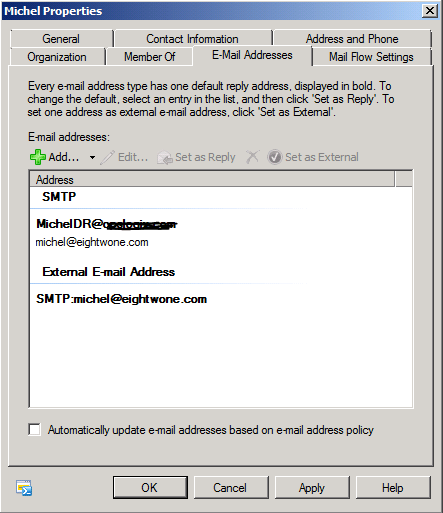
Setting this address is also possible using the Exchange Management Console, which may be more appropriate for testing purposes or a small number of changes (though I’d prefer the less-prone-to-error script any day):
When utilized in scripts, you can use PowerShell Piping Power (is that abbreviation already taken?) to process (CSV) files or use filtering to select the objects of which you want to configure the targetAddress, e.g.:
Get-MailContact -OrganizationalUnit “contoso.local/Division” -Filter {EmailAddresses -like *@contoso.local} -ResultSize unlimited | ForEach { Set-MailContact –ExternalEmailAddress “$($_.Alias)@newcompany.local” }
Get-Content “users.txt” | Get-MailContact | ForEach{ Set-MailContact $_.Identity -ExternalEmailAddress “$($_.Alias)@newcompany.local” }
This will configure all mail-enabled contacts in the Division OU with an @contoso.local e-mail address with a target address which consists of the current alias followed by @newcompany.local. The other example uses a text file with names to process contacts and set the targetAddress to the current value of “alias” followed by the external e-mail domain.
Needless to say, the connectors between contoso and newcompany as well as the accepted domains should be properly configured to route those contoso.local and newcompany.local domains between those organizations. Of course, this also depends on whether you’re using internal or external domain names and if you want those messages to go through the public network or not.
Note that this is also how you can set configure the targetAddress of a local (DirSync’ed) mail-enabled contact with an Office 365 mailbox in a Hybrid setup, for example after moving the mailbox to Office 365. In such case you set the targetAddress to the service domain in a Hybrid Office 365 setup, e.g. mydomain.mail.onmicrosoft.com.
Pingback: Exchnage – Forwarding And Redirection | FICILITY.NET
You, sir, are absolutely right on the money with this post. I had the exact same problem dealing with a child domain that was sync’ed to O365, but the parent domain was not. Hybrid setup with Office 2010. Mail from parent.net (on-premises) to child.parent.net would not flow if the primary address for the users in O365 were set as SMTP:child.parent.net. Setting the “targetaddress” attribute allows the mail to flow. I spent almost 2 weeks with MS support, and they could not tell me this. You, however, win the prize.
By running the following script, I was able to fix the issue for ALL user accounts (this also sets the primary SMTP address for the users as well.
$s = Get-ADUser -SearchBase “ou=OUofUserAccts,dc=site,dc=domain,dc=local” -resultsetsize $null -filter *
$s | foreach {
set-aduser $_.samaccountname -add @{“targetaddress” = $_.samaccountname + “@O365domain.net”}
}
$s | foreach {
set-aduser $_.samaccountname -add @{“proxyaddresses” = “SMTP:” + $_.samaccountname + “@o365domain.net”}
}
So…this fixed what MS couldn’t figure out after working with them for over a week! Over 25K accounts, fixed in about an hour and a DirSync setting. Brilliant!
Hello
got an issue on one customer.
Just after installing 2010 SP3 RU8v2, it complains having issue to send mails to some Distribution Groups.
After investigation, we found that ExternalEmailAddress was defined on these Distribution Groups.
It should not be. Maybe a third party provisioning tool did this.
We didn’t have any issue with all previous Exchange 2010 versions (including 2010 SP3 RU7).
It seems that Microsoft has changed something in RU8v2 regarding this attribute for Distribution Groups
Hello,
thank you for this blog. Microsoft did something with attributes in Distribution Groups. We had the same issue after installing RU8v2. We have deleted the targetAddress from every MailEnabledDG. After that change it was possible to send an email to the groups.
Uwe
I need to have know the powershell commands to find target address of mail contact. I know how to manually check it in Resource Forest. So, I wanted to know if there is a way to pull Target address for existing mailcontatcs: I tried this Get-MailContact -Identiey ” mailcontact@abc.com” -targetaddress? Thoug it never worked. Please help
The AD properties don’t always match the object property names. The AD property targetAddress maps to externalEmailAddress. You could also use Get-ADUser to construct a query, which will result the AD properties (though you needto explicitly request for the non-default ones), e.g. Get-ADUser -Filter { … } -Properties targetAddress
Pingback: Annual Report 2020 | EighTwOne (821)