
Normally, the setup of Exchange 2010 Rollup 1 is a no-brainer. However, not all Exchange systems have access to the internet. As with Exchange 2007 Rollups, Exchange 2010 Rollup 1 contains managed code of which the assemblies need to be compiled during setup. This requires an internet connection to verify the certificates. If you have no internet connection the setup is very slow because it needs to wait for certificate revocation checks to timeout.
To prevent this behaviour, you can disable the check as follows:
- Go to Internet Explorer > Tools > Internet Options or Control Panel > Internet Options
- Navigate to Advanced > Security
- Make sure the Check for publisher’s certificate revocation and Check for server certificate revocation options are unchecked
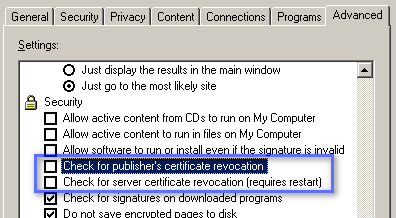
You can re-enable the checks afterwards when required.
 EighTwOne (821)
Pingback: Exchange Updates (and more) – H1 2023 | EighTwOne (821)
Pingback: Exchange 2019 CU14 (2024 H1) | EighTwOne (821)
Pingback: Exchange 2019 CU15 (2025 H1) | EighTwOne (821)