
 Not directly Exchange related but mail-related, I’d like to mention a function in Outlook which could make organizing e-mail a lot easier, depending on if and how you organize them of course.
Normally, when replying to an e-mail in Outlook, it will store a copy of that message in the Sent Items folder of that account. That is, assuming you have 1 Exchange account set up or multiple in conjunction with the DelegateSentItemsStyle setting as described here.
Now after a while, your Sent Items folder will be full of messages sent over the past period. For received messages you may have created folders and perhaps rules to automatically organize incoming e-mail in projects or customers folders. Wouldn’t it be nice if you can keep those messages with their replies automatically, instead of having to organize your Sent Items by manually distributing its contents over the projects and customers folders?
Well, you can actually, and it’s a setting in Outlook. Open up the File > Options and select the Mail settings. In the right pane, check the When replying to a message that is not in the Inbox, save the reply in the same folder setting:
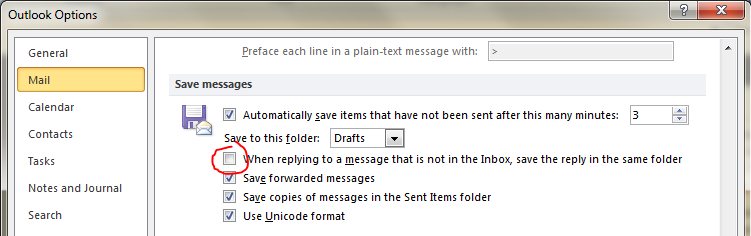
Note that this setting in pre-Outlook 2010 versions is called In Folders Other Than The Inbox, Save Replies With Original Message.
Now when you reply to a message, it will save the reply in the same folder unless the message was in the Inbox.
Note that this setting will apply to all accounts and personal folders.
 EighTwOne (821)
Is there a way to enable this feature in Outlook for Mac 2011?
Also, while on the topic of Outlook for Mac, is there a way that the “move email to xxxx folder” actually moves the email to that folder instead of just placing a copy of the email in that folder? Today I need to hold down the command key when I drag the message to the target folder
thanks!
LikeLike