

A small post on something that I only noticed today, which is that one of the recent updates for the Teams app on iOS introduced the much welcome support for Calendar View in Teams on CarPlay. This was published since January as Roadmap ID 114306 and is also published in the Message Center as MC516905. I am currently running Teams for iOS version 5.5.0, so that build definitely contains this functionality.
No longer you need to tell Siri you want to join your ‘next meeting’, as you now will be presented with current and upcoming events. You can join any meetings early simply by tapping on them, and joinable meetings will display a phone icon, which you can also tap to join. Of course, you can only join Teams meetings, if you tap a regular appointment you will get a notice that this is not a Teams meeting.
The picture below shows the Calendar View both on Teams Mobile (left) and the corresponding view as displayed on Teams for iOS with CarPlay (right). It shows our Test meeting which is currently in progress, as indicated by a progress bar as well.
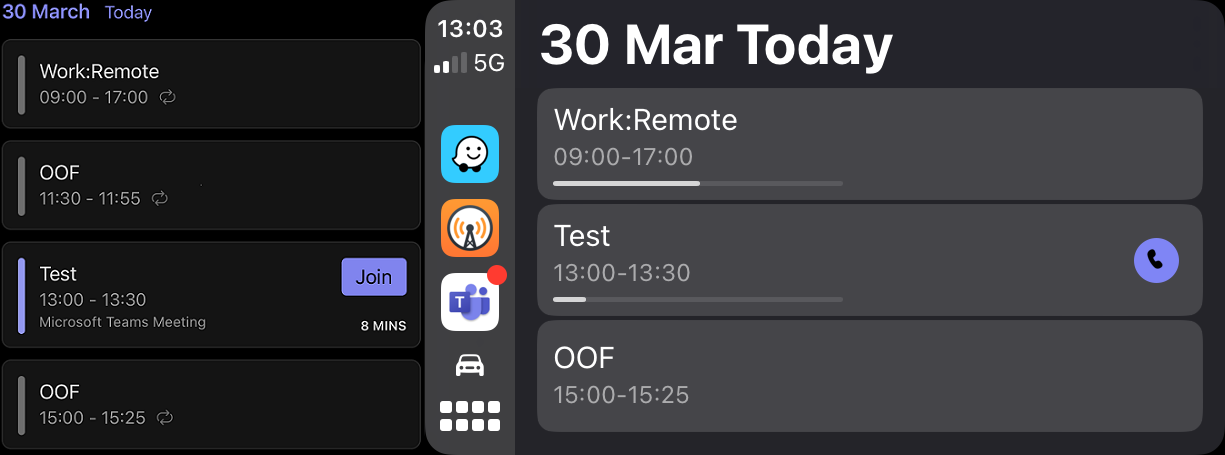
Note that the calendar view is showing today’s items, and only from the currently active account in Teams Mobile on your connected mobile device. If you have multiple accounts configured, switching accounts on Teams Mobile is required to show their respective calendars. Doing so will update the Calendar View immediately and allows you to join those meetings using the display. A holistic view would be nice, but compared to where Teams on CarPlay is coming from, this is already a big step in usability.
A small request to the Teams development group: Please use meaningful descriptions to the version history, as this added functionality is nowhere to be found between the “Bug fixes and performance improvements” and occasional mention of functionality changes.
 EighTwOne (821)
Thank you for this. Can I also access Teams chat messages, and can I reply if so from CarPlay?
LikeLike
Meetings and calling only
LikeLike
Bummer, thank you. I wish it worked like iPhone messages.
LikeLike