
 The issue and solution described here is by design, but not known by every customer so here’s my short write-up on this subject.
Recently, I was at a customer reporting issues with several users not being able to synchronize their mobile devices using ActiveSync. The customer was running Exchange 2010 SP1 and used various mobile devices, e.g. iPhones as well as Android phones and tablets. A quick look in the IIS logs revealed that devices were connecting properly, but they received HTTP return code 403 (forbidden):
2011-08-30 10:09:31 172.16.10.12 OPTIONS /Microsoft-Server-ActiveSync/default.eas User=XXXXX&DeviceId=d849cec9be024c828b9af73da93bb59b&DeviceType=htcbravo&Log=LdapC2_Error:UserPrincipalCouldNotBeFound_Dc:dc.domain.com_Budget:(D)Conn%3a1%2cHangingConn%3a0%2cAD%3a%24null%2f%24null%2f0%25%2cCAS%3a%24null%2f%24null%2f0%25%2cAB%3a%24null%2f%24null%2f0%25%2cRPC%3a%24null%2f%24null%2f0%25%2cFC%3a1000%2f0%2cPolicy%3aDefaultThrottlingPolicy%5Fe205201e-d418-409a-a15b-4b51baef9bf4%2cNorm%5bResources%3a(DC)dc.domain.com(Health%3a-1%25%2cHistLoad%3a0)%2c%5d_ 443 domain\XXXXX 62.140.137.149 Android-EAS/0.1 403 0 0 124
Another clue was provided by the eventlog, which revealed MSExchange ActiveSync was reporting error 1053:
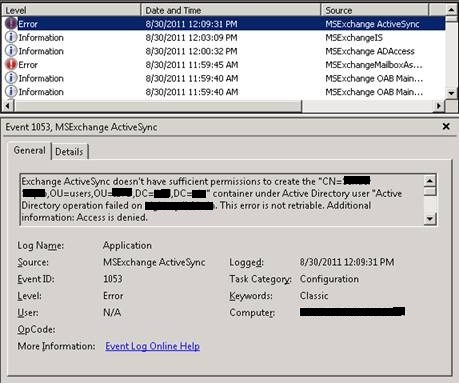
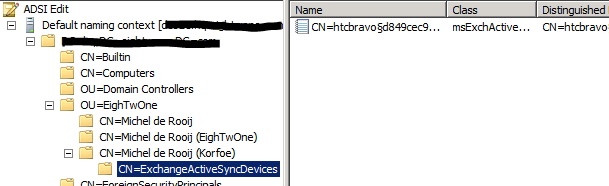
The remainder of the message reads: “Make sure the user has inherited permission granted to domain\Exchange Servers to allow List, Create child, Delete child of object type “msExchangeActiveSyncDevices” and doesn’t have any deny permissions blocking such operations”. What happens when setting up ActiveSync is that Exchange tries to create a container named ExchangeActiveSyncDevices below the user object in Active Directory and will store in that container an MsExchActiveSync object for each ActiveSync device. Apparently Exchange doesn’t have sufficient permissions to create these objects.
To fix this, open up Active Directory Users and Computers. Now, to be able to inspect the security settings, we first need to activate Advanced Features if not already set. To do this, from the View menu option, select Advanced Features.
Next, navigate to the user object experiencing the issue. Open up Properties, select the Security tab and click Advanced.
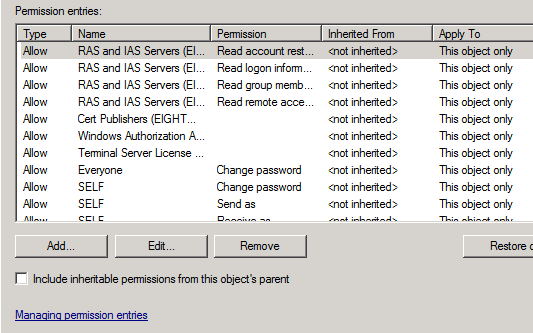
Notice the Include inheritable permissions from this object’s parent is not set, the reason for Exchange not having any permissions on the object.
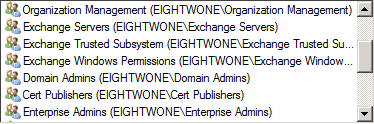
To fix the issue, simply check Include inheritable permissions from this object’s parent and click OK. You’ll return to the previous window where you’ll notice the Exchange Server account is now granted permissions on the object:
At this point, ActiveSync will work and Exchange will be able to create MsExchActiveSync objects in the ExchangeActiveSyncDevices container:
Note that Include inheritable permissions from this object’s parent by default is not enabled for members of the protected groups, e.g. Domain Admins. In fact, every hour the DACL on members of protected groups will be reset and inheritable permissions will be removed. This process is called AdminSDHolder which is to prevent inappropriate changes from being made to protected groups, accidently or otherwise. Michael B. Smith did a nice write-up on this subject here. This is also the reason why bypassing the AdminSDHolder limitation by manually granting Exchange permissions would be inappropriate.
To prevent this issue, it is recommend to follow an old, yet far from rusty administrator best practice, which is to use one account for day-to-day operations, e.g. work and e-mail, and another account for administrative purposes.
Good Stuff! If you want to do a quick audit of objects without inheritable permissions set you can use these powershell one-liners (Quest AD powershell cmdlts required);
Get a list of all objects and list those without permission inheritance setting set
Get-QADUser -SizeLimit 0 | Select-Object Name,@{n=’IncludeInheritablePermissions’;e={!$_.DirectoryEntry.PSBase.ObjectSecurity.AreAccessRulesProtected}} | Where {!$_.IncludeInheritablePermissions}
I remember the old day’s of Exchange 2010 RTM…The old Microsoft PSS Days:)
http://social.technet.microsoft.com/Forums/en-US/exchange2010/thread/0cb489da-c490-42ea-91fe-19b8e4de8571/
Good work Michel..
Cheers,
Hi, I’m having a similar problem but with 2007. Which entries should I make sure are .
Many thanks,
Ed
That should have been not inherited but I put it inside the less than greater than signed 🙂
Set-InheritablePermissions.ps1
## Script name = Set-IheritablePermissionOnAllUsers.ps1
##
## sets the “Allow inheritable permissions from parent to propagate to this
##object”check box
# Contains DN of users
#
#$users = Get-Content C:C:Navdeep_DoNotDeletevariablesusers.txt
Get-ADgroup -LDAPFilter “(admincount=1)” | select name
$users = Get-ADuser -LDAPFilter “(admincount=1)”
##Get-QADUser -SizeLimit 0 | Select-Object Name,@{n=’IncludeInheritablePermissions’;e={!$_.DirectoryEntry.PSBase.ObjectSecurity.AreAccessRulesProtected}} | Where {!$_.IncludeInheritablePermissions}
ForEach($user in $users)
{
# Binding the users to DS
$ou = [ADSI](“LDAP://” + $user)
$sec = $ou.psbase.objectSecurity
if ($sec.get_AreAccessRulesProtected())
{
$isProtected = $false ## allows inheritance
$preserveInheritance = $true ## preserver inhreited rules
$sec.SetAccessRuleProtection($isProtected, $preserveInheritance)
$ou.psbase.commitchanges()
Write-Host “$user is now inherting permissions”;
}
else
{
Write-Host “$User Inheritable Permission already set”
}
}
Nice, but bit will be set again after next AdminSDHolder cycle so it’s recommended to use a non-Admin account instead of fixing it this way.
Hello, I was having a problem with my iphone accessing my new exchange 2013 server, it would not sync. I discovered that if did the below I got it working on my iphone.
I went into adsi edit
Go into default naming context
Drill down into domain and to the user in question cn=(user)
Delete the container cn=exchangeactivesyncdevices
Just an extra to look at
That location is used to register ActiveSync devices; removing it may temporarily work (until AdminSDHolder kicks in).
Thank you very much, worked perfectly!
Pingback: EighTwOne 2013 Annual Report | EighTwOne (821)
Hello Michel
what is the best way to apply it for all users ?
For regular users this shouldn’t be an issue. Have a look at a write-up fellow MVP Pat Richard made here:
http://www.ehloworld.com/1621
Michael –
Three follow-up questions:
1) I am a domain admin, don’t have inheritable permissions checked, and therefore can’t sync my e-mail to my phone. You stated that “In fact, every hour the DACL on members of protected groups will be reset and inheritable permissions will be removed.” If that is the case, then what good does it do to check the inheritable permissions box? Won’t it just be cleared the next hour?
2) Is there a security risk in checking the inheritable permissions box for members of the Domain Admin group? If Windows is built to not have permissions inherited for Domain Admins, maybe it is best to leave that unchanged.
3) Do users who are not members of a protected group need to have their permission inheritance box checked to sync on ActiveSync?
At one point I had granted everyone local admin rights for a day so that it would make adding the drivers to the printers created on a replacement server easier to accomplish. Apparently, this has turned off the permissions inheritance for everyone. I am now moving to Exchange 2013 and recognize the ActiveSync issue for domain admins (and for all users until I fix it). It appears that as long as you keep the existing Activesync device (Exchange doesn’t have to create anything new) that things should work OK, even for the domain admins’ email accounts, right? Only if they change devices will Exchange have problems creating the device due to the permissions inheritance being turned off.
Pingback: EighTwOne 2014 Stats | EighTwOne (821)
I recovered my exchange server from a disaster, and things haven’t been exactly correct since. I need to know the default permissions for each exchange object so that I may manually enter them before granting inheritable permissions. The exchange objects had no permissions granted, and I had to enable all for all exchange objects at the domain level for things to begin to operate. I feel this is sloppy.
using preparead doesn’t fix it. it seems to create accounts for objects that are no longer there, as it gives them an unknown sid
This helped, thanks!
Pingback: Exchange ActiveSync and Inheritable Permissions issue | EighTwOne (821) | ICT Dave
Pingback: Enable AD Inheritance on all users in an OU and all sub OUs | powerscripter
Thanks Michel, very helpful.
HI, I am facing an issue in recovery password for all the users who are accessing active sync. I am having Exchange 2013. Kindly guide me for getting the recovery password for the devices whoa re using active sync.
There’s no such thing as a recovery password, or I didn’t understand your question.
Just wanted to say THANK YOU for this tidbit of info. Worked like a charm
what about server 2012 R2?
What about what? It’s OS-independent, AdminSDHolder is an AD feature. See the Michael B. Smith article referenced.
I have never been able to get Exchange 2010 & Active Sync working with my phone on my admin account no matter what I do. And believe me, I’ve tried everything over and over and over several times over the years.
I’m starting to think it’s cursed. According to most of the posts out there all you need to do is clear a check box and it works. It doesn’t. Not even for a moment let alone a 60 minute cycle.
Pingback: Exchange ActiveSync Inheritable Permissions not checked – Shawn Elg
Pingback: Protected AD Groups and the problems they can cause accounts. – IT Blog
Pingback: Exchange Active Sync – not connecting to Exchange Server – UC Steps
This enabled me to get my work phone working, however is it going to break as soon as the AdminSDHolder runs, or is it simply required for the 10 minutes or so that is needed for activesync to create the objects under the user in AD, and then the reversion will ensure that full security is maintained?
Pingback: Annual Report 2020 | EighTwOne (821)