
Hybrid Configuration Wizard & F12

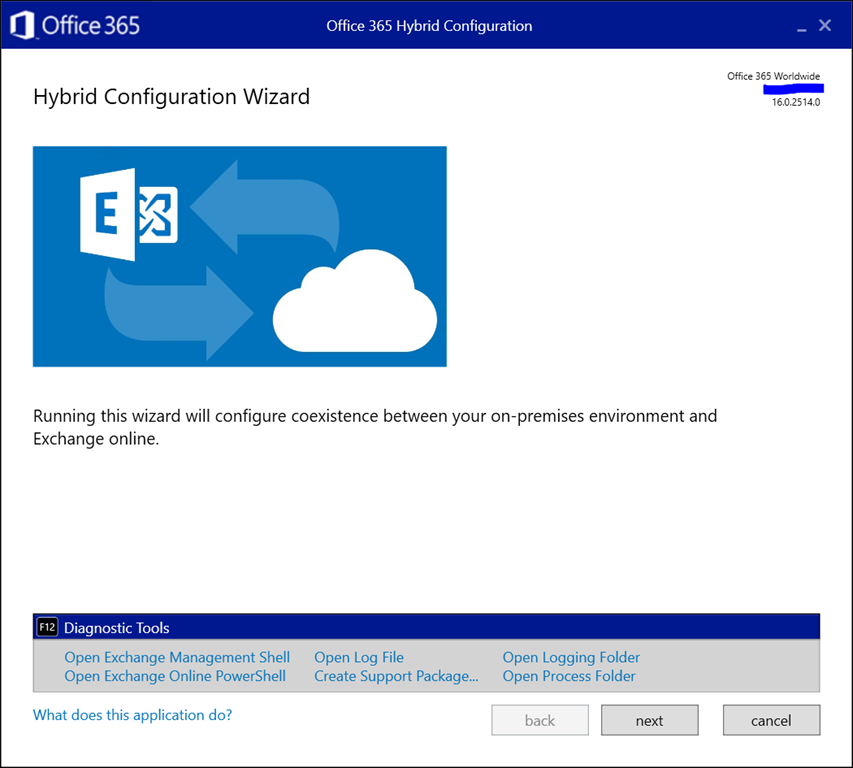
A small tip for those running the Exchange Hybrid Configuration Wizard. As announced at Ignite yesterday, a convenient feature was added to the HCW and is available now. Pressing F12 in the HCW will now open up a panel with shortcuts to the following tools and locations:

  • Exchange Management Shell
  • Exchange Online PowerShell
  • (current) Hybrid Configuration Wizard Log File
  • Create Support Package (to zip HCW logs for support)
  • Open Logging folder (of HCW)
  • Open Process Folder (of the HCW app)

Here is how it looks:
image

This might save you an occasional click or two.

This entry was posted in Exchange Online, Exchange Server, Office 365 and tagged , by Michel de Rooij. Bookmark the permalink.
Unknown's avatar

About Michel de Rooij

Michel de Rooij, with over 25 years of mixed consulting and automation experience with Exchange and related technologies, is a consultant for Rapid Circle. He assists organizations in their journey to and using Microsoft 365, primarily focusing on Exchange and associated technologies and automating processes using PowerShell or Graph. Michel's authorship of several Exchange books and role in the Office 365 for IT Pros author team are a testament to his knowledge. Besides writing for Practical365.com, he maintains a blog on eightwone.com with supporting scripts on GitHub. Michel has been a Microsoft MVP since 2013.

1 thought on “Hybrid Configuration Wizard & F12

  1. One of the best-kept secrets in the hybrid configuration wizard ( HCW ) is the F12 easter-egg. Jeff Kizner demonstrated this feature during his Ignite session back in September.

    Like

Leave a reply to mobile Cancel reply