
Unknown's avatar

About Michel de Rooij

Michel de Rooij, with over 25 years of mixed consulting and automation experience with Exchange and related technologies, is a consultant for Rapid Circle. He assists organizations in their journey to and using Microsoft 365, primarily focusing on Exchange and associated technologies and automating processes using PowerShell or Graph. Michel's authorship of several Exchange books and role in the Office 365 for IT Pros author team are a testament to his knowledge. Besides writing for Practical365.com, he maintains a blog on eightwone.com with supporting scripts on GitHub. Michel has been a Microsoft MVP since 2013.

Exchange 2010 SP1 Beta Setup & Prerequisites


Many of us have been setting up and testing SP1 Beta in (I hope) lab environments. One of the nice additions to the setup process people reported is the option Automatically install Windows Server roles and features required for Exchange Server, shown during the Installation Type selection. Be advised that this option is – as stated – limited to Windows Server roles and underlying features only. You still need to install other possible prerequisites first, such as the 2007 Office System Converter. Also, the option doesn’t seem to work 100% in SP1 Beta, as I had to manually add IIS features like IIS7 Basic Authentication and IIS7 Windows Authentication.

Although this potentially saves us executing the well-known Add-WindowsFeauture cmdlets (2008 R2 or ServerManagerCmd in 2008 SP2, see this article), I hope Microsoft includes automatic installation of the additional prerequisite components in SP1 RTM as well. I expect it would be little trouble to include these components as well, accelerating the process of installing Exchange 2010 SP1 and rendering prerequisite installation scripts like this script from Pat Richard obsolete.

Note that Exchange 2010 setup also supports resuming. Nice when setup discovers a pending restart; resuming means you can reboot, start setup again and continue where you left off; no need to enter all the information again. More information on resuming setup and watermarks here.
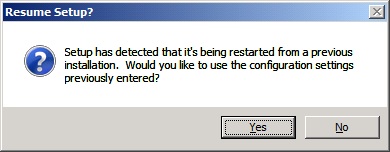
Note that I’ve been installing Exchange 2010 SP1 Beta on Windows Server 2008 R2 only so far, so on Windows Server 2008 SP2 your mileage may vary.

Exchange 2010 SP1 Beta updates (cont’d)


Even more collateral updates after the release of Exchange Server 2010 SP1 Beta. Today the updated Exchange Server 2010 SP1 Beta Help file and the Exchange Server 2010 SP1 Beta UM Language Packs saw daylight.

The standalone Exchange Server 2010 SP1 Beta Help file can be used to as a reference to plan, deploy and manage your Exchange 2010 SP1 Beta organization.

The Exchange Server 2010 SP1 Beta Unified Messaging (UM) Language Packs allow an Exchange Server 2010 SP1 Beta UM server to speak additional languages to callers and recognize other languages when callers use Automatic Speech Recognition (ASR) or when voice messages are transcribed.

You can download the Exchange Server 2010 SP1 Beta Help file here; the individual Exchange Server 2010 SP1 Beta UM Language Packs can be retrieved from this location.

Hosting Deployment Guide for Exchange 2010 SP1 Beta


In addition to the Exchange 2010 SP1 Beta release yesterday and all the updated related documents and kits, the Hosting Deployment Guide for Exchange 2010 SP1 Beta became available today.

The guide (CHM help file) describes hosting Exchange Server 2010 SP1 in a multi-tenant organization using single installation.

You can download the guide here.

Exchange 2010 SP1 Beta


This weeked the Exchange team released the public beta of Service Pack 1 for Microsoft Exchange Server 2010.

You can download the Exchange 2010 SP1 Beta here.

For those still unaware, the 500Mb+ file contains the full set of binaries; you can use it to upgrade existing RTM installations but can also deploy new Exchange 2010 SP1 Beta installations.

Note that when you want to install SP1 Beta on an Exchange Server holding the Client Access Server role, on top of Windows Server 2008 R2, you first need to install hotfix 981002 – Windows Communication Foundation in the .NET Framework 3.5 SP1 for Windows 7 and Windows Server 2008 R2. You can download this hotfix here.

With the release of SP1 Beta Microsoft also released updates of the following documents and kits (list might be incomplete):

Note: As always with beta code, it is advised to use it on non-production systems only.

Update: The Exchange Team blogged on the Exchange 2010 SP1 Beta availability and confirmed included updates mentioned earlier, e.g. archiving and discovery enhancements, OWA improvements, upgraded mobility features and Management Console improvements. Still no Release Notes though, but the team also mentioned that Exchange 2007 SP3 is imminent.

Microsoft Exchange Server 2010 SP1 Beta Web Services SDK June 2010

MapiExceptionNotFound: Unable to delete mailbox


Johan Veldhuis blogged about the problem we encountered when moving mailboxes cross-forest from Exchange 2003 to Exchange 2010 (also see my 2-part article on cross-forest move). We received the following mailbox move failure message:

Warning: Unable to update AD information for the source mailbox at the end of the move.  Error details: An error occurred while updating a user object after the move operation. –> Failed to find the address type object in Active Directory for address type “SMTP:AMD64″.

Failed to cleanup the source mailbox after the move.
Error details: MapiExceptionNotFound: Unable to delete mailbox. (hr=0×8004010f, ec=-2147221233)

So, besides an Exchange 2010 mailbox the Exchange 2003 mailbox was still there, and AD attributes weren’t changed on the source AD object (e.g. HomeMDB still pointing to Exchange 2003). This is a potential serious condition as incoming e-mail might be delivered to the Exchange 2003 mailbox instead of the new Exchange 2010 mailbox, depending on your setup and speed to remove the source mailbox.

To assist with this issue Microsoft released hotfix 940012 for Exchange 2003. It will generate an event on Exchange 2003 when it cannot remove the mailbox. It will also log which folder might be the culprit. After detecting and identifying  the mailbox with issues, you still need to remove it manually (steps should be known; if not, they’re contained in the kb article).

You can view kb article 940012 here and download the related hotfix for Exchange Server 2003 SP2(!) through here.