
Windows Server patches breaking Exchange.

alarm

Updated Oct19: Removed “additional mitigation is available for affected devices” comment, which concerns the same registry key mitigation.

A heads-up not directly related to the October Exchange SUs, but important if you run Exchange on-premises: Reports indicate that last Tuesday’s Windows Server patches might break Exchange functionality.

The Windows Server updates that might cause issues are:

Symptoms

Official and user-reported symptoms include:

  • OWA and Outlook losing mailbox connectivity.
  • External and internal messages accumulating in mail queues.
  • DAG copies no longer replicating; switchovers might not function.
  • EAC still showing databases as mounted when they are not.

Also, the following event might be logged in the Application event log:

Source: MSExchange Mailbox Replication
Event ID: 1006
Description: The Microsoft Exchange Mailbox Replication service was unable to process jobs in a mailbox database.
Database: <Mailbox DB>
Error: MapiExceptionMdbOffline: Unable to make connection to the server. (hr=0x80004005, ec=1142).

You might want to check your event log using:

Get-WinEvent -FilterHashtable @{ LogName='Application'; Id=1006; StartTime=(Get-Date).AddDays(-1); ProviderName='MSExchange Mailbox Replication' }

These symptoms start around 24 hours after installing the Windows Update. Rebooting the server temporarily resolves the issue, but symptoms may reappear after the same interval.

RPC Endpoint Mapper

As noted in comments on a German website, Frankyweb, someone noticed that these Windows Server updates introduce a 512-stored-search-contexts limit in RpcEpMap.dll (RPC Endpoint Mapper). A search context is how RPC keeps track of which service runs on which port/interface. Microsoft likely introduced this limit to mitigate CVE-2026-96300, which addresses “Uncontrolled resource consumption” that could lead to denial-of-service attacks. Because Exchange might create more requests simultaneously and only release them when the related Exchange process terminates, you might run into RPC port exhaustion.

This sounds like a plausible explanation, as I noticed on my setup, which hosts a Database Availability Group, the event log contains the following “no more endpoints available” events around the same time the 1006 events start to show up:

Source: MSExchangeRepl
Event ID: 4082
Description: The replication network manager encountered an error while monitoring events. Error: Microsoft.Exchange.Cluster.Shared.ClusterApiException: An error occurred while attempting a cluster operation. Error: Cluster API failed: “OpenCluster( … ) failed with 0x6d9. Error: There are no more endpoints available from the endpoint mapper” —> System.ComponentModel.Win32Exception: There are no more endpoints available from the endpoint mapper

The ~24-hour interval also makes sense, as the search contexts slowly fill up. A reboot would clear them.

Workaround

The suggested temporary workaround is to set the contexts registry key to something bigger than the new default of 512, e.g., 65536:

New-ItemProperty -Path HKLM:\SOFTWARE\Microsoft\Rpc -Name EpmapSavedContextCap -Value 65536 -PropertyType DWORD -Force

Be advised that this undermines CVE-2026-96300, so you may not want to jump straight to the maximum value. If needed, you can always bump it. Should you want to remove the key again, use:

Remove-ItemProperty -Path HKLM:\SOFTWARE\Microsoft\Rpc -Name EpmapSavedContextCap

Needless to say, the above puts a band-aid on your servers until Microsoft releases an official fix.

Official statement

On October 17, the Exchange team published a blog confirming the issue. They explicitly recommend against uninstalling Windows Server updates, applying the mitigation through the registry key mentioned above, rather than rolling back the security updates. They recommend setting it initially to 65536 and raising it if issues persist. Implementing the registry key is considered a temporary mitigation. Note that the official statement claims this issue “might happen under load”, but I have seen it occur in my lab environment, which I can assure you is not under load.

The Windows Server known issues page contains information on the OWA issue:
Users might be unable to sign in to OWA or send emails on Exchange Server.

Officially, Microsoft is still investigating this issue. It’s likely more about how to proceed than the root cause, which is clear now. Given how Exchange uses RPC for communication, especially within its own ecosystem, I suspect a fix would require steps from both the Exchange team (RPC Endpoint Mapper connection management) and the Windows Server team. Until then, the registry mitigation works fine.

I will update the post as information becomes available.

Issues with July Updates of Windows

bandaidLast Update July 19th: Corrected Update information.
About a week ago, Microsoft released the July Updates for Windows systems. Unfortunately, something must have gone wrong in quality control, because people were reporting all sorts of issues, mostly related to IIS and Exchange servers.

The issue is created at the operating system level, probably due to changes in networking as mentioned in the July update notes. Therefor, symptoms can be experienced on systems running Exchange Server 2016 or even back to Exchange Server 2007.

Some of the symptoms are:

  • The World Wide Web Publishing Service – W3SVC – won’t come up, remains in a “stopping” state, but cannot fully stop or it cannot be restarted.
  • Exchange Transport and SMTP services becomes unresponsive or stops, causing mail flow issues (Source).

The issues were serious enough to have the Exchange PG publish a notice.

Meanwhile, Microsoft has released a superseding update for Windows Server 2016, and updates for older operating systems. However, looking at the information provided with updates for older operating systems, there are fixes for the original security updates, and (previews of) Monthly Rollups for the July updates. Replacements and updates may manifest themselves in Windows Update only after installing the original – faulty – update, meaning you might have to go through more than one Windows Update cycle (and possibly reboot) for the updates to become visible and installable. This applies to the Monthly Rollups as well.

The table below contains information on the original rollups and updates, the update you need to apply, and the type of update.

Operating System Original Update Update Type Comments
Windows Server 2016 KB4338814 KB4345418 Monthly Rollup Replacement
Windows Server 2012 R2 KB4338815 KB4338831 Monthly Rollup Replacement
KB4338824 KB4345424 Security Update Update for v1
Windows Server 2012 KB4338830 KB4338816 Monthly Rollup Replacement
KB4338820 KB4345425 Security Update Update for v1
Windows Server 2008 R2 KB4338823 KB4345459 Security Update Update for v1
KB4338818 KB4338821 Monthly Rollup Replacement
Windows Server 2008 KB4295656 KB4345397 Security Update Update for v1

Finally, apart from adopting a less aggressive updating strategy, this again shows unfortunately that having a separate production environment next to your test environment is no frivolous luxury.

KB2750149 breaks WS2012 Fail-over Clustering Snap-In (Updated)

Windows Server 2012 RC LogoA quick heads-up on Windows Server 2012, Fail-over Clustering and KB2750149, an update for the .NET 4.5 Framework. This hotfix was released on the January 8th, 2013.

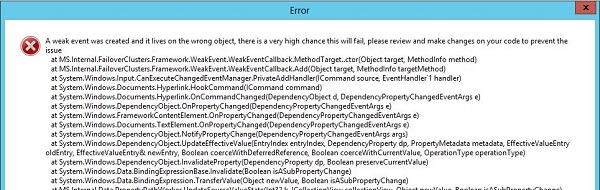
After installation, this hotfix will break the Windows Server 2012 Fail-Over Clustering MMC Snap-In, resulting an error when navigating stating:

A weak event was created and it lives on the wrong object, there is a very high chance this will fail, please review and make changes on your code to prevent the issue.

WS2012FCCapture

Microsoft is currently investigating the issue. Until then,it is advised not to apply KB2750149 on Windows Server 2012 Fail-over Clusters or uninstall it when you are experiencing the issue.

Note that the Windows Server 2012 Fail-over Cluster will keep working, as well as the related PowerShell cmdlets (another reason to start using the shell instead), it’s just that the cluster can’t be properly managed from the MMC.

Regarding Exchange 2013 DAG, which can be build on top of WS2012 Fail-over Clusters, you shouldn’t notice the issue because fiddling around in Fail-over Cluster Manager is a no-no for Exchange DAGs. Nevertheless, I’d recommend following the advisory and not install or uninstall the hotfix until further notice.

More information in this and this topic on the TechNet forums.

Update (23jan2013): Hotfix KB2803748 fixes the MMC crashing issue. It’s available through Windows Update or download it directly from here.

Windows Server 2012 RC Version and Levels

A quick post on the possible schema version and functional levels introduced with the release of Windows Server 2012 RC.

The schema version of a Windows Server 2012 Release Candidate forest is 56 (was 52 in the Windows “8” Beta). For more information on Active Directory schema versions and how to read this information, consult the AD Schema Versions page here.

Also, the msDS-Behavior-Version attribute of Windows Server 2012 domain controllers is set to 5, which is the same number as the Windows “8” beta version number. For more information on Active Directory Functional Levels and how to read this information, consult the AD Functional Levels page here.

Windows Server 2012 RC (Update)

A quick heads-up on today’s release of the much-anticipated Windows Server 2012 Release Candidate (Datacenter). The RC build number is 8400 (beta was 8250).

You can download the x64 ISO or VHD through here.

The Windows Server 2012 Release Candidate is available in Chinese (Simplified), Chinese (Traditional), English, French, German, Japanese, Korean, Portuguese (Brazil), Russian, Spanish, Swedish, and Turkish. The VHD is available in English.

Some documentation to get you started:

More documentation related to Windows Server 2012 RC here.

Other related releases:

Note: Like with all pre-release bits: it’s not recommended to use this in your production environment, so use them in a lab or testing environment only.