Unknown's avatar

About Michel de Rooij

Michel de Rooij, with over 25 years of mixed consulting and automation experience with Exchange and related technologies, is a consultant for Rapid Circle. He assists organizations in their journey to and using Microsoft 365, primarily focusing on Exchange and associated technologies and automating processes using PowerShell or Graph. Michel's authorship of several Exchange books and role in the Office 365 for IT Pros author team are a testament to his knowledge. Besides writing for Practical365.com, he maintains a blog on eightwone.com with supporting scripts on GitHub. Michel has been a Microsoft MVP since 2013.

Forefront TMG 2010 docs available


Today, the Forefront Threat Management Gateway (TMG) 2010 documentation became available on TechNet.

Besides the regular topics, like configuring TMG as a secure gateway between your network and the internet, the documentation also focuses on new functionality like HTTPS inspection, Anti-malware, Network Inspection (NIS), Enhanced NAT, VOIP support, 64-bit support and interoperability between TMG and BranchCache (new functionality in Windows 7 and Windows Server 2008 r2).

The documentation also contains steps on how to plan to, prepare for and configure ForeFront TMG in relationship with Exchange Edge Servers, i.e. E-Mail Protection as well as steps on how to upgrade from previous products like ISA Server to ForeFront TMG here.

You can find the ForeFront TMG 2010 documentation here.

Minimum HA Exchange 2010 configuration


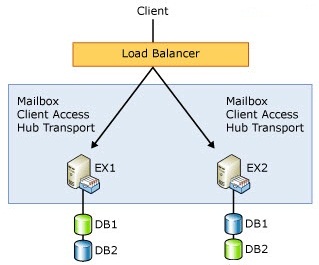
There is some confusion on the minimum number of Exchange 2010 servers that are required for running a Exchange 2010 in a High Available configuration. This seems logical, because with Exchange 2007 you could not mix a clustered Mailbox role with one of the other Exchange roles. That meant for a minimum Exchange 2007 HA configuration you need 2 clustered Mailbox servers and 2 Exchange servers with the CAS en Hub role, where you load balanced the CAS role using Network Load Balancing (NLB).

With Exchange 2010 you can add CAS and HUB roles to a Mailbox server that is part of a Database Availability Group (DAG). So this might lead people to think you can suffice with 2 servers with Exchange 2010, each server holding the Mailbox, CAS and Hub role, part of a DAG and with load balancing configured for CAS (Hub roles are load balanced automatically within a site).

However, there’s a caveat: NLB and Failover Clustering (on which DAGs are build) are mutually exclusive. This means you can’t have both.

The solution is to install the CAS and Hub roles on DAG’ed Mailbox servers, but instead of load balancing client requests on the server, you use an external load balancer or ISA Server. When using a load balancer you need to configure the CAS servers in a CAS array, but I’ll devote another article to that at a later time.

So, when asked what’s the minimum number of Exchange 2010 servers required for a HA solution, the answer is 2½.

Update: The mentioned article on CAS Arrays is located here.

Forefront Unified Access Gateway 2010 RTM


A few days ago, Forefront Unified Access Gateway 2010 (UAG) reached RTM status. UAG is the successor to Intelligent Application Gateway (IAG), and provides remote access to remote resources through (SSL) VPN or DirectAccess, providing a Single Sign-On (SSO) portal and making more granular control over publishing of applications, such as Exchange, possible.

For more information follow on of the provided links below:

ForeFront Protection 2010 SP1 64-bit?


In a statement on the issue with ForeFront being 32-bit or 64-bit, ForeFront Senior Program Manager Carolyn Liu announced today that the upcoming releases of Microsoft ForeFront Protection for SharePoint 2010 (FPSP) and Microsoft ForeFront Protection for Exchange Server (FPES) 2010 with Service Pack 1 will be native 64-bit. The statement came after questions rose on the 32-bit parts in for instance FPE 2010, while Exchange 2007 and 2010 may only be installed on 64-bit platforms in production environments. This is their intent, as the blog also states that scanning engines not yet available in 32-bit will remain hosted in a seperate process with FPSP and FPE 2010 SP1. SP1 will introduce the possibility to alternate between using 32-bit or 64-bit engines. This way you can make the switch when a 64-bit engine becomes available or switch back to the 32-bit engine when required.

FPE2010 capacity planning guide update


The ForeFront Server Protection team is very active and just released an updated of their capacity planning guide for Forefront Protection 2010 for Exchange Server (FPE). This guide is a hardware design document for FPE, advising on the number of CPU cores, memory requirements and utilization and throughput tresholds. It also contains performance guidelines are also given for Exchange 2010 deployments; an interactive tool – like the one for ForeFront Security for Exchange Server v10 SP1 (FSE10SP1) – is announced for the future. Goal of the document document is to perform an indication of the impact on the Exchange environment. You can view the FPE2010 capacity planning guide here.