Exchange 2013 CU1 Help File


Ex2013 LogoA quick post as the Exchange 2013 Cumulative Update 1 Help file (.CHM) file for offline usage has been released on the Microsoft Download Center.

The offline help files files are convenient if you’re on the road or in a location (yes, that happens sometimes) without internet connection.

You can download the Exchange 2013 Cumulative Update 1 .CHM Help file dated April 4th, 2013 for On-Premise and Hybrid deployments here.

Exchange 2013 Cumulative Update 1 (Updated)


Ex2013 LogoToday the long-awaited Cumulative Update 1 for Exchange Server 2013 was released by the Exchange Team (KB2816900). This update raises Exchange 2013 version number to 15.0.620.29.

As mentioned in an earlier post, this is the Exchange 2013 product level required for co-existence with previous versions of Exchange, being Exchange Server 2010 SP3 or Exchange Server 2007 SP3 Rollup 10.

The Exchange Team provided a description of the major changes in CU1 in the CU1 announcement here; Here are some of the major changes in CU1:

  • Includes Address Book Policy Routing Agent (info);
  • Allows group memberships to be managed by groups (again, as it was possible in Exchange 2007 but not in Exchange 2010);
  • Access to Public Folders you have added as favorites via your favorites menu either in Outlook or Outlook Web App (still no regular Public Folder tree access though);
  • EAC has been enhanced and now includes Unified Messaging management and migration options;
  • Many probes, monitors, and responders have been updated and improved over the RTM release;
  • Get-HealthReport cmdlet has been streamlined and its performance has been optimized;
  • Supports the Exchange Server 2013 Management Pack for SCOM 2007 R2 and SCOM 2012 (due at a later date);
  • High Availability changes (reported on by Scott Schnoll here).

Note that CU1 includes schema changes. Like Service Packs for earlier versions of Exchange, the Cumulative Update is indeed cumulative (hence the size of 1.3 GB) and you can install it directly, i.e. no need to install RTM first. Also, once installed you can’t uninstall CU1 or any of the installed roles. The order of upgrading servers doesn’t matter, unlike with earlier Exchange versions.

You can download Exchange 2013 Cumulative Update 1 here.

Update 3rd April, 2013: Meanwhile, the TechNet documentation has been updated; relevant sections for upgrading are:

The UC Architects Podcast Ep19


iTunes-Podcast-logo[1]The 19th episode of The UC Architects podcast is now online. This episode is hosted by Pat Richard who’s joined by Johan Veldhuis, Michael Van Horenbeeck, Paul Cunningham (at last!),  Tom Arbuthnot and Ståle Hansen. Editing was done by Michael van Hoorenbeeck.

Amongst the topics discussed in this episode are:

  • Enterprise Connect
  • Web RTC
  • Exchange CU1
  • Upgrading Office Web Apps servers
  • Lync 2013 Rollout and Adoption Success Kit (RASK)
  • Stale’s Script Calling Numbers
  • Lync Android Client
  • Skype 6.3 and Lync Federation
  • Retirement of Dr. Rez blog site
  • Script: Michael’s connect to Exchange Online
  • Script: Paul’s Get-DagHealth
  • DAG Networks
  • Script: Johan’s IOS6 Calender Issue Cleanup
  • Office 365 IPv6 test plan and ITAR Support Service & Network descriptions
  • TechEd NA
  • London User Group

More information on the podcast including references and a link to download the podcast directly here or you can subscribe to the podcasts using iTunes, Zune or use the RSS feed.

About
The UC Architects is a bi-weekly community podcast by people with a passion for Unified Communications; our main focus is on Exchange, Lync or related subjects.

Exchange 2013 CU1 ETA: April 2nd


Ex2013 LogoToday the Exchange Team announced postponing the release of Exchange 2013 Cumulative Update 1 for a few more days. Originally, CU1 was scheduled for Q1 2013, but the date has been set now at April 2nd, 2013.

While it may sound disappointing when you’re waiting for Exchange 2013 RTM CU1, it makes sense to postpone it a bit. As the team indicated,the time is used to add functionality required for coexistence scenarios with Exchange Server 2010 which otherwise had to be put in an update for Exchange 2010 Client Access servers. I expect people to be less happy as Exchange 2010 Service Pack 3 was heralded as the Exchange 2010 product level for coexistence support with Exchange 2013 (running CU1).

Also, looking at time frames involved with testing and accepting updates in production environments, I personally applaud this decision as putting that code in Exchange 2013 at the cost of a few days may in the end be faster than adding that code to Exchange Server 2010, requiring customers to initiate test an acceptance tracks for production updates.

So, until further notice we’ll have to wait just a few more additional days to see what Cumulative Update 1 will bring us.

New-MoveRequest fails with “Database .. doesn’t exist”


Exchange 2010 LogoA quick write up on something which you might encounter when trying to move mailboxes across forests. Often, operators don’t always have full access permissions in both environments and rely on provided accounts or delegated permissions to execute the move.

Suppose you’re in the target environment and are asked to migrate mailboxes cross-forest from a previous version of Exchange to Exchange 2010. One of the first steps would be to run the Prepare-MoveRequest.ps1 script to prepare the target object and populate it with Exchange-related attributes from the source environment.

You then come at a point in such a migration, after running Active Directory Migration Tool – ADMT and perhaps some additional tweaks, when you need to actually move the user’s mailbox. So, you enter for example:

$cred= Get-Credentials
New-MoveRequest –Identity UserX –RemoteLegacy –TargetDatabase DB1 -RemoteGlobalCatalog SourceDC –RemoteCredential $cred –TargetDeliveryDomain maildomain.com

Mailbox move request are being queued but for some mailboxes you may encounter the following error message: “Database xxxxx-xxxx-xxxx-xxxx-xxxxx doesn’t exist”. That error message may get you worrying, but let’s investigate.

image

We’re in the target environment and the source environment is running a legacy version of Exchange so setting up a remote PowerShell session and using Get-MailboxDatabase <GUID> is not an option. All roads lead to Rome when querying Active Directory, but in this case let’s load up our trusty LDP to look up that GUID; it should map to a database in the source environment.

In LDP, use Connection > Connect and enter the name of a remote domain controller, like the one specified as RemoteGlobalCatalog, in our example RemoteDC. Then, use Bind providing the credentials you used with RemoteCredential.

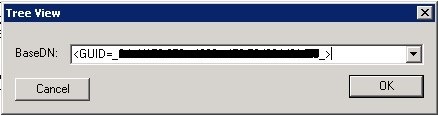
Next, select View > Tree and use <GUID=xxxxx-xxxx-xxxx-xxxx-xxxxx> as BaseDN (replace those x’s with the GUID reported by the failing New-MoveRequest and make sure you include those less and greater than symbols).

CantMoveLookup

Now, normally the database object with that GUID and its properties will be returned. If not, something is probably wrong with the permissions on the mailbox, directly or indirectly. Depending on whether you’re able to migrate other users from the same database, server up to the organization, you can rule out if it’s a per-mailbox issue, database permission issue etc.

This proves that as always, preparation is everything. Therefor, prior to migration be sure to check or correct effective permissions on mailboxes to prevent any surprises in that area when you’re actually migrating.

Note that the permission ACLs on a mailbox needs to be in a so-called non-canonical order. To fix this, you may find the FixMailboxSD utility helpful. More information on the importance of canonical ordering of mailbox permissions in Exchange here.