Ignite 2015 Session Catalog is here!


ignite ButtonA short heads-up as the session catalog for Microsoft Ignite has been published. So, if you are still undecided or already want to pick ‘must see’ sessions for your schedule, you can check the session catalog here.

The session catalog contains 275 sessions, covering products like Exchange (49), Office 365 (85) and Skype for Business (26). It will be the first major Microsoft event where details will emerge on the next version of Exchange, Exchange v.Next.

The Exchange team published a blog on the Exchange-related Ignite sessions here. The blog contains a nice video featuring Greg Taylor and Jeff Mealiffe talking about what to expect at Ignite.

Also, on Febuary 3rd, the team behind Ignite as well as several speakers will be available on Twitter to answer any questions you may have on Ignite. Use the hashtag #IgniteJam to participate, or follow @MS_Ignite for any updates.

More information on Ignite, pre-day sessions, the session catalog and the #IgniteJam in the original post on Channel 9 here.

(Re)configuring IM Integration


Last Update: August 16th, 2016.

powershellNote: The procedure has changed for Exchange 2016, which can use overrides to make this setting persistent. For these instructions, consult this article.

Anyone who has configured Exchange 2013 IM integration with Lync Server at some point has to modify the web.config file on the Mailbox servers to configure OWA with the proper certificate for enabling IM. Another thing (read: nuisance) is that when you have configured IM integration and you apply a Cumulative Update to Exchange 2013, the web.config will be overwritten, in which case you need to reapply those changes to the web.config file.

This is where the script Configure-IMIntegration.ps1 might come in handy.

Requirements
Using the script requires Exchange 2013 and Lync Server. You need to provide the Lync pool and the Mailbox server you want to configure needs to have a valid certificate assigned to IIS (or UM) service. The script will modify the web.config remotely using the system share (e.g. C$), using the location of the Exchange installation, and uses WMI to recycle the OWA Application Pool in IIS. It will create a backup of the web.config before modifying it.

Note that the script does not perform the following steps:

  • It does not perform the Lync Server parts to configure IM integration, e.g. configure Exchange as a trusted application.
  • It does not configure Lync Server as an partner application for Exchange (Configure-EnterprisePartnerApplication.ps1).

Usage
The script Configure-IMIntegration.ps1 uses the following syntax:

.\Configure-IMIntegration.ps1 [-Server <String>[]] -PoolFQDN <String> [-AllCAS] [-AllMailbox] [-UM] [-Thumbprint <String>]

A quick walk-through on the parameters and switches:

  • Server specifies the server(s) to configure. When omitted, it will configure the local server. This parameter is mutually exclusive with AllMailbox.
  • AllMailbox switch specifies to configure all Mailbox servers. This switch is mutually exclusive with Server.
  • AllCAS switch specifies to enable IM integration on all Client Access servers.
  • PoolFQDN specifies the FQDN of the Lync Pool to use. This parameter is required.
  • UM specifies that the script should look for a certificate assigned to UM services instead of IIS (default).
  • Thumbprint to manually specify the thumbprint of the certificate to use.

So, suppose you want to quickly reconfigure IM integration on a Mailbox server after applying a Cumulative Update, you can use:

.\Configure-IMIntegration.ps1 -PoolFQDN lync.contoso.com –Server exchange01.contoso.com

image

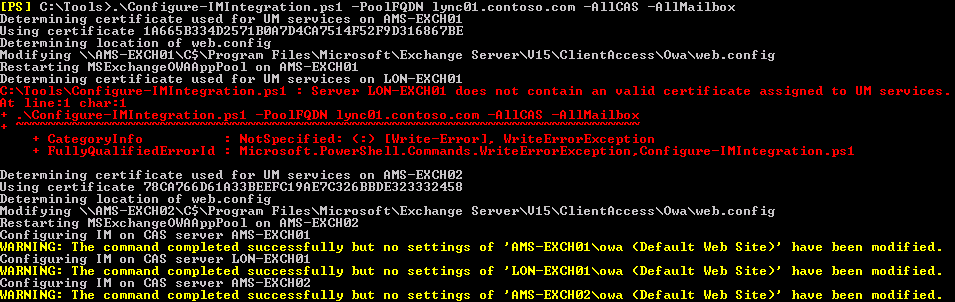
Or, you can quickly configure Mailbox servers and CAS servers for IM integration after performing the required steps to configure the trusted application settings and installing and assigning the certificate for UM:

.\ Configure-IMIntegration.ps1 -PoolFQDN lync.contoso.com -AllMailbox –AllCAS

image

Also, in the example above, the CAS servers had already been enabled for IM.

Download
You can download the script from the TechNet Gallery here.

Feedback
Feedback is welcomed through the comments. If you got scripting suggestions or questions, do not hesitate using the contact form.

Revision History
See TechNet Gallery page.

Ignite 2015: Call for Topics


ignite ButtonIn October, I reported on the new ‘mother of all Microsoft events’, Microsoft Ignite. This event is going to take place from May 4-8, 2015 in Chicago, US.

Contrary to how the agenda used to be determined for events like TechEd or the Microsoft Exchange Conference (MEC), Microsoft is now asking for your help by scoring contents and topics. By completing a short, anonymous Call for Topics survey here, you can let those in charge of assigning session slots know what you would like to see at Ignite.

If you have any questions on Ignite, Microsoft is also having some Twitter sessions for specific products. More on this in the original Call for Topics post here. The Exchange session takes place at Tuesday, December 2nd 9 am (Pacific Time) and use hashtag #ignitejam to participate.

So, if you went to MEC and would like to see a fair share of Exchange or Office 365 should you visit Ignite, be sure to complete the Call for Topics survey and plug your favorite product or platform.

The UC Architects Podcast Ep44


iTunes-Podcast-logo[1]Episode 44 of The UC Architects podcast is now available,which was recorded at the Norwegian Lync Day. This episode is hosted by Pat Richard, who joined by Ståle Hansen, Tom Arbuthnot and Steve Goodman. Special guests are Lasse Nordvik Wedø, Adam Gent, Johan Delimon, Tommy Clarke, and Martin Lidholm. Editing was done by Andrew Price.

Some of the topics discussed in this episode are:

  • Configuring QoS for Lync IP Phones
  • New version of Lync SDN interface
  • Lync Call Concurrency Calculator
  • Never be late for a meeting again
  • MS14-055 Broke My Edge Server
  • Norwegian Lync Day recap
  • Session recap: Lync Backup and Restore by Lasse Nordvik Wedø
  • Session recap: Lync Hybrid and Skype by Tommy Clarke
  • Session recap: Lync Mobile sign in process and media flow by Tom Arbuthnot
  • Session recap: SIP and media in Lync explained by Johan Delimon
  • Session recap: Lync voice explained by Adam Gent
  • Lessons learned about holding a conference by StĂĄle Hansen
  • Session recap: 5 Elements That Ensure a Successful Lync Deployment by Martin Lidholm
  • TechEd Europe events

More information on the podcast including references and a link to download the podcast here or you can subscribe to the podcasts using iTunes, Zune or use the RSS feed.

About
The UC Architects is a bi-weekly community podcast by people with a passion for Unified Communications; our main focus is on Exchange, Lync or related subjects.

Aaand we named it .. Microsoft Ignite!


Today Microsoft revealed the name of the event temporarily known as MUTEE, or Microsoft’s Unified Technology Event for Enterprises:

Microsoft Ignite 2015 Full

The Microsoft Ignite event, which replaces Microsoft Exchange Conference, LyncConf, Microsoft Management Summit, SharePoint Conference and TechEd North America, will be held from May 4-8, 2015 in Chicago at McCormick Place. On the Exchange Team blog, former  Microsoft Exchange Conference attendees are told this will be their ‘go to’ event for 2015 (apart from independent conferences, such as Exchange Connections 2015).

The Microsoft Ignite 2015 site is already up and you can even register, in case you are worried this event with a potential of 20k attendees will soon be sold out. Microsoft is asking potential attendees to provide input through a YamJam. For those unenlightened, a YamJam is a virtual event on Microsoft’s Enterprise Social platform called Yammer, meaning you have to register on the hosting Yammer network first.

The announcement on the Office blog has some additional information here, including information on Convergence and //Build 2015.

PS: It is likely that the adoption of this name has consequences for the events formerly known as Ignite, e.g. Office 365 Ignite. Those events were technical training to get IT Pros up to speed on new products. The faith of those training sessions has not been disclosed.