Exchange 2010 SP3 Rollup 8v2


Exchange 2010 Logo

UPDATE (December 12th, 2014): Exchange 2010 SP3 Rollup 8 v2 is released, addressing the issue mentioned below in the initially published version. The new version number is 14.3.224.2 (was 14.3.224.1). You can download RU8v2 here.

UPDATE (December 10th, 2014): Exchange 2010 SP3 Rollup 8 has been pulled after discovery of Outlook MAPI issues. It is currently recommended not to deploy RU8 and when you have installed RU8, to revert to RU7 to prevent walking into this issue. Other protocols, such as EAS or IMAP4, as unaffected which is why you might not encounter this problem immediately.

Today the Exchange Team released Rollup 8 for Exchange Server 2010 Service Pack 3 (KB2986475). This update raises Exchange 2010 version number to 14.3.224.1.

This Rollup contains a security update to fix a potential elevation of privilege issue (bulletin MS14-075), as well as the following fixes:

  • 3004235 Exchange Server meetings in Russian time zones as well as names of time zones are incorrect after October 26, 2014
  • 3009132 Hybrid mailbox moves to on-premises environment but finishes with CompletedWithWarnings status
  • 3008999 IRM restrictions are applied to incorrectly formatted .docx, .pptx, or .xlsx files in an Exchange Server 2010 environment
  • 3008370 Group members are not sorted by display name when HAB is used with OAB in Exchange Server 2010
  • 3008308 Public folder database migration issue in a mixed Exchange Server environment
  • 3007794 Hub Transport server cannot deliver messages when a database fails over to a cross-site DAG in Exchange Server 2010
  • 3004521 An Exchange server loses its connection to domain controllers if a public folder server is down in Exchange Server 2010
  • 2999016 Unreadable characters when you import ANSI .pst files of Russian language by using the New-MailboxImportRequest cmdlet
  • 2995148 Changing distribution group takes a long time in an Exchange Server 2010 environment
  • 2992692 Retention policy is not applied to Information Rights Management protected voice mail messages in Exchange Server 2010
  • 2987982 Issues caused by ANSI mode in Exchange Server 2010
  • 2987104 Email message is sent by using the “Send As” instead of “Send on Behalf” permission in Exchange Server 2010
  • 2982017 Incorrect voice mail message duration in Exchange Server 2013 and Exchange Server 2010
  • 2977279 You cannot disable journaling for protected voice mail in Exchange Server 2013 and Exchange Server 2010

Notes:

  • If you want to speed up the update process for systems without internet access, you can follow the procedure described here to disable publisher’s certificate revocation checking.
  • If you got a DAG and want to properly update the DAG members, check the instructions here.
  • Rollups are cumulative per service pack level, i.e. they contain fixes released in earlier update Rollups for the same product level (RTM, SP). This means you don’t need to install previous Rollups during a fresh installation but can start with the latest Rollup package.

As with any Hotfix, Rollup or Service Pack, I’d recommend to thoroughly test this rollup in a test and acceptance environment first, prior to implementing it in production.
You can download Exchange 2010 SP3 Rollup 8 here.

Exchange 2007 SP3 Rollup 15


exchange2007logo2[1]Today the Exchange Team released Rollup 15 for Exchange Server 2007 Service Pack 3 (KB2996150). This update raises Exchange 2007 version number to 8.3.389.2.

This Rollup contains a security update to fix a potential elevation of privilege issue (bulletin MS14-075), as well as the following fixes:

  • 3004235 Exchange Server meetings in Russian time zones as well as names of time zones are incorrect after October 26, 2014
  • 3008308 Public folder database migration issue in a mixed Exchange Server environment

Notes:

  • When running ForeFront Protection for Exchange, make sure you disable ForeFront before installing the rollup and re-enable it afterwards, otherwise the Information Store and Transport services may not start. You can disable ForeFront using fscutility /disable and enable it using the fscutility /enable command;
  • If you want to speed up the update process for systems without internet access, you can follow the procedure described here to disable publisher’s certificate revocation checking;
  • Rollups are cumulative per service pack level, i.e. they contain fixes released in earlier update Rollups for the same product level (RTM, SP). This means you don’t need to install previous Rollups during a fresh installation but can start with the latest Rollup package.

As with any Hotfix, Rollup or Service Pack, I’d recommend to thoroughly test this rollup in a test and acceptance environment first, prior to implementing it in production.
You can download Exchange 2007 SP3 Rollup 15 here.

Ignite 2015: Call for Topics


ignite ButtonIn October, I reported on the new ‘mother of all Microsoft events’, Microsoft Ignite. This event is going to take place from May 4-8, 2015 in Chicago, US.

Contrary to how the agenda used to be determined for events like TechEd or the Microsoft Exchange Conference (MEC), Microsoft is now asking for your help by scoring contents and topics. By completing a short, anonymous Call for Topics survey here, you can let those in charge of assigning session slots know what you would like to see at Ignite.

If you have any questions on Ignite, Microsoft is also having some Twitter sessions for specific products. More on this in the original Call for Topics post here. The Exchange session takes place at Tuesday, December 2nd 9 am (Pacific Time) and use hashtag #ignitejam to participate.

So, if you went to MEC and would like to see a fair share of Exchange or Office 365 should you visit Ignite, be sure to complete the Call for Topics survey and plug your favorite product or platform.

Exchange 2013 Server Role Requirements Calculator 6.6


Ex2013 LogoNote: Shortly after publishing, a minor update was made in to fix circular referencing in the sheet.

Next to an updated Exchange 2010 Server Role Requirements calculator, the Exchange team published an update for the Exchange 2013 Server Role Requirements Calculator as well. The new version number is 6.5.

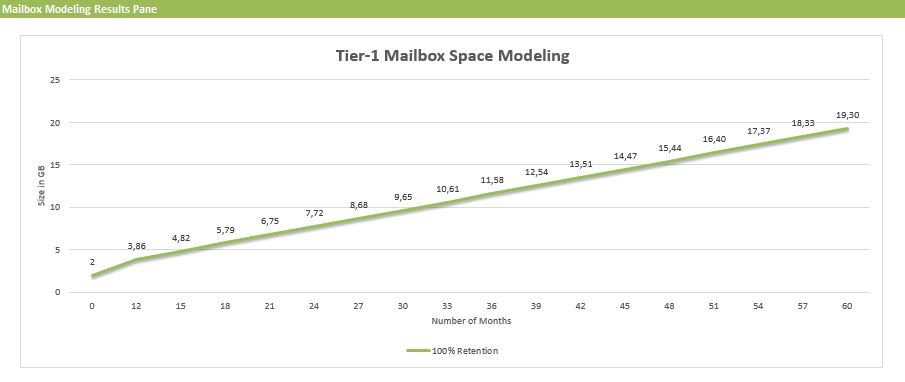
This new version includes a nice new feature, courtesey of Excel, which will plot mailbox usage using the provided input. You can find this chart on the Mailbox Space Modeling tab.

msm

Changes since version 6.5:

  • Fixed circular logic issue with initial mailbox size calculation

Changes since version 6.3:

  • New: The calculator now includes mailbox space modeling graphs that extrapolates (for each mailbox tier) the projected amount of time it will take to consume the mailbox quota.
  • Fixed “Number of Exchange Data Volumes per Server” to support more than 50 volumes.
  • Optimized memory sizing for FAST which reduces memory requirements for small mailbox server designs.
  • Added the ability to specify multiple AutoReseed volumes per DAG server to calculator and scripts.
  • Fixed 3 database/volume layout scenario involving 100 copies/server.
  • Fixed rounding error in calculating number of databases/volume in “2 Volumes / Backup Set”
  • Log isolation is now a calculated property to align with best practices guidance.
  • Changed “Disk” to “Vol” in left column of Distribution tab to align with scenarios that do not involve JBOD configurations.
  • Added additional processor core options.
  • Fixed JBOD storage design results table to accurately account for Restore Disk capacity being set to “–” and for differences between PDC and SDC Restore Disk capacity settings.
  • Fixed Backup Requirements worksheet to expose Weekly Full backups correctly.
  • Various comment changes/corrections.

You can download the calculator here. For more information, please consult the list of changes here or Read Me here.

Exchange 2010 Server Role Requirements Calculator 20.9


Exchange 2010 LogoAlmost 1,5 year after, the Exchange Team released an update for the Exchange 2010 Server Role Requirements Calculator. The updated version is 20.9 and contains minor bug fixes over the previous version.

Fixes since version 20.8:

  • Additional fixes on CAS/HT CPU calculations formulas
  • Disabled Distribution tab for Active/Active Single DAG model
  • Added Distribution tab warning that only one of the two DAGs is shown
  • Fixed RAID disk calculation for A/A scenario and lagged copies

You can download the calculator here. For more information please consult list of changes here or view usage instructions here.