Discontinued support of ActiveSync in GMail


TechTarget QuoteFew days ago, Stuart J. Johnston of TechTarget approached me and several other Exchange fellows to ask how we thought the discontinued support of ActiveSync in GMail, part of Google’s “Winter Cleaning” operation, would impact users. You can read Stuart’s article here.

For reference and because Stuart only used a single quote from my (I think) extensive response, I’ve included my take on the situation below. Interestingly, today it turns out Google lost an ActiveSync patent case against Microsoft in a British court. Exchange fellow Tony Redmond did a nice writeup on that case and his personal involvement in that case here.

PS: I’ve already asked Stuart to fix my last name in the quote.

Regarding the discontinued support of ActiveSync in GMail, I think impact on both the Exchange as well as the GMail population varies.

First of all, the measure is aimed at new, free GMail accounts. I don’t know exact numbers, but I can imagine the number of people still not having a free GMail account is relatively minimal. Also, EAS will remain available to paid accounts.

Second, EAS is a means – no end – to synchronize information like mail, contacts or agenda. Consumers will adapt and switch to alternative protocols (or plugins) to synchronize this information between their Google account and their device. I think the effect of the information exchange becoming less efficient and the lack of information push is negligible.

Thirdly, Android and iPhone – covering 85% over the smartphone market – provide apps specifically aimed at GMail or other Google services. For those not using Google’s apps, the end user experience may be affected and all the additional tools required to fully synchronize with desktops won’t help.

Worst off are Windows Phone users or Windows 8 users using the built-in Mail app (Surface RT). While the Windows Phone user base may be relatively small, the Windows 8 user base is growing and they are both forced to use IMAP, which only does mail and there are – AFAIK – no *DAV apps in the Store to synchronize calendar or contact information.

While I do understand Google’s case, which is probably more a cost reduction and (resource) focus shift measure rather than another act in the Google vs Microsoft war, I also believe there might be a fair chance of Google shooting itself in the foot by dropping EAS. Microsoft’s free outlook.com service keeps supporting EAS (not surprisingly) and Microsoft has already taken up on plugging outlook.com as the alternative for Google

Finally, I’m in favor of competition which drives innovation. The whole GMail versus Hotmail/Office365 is no exception. However, it gets annoying when vendors drop functionality end users are accustomed to, making them have to put energy into looking at solutions or alternatives, which may become tiresome at some point.

iOS6 issues with Exchange (updated)


Since the release of iOS6, several issues have been identified with this version when used in conjunction with Exchange:

  • Meeting Request where the device user becomes the meeting organizer, which can potentially enable attendees to cancel the meeting for everyone invited. This issue has been documented in KB2768774;
  • Autodiscover not working properly when the e-mail address doesn’t match the user’s UPN.

The Exchange Team published an article where they mentioned several suggestion to “mitigate” the issue; mitigate is quoted here, because some of the suggestions mentioned are in my opinion non-options in a corporate environment, like the suggestion to switch to IMAP/POP. Not only does that remove calendaring functionality, it’s also a lot of work and hassle for end users for the – I expect – short period before we see an iOS update from Apple, after which people can go back to using Exchange ActiveSync again.

How to deal with this issue in the – relatively short – period between now and the iOS 6 fix, depends on the risk your organization is willing to take. When you’re not willing to take any chances, you can block IOS 6 devices using Exchange’s Allow/Block/Quarantine (ABQ) feature or blocking them on the Reverse Proxy level, e.g. ISA or TMG; more information on how to accomplish the latter here. While being a rather draconic measure, it might prove a better temporary measure when compared to the suggestion to ask end users not to take action on calendars in iOS, which could be an accident waiting to happen.

As a more user friendly solution, I’ll gladly bring to your attention a script created by UC Architects fellow Steve Goodman, which can collect information on current iOS users in your environment. Then, with this information, you can selectively pick out iOS 6 devices and communicate the issues with their users until a fix is released. You can get the script here.

Note that there are reports of Apple currently testing IOS 6.0.1 and it is rumored the Meeting Request fix will be included.

Update, November 1st, 2012: Apple released IOS 6.0.1 which fixes the meeting request issue amongst other things (but not the Autodiscover issue). Update your IOS device Over The Air or using iTunes.

Review: iPhone with Exchange 2010: Business Integration & Deployment


A while back, I was asked if I wanted to review a book written by Exchange fellow Steve Goodman. The full title of the book is “iPhone with Microsoft Exchange Server 2010: Business Integration and Deployment” and it’s Steve’s first book. However, I didn’t take that into account when writing this short review.

image

Overall, the book is a well written blend of Exchange and iPhone related content. Now, I look at products called “iPhone and/with ..” with a certain amount of skepticism. In such cases I expect something of which a marketing department decided that adding “iPhone” to the title could increase sales or justify a higher price, all because iPhone sells.

However, when reading through the 290 pages I was pleasantly surprised the book touches iPhone related contents some Exchange administrators may have never experienced first hand, like using the iPhone Configuration Utility. From my experience, most customers treat an iPhone device for what they are, YAEASC (Yet Another Exchange ActiveSync Client).

From an Exchange perspective, the book is extensive and covers topics like server roles and Database Availability Groups, but doesn’t cover all topics and not in too much details. For example, the book mentions that you need to make arrangements in order to make the environment available via the internet, but a little guidance on reverse proxy settings or how the important autodiscover process works might be helpful.

Overall, the book does a good job of trying to cover the gray area between iPhones and Exchange server, and could be appealing to Apple shops wanting to implement Exchange or a customer with Exchange or Office 365 looking for ways to manage iPhone end user devices. If you’re looking for in-depth information on Exchange only or PowerShell/Exchange Management Shell, I’d recommend like “Microsoft Exchange Server 2010 Inside Out” by Tony Redmond or Microsoft Exchange 2010 PowerShell Cookbook by Mike Pfeiffer.

You can check for the book on Amazon here (Kindle version here).

ActiveSync, Intermediate Certificates and You


Recently, a customer called with ActiveSync issues. They had installed the certificate with the proper Subject and SAN entries on the Exchange server, but were unable to synchronize their Windows Phone 7 devices with Exchange 2010; iPhone and Android device encountered no issues.

A quick run of the Exchange Remote Connectivity Analyzer (ExRCA) showed the following:

Capture1 - Ano

As ExRCA discovered, not all certificates of the certificate chain were offered by the server. A quick inspection of the certificate showed the following certification path:

CertChain

In this example, the certificate authority (CA), GlobalSign, uses an intermediate CA, GlobalSign Domain Validation CA – G2, to delegate the process of creating UC certificates. Consequence is that the certificate of the root CA, in this example GlobalSign, as well as the certificate of the intermediate CA, here , must be present on the device or should be offered when setting up the connection so the client can validate them.

Inspection of the Exchange server showed that the intermediate certificate was properly installed on the Exchange server, after the customer imported the Personal Information Exchange File (.pfx) file, provided by the CA as part of the certificate package, which contained all certificates in the chain: root CA, intermediate CA and the UC certificate.

CertIntermediate

Then, investigation moved to the reverse proxy, in this case ISA Server 2006 SP1. It turned out the intermediate certificate on the ISA server, or rather the lack of it, was causing the issue. The customer had imported the individual UC certificate on the ISA server. Because the ISA server didn’t contain the intermediate certificate, it couldn’t send it to the client as part of the certificate chain. After importing the intermediate certificate on the ISA server, ActiveSync started working.

Generally speaking, Windows Mobile or Windows Phone devices don’t contain intermediate certificates so be sure to install them on your Exchange servers as well as on your reverse proxies. Checking and validating intermediate certificates is a client thing and in this case the intermediate CA was available on the non-Windows Phone devices which explained the difference in behavior between Windows Phone, iPhone and Android devices.

Note that, depending on your situation, you may have never seen the above issue before. |This could be the case when you’ve been using certificates directly provided a root CA so far. When selecting your CA, this might be something to take into account as not all mobile devices behave identical as you’ve seen. Also, although lifetime of root and intermediate certificates is quite long, it is something you should manage properly in your environment as you have to an additional certifiate to watch (which might expire or be revoked). Also, depending on volume and mobile costs, sending down extra traffic through the wire/air could be something to take into account. If you don’t think this could be an issue because certificates are relatively small, there’s a reason Mini OWA’s so popular in some regions. Distributing certificates to clients might become a better alternative in those circumstances.

Finally, I want to recommend the excellent SSL Certificate Management & Troubleshooting Tool, provided by DigiCert. It cannot only indicate potential certificate issues like these, or wrongly imported certificates (e.g. user store instead of computer store), but also fix them. As an alternative to ExRCA, you could use the online SSLchecker provided here.

Loadbalancing, ActiveSync and Affinity


Recently, a client was experiencing load issues on the Exchange 2010 Client Access Servers. The client also had installed a hardware load balancer to balance client traffic.

While investigating the PAL results, the ActiveSync connections chart showed a significantly unbalanced number of ActiveSync connections between the CAS servers.

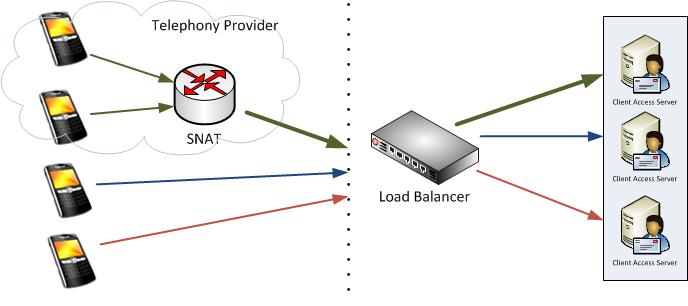
It turned out the client had load balanced all client traffic using Source IP affinity for all protocols. This means each client gets assigned the same CAS server, based on the client’s IP address. While this may sound reasonable, for ActiveSync this may not be optimal. Reason is that most mobile telephony providers use some form of NAT translation for their clients, resulting in these devices to appear having the same IP address.

When organizations standardize on a NAT utilizing mobile telephony provider, the problem might emerge sooner as all of their mobile clients will be assigned to the same Client Access Server.

In the picture above you’ll see the top two mobile devices are being NAT’ed. When the top device connects to the Exchange environment, it gets assigned the 1st CAS server based on its IP address. When the 2nd mobile device connects, the load balancer sees the same IP address after which it will direct that traffic to 1st CAS server as well.

While affinity is not required for ActiveSync, it is recommended since for each newly appointed CAS server, the notification subscription to the mailbox to be informed of updates would have to be recreated. Of course, this would result in a performance penalty and increased latency. Another option would be Session ID, but some EAS clients unnecessarily create a new SSL session ID.

After switching affinity from Client IP to Authorization HTTP Header the ActiveSync clients spread out more evenly. When using Authorization HTTP Header affinity, the load balancer uses the base64 encoded credentials as part of the http client request, e.g.

POST http://mail.eightwone.com/Microsoft-Server-ActiveSync/default.eas?Cmd=Sync&..
..
Authorization: Basic YW55IGNhcm5hbCBwbGVhc3VyZS4=

After switching affinity for ECP as well (should be Cookie or Session ID), the load issues were gone.

Where in the past mobile clients were insignificant to Outlook clients when compared in numbers, the ongoing consumerization of IT movement results in an increasing mobile client population. The number of ActiveSync users may easily outweigh the number of Outlook clients, as many users use a phone or tablet (or both) in addition to Outlook, if they use Outlook at all.