Exchange 2010 SP2 Rollup 5 v2


Exchange-2010-Logo-733341[1]Today the Exchange Team released version 2 of Rollup 5 for Exchange Server 2010 Service Pack 2 (KB2785908). This is an updated version of Rollup 5, released on November 14th but pulled due to a DAG issue; this updated Rollup should fix that issue. This update raises Exchange 2010 version number to 14.2.328.10.

For a list of changes included in the original version of Rollup 5, consult the original EX2010SP2RU5 post here. In addition, this version of the Rollup addresses vulnerabilities described in MS12-080 and will fix the following error when running Get-DatabaseAvailabilityGroup after installing of the original version of the Rollup:

An unexpected error has occurred and a Watson dump is being generated: Could not load type ‘Microsoft.Exchange.Rpc.ActiveManager.AmDeferredRecoveryEntry’ from assembly ‘Microsoft.Exchange.Rpc, Version=14.0.0.0, Culture=neutral, PublicKeyToken=31bf3856ad364e35’.

Oddly, when comparing the lists of issues fixed, the following fix went MIA in Rollup 5 v2:

  • 2748870 Declined meeting request is added back to your calendar after a delegate opens the request by using Outlook 2010

I’ll update this article when I receive information on the missing KB2748870 fix.

As of Rollup 4, its no longer required to disable/re-enable ForeFront Protection for Exchange using the fscutility to be able to install the Rollup properly. However, if you want to remain in control, you can disable ForeFront before installing the Rollup using fscutility /disable and re-enable it afterwards using fscutility /enable.

If you want to speed up the update process for systems without internet access, you can follow the procedure described here to disable publisher’s certificate revocation checking.

If you got a DAG and want to properly update the DAG members, check the instructions here.

Note that Rollups are cumulative, i.e. they contain fixes released in earlier Rollups for the same product level (RTM, SPx). This means you don’t need to install previous Rollups during a fresh installation but can start with the latest Rollup.

As with any Hotfix, Rollup or Service Pack, I’d recommend to thoroughly test this rollup in a test and acceptance environment first, prior to implementing it in production.

You can download Exchange 2010 SP2 Rollup 5 v2 here.

Exchange 2010 SP2 Rollup 5 (Updated)


Update (November 16th): It turns out there’s a serious bug affecting DAGs after installing RU5. Recommendation is not to deploy RU5 while Microsoft investigates the issue. Meanwhile, the RU was also pulled. Note that this is the exact reason why I emphasize on not rushing updates in production and run them in test and acceptance environments first. When testing is not an option (but there are lots of options there with free virtualization technologies available), I recommend maintaining an incubation period of at least 1 month and monitoring sites like TechNet forum or related comments on the EHLO blog for issues.

Today the Exchange Team released Rollup 5 for Exchange Server 2010 Service Pack 2 (KB2719800). This update raises Exchange 2010 version number to 14.2.328.5.

Here’s the list of changes in this Rollup:

  • 2707146 IRM-protected messages cannot be returned in search results if the messages are recorded and sent to an external contact in an Exchange Server 2010 environment
  • 2710975 Some MAPI property objects in an ANSI .pst file contain unreadable characters if you import the file by using the “New-MailboxImportRequest” cmdlet
  • 2712001 ExTRA.exe does not collect data if you select a scheduled task for a data collection in an Exchange Server 2010 environment
  • 2712595 Microsoft Exchange RPC Client Access service crashes when you run the New-MailboxExportRequest cmdlet in an Exchange Server 2010 environment
  • 2716145 Store.exe crashes on an Exchange Server 2010 mailbox server if a VSAPI based antivirus software is used
  • 2717522 Microsoft Exchange System Attendant service crashes on an Exchange Server 2010 server when you update the OAB that contains a DBCS address list
  • 2720017 An RBAC role assignee can unexpectedly change a DAG that is outside the management role group scope in an Exchange Server 2010 environment
  • 2727802 Microsoft Exchange Replication service crashes intermittently when you try to move mailboxes from an Exchange Server 2003 server to an Exchange Server 2010 server
  • 2733415 Event ID 1 is logged on the Exchange Server 2010 Client Access server in a mixed Exchange Server 2010 and Exchange Server 2003 environment
  • 2733609 Email message and NDR message are not delivered if an email message contains unsupported character sets in an Exchange Server 2010 environment
  • 2743761 DAG loses quorum if a router or switch issue occurs in an Exchange Server 2010 environment
  • 2748766 Retention policy information does not show “expiration suspended” in Outlook Web App when the mailbox is set to retention hold in an Exchange Server 2010 environment
  • 2748767 You receive an NDR message that incorrectly contains recipients of successful message delivery in an Exchange Server 2010 environment
  • 2748870 Declined meeting request is added back to your calendar after a delegate opens the request by using Outlook 2010
  • 2748879 You cannot access a mailbox by using an EWS application in an Exchange Server 2010 environment
  • 2749075 A copy of an archived item remains in the Recoverable Items folder of a primary mailbox in an Exchange Server 2010 environment
  • 2749593 Outlook logging file lists all the accepted and internal relay domains in the Exchange Server 2010 organization when you enable troubleshooting logging
  • 2750293 Items remain in the “Recoverable Items\Deletions” folder after the retention age limit is reached in an Exchange Server 2010 environment
  • 2750847 An Exchange Server 2010 user unexpectedly uses a public folder server that is located far away or on a slow network
  • 2763886 “The operation failed” error in the Outlook client when you open a saved message from the Drafts folder and then try to send it in an Exchange Server 2010 environment

As of Rollup 4, its no longer required to disable/re-enable ForeFront Protection for Exchange using the fscutility to be able to install the Rollup properly. However, if you want to remain in control, you can disable ForeFront before installing the Rollup using fscutility /disable and re-enable it afterwards using fscutility /enable.

If you want to speed up the update process for systems without internet access, you can follow the procedure described here to disable publisher’s certificate revocation checking.

If you got a DAG and want to properly update the DAG members, check the instructions here.

Note that Rollups are cumulative, i.e. they contain fixes released in earlier Rollups for the same product level (RTM, SPx). This means you don’t need to install previous Rollups during a fresh installation but can start with the latest Rollup.

As with any Hotfix, Rollup or Service Pack, I’d recommend to thoroughly test this rollup in a test and acceptance environment first, prior to implementing it in production.

You can download Exchange 2010 SP2 Rollup 5 here.

Copying Receive Connectors (update)


Once in a while you may have to execute a task so tedious and repetitive, you end up with an idea for a script to make your life easier. By tidying and publishing that script, I hope to make the life of others easier as well. This is one of those scripts.

When implementing Hub Transport servers on Exchange 2010, you may have to configure multiple receive connectors. Because receive connectors are defined on the Hub Transport server itself, contrary to send connectors, you may end up defining each receive connector on each Hub Transport server. This gets painful when you need to implement the ForeFront Online Protection for Exchange servers in the Remote IP ranges for example.

Yes, you can create a script which configures the connectors for you, but wouldn’t it be nice if you can create definitions on one server using the GUI and then just copy and paste those definitions to the other Hub Transport servers? This script also allows you to simply duplicate existing Receive Connector definitions after adding an additional Hub Transport server afterwards, not only after the initial configuration of the Exchange environment.

Here’s were my Copy-ReceiveConnector.ps1 script may come in handy.

The script is quite simple, and can help you with the following:

  • Copy Receive Connectors from one Exchange server to another (CopyFrom);
  • Export Receive Connector definitions to an XML file (ExportTo);
  • Import Receive Connector definitions from an XML file (ImportFrom).

In addition, you can specify whether you want to overwrite existing Receive Connector definitions (based on name) using the -Overwrite switch or clear all existing Receive Connectors before copying/importing using the -Clear switch.

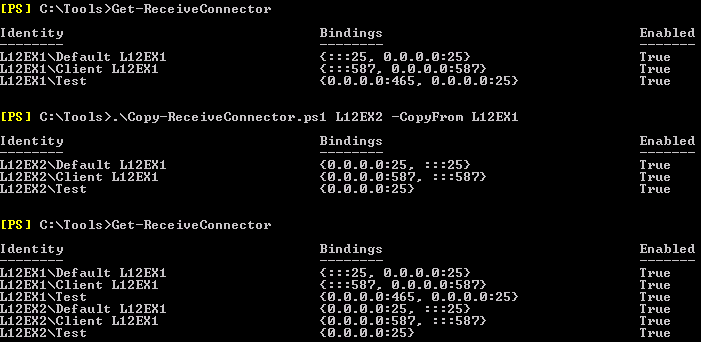
So, let’s say you have two Hub Transport servers, L12EX1 and L12EX2. You have configured L12EX1 and you need to create the same set of receive connectors on L12EX2.

image

You can see in the example above, you can use the script to copy definitions from an existing server, e.g.

Copy-ReceiveConnector.ps1 <TargetServer> –CopyFrom <SourceServer>

You can also export and import settings, which may come in handy when you need to troubleshoot (you can have the customer export the receive connectors to a file) or when you want to prepare receive connector definitions off-site, e.g.

Copy-ReceiveConnector.ps1 <TargetServer> –ExportTo .\conn.xml

Copy-ReceiveConnector.ps1 <TargetServer> –ImportFrom .\conn.xml –Clear

image

Note that when ExchangeServer is specified as AuthMechanism on a receive connector, the FQDN needs to be set to the server’s FQDN, NetBIOS name or $null; in such cases I set it to the FQDN of the target server. Also, it uses the existing name, meaning you may need to rename the Default and Client connectors, which contain the server name, afterwards.

Update 24th August, 2012 (v1.1): Added find/replace in Receive Connector name so that “Default L12EX1” on server L12EX1 will become or match with “Default L12EX2” on server L12EX2.

Click here to download the script from the Technet Gallery.

Exchange 2010 SP1 Rollup 7


The Exchange Team silently released RU7 for Exchange Server 2010 Service Pack 1 (KB2743248). This update raises Exchange 2010 version number to 14.1.421.0.

This Rollup only includes the fix for the WebReady security issue described in Microsoft Security Bulletin MS12-058 (KB2740358).

Note that update rollups are cumulative, i.e. they contain fixes released in earlier update rollups for the same product level (RTM, SPx). This means you don’t need to install previous update rollups during a fresh installation but can start with the latest rollup available right away.

As with any Hotfix, Rollup or Service Pack, I’d recommend to thoroughly test this rollup in a test and acceptance environment first, prior to implementing it in production. For the correct procedure on how to update DAG members, check here.

You can download Exchange 2010 SP1 Rollup 7 here.

Exchange 2010 SP2 Rollup 4


Today the Exchange Team released Rollup 4 for Exchange Server 2010 Service Pack 2 (KB2706690). This update raises Exchange 2010 version number to 14.2.318.2.

Here’s the list of changes in this Rollup:

  • 2536846 Email messages sent to a mail-enabled public folder may be queued in a delivery queue on the Hub Transport server in an Exchange Server 2010 environment
  • 2632409 Sent item is copied to the Sent Items folder of the wrong mailbox in an Exchange Server 2010 environment when a user is granted the Send As permission
  • 2637915 “550 5.7.1” NDR when an email message is sent between tenant organizations in a multi-tenant Exchange Server 2010 environment
  • 2677727 MRM cannot process retention policies on a cloud-based archive mailbox if the primary mailbox is in an on-premises Exchange Server 2010 organization
  • 2685001 Retention policies do not work for the Calendar and Tasks folders in an Exchange Server 2010 SP1 environment
  • 2686540 Journal report is not delivered to a journaling mailbox in an Exchange Server 2010 environment
  • 2689025 Performance issues when you use the light version of Outlook Web App in an Exchange Server 2010 environment
  • 2698571 Some email messages are not delivered when you set the MessageRateLimit parameter in a throttling policy in an Exchange Server 2010 environment
  • 2698899 Add-ADPermission cmdlet together with a DomainController parameter fails in an Exchange Server 2010 environment
  • 2700172 Recipient’s email address is resolved incorrectly to a contact’s email address in an Exchange Server 2010 environment
  • 2701162 User A that is granted the Full Access permission to User B’s mailbox cannot see detailed free/busy information for User B in an Exchange Server 2010 environment
  • 2701624 ItemSubject field is empty when you run the Search-MailboxAuditLog cmdlet together with the ShowDetails parameter in an Exchange Server 2010 environment
  • 2702963 The “Open Message In Conflict” button is not available in the conflict notification message in Exchange Server 2010
  • 2707242 The Exchange Information Store service stops responding on an Exchange Server 2010 server
  • 2709014 EdgeTransport.exe process crashes intermittently on an Exchange Server 2010 server
  • 2709935 EdgeTransport.exe process repeatedly crashes on an Exchange Server 2010 server
  • 2713339 Multi-Mailbox Search feature returns incorrect results when you perform a complex discovery search in an Exchange Server 2010 environment
  • 2713371 Throttling policy throttles all EWS applications in Exchange Server 2010
  • 2719894 The Microsoft Exchange RPC Client Access service consumes 100 percent of CPU resources and stops responding on an Exchange Server 2010 Client Access server
  • 2723383 Incorrect time zone in a notification when the Resource Booking Attendant declines a meeting request from a user in a different time zone in an Exchange Server 2010 environment
  • 2724188 A subject that contains colons is truncated in a mixed Exchange Server 2003 and Exchange Server 2010 environment
  • 2726897 Event 14035 or Event 1006 is logged when Admin sessions are exhausted in an Exchange Server 2010 environment

In addition to these fixes, this Rollup also includes a fix for the WebReady security issue described in Microsoft Security Bulletin MS12-058 (KB2740358).

Note that  This Rollup includes changes enabling Retention Tags for Calendar Items and Tasks (see KB2685001). If you wish to retain pre-SP2RU4 functionality, implement the following registry key on each Mailbox server:
HKLM\SYSTEM\CurrentControlSet\Services\MSExchangeMailboxAssistants\Parameters\ELCAssistantCalendarTaskRetentionEnabled=0x00000000 (REG_DWORD); default value is 1. More information on possible implications at the Exchange Team’s blog here.

Important: Be advised that it is reported that installing MS12-058 (KB2740358) means Rollup 4 will be installed on your system. This applies to manual installations but updates installed through Windows Update / WSUS as well, which might pose a challenge (or better, dilemma) for security departments (Thanks to Paul Bendall).

Those who use WSUS to deploy security updates or manually apply MS12-058 will be inadvertently applying Exchange 2010 SP2 RU4 as the security

As of this Rollup, its no longer required to disable/re-enable ForeFront Protection for Exchange using the fscutility to be able to install the Rollup properly. However, if you want to remain in control, you can disable ForeFront before installing the Rollup using fscutility /disable and re-enable it afterwards using fscutility /enable.

Note that Rollups are cumulative, i.e. they contain fixes released in earlier Rollups for the same product level (RTM, SPx). This means you don’t need to install previous Rollups during a fresh installation but can start with the latest Rollup.

As with any Hotfix, Rollup or Service Pack, I’d recommend to thoroughly test this rollup in a test and acceptance environment first, prior to implementing it in production. For the correct procedure on how to update DAG members, check here.

You can download Exchange 2010 SP2 Rollup 4 here.