

Cmdlet Extension Agents & XML Case Sensitivity


Ex2013 LogoOccasionally, I get requests to come to the aid of a fellow IT professional (I seldomly get requests to come to the aid of fair maidens. Oh, well). This weekend I responded to one of those distress calls by someone who couldn’t get his Cmdlet Extension Agent to work. This post is a quick heads-up for the collective memory of IT Professionals as it took me quiet a bit of screen staring to spot the issue.

For those unfamiliar with Cmdlet Extension Agents, they are modules which allow you to enhance or customize the behavior of cmdlets in Exchange. For example, the built-in Mailbox Resources Management agent is responsible for picking the database when creating new mailboxes when a database hasn’t been specified. By means of the Script Agent and an XML file named ScriptingAgentConfig.xml containing PowerShell code fragments, you can enhance and tailor Exchange cmdlets to your own needs. For those interested in Cmdlet Extension Agents, I did two earlier articles on Cmdlet Extension Agents, here and here.

The code provided was a simple agent to enhance New-Mailbox with enabling SingleItemRecovery after the mailbox was created:

<?xml version="1.0" encoding="utf-8" ?>
<Configuration version="1.0">    
        <Feature Name="Mailbox Provisioning" cmdlets="new-mailbox">
         <ApiCall Name="OnComplete">
             if($succeeded) {
                $newmailbox = $provisioningHandler.UserSpecifiedParameters["Name"]
                set-mailbox $newmailbox -SingleItemRecoveryEnabled $true
                }
        </ApiCall>
        </Feature>
</Configuration>

The Scripting Agent was enabled using Enable-CmdletExtensionAgent. Yet, for some reason after creating a new mailbox, SingleItemRecoveryEnabled wasn’t enabled. Running New-Mailbox in Verbose mode showed that the Scripting Agent did not come into play:

Capture1Now know that debugging and troubleshooting Cmdlet Extension Agents can be an unpleasant task since you put PowerShell code in XML files and there is no way to easily perform simple tests except running the Cmdlet you’re customizing or developing script fragments in an external PowerShell script and copy/paste it in the Scripting Agent XML file when you think it’s ready for and want to perform some final tests.

I didn’t immediately spot it, so to see if the problem was actually in the XML I picked the example of my 2nd article on Cmdlet Extension Agents and I compared it with the non-working XML using WinMerge (which by the way is an excellent tool to compare code or plain texts):
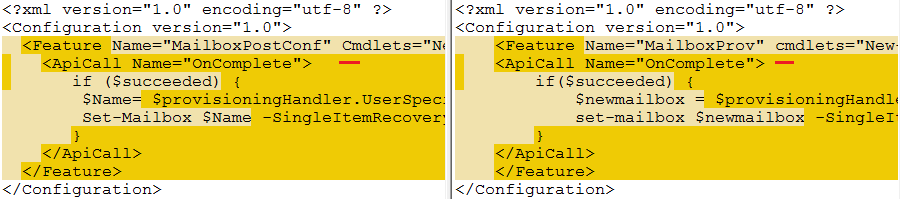
WinMergeIt took some time to discover why the Scripting Agent wouldn’t pick up the XML and it can be easily overlooked. The culprit in underlined in red: the C of the Cmdlets attribute in the Feature tag should be uppercase. Doh! This case sensitivity is perhaps not a primary suspect by Windows folks, as mostly we don’t have to worry about it and things “just work”, but in the case of XML it is essential. The XML standard prescribes that element names (<Feature> .. </Feature>) and attribute names (<Feature Cmdlets=..>) are case-sensitive entitling the Scripting Agent to be strict.

MS13-105: Security Fix & Rollup Fest for Exchange 2007/2010/2013


Ex2013 LogoToday the Exchange Team released security fixes for the issue described in bulletin MS13-105. Fixes have been released for the following product levels:

Note that depending on the release scheme fixes are either made available through a Rollup or as security fix; the Rollups only address the vulnerabilities mentioned in security bulletin.

Note that this Rollup or security fix replaces MS13-061 – you can install MS13-105 over installations containing MS13-061 (no need to uninstall it first).

Sharing your Exchange ideas


Ex2013 LogoOur Pat Richard of the UC Architects put up an Exchange community on ideascale.com,similar to the popular lync.ideascale.com.

IdeaScale is a site where you can create communities for exchanging suggestions or ideas – in this case Exchange-related – and have people vote or provide other feedback on those ideas in an open but organized fashion. The idea is that the best or much in-demand ideas will float to the top as they will receive the most votes.

This is of course only possible if you participate You can make suggestions, vote on ideas or provide feedback at exchange.ideascale.com. When making suggestions, please keep in mind to:

  • Check if your idea is not already listed;
  • Submit well-defined ideas, so everyone know what you are referring to or mean;
  • Submit single ideas, i.e. do not post a suggestion containing a set of ideas. This makes it easier to comment on (or provide workarounds) or mark it completed.

Note that the The Microsoft Exchange Improvement Suggestions community is informal, meaning Microsoft does not (necessarily) monitor or support this community in any way. However, Microsoft did address some of the top voted items on lync.ideascale.com, and we’re hoping that a loud voice from the Exchange community will be heard with regards to product improvement suggestions or other ideas.

Exchange 2010 SP3 Rollup 3


Exchange 2010 LogoToday the Exchange Team released Rollup 3 for Exchange Server 2010 Service Pack 3 (KB2891587). This update raises Exchange 2010 version number to 14.3.169.1.

Here’s a list of fixes contained in this Rollup:

    • 2715761 “550 5.6.0” NDR when you send a yearly recurring meeting request in an Exchange Server 2010 environment
    • 2839533 RPC Client Access service freezes in an Exchange Server 2010 environment
    • 2840454 “The rules on this computer do not match the rules on Microsoft Exchange” error when you manage rules by using Outlook 2013 in an Exchange Server 2010 environment
    • 2874070 Public folders are exposed although the user does not have rights to see the parent folders in an Exchange Server 2010 SP3 environment
    • 2878175 Client Access server crashes when you use Outlook with a Riverbed WAN optimizer in an Exchange Server 2010 environment
    • 2879320 Retention action setting is not updated in FAI items by running the Set-RetentionPolicyTag cmdlet in an Exchange Server 2010 environment
    • 2879736 Office 365 users cannot retrieve an on-premises user’s free/busy data in an Exchange Server 2010-based hybrid deployment
    • 2880153 RPC Client Access Service crashes if Outlook is in online mode in an Exchange Server 2010 environment
    • 2880290 RPC Client Access service crashes when you use Outlook in ANSI online mode in an Exchange Server 2010 environment
    • 2882467 RPC Client Access service stops if Outlook is in online mode in an Exchange Server 2010 environment
    • 2882677 BlackBerry device is not redirected in an Exchange Server 2010 environment
    • 2886469 EAS client receives status code 8 during synchronization in an on-premises Exchange Server 2010 environment
    • 2886567 “Objects added to a BindingSource’s list must all be of the same type” error message when you add an additional domain name in Exchange Server 2010 SP3
    • 2887574 RPC Client Access service freezes when your mailbox reaches the quota limit in an Exchange Server 2010 environment
    • 2888406 Mailbox Replication service crashes when you try to move mailboxes in an Exchange Server 2010 environment
    • 2888906 Events 1000, 4999, and 9775 are logged when Store.exe crashes on an Exchange Server 2010 SP3 Mailbox server
    • 2888911 W3wp.exe crashes when you decline a meeting request by using Outlook Web App or an EWS application in an Exchange Server 2010 environment
    • 2890650 Items in the Drafts folder are not stamped with the retention policy tag in an Exchange Server 2010 or 2013 environment
    • 2891194 Exchange ActiveSync devices are marked as “Blocked” in EMS and EMC when the devices are synchronizing with the Exchange Server 2010 server
    • 2892337 Outlook client freezes when you try to sort email folders by columns in an Exchange Server 2010 environment
    • 2893437 Delegate can read your AD RMS protected messages by using Outlook Web App in an Exchange Server 2010 environment
    • 2896304 Background image is displayed incorrectly in an email message when a disclaimer rule is enabled in an Exchange Server 2010 environment
    • 2899146 You cannot drag email messages to other folders by using Outlook Web App in an Exchange Server 2010 environment

As of Service Pack 2 Rollup 4, its no longer required to disable/re-enable ForeFront Protection for Exchange using the fscutility to be able to install the Rollup properly. However, if you want to remain in control, you can disable ForeFront before installing the Rollup using fscutility /disable and re-enable it afterwards using fscutility /enable.

If you want to speed up the update process for systems without internet access, you can follow the procedure described here to disable publisher’s certificate revocation checking.

If you got a DAG and want to properly update the DAG members, check the instructions here.

As with any Hotfix, Rollup or Service Pack, I’d recommend to thoroughly test this rollup in a test and acceptance environment first, prior to implementing it in production.

You can download Exchange 2010 SP3 Rollup 3 here.

IOS 7.0: To Block or Not to Block? (updated)


iPhone iOSWith the meeting and log flooding issues caused by certain IOS 6.x versions still fresh in memory, one may prefer to adopt a more conservative strategy when it comes to new IOS releases interacting with your Exchange infrastructure – or any mobile OS for that matter.

After Apple released IOS 7.0 this week, some shops consider blocking or quarantining this version until it’s been approved after proper testing and monitor online communities for potential issues during a small waiting period.

In an earlier article, I mentioned how to accomplish (temporarily) blocking IOS 6.x on Exchange 2010 or TMG; here’s how to achieve this for IOS 7.0 on current platforms:

To distinguished IOS 7.0 from earlier versions, you need to check the DeviceOS field as returned by Get-ActiveSyncDevice (Exchange 2010) or Get-MobileDevice (Exchange 2013). For example, here’s how to return current partnered EAS devices:

#Exchange 2010:
Get-ActiveSyncDevice | Where {$_.DeviceOS -like"IOS 7.0*"}

#Exchange 2013:
Get-MobileDevice | Where {$_.DeviceOS -like "IOS 7.0*"}

To block or quarantine IOS 7.0 devices you can utilize Exchange’s Allow/Block/Quarantine (ABQ) mechanism using the New-ActiveSyncDeviceAccessRule cmdlet in conjunction with the DeviceOS, DeviceModel or UserAgent string. When using DeviceOS, it requires specifying the full device OS string, which can vary per device or IOS.

For example, when the DeviceOS is iOS 7.0 11A465 (meaning build 11A465) or 7.0.1 11A470a, the cmdlet for setting up the quarantine rule would be (for blocking replace Quarantine with Block):

New-ActiveSyncDeviceAccessRule -QueryString “iOS 7.0 11A465″ -Characteristic DeviceOS -AccessLevel Quarantine
New-ActiveSyncDeviceAccessRule -QueryString “iOS 7.0.1 (11A470a)″ -Characteristic DeviceOS -AccessLevel Quarantine 

For the exact strings consult Get-ActiveSyncDevice/Get-MobileDevice output.

For examples of alternative blocking methods using TMG or F5, check this article. More information on ABQ here. Note that users utilizing the OWA for iPhone or iPad apps won’t be blocked after implementing this measure.

Be advised there are already reports of issues with iOS 7.0 such as substantial reduction of battery life and slow devices. What’s far worse is that you can also bypass the lock screen, similar to the lock screen glitch in IOS 6.1.3. L’histoire se répète.

Update (21Sep): According to reports, iOS 7 allows you to make calls despite the lock. How’s that for a potential corporate smart phone.

Update (26sep): Apple has released security update iOS 7.0.2 (build 11A501, all devices) which fixes the lock screen glitch. Another good reason to block earlier iOS 7.0 / 7.0.1 versions, only allowing iOS 7.0.2 devices to retrieve company data.