
Clutter in the Gutter?


At the Microsoft Exchange Conference earlier this year, the Office team introduced us to some nice features which were under development at that time. These features are part of Office Graph, a machine learning feature set meant to make the end user experience more personal and contextual as part of the Enterprise Social initiative.
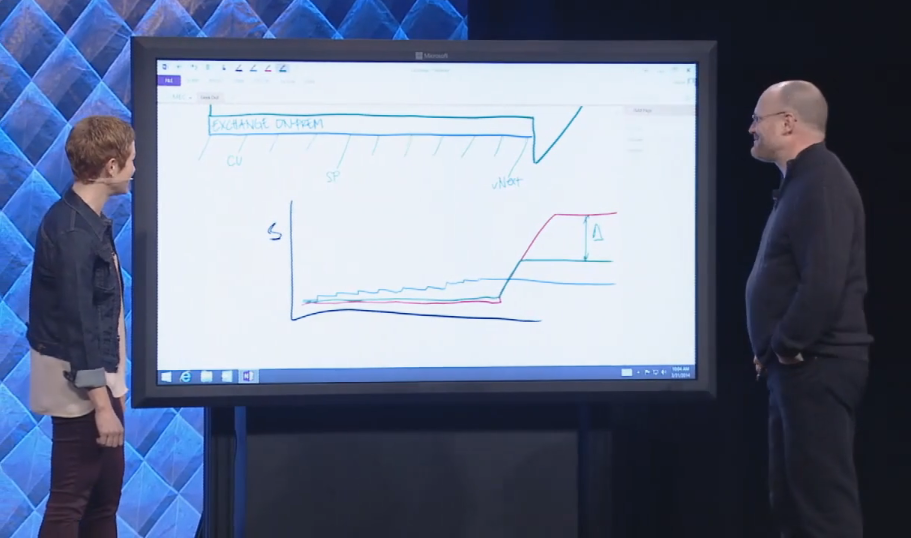
imageIn the keynote, during a “Geek out with Perry”, Perry (Corporate VP for Microsoft Exchange) mentioned that the “Cloud First” approach allowed Microsoft to implement features step by step, with the option of reverting not-so-good changes. In the end, this should also result in a better product for the on-premises customer when releasing new Exchange builds, and ultimately Exchange v.Next (the next version), as they would not receive the not-so-good changes. It was mentioned several times, also in individual sessions on Office Graph features like Clutter and Groups as well, that these features would be “cloud-first” but there was “no ETA yet” for Exchange on-premises. At that time, most of us leaving MEC did that with the impression that all these features, at some point, would make it to Exchange or Exchange v.Next.

Apparently we got hold of the wrong end of the stick. Last week this article appeared on Network World, where in an interview with Julia White (GM Office Marketing) she mentioned that Clutter would not make it to “Office Server”, which seems to be the term for the on-premises deployments of the Exchange, Sharepoint and Lync Server triplet. This was a bit surprising, given the information received at MEC. The reason given in the article for this deviation was that Office Graph is too “compute intensive” to include on a Office Server. I assume to preempt any sounds on being forced to the service, Julia states that, “It’s not capricious favoritism toward Office 365 customers.” This is more or less in line with Microsoft’s earlier statements, on not having plans to stop delivering on-premises releases of Exchange (v.Next). In the discussion that followed on Twitter, Julia confirmed that “Clutter won’t make ExServer v.Next unfortunately.”

File:Classic shot of the ENIAC.jpgThe scale of Office 365 is incomparable to the average business running Exchange, Sharepoint and Lync on-premises and the amount of information that needs to be processed for Office Graph. And I can’t help it, but looking at the ‘compute intensive’ argument brings back memories of computer rooms where big monolithic systems offered computing powered easily surpassed by today’s tablet. With Clutter being expected for later this year and vNext next year, that is a considerable window. Some claim that Moore’s Law is obsolete and we also can’t expect to be running Skynet from home next year but still, computing power increases and I know of some customers who would just get the additional hardware onboard to facilitate those extra features. In addition, Clutter can be enabled on a per-user basis anyway.

In a more or less opposite statement, Julia is quoted saying, “Our philosophy is anything we technically can ship in servers, we will. We want our server customers and our cloud customers to have as much as we can ship to them. If it’s possible technically and it’s feasible then we’ll put it in the servers.” I think the reason for not adding Clutter should be sought in the hints Julia provided in the 2nd part of the article. With on-premises customer not following or even delaying upgrading to current versions of Microsoft’s products, Exchange, Sharepoint, Lync and clients, makes it hard to ship and support product transcending features, especially if this requires the latest (and greatest) version.

Think Site Mailboxes, more or less the predecessor of the announced Groups feature of Office Graph. Implementing Site Mailboxes requires Exchange 2013, Sharepoint 2013 and Outlook 2013 and additional configuration to integrate the Exchange and Sharepoint products. In the field, I see very low adoption of Site Mailboxes. Many customers are running older product levels (blocking implementation) or it’s a more elementary reason like not having deployed Sharepoint. But then, for those that are running Site Mailboxes, it adds value. Isn’t that what this is all about? Note that for the compliance discovery feature to work, proper configuration of Exchange, Sharepoint and Lync is required as well, but compliance is perhaps is a better selling point than clutter or one of the other Office Graph features could ever be.

“Assumption is ..” are the first words of a well-known saying. For the future, don’t expect anything you see announced for Office 365 to be ported to the on-premises Exchange releases, even though that product stems from the same code. Then again, features might get dropped, for reasons provided above or just because they were not ready. That’s nothing new and we got accustomed to a little disappointment now and then. In the case of Clutter, it’s a shame because it looked like a neat feature to work more efficiently through e-mail without configuring tons of rules. In the case of Groups, it is confirmed for v.Next, but you never know for sure until it is released. Meanwhile, Microsoft should maybe try to prevent confusion by demonstrating Clutter a.o. in sessions called “What’s new in Exchange“.

If you got an opinion on these changes in course or feature drops, please share them in the comments.

Exchange Server 2003 â€ 


ex2003eeHĂłka-hĂŠy! Today is a good day to die(*).

With all the media attention for Windows XP support coming to an end today, one might forget that today also marks the official death of Exchange Server 2003 as the extended support phase ends for one of the products many of us developed a love-hate relationship with over the years. In addition, extended support for Office 2003 also ends today.

Reaching the end of extended support means that as of today, those products are no longer supported and will no longer receive security patches. Therefor, organization running Exchange Server 2003 or using Outlook 2003 might be exposed to security risks.

Of course there is an exception to this rule, depending on how deep your pockets are. Organization neglecting or ignoring the upcoming demise of products for some period can continue to receive support for a hefty price. For example, the UK government paid $9m for an additional year of Windows XP, Office 2003 and Exchange 2003 support, and the Dutch government paid an undisclosed amount for an additional year of Windows XP support for around 40,000 systems. Ironically, the Dutch National Cyber Security Center NCSC, part of the department of justice, warned citizens to stop using Windows XP and upgrade.

For organizations still running Exchange Server 2003, there is nothing to be ashamed of as there are occasional sightings of Exchange 5.5 out there. When you think about upgrading, be advised that there is no direct upgrade path to Exchange Server 2013 and you either need to perform a double hop migration through Exchange Server 2007 or Exchange Server 2010 (recommended) or migrate to Office 365 as an alternative.

*) A battle cry attributed to Crazy Horse

So long RPC/HTTP, Hello MAPI/HTTP


Ex2013 LogoMicrosoft published three sessions from the Redmond Interoperability Protocols Plugfest 2013 on Channel 9 on the protocol MAPI over HTTP or MAPI/HTTP which looks scheduled to arrive with Exchange 2013 Service Pack 1.

This protocol is set to (over time!) replace the RPC/HTTP protocol we all know. RPC/HTTP, or Outlook Anywhere, is used by Outlook to communicate with Exchange Server and is most often seen with clients working remotely. With Exchange Server 2013, support for MAPI was dropped and RPC/HTTP became the only protocol. With Exchange 2013 SP1 it seems we will receive an alternative which is set to replace RPC/HTTTP, MAPI/HTTP.

Of course, the information is preliminary and subject to change as Exchange 2013 SP1 hasn’t been released yet, but it won’t harm to get familiar with the planned changes. It also remains to be seen how quick organizations will adopt this new protocol, which I’m pretty sure we will soon see getting supported by Office 365.

MapiHttp in Exchange 2013 SP1
Joe Warren, Principal SDE at Microsoft delivering a presentation covering the Exchange 2013 MapiHttp protocol implementation in Exchange 2013 SP1. Topics: What is MAPI-HTTP?, Why do MAPI-HTTP?, Goal of MAPI-HTTP, Why not rebuild with EWS?, Existing RPC-HTTP, New MAPI-HTTP, What does a MAPI-HTTP request look like?, What does a MAPI-HTTP response look like?, Session Context, Request Types, Sequencing & Protocol Failures. Click here.

Outlook 2013 Client Protocols
Shri Vidhya Alagesan, SDE at Microsoft presenting on Outlook 2013 Client Protocols from a client’s perspective. Topics: Client side view of Outlook-Exchange MAPI-HTTP protocol using WinHTTP, Error Handling & RPC Vs. MAPI-HTTP with sub-topics of Architecture Overview, Outlook & WinHttp, Cookies, Connection Status Dialog, Timeout, Pause/Resume & Protocol Switching. Click here.

Exchange 2013 Protocols
Andrew Davidoff, Senior Software Developer Engineer in Test at Microsoft presenting on the Exchange 2013 protocol families and important protocol updates for Exchange 2013. Click here.

Apart from these sessions on protocol change announced for Exchange Server 2013 SP1, Microsoft also published some other interesting Exchange-related sessions:

Exchange 2013 Web Services Overview
Harvey Rook, Principal Development Lead, and Naveen Chand, Senior Program Manager Lead, deliver a presentation on Exchange Web Services best practices. Click here.

Exchange RPC and EWS Protocol Test Suites
Jigar Mehta, Software Development Engineer in Test provides an in depth overview of the test suite packages for the Exchange RPC and Exchange Web Services protocols. Click here.

TechNet Subscriptions Changes


In the wake of Microsoft’s announcement to retire TechNet and more recently cancelling the MCM/MCSM/MCA certifications, Microsoft is offering some changes in the TechNet area, in what looks like a move to regain some trust from the community.

After the TechNet retirement announcement, in which Microsoft suggested IT Pros to switch to the far more expensive MSDN subscriptions, use time-bombed eval software or make use of the very limited Virtual Academy and Virtual Labs, the community cried foul which resulted in initiatives like a petition which currently has received over 10,000 signatures (if you haven’t signed yet, please do so).

The changes announced today are published in full here. In short:

  • Non-Volume Licensing program particpating subscribers who were active on September 1st, 2013 who’s subscription expires on or before September 30th, 2014, may extend their subscription for another 90 days for free;
  • 180 day limited previous versions of software will be made available through the Evaluation Center. No details yet on the number of software generations that will be made available.
  • Microsoft Certified Trainers (MCT) will also get a 90 day extension for their TechNet Professional subscription. In addition, a replacement is in the works in which MCT’s get access to non-time-bombed software for instructional/training purposes.

While still short of the original subscription, Microsoft is moving. However, if they can quickly make arrangements for MCTs, why not for IT Professionals and their TechNet subscriptions?

Looking at the way many fellows, myself included, work, that 180 day time-bombed is pretty useless or at least annoying and time consuming (like if I have nothing better to do than to redeploy and reconfigure lab environments).

With MCT nowadays mainly being a registration and fee donation process, I won’t be surprised to see a lot of “paper MCTs” after January, 2015 (September 2014 + 90 days) if the situation stays like this.

What do you think? Are these changes satisfactory?

TechNet Subscriptions Retirement

Image


Only 3 days ago, the (Microsoft) IT Pro community was surprised and shocked by an e-mail they received from Microsoft regarding retirement of TechNet Subscriptions after its introduction 15 years ago:

Microsoft is retiring the TechNet Subscription service.
As IT trends and business dynamics have evolved, so has Microsoft’s set of offerings for IT professionals who are looking to learn, evaluate and deploy Microsoft technologies and services. In recent years, we have seen a usage shift from paid to free evaluation experiences and resources.  As a result, Microsoft has decided to retire the TechNet Subscriptions service and will discontinue sales on August 31, 2013.

This means that after August 31, you won’t be able to purchase a subscription for downloading software for test and evaluation purposes. When you buy a subscription, you also need to activate it before September 30, 2013. Microsoft will honor current subscriptions, meaning its TechNet Subscriptions end of life date will be August 31, 2014. More information in the TechNet Subscriptions FAQ.

As part of the announcement, Microsoft suggests using time bombed evaluation software from the TechNet Evaluation Center, TechNet Virtual Labs or buying an MSDN subscription amongst other things. Not surprisingly, the majority of the IT Pro world cried foul:

TechNet Evaluation Center
Time bombed evaluation software is no replacement. For example, I have various environments set up in my lab which I use for research, blogging or articles, develop and test scripts, test (customer) scenarios, try to reproduce issues, evaluate 3rd party software, etc. I also use it to deploy environments for demonstration purposes. I don’t consider redeploying and reconfiguring all those environments on a frequent basis an option, apart from the fact that Evaluation Center only offers the recent generation of products.

TechNet Virtual Labs
TechNet Virtual Labs are very limited and aimed at exploring products and exams.

MSDN subscriptions
MSDN subscriptions are way more expensive and are primarily aimed at developers.TechNet Standard entry subscription with all non-developer software (e.g. OS, Exchange, Sharepoint, Lync) costs $199 ($149 renewal) while Professional with Enterprise software and Dynamics costs $349 ($249 renewal). Compared with MSDN‘s entry Subscription which costs $699 ($499 renewal, only getting you Operating Systems and some dev kits .. which IT Pro needs those?) MSDN is inferior. If you’re looking for a matching MSDN replacement which includes server software like Exchange, you’re looking at a $6.119 ($2.569 renewal) Subscription!

Microsoft Virtual Academy
Very limited and not representative of hands-on experience.

As for myself, my subscription expires July 26th, 2013. I’m curious, how does this decision affect you? Let me know in the comments section below.

Meanwhile, if you disagree with Microsoft’s decision, let your voice be heard by signing this petition for an affordable, TechNet comparable MSDN Subscription as an alternative. Microsoft also reversed Xbox One online check and used game policies and will reintroduce the “Start” button in Windows 8.1, so who knows.