
Unknown's avatar

About Michel de Rooij

Michel de Rooij, with over 25 years of mixed consulting and automation experience with Exchange and related technologies, is a consultant for Rapid Circle. He assists organizations in their journey to and using Microsoft 365, primarily focusing on Exchange and associated technologies and automating processes using PowerShell or Graph. Michel's authorship of several Exchange books and role in the Office 365 for IT Pros author team are a testament to his knowledge. Besides writing for Practical365.com, he maintains a blog on eightwone.com with supporting scripts on GitHub. Michel has been a Microsoft MVP since 2013.

LUN design and Hardware VSS


I had a question why you need to design seperate LUNs for Exchange database and log files when using a hardware based Volume Shadow Copy Service (VSS) backup solution, as mentioned in this TechNet article:

To deploy a LUN architecture that only uses a single LUN per database, you must have a database availability group (DAG) that has two or more copies, and not be using a hardware-based Volume Shadow Copy Service (VSS) solution.

The reason for this requirement is that hardware VSS solutions operate at the hardware level, i.e. the complete LUN. Therefor, if you put the Exchange database and log files on a single LUN, it will always create a snapshot of the whole LUN. This restricts your recovery options, since you can by definition only restore that complete LUN, overwriting log files created after taking the snapshot. So, changes (log files) made after the snapshot are lost and you have no point-in-time recovery options.

For example, with the database and log files on a single LUN, suppose you create a full backup on Saturday 6:00. Then, disaster strikes on Monday. By definition, you can now only restore the database and log files as they were on Saturday 6:00; log files which were created after Saturday 6:00 are lost.

With the database and log files on separate LUNs, you can restore the database LUN, which leaves the LUN with the log files intact. Then, after restoring the database, you can start replaying log files.

So, keep this in mind when planning your Exchange LUNs in conjunction with the backup solution to be used. Note that the Mailbox Role Calculator supports this decision by letting you specify Hardware or Software VSS Backup/Restore as the Backup Methodology to be used.

If you’re interested in more background information on how VSS works, I suggest you check out this TechNet article.

Note: This blog has also been published on Exchange fellow Jaap Wesselius’ ExchangeLabs blog here.

Exchange & Windows Phone 7


This TechNet article on Windows Phone 7 got my attention. It appears you cannot fully utilize Exchange ActiveSync mailbox policies, unless you set AllowNonProvisionableDevices to True. If you don’t do that, you can only use the following properties, otherwise synchronization issues might be experienced:

  • PasswordRequired
  • MinPasswordLength
  • IdleTimeoutFrequencyValue
  • DeviceWipeThreshold
  • AllowSimplePassword
  • PasswordExpiration
  • PasswordHistory
  • DisableRemovableStorage
  • DisableIrDA
  • DisableDesktopSync
  • BlockRemoteDesktop
  • BlockInternetSharing

Another option is to create a seperate policy for Windows Phone 7 users.

Another thing worth mentioning is that when using multiple Exchange accounts on your Windows Phone 7, policies will be merged into a most restrictive set (credit to Dave Stork who got the information at TEE10).

JetStress updated


A quick note to inform you the the JetStress tool has been updated to version 14.1.225.17.

The online documentation on TechNet is currently being revised (article 706601). Currently on the following sentence has been removed from the article:

“You should test Jetstress 2010 with Exchange 2010 ESE binaries, and use Jetstress 2007 for testing legacy ESE versions of Exchange 2007 and Exchange 2003”

The JetStress tool can be used to simulate disk I/O load on a test server running Exchange to test and validate performance and stability of the disk subsystem, prior to moving them into a production environment.

The toolkit page has been updated accordingly.

You can download it here; x86 version is located here.

Exchange 2010 Visio Stencil


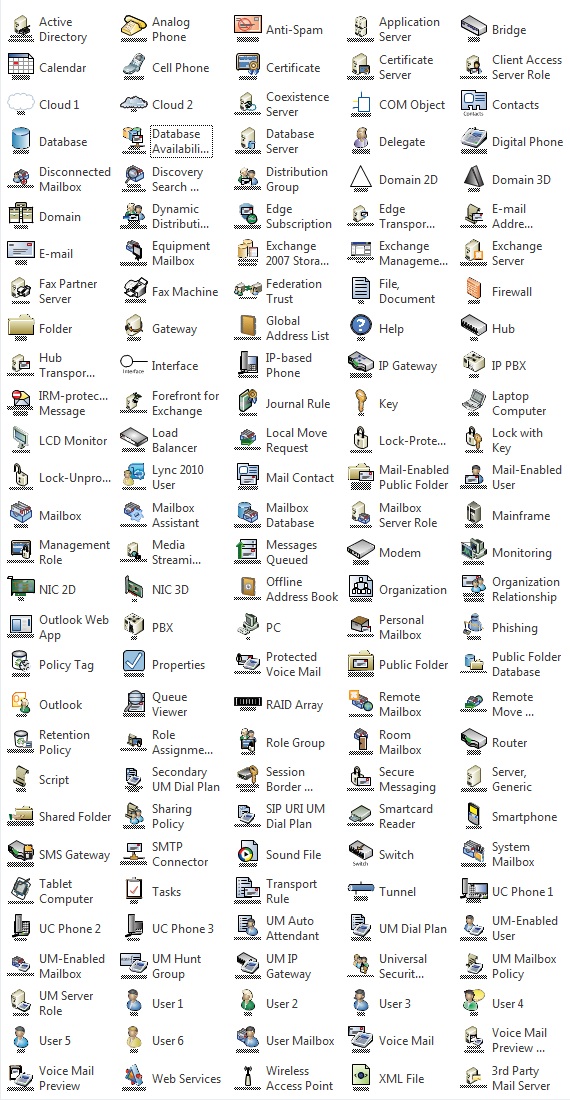
A quick post, but helpful for all those involved with designing and drawing out infrastructure diagrams related to Microsoft Exchange Server. Microsoft published Visio stencil with shapes for Microsoft Exchange Server 2010 (RTM and SP1). These shapes include icons for the following:

  • Exchange 2010 server roles
  • Features new to Exchange 2010 SP1
  • Networking, telephony, and Unified Messaging objects
  • Active Directory and directory service objects
  • Client computers and devices
  • Other Exchange organization elements
  • Cloud elements

You can download the stencil, which is suited for Visio 2007 as well as Visio 2010, here; it has also been added to the toolkit page.

Exchange 2010 SP1 protocols+standards & FOPE Documentation Update


The Exchange 2010 protocol documentation set has been updated to version 8.0. This version is for “Exchange Server 2010 SP1 RTM”. The documentation describes in detail each protocol used by Microsoft Exchange Server. You can retrieve the individual documents or the complete set in one archive  here.

In addition, the Microsoft Exchange Server 2010 and Outlook 2010 Standards documentation set has been updated to version 7.0.The documents describe Exchange 2010 and Outlook 2010 support for industry standards and RFCs, like IMAP4 and POP3. You can retrieve the individual documents or the complete set in one archive here.

And finally, the Forefront Online Protection for Exchange (FOPE) 10.1 Product documents have been released. This set contains the following:

  • New Features Guide, containing information on the features and changes for FOPE, including the Directory Synchronization Tool, new company filtering service settings, domain enhancements, and enhanced reporting features.
  • Administration Center User Guide, containing information fore using FOPE’s Administration Center, the web-based admin tool to create reports and customize FOPE services.

You can retrieve the FOPE product documents here.