
Unknown's avatar

About Michel de Rooij

Michel de Rooij, with over 25 years of mixed consulting and automation experience with Exchange and related technologies, is a consultant for Rapid Circle. He assists organizations in their journey to and using Microsoft 365, primarily focusing on Exchange and associated technologies and automating processes using PowerShell or Graph. Michel's authorship of several Exchange books and role in the Office 365 for IT Pros author team are a testament to his knowledge. Besides writing for Practical365.com, he maintains a blog on eightwone.com with supporting scripts on GitHub. Michel has been a Microsoft MVP since 2013.

Blocking automatic activation in DAGs


After the post on Exchange 2010’s Active Manager I received a question on the possibilities to block automatic activation of database copies in a DAG. There could be legitimate reasons for wanting this, like when you want to prevent remote database copies in a secondary data center from being activated automatic.

The blockade can be created on two levels:

  • Server – this prevents automatic activation for any database copy hosted on that server;
  • Database Copy – this prevents automatic activation for a specific database copy hosted on a specific server.

To block all database copies on DAG member <ServerID> from becoming activated automatically, use:

Set-MailboxServer –Identity <ServerID> – DatabaseCopyAutoActivationPolicy Blocked

To enable all database copies on DAG member <ServerID> for automatic activation again, use:

Set-MailboxServer –identity <ServerID> –DatabaseCopyAutoActivationPolicy Unrestricted

To block automatic activation on the database copy level, use the Suspend-mailboxDatabaseCopy. For example, to block the database copy of DatabaseID from automatic activation on ServerID, use:

Suspend-MailboxDatabaseCopy –identity <DatabaseID>\<ServerID> –ActivationOnly

To enable automatic activation again for this database copy on the specified server, use Resume-MailboxDatabaseCopy, like:

Resume-MailboxDatabaseCopy –identity <DatabaseID>\<ServerID>

Be advised that contrary to what the name of the cmdlet might suggest, using Suspend in conjunction with ActivationOnly and Resuming an activation blocked database copy does not affect the replication process for that database copy.

Geek Out with Perry series


As EHLO posted today, there is a new video of the Perry Clark, General Manager, Exchange from the Mailbox team. Its the latest addition to the Geek Out with Perry series, short (around) 10 minute videos hosted by Ann Vu (Product Manager), where various in-depth topics like Archiving, Storage and Data Protection are discussed. Perhaps not all of you are aware of the series, so for your convenience I’ve embedded the videos:

Answers to Questions on Archiving with Tiered Storage and Stubbing

Archiving in Exchange

Answering Data Protection Questions: Replication and Backups

Managing Storage Efficiently

Data Protection Evolution

For those interested, Perry blogs and videos can be found on Ask Perry.

RBAC Overview (RTM,SP1 Beta)


NOTE: The sheet has been updated after the release of SP1, a post containing a link to the updated sheet can be found here.

In an attempt to get more grip on and understanding of Exchange 2010’s Role Based Access Control, I created an Excel workbook for RBAC reference. Besides the default RBAC configuration of Exchange 2010 RTM and Exchange 2010 SP1 Beta, it also contains a list of differences found between the two setups.

Now for a quick word on how to use this thing.

The Exchange sheets contains RoleGroup, ManagementRoleAssignment, ManagementRole, ManagementRoleEntry and RoleEntry (cmdlet)  information. The ManagementRoleAssignment and ManagementRoleEntry are hidden columns, because they only contain values linking the two pieces of information next to them together. You can unhide these if you you, by selecting the sheet, right-clicking on it and selecting Unhide .

Now each row is a complete set of permissions, meaning it states a unique RoleEntry + Role + RoleGroup combination, meaning that RBAC by default grants that RoleEntry to that Role to that RoleGroup. The nice thing is that you can use Excel’s data filter to filter results and see what cmdlets are available to a certain RoleGroup or which RoleGroup or Roles can use a certain cmdlet.

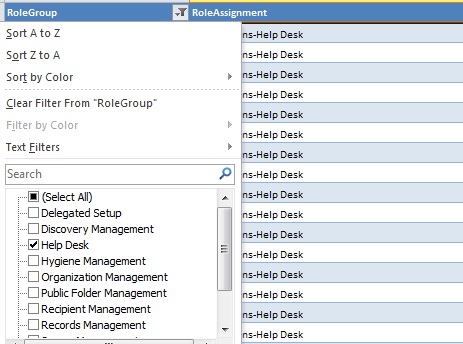
To use this function, select one of the Exchange sheets. On the top row containing the header you’ll notice a drop-down box. When clicking that drop-down box, it’ll show all entries in the table for that colum and various options like sorting. Notice that in front of the unique entries for in that colum is a checkbox. By checking or unchecking this you can apply or remove a filter on that colum. You can also combine filters. Use the “Select (All)” option lets you quickly (un)check all filtering options.

For example, by selecting only the RoleGroup “Help Desk”, you will see all entries for that RoleGroup:

Looking from the RoleEntry perspective, by filtering on a CmdLet, you can see what Roles and RoleGroups may perform a certain operation:

The 3rd sheet contains differences in RBAC configuration between Exchange 2010RTM and Exchange 2010 SP1 Beta. A green row with a “!>” indicates a new RBAC entry for SP1 Beta; a red one row with “<!” means the setting has been removed or became obsolete in 2010 SP1 Beta.

You can download the sheet RBAC_Overview_v11.xlsx from here. That isn’t the permanent location; I’m still looking for a location to host Excel files or ZIP files since WordPress won’t let me upload those. Also note that the file also contains information based on Exchange 2010 SP1 Beta which is subject to change in the final product.

Hope you find the RBAC information in this form useful. Feedback is appreciated (comment or e-mail).

Note: Whilst I was busy creating this workbook I noticed a guy from MS has already developed an Exchange 2010 RBAC Manager. You can use this not only to interactively browse the current RBAC configuration but you can also make changes. This excellent tool can be download here.

Eightwone.com


As of yesterday this blog can be reached on a native URL, http://eightwone.com. Looking at where this blog is going, I made things in order regarding DNS and the mail server (still on Postfix, sorry), so no more redirections to WordPress URL when surfing to eightwone.com (I already purchased the domain when I started this blog). It also looks more professional than that tertiary domain name. Note that all links to eightwone.wordpress.com remain valid and are automatically mapped to their eightwone.com counterpart.

Also, I took 70-638, “Office Communications Server 2007, Configuring” exam today. Hurray, I passed!

Exchange 2010 CAS workloads paper


The Exchange team at EHLO released a nice paper in the TechNet library on the subject of Client Access Server workloadson Exchange Server 2010. This paper is to illustrate the effect of using different client modes with different protocols (i.e. Outlook Cached Mode yes/no, Outlook Anywhere, OWA, POP, IMAP, ActiveSync). It also shows the differences between using Windows Server 2008 SP2 and Windows Server 2008 R2 in combination with these protocols.

Some examples:

  • For Outlook Anywhere, the CPU usage per user on CAS servers almost quadruples around 6.000 users when comparing SP2 against R2;
  • For Outlook Anywhere, CPU usage for AD/Hub/Mailbox starts to flatline at 3.000+ users;
  • For Outlook Anywhere, as you probably already knew, it is recommended to use Windows Server 2008 R2;
  • For IMAP, the mailbox size is of big influence on the CPU usage;
  • For POP3, the number of Mailbox IOPS drops as the number of users increases;

They also perform a comparison between Exchange Server 2007 SP1 and Exchange Server 2010 regarding IMAP. For example, CPU usage on CAS servers when using IMAP clients is reduced by 40% and memory bij 30%.

What does puzzle me is that in some comparisons they left out certain measurements and some graphs are missing scale information. For instance, the graph for Total CPU consumption for IMAP4 has SP2 start at 37.000 while R2 starts at 12.000. Why? Did SP2 produce some weird results or is it off the scale? The paper doesn’t mention it.

Nevertheless, interesting stuff.

You can read the whitepaper here. Unfortunately, there’s only an online version of the paper.