
Unknown's avatar

About Michel de Rooij

Michel de Rooij, with over 25 years of mixed consulting and automation experience with Exchange and related technologies, is a consultant for Rapid Circle. He assists organizations in their journey to and using Microsoft 365, primarily focusing on Exchange and associated technologies and automating processes using PowerShell or Graph. Michel's authorship of several Exchange books and role in the Office 365 for IT Pros author team are a testament to his knowledge. Besides writing for Practical365.com, he maintains a blog on eightwone.com with supporting scripts on GitHub. Michel has been a Microsoft MVP since 2013.

Speedup Exchange 2010 Rollup 1 setup


Normally, the setup of Exchange 2010 Rollup 1 is a no-brainer. However, not all Exchange systems have access to the internet. As with Exchange 2007 Rollups, Exchange 2010 Rollup 1 contains managed code of which the assemblies need to be compiled during setup. This requires an internet connection to verify the certificates. If you have no internet connection the setup is very slow because it needs to wait for certificate revocation checks to timeout.

To prevent this behaviour, you can disable the check as follows:

  1. Go to Internet Explorer > Tools > Internet Options or Control Panel > Internet Options
  2. Navigate to Advanced > Security
  3. Make sure the Check for publisher’s certificate revocation and Check for server certificate revocation options are unchecked
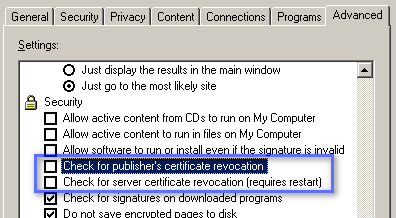
You can re-enable the checks afterwards when required.

Installing Update Rollup 1 for Exchange 2010 on DAG Members


Scott Schnoll publiced an blog on the process of installing Rollup 1 on Exchange 2010 servers with DAG members. The process doesn’t really differ from existing Exchange 2007 CCR/SCR scenarios, i.e.

  1. Suspend replication;
  2. Move active copy/copies;
  3. Install the update;
  4. Resume replication;
  5. Reactivate copies when required.

You can find the blog article here.

Microsoft Virtualization Best Practices for Exchange Server (Level 300)


The TechNet Webcast: Microsoft Virtualization Best Practices for Exchange Server (Level 300)  might be of interest to you:

Virtualizing business critical applications delivers significant benefits, including cost savings, enhanced business continuity, and an agile and efficient management solution. In this webcast, we focus on virtualizing Microsoft Exchange Server using Microsoft solutions, we discuss the benefits of using Microsoft virtualization technologies instead of technologies from key competitors such as VMware, and we provide technical guidance and best practices for virtualizing Exchange Server in various production scenarios. We also discuss results from lab deployment tests.

You can register for the event here.

Forefront Protection for Exchange Server survey


The ForeFront Server Protection team is looking for feedback on the Forefront Protection for Exchange Server:

Although we just shipped Forefront Protection for Exchange Server 2010, we are already hard at work planning the next release. To that end, we are very interested in hearing feedback on your experience deploying and managing your current antimalware solution for Exchange. Please take 5-10 minutes to answer the survey questions. This type of feedback directly impacts future product decisions and we would appreciate your valuable input.

To contribute you can enter the survey here.

IPD guide on Forefront Unified Access Gateway


The Infrastructure Planning and Design guides have been updated. Version number is 1.0, date December 10th, 2009. What’s new is the guide on Forefront Unified Access Gateway. You can download the guides individually or as a set here.