

 Last Update: October 10th, 2015
Yesterday, news rose of a security vulnerability in Outlook Web Access (OWA). A company called Cybereason claimed to have discovered an OWA backdoor hack of which they published in a report, “Webmail Server APT: new persistent attack methodology targeting Microsoft Outlook Web Application (OWA)” (APT stands for Advanced Persistent Threat). Supposedly, an OWA backdoor in ‘OWA Server’, the term used for Exchange Server in the report, allows a hacker to collect clear text usernames and passwords.
News sites quickly picked up the story, with catchy headlines such as:
- New Outlook mailserver attack steals massive number of passwords (Arstechnica)
- Microsoft OWA falls victim to password-pinching APT attack (Inquirer)
- Potent OWA backdoor scores 11000 corporate creds from single biz (The Register)
- Hackers Breach Microsoft OWA Server, Steal 11,000 User Passwords (SoftPedia)
- Researchers find credential-stealing webmail server APT attack (ComputerWeekly)
The news was copied a lot without fact checking, and Microsoft felt the need to publicly make a statement: “No new security vulnerability in Outlook Web Access (OWA)”. Unfortunately that doesn’t stop media from reporting, as they are driven by a model based on page views and clicks. And such headlines most certainly will attract viewers.
Looking closer at the report, I’m inclined to think the company wanted to push for business and free publicity by spreading FUD (Fear, Uncertainty and Doubt), not uncommon in the security world. The report states that it is required to have installed (report does not disclose how) a malicious ISAPI filter on the ‘OWA Server’, without details on how this was achieved. Most likely they have used (or are referring to) the OWAAuth ISAPI filter also mentioned in a threat report (TG-3390) from Dell, dated August, 2015. The OWAAuth.dll filter authenticates users through Forms-Based Authentication against Active Directory. Capturing and decoding client traffic is what these ISAPI filters can do, so that’s not worrying. Unfortunately, Cybereason report does not state the version of the ‘OWA Server’ or operating system. Was it current, and fully patched?
Key question is how did this filter get on the Exchange server in the first place? A properly managed environment does not allow for this type of access. So, the problem is likely not with the ‘OWA Server’ or the operating system. In a response on a blog reporting on this issue, Cybereason clarified that, “The hackers managed to obtain access to this server using stolen credentials.” Well, there is the confirmation of the real issue at hand: This is not an ‘OWA Server’ issue. The person could in theory have done anything with those stolen credentials.
In their response, the Cybereason spokesperson also stated that:
“The problem is that this server was in a very unique position. On one hand it’s completely internet facing and on the other hand, it is a focal point for the full credentials of all employees in the organization. Companies should be wary of using this server without requiring VPN (although this is usually its biggest advantage) and at the very least, require 2FA (2 factor authentication).”
I agree on the multi-factor authentication statement, especially for administrative or high profile accounts. However, claiming that VPN would prevent the issue is strange, as with most typical organizations that same set of stolen credentials would allow for setting up a VPN connection, maybe requiring some guesswork on the endpoint, but in the end enabling access to the same environment and practicing the same malicious behavior. Also, it is best practice to use a more regular account for e-mail and connectivity, requiring another set of credentials for administrative privileges.
So, while the report may be based on a real world scenario, always have a healthy dose of common sense when reading these ‘research reports’ from companies selling security products and services. Manage your Active Directory and Exchange environment properly, use MFA for privileged accounts and remote access, and life should be good.
Other Exchange fellows also debunked the report:
- Doubtful security report about OWA flaw gains headlines but offers little real value
- Misleading Reports of Outlook Web App Vulnerability in Exchange Server
Update (Sep9): If you are nevertheless still concerned, and want to do a quick scan of the currently loaded ISAPI modules on your Exchange servers, you can run the cmdlet below (be advised it’s a one-liner!). You should be able to spot ISAPI modules loaded from unusual locations or reporting an unexpected version number:
Get-ExchangeServer | ForEach-Object { Invoke-Command -ComputerName $_.Name -ScriptBlock { Get-WmiObject -Namespace 'Ro
ot\MicrosoftIISv2' -Class IISFilterSetting -Authentication 6 | ForEach-Object { (Get-Item $_.FilterPath | Select -ExpandPropert
y VersionInfo) } } } | Sort-Object PSComputerName,FileName | Format-Table -AutoSize PSComputerName, ProductVersion, FileName
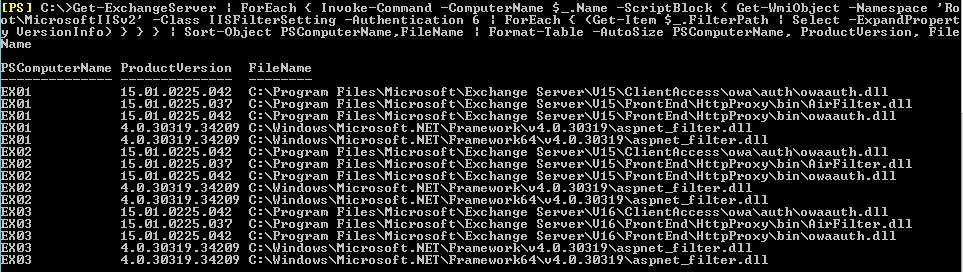
Update (Sep10): Cybereason provided some more details through Twitter and will publish a FAQ next week. However, more details were already given in an interview with ThreatPost (by Kaspersky Lab), in which Cybereason states that:
- The harvesting took place over a period of months.
- Stolen credentials were used to load a malicious, unsigned ISAPI filter, OWAAuth.dll.
- The malicious OWAAuth.dll was residing in a non-standard location.
- The malicious OWAAuth.dll was persistently loaded by modifying the registry.
- Other modules were loaded, amongst them PlugX which has been around for a while, and which is the actual backdoor providing remote control mechanisms.
There are lots of similarities with the Cybereason case and Dell CTU’s TG-3390 analysis (use of PlugX, OWAAuth.dll). Since the harvesting took place over a longer period, were administrators not aware of the theft or not paying attention. Could it be that there’s a sudden increase of organizations and administrators not properly dealing with stolen passwords and password policies in general?
Meanwhile, Cybereason also claims the report, “was a malware analysis report and never about an OWA exploit”. While they have no control over the media, wording like “Cybereason Labs Reports on OWA Backdoor Attack” implies something differently. They also state one of the main concerns is, “Corporate Microsoft OWA servers are high prevalence in financial institutions”, which seems odd statement. Possibly, it’s a clue on where they hope to push business from, but from my personal experience these organizations are the most likely to have implemented multi-factor authentication and provide limited – if any at all – remote access functionality.
![rss[1]](https://eightwone.com/wp-content/uploads/2013/05/rss1.png)


 EighTwOne (821)