 After some recent Exchange troubleshooting I decided to do a small write-up on an attribute most people working with Exchange know about, the infamous exchangeLegacyDN.
History
In the early days of Exchange, the NT world was flat. Exchange utilized its own hierarchical X.500 addressing scheme, and to uniquely identify objects it used an attribute called obj-Dist-Name (similar to distinguishedName nowadays). It contained a constructed value using elements like organization, containers and the canonical name to construct the entry, e.g. /o=Contoso/ou=EMEA/cn=Recipients/cn=User.
Then came the introduction of Active Directory with the release of Windows Server 2000. In AD, while you could refer to object using obj-Dist-Name’s counterpart distinguishedName, objects are primarily identified using their static Global Unique Identifier (GUID). The distinguishedName is constructed using relative names like the OU and CN, e.g. CN=User,OU=EMEA,DC=contoso,DC=com. Because it’s dynamic, the distinguishedName will change when you move or rename the object.
For backward compatibility with older versions of Exchange, clients or 3rd party tooling the legacyExchangeDN attribute was introduced which was to provide a unique key for the Exchange object. A process called Recipient Update Service (RUS) was responsible for populating the legacyExchangeDN value using the current location in conjunction with the given name (CN). Since Exchange 2007, legacyExchangeDN is set at creation time or can be updated manually using the Update-Recipient cmdlet. When a conflicts are detected, a unique value was constructed by adding a GUID-like series of hex characters.
When public folders are used for publishing Free/Busy information, the legacyExchangeDN was used to determine in which public folder the information was published. More information on this in an earlier blog here.
Typical values for the legacyExchangeDN attribute are:
- Pre-Exchange 2007:
- /o=Contoso/ou=First Administrative Group/cn=Recipients/cn=UserA
- Exchange 2007 and later:
- /o=Contoso/ou=Exchange Administrative Group (FYDIBOHF23SPDLT)/cn=Recipients/cn=UserA
Until Exchange 2010 SP1 Rollup 6 the legacyExchangeDN value was predictable, but as of this Rollup (and Exchange 2013), 3 random hex characters are added for uniqueness.
Exchange Internal Addressing
While SMTP addressing is the de facto e-mail addressing standard, Exchange internally still uses an X.500 addressing scheme. Using X.500 implies that an X.500 is required, which is why mail objects in an Exchange organization such as mailboxes, require a properly populated legacyExchangeDN.
The most encountered symptom of not having properly populated or unpopulated legacyExchangeDN attributes is failure of e-mail delivery or transport, which I’ll elaborate on a bit below. I’ll mention it again: legacyExchangeDN is required, unlike some Exchange admins I overheard a while ago when they were looking for the cause of several NDRs discussing SMTP was used so it should be ‘no problem’.
IMCEA and IMCEAEX
When sending a message, the sender and recipient are checked against the Global Address List (GAL). When it can’t find a match in the GAL, IMCEA encapsulation is used which stands for Internet Mail Connector Encapsulated Addressing. An IMCEA encapsulated address looks like:
IMCEAEX-_O=CONTOSO_OU=First+20Administrative+20Group_cn=Recipients_cn=philip@contoso.com
A trailing “EX” at the end of IMCEAEX indicates that a non-SMTP address was encapsulated. The used SMTP domain “contoso.local” is taken from the GAL object unless the lookup failed; in that case the forest DN is used.
Migrations and Co-existence Issues
Clients like Outlook cache information like the legacyExchangeDN for name lookups (the infamous name cache or .nk2 files). It will also store the legacyExchangeDN (PR_EMAIL_ADDRESS) with e-mail item. This is used when replying to old e-mail and which is why you’ll see X.500 addresses when you open the e-mail outside of the organization.
While using the legacyExchangeDN makes your client insensitive to e-mail address changes, name changes etc. it will provide a (small) challenge when for example a mailbox is moved to a different forest (or to or from Office 365 for that matter) as it will get a new legacyExchangeDN value.
To attach those old legacyExchangeDN addresses to an object in the new environment, add an X.500 entry to the proxy addresses (X.500 refers to the protocols built on the X.400 standard), e.g. X500:/o=Contoso/ou=First Administrative Group/cn=Recipients/cn=UserA.
When the target environment already contains a mail-enabled contact, ideally you want to preserve the current legacyExchangeDN as x500 address on the mailbox object (depending on if the solution transforms the contact of creates a new object). This way, users in the target environment won’t be getting NDRs because their legacyExchangeDN became invalid by the move, e.g.
Delivery has failed to these recipients or groups:
Philip Mortimer
The e-mail address you entered couldn’t be found. Please check the recipient’s e-mail address and try to resend the message. If the problem continues, please contact your helpdesk
Diagnostic Information for administrators:
Generating Server: L13L14EX1.fabrikam.local
IMCEAEX-_O=CONTOSO_OU=First+20Administrative+20Group_cn=Recipients_cn=philip@contoso.com
In this case, the user tried to reply using the X.500 address /O=Contoso/OU=First Administrative Group/cn=Recipients/cn=philip. contoso.local (later more on address conversion).
If preserving the contact’s legacyExchangeDN isn’t possible, you could collect existing legacyExchangeDN values and stamp them as X500 address on the mailbox before or after moving it.
Unpopulated legacyExchangeDN
As explained earlier, the legacyExchangeDN is required for mail-enabled Exchange objects, including mail-enabled contacts. I’ve seen contacts with unpopulated legacyExchangeDN attributes in situations where the GAL Sync tool was misconfigured.
Sending an e-mail to such a contact will also result in an NDR:
Delivery has failed to these recipients or groups:
Francis Blake
The e-mail address you entered couldn’t be found. Please check the recipient’s e-mail address and try to resend the message. If the problem continues, please contact your helpdesk
Diagnostic Information for administrators:
Generating Server: L13L14EX1.fabrikam.local
IMCEAEX-_O=NT5_ou=00000000000000000000000000000000_cn=4D182F9E133B564F88CA6A86830D4314@contoso.local
#550 5.1.1 RESOLVER.ADR.ExRecipNotFound; not found ##
Solving this situation depends on the solution used. Basically, GAL Sync or Identity Management products directly manipulate AD objects, bypassing the regular process like provisioning Exchange attributes. Therefor, they should call “Update-Recipient” to provision Exchange attributes like the legacyExchangeDN or any e-mail addresses to be set via E-Mail Address Policies.
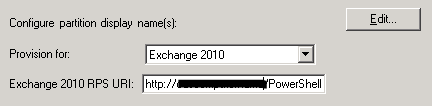
Microsoft’s Identity Management product, ForeFront Identity Manager’s, contains a GAL agent which has a setting which will trigger the provisioning of Exchange attributes. Make sure this setting is enabled and you provided a valid URI:
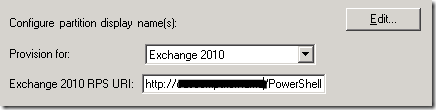
Reporting
Instead of waiting for users to report on (internal) NDR messages, you can consult the transport logs for failed delivery messages. For example, to report on all NDR messages of the last 7 days on all transport servers, you can run the following cmdlet from the Exchange Management Shell:
Get-TransportServer | Get-MessageTrackinglog -EventID FAIL -Start (Get-Date).AddDays(-7) -ResultSize Unlimited | Where {$_.Recipients -match "^IMCEAEX*"}
 Reconstructing legacyExchangeDN
If for some reason you need to reconstruct the X.500 address using the information from the NDR message, support article KB2807779 contains a short instruction or utilize the small interactive script below to convert the reported IMCEAEX address to an X500 entry:
$Addr= Read-Host "Enter full IMCEAEX address:"
$Repl= @(@("_","/"), @("\+20"," "), @("\+28","("), @("\+29",")"), @("\+2C",","), @("\+3F","?"), @("\+5F", "_" ), @("\+40", "@" ), @("\+2E", "." ))
$Repl | ForEach { $Addr= $Addr -replace $_[0], $_[1] }
$Addr= "X500:$Addr" -replace "IMCEAEX-","" -replace "@.*$", ""
Write-Host $Addr
Feedback
Feedback is welcomed through the comments. If you got scripting suggestions or questions, do not hesitate using the contact form.


 Note that the installation of Exchange 2010 SP3 RU2 might prompt for the Service Pack files. Yes, you read that right. Exchange fellow Steve Goodman posted a blog on this issue here.
![exchange2007logo2[1]](https://eightwone.com/wp-content/uploads/2009/12/exchange2007logo21.jpg)

![iTunes-Podcast-logo[1]](https://eightwone.com/wp-content/uploads/2012/07/itunes-podcast-logo1-e1341277366970.png)

 EighTwOne (821)