Unknown's avatar

About Michel de Rooij

Michel de Rooij, with over 25 years of mixed consulting and automation experience with Exchange and related technologies, is a consultant for Rapid Circle. He assists organizations in their journey to and using Microsoft 365, primarily focusing on Exchange and associated technologies and automating processes using PowerShell or Graph. Michel's authorship of several Exchange books and role in the Office 365 for IT Pros author team are a testament to his knowledge. Besides writing for Practical365.com, he maintains a blog on eightwone.com with supporting scripts on GitHub. Michel has been a Microsoft MVP since 2013.

Exchange 2010 SP3


Exchange 2010 LogoExchange Server 2010 Service Pack 3 (SP3) has been released, raising the Exchange version number to 14.3.123.4.

For those still unaware, the 550 MB file (1.45 GB uncompressed) contains the full set of binaries; you can use it to upgrade existing installations or deploy new Exchange 2010 SP3 installations.

Service Pack 3 introduces the following features:

  • Exchange 2013 Coexistence
    This Service Pack for Exchange 2010 adds coexistence with Exchange 2013. However, for coexistence Exchange Server 2013 Cumulative Update 1 (CU1) is required, which hasn’t been released yet.
  • Windows Server 2012 Support
    This Service Pack enables you to deploy Exchange Server 2010 on WIndows Server 2012 platform.
  • Internet Explorer 10
    You can now use Internet Explorer 10 to connect to Exchange 2010.
  • Sent Items Management
    You can now control behavior of Send-As or Send-on-Behalf messages regarding the folder used to store a copy of the sent message, analogue to the Delegated Send Items options available in Outlook.

In addition to fixes that were part of the Exchange 2010 SP2 Rollups 1 to version 6, SP3 adds the following fixes:

  • 2552121 You cannot synchronize a mailbox by using an Exchange ActiveSync device in an Exchange Server 2010 environment
  • 2729444 Mailboxes are quarantined after you install the Exchange Server 2010 SP2 version of the Exchange Server 2010 Management Pack
  • 2778100 Long delay in receiving email messages by using Outlook in an Exchange Server 2010 environment
  • 2779351 SCOM alert when the Test-PowerShellConnectivity cmdlet is executed in an Exchange Server 2010 organization
  • 2784569 Slow performance when you search a GAL by using an EAS device in an Exchange Server 2010 environment
  • 2796950 Microsoft.Exchange.Monitoring.exe process consumes excessive CPU resources when a SCOM server monitors Exchange Server 2010 Client Access servers
  • 2800133 W3wp.exe process consumes excessive CPU and memory resources on an Exchange Client Access server after you apply Update Rollup 5 version 2 for Exchange Server 2010 SP2
  • 2800346 Outlook freezes and high network load occurs when you apply retention policies to a mailbox in a mixed Exchange Server 2010 SP2 environment
  • 2810617 Can’t install Exchange Server 2010 SP3 when you define a Windows PowerShell script execution policy in Group Policy
  • 2787500 Declined meeting request is added back to your calendar after a delegate opens the request by using Outlook 2010
  • 2797529 Email message delivery is delayed on a Blackberry mobile device after you install Update Rollup 4 for Exchange Server 2010 SP2
  • 2800080 ErrorServerBusy response code when you synchronize an EWS-based application to a mailbox in an Exchange Server 2010 environment

Be advised that after installing SP3 on Mailbox servers, the databases are upgraded to the SP3 version database schema. An SP3 database can’t be mounted on pre-SP3 Mailbox servers. Keep this in mind when upgrading your DAG (you will temporarily have limited fail-over/fall-back or switch-over options) or for example when utilizing database portability. Note that upgrading databases can be time consuming, especially with RTM or low SP databases as the database will be upgrade using interim steps, i.e. RTM to SP1, SP1 to SP2 and finally SP2 to SP3.

Also, while Exchange Server 2010 SP3 is supported on Windows Server 2012, that doesn’t mean .NET 4.5 (WMF 3.0, PowerShell 3.0) is supported on Windows Server 2008 or Windows Server 2008 R2; on Windows Server 2012, PowerShell 2.0 will be used. Also, OS upgrades (e.g. WS2008 R2 to WS2012) with Exchange installed aren’t supported.

After preparing your forest for Exchange 2010 SP3, the schema version number will have changed. Check the Schema Versions page for information on the new values for Exchange 2010 SP3.

The proper method to upgrade mailbox servers that are a member of a Database Availability Group is described here.

You can download Exchange 2010 SP3 here.

The UM language packs for SP3 can be downloaded here. Note that you need to uninstall previous UM language packs before you can install the SP3 versions.

Exchange 2010 SP2 Rollup 6


Today the Exchange Team released Rollup 6 for Exchange Server 2010 Service Pack 2 (KB2746164). This update raises Exchange 2010 version number to 14.2.342.3.

Here’s the list of changes included in this Rollup:

  • 2489941 The “legacyExchangeDN” value is shown in the “From” field instead of the “Simple Display Name” in an email message in an Exchange Server 2010 environment
  • 2717453 You cannot move or delete a folder by using Outlook in online mode in an Exchange Server 2010 environment
  • 2733608 Corrupted Japanese DBCS characters when you send a meeting request or post a reply to a posted item in a public folder in an Exchange Server 2010 environment
  • 2734635 Folder-associated information (FAI) items are deleted when you run the New-InboxRule cmdlet or change Inbox rules in an Exchange Server 2010 environment
  • 2737046 AutoPreview feature does not work when you use Outlook in online mode in an Exchange Server 2010 environment
  • 2741117 High CPU utilization by Microsoft Exchange Replication service on Client Access servers in an Exchange Server 2010 environment
  • 2746030 Incorrect ExternalURL value for EWS is returned by an Exchange Server 2010 Client Access server
  • 2750188 Exchange Service Host service crashes when you start the service on an Exchange 2010 server
  • 2751417 Synchronization fails if you sync an external device to a mailbox through EAS in an Exchange Server 2010 environment
  • 2751581 OAB generation fails with event IDs 9126, 9330, and either 9338 or 9339 in an Exchange Server 2010 environment
  • 2760999 “The signup domain ‘org’ derived from ‘<TenantDomainName>.org’ is not a valid domain” error message when you use the Hybrid Configuration wizard in an Exchange Server
  • 2776259 Msftefd.exe process crashes if an email attachment has an unexpected file name extension or no file name extension in an Exchange Server 2010 environment
  • 2779387 Duplicated email messages are displayed in the Sent Items folder in a EWS-based application that accesses an Exchange Server 2010 Mailbox server
  • 2783586 Name order of a contact is displayed incorrectly after you edit the contact in an Exchange Server 2010 environment
  • 2783631 User-Agent field is empty when you run the Get-ActiveSyncDeviceStatistics cmdlet in an Exchange Server 2010 SP2 environment
  • 2783633 You cannot move or delete an email message that is larger than the maximum receive or send size in an Exchange Server 2010 environment
  • 2783649 Private appointment is visible to a delegate in an Exchange Server 2010 environment
  • 2783771 Mailbox on a mobile device is not updated when EAS is configured in an Exchange Server 2010 environment
  • 2783772 Edgetransport.exe process crashes after a journal recipient receives an NDR message in an Exchange Server 2010 environment
  • 2783776 You cannot perform a cross-premises search in a mailbox in an Exchange Server 2010 hybrid environment
  • 2783782 Error message when you use Scanpst.exe on a .pst file in an Exchange Server 2010 environment
  • 2784081 Store.exe process crashes if you add certain registry keys to an Exchange Server 2010 Mailbox server
  • 2784083 Week numbers in the Outlook Web App and Outlook calendars are mismatched in an Exchange Server 2010 environment
  • 2784093 SCOM alerts and event ID 4 in an Exchange Server 2010 SP2 organization that has Update Rollup 1 or later
  • 2784566 Exchange RPC Client Access service crashes on an Exchange Server 2010 Mailbox server
  • 2787023 Exchange Mailbox Assistants service crashes when you try to change a recurring calendar item or publish free/busy data in an Exchange Server 2010 environment
  • 2793274 A new option is available that disables the PermanentlyDelete retention action in an Exchange Server 2010 organization
  • 2793278 You cannot use the search function to search for mailbox items in an Exchange Server 2010 environment
  • 2793279 Exchange Server 2010 does not restart when the Microsoft Exchange Replication service freezes
  • 2793488 Internet Explorer freezes when you connect to the OWA several times in an Exchange Server 2010 environment
  • 2810616 Email message delivery is delayed on a Blackberry mobile device after you install Update Rollup 4 for Exchange Server 2010 SP2

In addition to these fixes, this Rollup also includes a fix for the security issue described in Microsoft Security Bulletin MS13-012.

As of Rollup 4, its no longer required to disable/re-enable ForeFront Protection for Exchange using the fscutility to be able to install the Rollup properly. However, if you want to remain in control, you can disable ForeFront before installing the Rollup using fscutility /disable and re-enable it afterwards using fscutility /enable.

If you want to speed up the update process for systems without internet access, you can follow the procedure described here to disable publisher’s certificate revocation checking.

If you got a DAG and want to properly update the DAG members, check the instructions here.

Note that Rollups are cumulative, i.e. they contain fixes released in earlier Rollups for the same product level (RTM, SPx). This means you don’t need to install previous Rollups during a fresh installation but can start with the latest Rollup.

As with any Hotfix, Rollup or Service Pack, I’d recommend to thoroughly test this rollup in a test and acceptance environment first, prior to implementing it in production.

You can download Exchange 2010 SP2 Rollup 6 here.

Exchange 2007 SP3 Rollup 10


exchange2007logo2[1]Today the Exchange Team released Rollup 10 for Exchange Server 2007 Service Pack 3 (KB2788321). This update raises Exchange 2007 version number to 8.3.298.3.

Here’s the list of changes included in this Rollup:

  • This Rollup adds coexistence with Exchange Server 2013. However, for coexistence Exchange Server 2013 Cumulative Update 1 (CU1) is required, which hasn’t been released yet.
  • 2783779 A hidden user is still displayed in the Organization information of Address Book in OWA in an Exchange Server 2007 environment

In addition to these fixes, this Rollup also includes a fix for the security issue described in Microsoft Security Bulletin MS13-012 and new daylight saving time (DST) updates.

When running ForeFront Protection for Exchange, make sure you disable ForeFront before installing the rollup and re-enable it afterwards, otherwise the Information Store and Transport services may not start. You can disable ForeFront using fscutility /disable and enable it using the fscutility /enable command.

Note that Rollups are cumulative, i.e. they contain fixes released in earlier update Rollups for the same product level (RTM, SP). This means you don’t need to install previous Rollups during a fresh installation but can start with the latest Rollup package.

You can download Exchange 2007 SP3 Rollup 10 here.

Exchange 2013 Cumulative Updates and You


Ex2013 LogoFew days ago, the Exchange Team published their intentions for Exchange 2013 regarding update schemes (or as Microsoft calls it, servicing). While the article describes the policy with a Q&A section at the bottom, there are still some grey areas. In this blog, I’d like emphasize on some elements and point out those grey areas.

As you probably read before, with Exchange 2013 the Rollup packages will be replaced by Cumulative Updates (CU), a name change probably inspired by Lync’s Cumulative Update packages. But it’s more than just a name change and admins or people involved managing releases should become familiar with the new policy as it will have some features that you don’t want to get surprised by.

One of the major changes in my opinion is that there will be one team working on the product; code bases for on-premises Exchange and Exchange Online (Office 365) will brought up to par. A small change is that Microsoft will first implement – or dogfood – the Cumulative Update in their Office 365 environment after while it will be made available for on-premises or hybrid deployments. While this may improve the quality of the Cumulative Update, not all kinds of deployments will be tested so it’s no warranty. However, looking at the current situation with Office 365, it may put stress on Microsoft procedures as there are already big variations between the various regions regarding Exchange Online implementations as well as Exchange Online and the on-premises version.
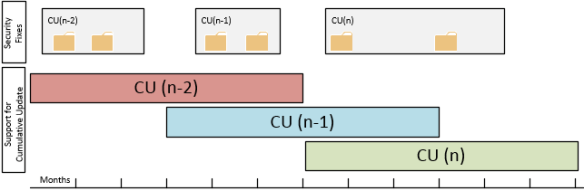
Ex2013CULifeCycleIt’s the intention Cumulative Updates will be released on a quarterly basis. Each Cumulative Update will consist of a full installation set, so for example you can install Exchange 2013 Cumulative Update 2 straightaway whereas with Rollups you had to implement the Service Pack level prior to applying the related Rollup. So, this is a big convenience when for example installing greenfield scenarios or adding systems.

However,  unlike Rollups you can’t uninstall a Cumulative Update once it has been installed. This could worry people, looking back at the qualify of some past Rollups which were pulled, rereleased and in some rare cases pulled and rereleased again. But since Microsoft will now implement Cumulative Updates first, bad Cumulative Updates will become Microsoft’s problem first, not yours as it seemed to few people with some of those Rollups.

Security updates will become Cumulative Update bound, meaning they are to be installed on a specific Cumulative Update. However, there can be two supported Cumulative Update “active” at a time, so I assume security updates can be installed on both (unless Microsoft will be making two versions of each security update). The next Cumulative Update will include security updates released since the previous Cumulative Update was released. However, it might be that security updates won’t make it in the a cumulative update because of the freeze period, the period before releasing the Cumulative Update when no more updates will be added, and one needs to wait for the Cumulative Update to be released or install the security update, wait for the Cumulative Update, install the Cumulative update and reinstall the security update, in which case you might prefer waiting for the Cumulative Update. Some might rushing (security) updates won’t harm you, but remember KB2624899 fixing the IE9/MMC issue, the initial EX2010SP2RU5 which caused DAG issues or KB2750149 which broke the WS2012 Fail-over Cluster snap-in and required KB2803748 to fix the issue. Yes, Microsoft will implement Cumulative Updates first but this will also raise the expectations set on Microsoft’s internal Quality Control enormously. They don’t want to end up in a situation releasing a faulty Cumulative Update to public, since it will be impossible to uninstall. Then again, nobody said Cumulative Updates would make the best practice of testing and accepting updates before implementing them in production environments obsolete.

A major change is that Cumulative Updates will be supported for 3 months after the next Cumulative Update is released. Because Cumulative Updates are to be released quarterly, this sets the support-window of a Cumulative Update (or plain, non-Cumulative Update) to 6 months. This may seem long, but I know a lot of companies will have an issue with this window because their test and acceptance periods easily transcends half a year, especially if schema updates are involved (yes, Cumulative Updates can require schema updates). And don’t forget about cases where customers adopted  a building block model where they will need to test that Cumulative Update against their Operating System building block with all the additional components, like Anti-Virus, Backup agents or Management software involved.

Finally, an odd element in this scheme are the Service Packs of which Microsoft said they will be getting released. But where in the past only Service Packs could embed Active Directory schema updates, that’s also something a Cumulative Update might require, making Service Packs effectively an Über Cumulative Update.

Feel free to share your thoughts in the comments below.

The UC Architects Podcast Ep16


iTunes-Podcast-logo[1]The 16th episode of The UC Architects podcast is online. This episode is hosted by Steve Goodman who’s joined by Tom Arbuthnot, Mahmoud Magdy, Serkan Varoglu, Dave Stork and yours truly.

Amongst the topics discussed in this episode are:

The UC Architects is a bi-weekly podcast on Unified Communications in the Microsoft domain, i.e. Exchange and Lync, or related subjects.

You can download the podcast here or subscribe to our podcasts using iTunes, Zune or RSS.