Unknown's avatar

About Michel de Rooij

Michel de Rooij, with over 25 years of mixed consulting and automation experience with Exchange and related technologies, is a consultant for Rapid Circle. He assists organizations in their journey to and using Microsoft 365, primarily focusing on Exchange and associated technologies and automating processes using PowerShell or Graph. Michel's authorship of several Exchange books and role in the Office 365 for IT Pros author team are a testament to his knowledge. Besides writing for Practical365.com, he maintains a blog on eightwone.com with supporting scripts on GitHub. Michel has been a Microsoft MVP since 2013.

Forefront TMG 2010 EOL Announcement


Today, Microsoft finally announced the discontinuing of most of it’s ForeFront products, including the retirement of products used in many Exchange deployments, ForeFront Threat Management Gateway (TMG) 2010 and ForeFront Protection for Exchange (FPE).

The products to be discontinued are:

  • ForeFront Threat Management Gateway (TMG), including Forefront TMG Web Protection Services (TMG WPS);
  • ForeFront Protection for Exchange (FPE);
  • ForeFront Protection for SharePoint (FPSP);
  • ForeFront Security for OCS (FSOCS);
  • ForeFront Protection Server Management Console (FPSMC).

This announcement is not a real surprise; rumors TMG would cease to exist circulated for months. Using this official statement companies can start adapting their strategies, when they have not already done so, when using one of the products mentioned. When companies were planning to use them in the (near) future, they need to turn to alternative solutions as well, since the these ForeFront offerings will no longer be available for purchase as of December 1st, 2012!

As it stands, mainstream support for TMG will end on April 14th, 2015; extended support for TMG will end on April 14th, 2020. Forefront Online Protection for Exchange (FOPE) will be rebranded as Exchange Online Protection.

First, the hygiene products. This is clearly a move these shift these layers of protection to “the cloud”, which has clear benefits like filtering incoming messages before they enter the organization which is also nice from a bandwidth perspective. However, that’s no solution for the many customers still requiring an on-premise solution which, for example, does store scanning; these customers are forced to tend to to 3rd parties, like McAfee or Symantec. Note that Exchange 2013 will contain basic anti-malware functionality, but I doubt this will meet any customer’s demands and certainly isn’t a very manageable solution.

Next, there’s the firewall, reverse proxy, load balancing and VPN functionality offered by TMG. Currently, many organizations use TMG to publish Exchange and as like many say and know, Exchange and TMG go very well together. For example, TMG can offer pre-authentication or SSL offloading for your Exchange boxes.These customers need to look into VPN like solutions like ForeFront UAG, which is a totally different concept and less straightforward than implementing a TMG in front of your Exchange boxes, or check for 3rd party solutions, like F5 BIG-IP with the Access Policy Manager add-on. Of course, your revised strategy and eligible solutions depend on your business requirements.

Roadmaps of ForeFront Identity Manager (FIM) and ForeFront Unified Access Gateway (UAG) remain unchanged, so publishing Exchange using UAG remains a future-proof possibility.

The UC Architects Podcast S01E06


The 6th episode of The UC Architects is online. The UC Architects is a bi-weekly podcast on Unified Communications in the Microsoft domain, i.e. Exchange and Lync Server, or related subjects.

This episode is hosted by Pat Richard, who’s joined by John Cook, Serkan Varoglu, Michael Van Horenbeeck and Mahmoud Magdy.

Amongst the topics discussed in this episode are:

  • Lync day added to MEC
  • Mac Lync 2011 Update
  • New Microsoft Logo
  • Lync Synthetic Tests
  • Exchange Update Rollups
  • Exchange DR Design
  • Exchange 2013 Migration Requirements
  • Exchange 2010 Data Protection & Compliance
  • Microsoft MVP Program

You can download the podcast here or subscribe to updates using iTunes here, Zune here or RSS here.

Copying Receive Connectors (update)


Once in a while you may have to execute a task so tedious and repetitive, you end up with an idea for a script to make your life easier. By tidying and publishing that script, I hope to make the life of others easier as well. This is one of those scripts.

When implementing Hub Transport servers on Exchange 2010, you may have to configure multiple receive connectors. Because receive connectors are defined on the Hub Transport server itself, contrary to send connectors, you may end up defining each receive connector on each Hub Transport server. This gets painful when you need to implement the ForeFront Online Protection for Exchange servers in the Remote IP ranges for example.

Yes, you can create a script which configures the connectors for you, but wouldn’t it be nice if you can create definitions on one server using the GUI and then just copy and paste those definitions to the other Hub Transport servers? This script also allows you to simply duplicate existing Receive Connector definitions after adding an additional Hub Transport server afterwards, not only after the initial configuration of the Exchange environment.

Here’s were my Copy-ReceiveConnector.ps1 script may come in handy.

The script is quite simple, and can help you with the following:

  • Copy Receive Connectors from one Exchange server to another (CopyFrom);
  • Export Receive Connector definitions to an XML file (ExportTo);
  • Import Receive Connector definitions from an XML file (ImportFrom).

In addition, you can specify whether you want to overwrite existing Receive Connector definitions (based on name) using the -Overwrite switch or clear all existing Receive Connectors before copying/importing using the -Clear switch.

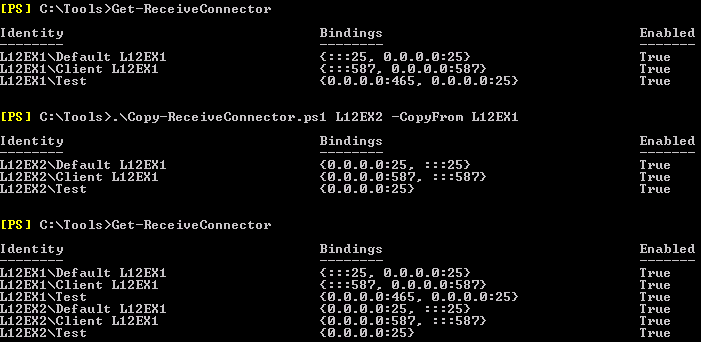
So, let’s say you have two Hub Transport servers, L12EX1 and L12EX2. You have configured L12EX1 and you need to create the same set of receive connectors on L12EX2.

image

You can see in the example above, you can use the script to copy definitions from an existing server, e.g.

Copy-ReceiveConnector.ps1 <TargetServer> –CopyFrom <SourceServer>

You can also export and import settings, which may come in handy when you need to troubleshoot (you can have the customer export the receive connectors to a file) or when you want to prepare receive connector definitions off-site, e.g.

Copy-ReceiveConnector.ps1 <TargetServer> –ExportTo .\conn.xml

Copy-ReceiveConnector.ps1 <TargetServer> –ImportFrom .\conn.xml –Clear

image

Note that when ExchangeServer is specified as AuthMechanism on a receive connector, the FQDN needs to be set to the server’s FQDN, NetBIOS name or $null; in such cases I set it to the FQDN of the target server. Also, it uses the existing name, meaning you may need to rename the Default and Client connectors, which contain the server name, afterwards.

Update 24th August, 2012 (v1.1): Added find/replace in Receive Connector name so that “Default L12EX1” on server L12EX1 will become or match with “Default L12EX2” on server L12EX2.

Click here to download the script from the Technet Gallery.

Exchange 2010 SP1 Rollup 7


The Exchange Team silently released RU7 for Exchange Server 2010 Service Pack 1 (KB2743248). This update raises Exchange 2010 version number to 14.1.421.0.

This Rollup only includes the fix for the WebReady security issue described in Microsoft Security Bulletin MS12-058 (KB2740358).

Note that update rollups are cumulative, i.e. they contain fixes released in earlier update rollups for the same product level (RTM, SPx). This means you don’t need to install previous update rollups during a fresh installation but can start with the latest rollup available right away.

As with any Hotfix, Rollup or Service Pack, I’d recommend to thoroughly test this rollup in a test and acceptance environment first, prior to implementing it in production. For the correct procedure on how to update DAG members, check here.

You can download Exchange 2010 SP1 Rollup 7 here.

Exchange 2007 SP3 Rollup 8


Today the Exchange Team released Rollup 8 for Exchange Server 2007 Service Pack 3 (KB2734323). This update raises Exchange 2007 version number to 8.3.279.3.

Here’s the list of changes included in this Rollup:

  • 2699574 Microsoft Exchange Information Store service may stop responding when you perform a search on Exchange mailboxes in an Exchange Server 2007 environment
  • 2701037 Events 4999 and 7034 are logged and the Microsoft Exchange Information Store service crashes on an Exchange Server 2007 mailbox server
  • 2730089 Microsoft Exchange Information Store service may stop responding when you perform a search on Exchange mailboxes in an Exchange Server 2007 environment
  • 2732525 Outlook keeps prompting you for credentials and incorrectly connects to an out-of-site global catalog after you install Update Rollup 6 for Exchange Server 2007 SP3.

In addition to these fixes, this Rollup also includes a fix for the WebReady security issue described in Microsoft Security Bulletin MS12-058 (KB2740358).

When running ForeFront Protection for Exchange, make sure you disable ForeFront before installing the rollup and re-enable it afterwards, otherwise the Information Store and Transport services may not start. You can disable ForeFront using fscutility /disable and enable it using the fscutility /enable command.

Note that Rollups are cumulative, i.e. they contain fixes released in earlier update Rollups for the same product level (RTM, SP). This means you don’t need to install previous Rollups during a fresh installation but can start with the latest Rollup package.

One special note: Exchange 2007 Mainstream Support has ended; extended support will end on April 11th, 2017. Because this is another Rollup released after mainstream support ended and releasing the Exchange 2013 Preview, I assume this will become the version level required for co-existence with Exchange 2013 RTM which, according to speculation by people like Tony Redmond, is expected in November. But of course, this remains speculation.

You can download Exchange 2007 SP3 Rollup 8 here.