Exchange Updates – June 2018

Ex2013 LogoThe Exchange Team released the June updates for Exchange Server 2013 and 2016, and an additional Rollup 22 for Exchange Server 2010 Service Pack 3.

Apart from fixes and time zone changes, these updates contain the following important changes and notes:

  • As announced earlier, Exchange 2013 CU21 and Exchange 2016 CU10 require .NET Framework 4.7.1.
  • All three updates require the VC++ 2013 runtime library, because it is needed by a 3rd component in WebReady Document Viewing in Exchange 2010/2013 and Data Loss Prevention in Exchange 2013/2016. Exchange 2010 SP3 RU22 will force installation of this VC++ runtime.
  • Updates include a critical security patch for Oracle Outside In libraries. More about the issue in MSRC advisory ADV180010.
  • Exchange 2013 CU21 and Exchange 2016 CU10 introduce support for directly creating and enabling remote shared mailboxes, e.g.
    New-RemoteMailbox [-Shared] [-Name remoteMailboxName]
    Enable-RemoteMailbox [-Identity user] [-Shared] [-RemoteRoutingAddress user@domain]
    Set-RemoteMailbox [-Name user] [-Type Shared]

    You need to run setup /PrepareAD to see these changes. More information in KB4133605.

  • This is the last planned Cumulative Update for Exchange 2013 as it enters Extended Support.
  • Exchange 2010 SP3 RU22 adds support for Windows Server 2016 Domain Controllers.


Version Build KB Article Download UMLP Schema Changes
Exchange 2016 CU10 15.1.1531.3 KB4099852 Download UMLP No
Exchange 2013 CU21 15.0.1395.4 KB4099855 Download UMLP No
Exchange 2010 SP3 RU22 14.3.411.0 KB4295699 Download

Exchange 2016 CU10 fixes:

  • 4056609 Event ID 4999 and mailbox transport delivery service won’t start with Exchange Server 2016 CU7 installed
  • 4133605 Cmdlets to create or modify a remote shared mailbox in an on-premises Exchange environment
  • 4133620 “HTTP 500 due to ADReferralException” error when a user tries to view detail properties of mailboxes in a child domain in Exchange Server
  • 4095974 “System.InvalidOperationException” occurs when the “Enable-MailPublicFolder” cmdlet is run against a public folder in Exchange Server
  • 4095973 Set-ServerComponentState cmdlet does not honor the write scope defined in the RBAC management scope in Exchange Server
  • 4095993 HTTP 500 error when an administrator tries to manage regional settings in ECP on Windows Server 2016
  • 4294209 Cannot clear the “Maximum message size” check box for Send messages or Receive messages in EAC in Exchange Server 2016
  • 4294208 “TooManyObjectsOpenedException” error when you run the “Get-PublicFolderMailboxDiagnostics” cmdlet in Exchange Server
  • 4294212 Cannot send VBScript-created messages in the Outlook 2016 client
  • 4294211 Cannot run “Set-CalendarProcessing” cmdlets after you apply CU8 or CU9 for Exchange Server 2016
  • 4294210 Cannot edit an email attachment in OWA in an Exchange Server 2016 environment
  • 4294204 Changing “IsOutOfService” to “False” in an earlier Exchange Server version does not immediately update in a later Exchange Server environment
  • 4092041 Description of the security update for Microsoft Exchange Server 2013 and 2016: May 8, 2018

Exchange 2013 CU20 fixes:

  • 4133605 Cmdlets to create or modify a remote shared mailbox in an on-premises Exchange environment
  • 4133604 User can’t log on to a POP/IMAP account by using NTLM authentication in Exchange Server 2013
  • 4133618 Unexpected error occurs when running the Get-DatabaseAvailabilityGroupNetwork cmdlet in Exchange Server 2013
  • 4133620 “HTTP 500 due to ADReferralException” when a user tries to view detail properties of mailboxes in a child domain in Exchange Server
  • 4058473 An Office 365 primary mailbox user cannot be assigned full access permissions for an on-premises mailbox in Exchange Server
  • 4094167 The MSExchangeRPC service crashes with a System.NullReferenceException exception in Exchange Server 2013
  • 4095974 “System.InvalidOperationException” occurs when the “Enable-MailPublicFolder” cmdlet is run against a public folder in Exchange Server
  • 4092041 Description of the security update for Microsoft Exchange Server 2013 and 2016: May 8, 2018
  • 4294205 POP3 services intermittently stop in an Exchange Server 2013 environment
  • 4294204 Changing “IsOutOfService” to “False” in an earlier Exchange Server version does not immediately update in a later Exchange Server environment

Exchange 2010 Rollup 22 fixes:

  • 4295751 EWS impersonation not working when accessing resource mailboxes in a different site in Exchange Server 2010 SP3

Notes:

  • Exchange 2016 CU8 and Exchange 2013 CU18 do not contain schema changes compared to their previous Cumulative Update. However, they introduce RBAC changes in your environment. Use setup /PrepareAD to apply RBAC changes, before deploying or updating Exchange servers.
  • When upgrading from an n-2 or earlier version of Exchange, or an early version of the .NET Framework, consult Upgrade Paths for CU’s & .NET.
  • When upgrading your Exchange 2013 or 2016 installation, don’t forget to put the server in maintenance mode when required. Regardless, setup will put the server in server-wide offline mode post-analysis, before making actual changes.
  • When using Exchange hybrid deployments or Exchange Online Archiving (EOA), you are required to stay at most one version behind (n-1).
  • If you want to speed up the update process for systems without internet access, you can follow the procedure described here to disable publisher’s certificate revocation checking.
  • Cumulative Updates can be installed directly, i.e. no need to install RTM prior to installing Cumulative Updates.
  • Once installed, you can’t uninstall a Cumulative Update nor any of the installed Exchange server roles.
  • The order in which you upgrade servers with Cumulative Updates is irrelevant.

Caution:

As for any update, I recommend to thoroughly test updates in a test environment prior to implementing them in production. When you lack such facilities, hold out a few days and monitor the comments on the original publication or forums for any issues.

Automation, DevOps and the Evolution of the IT Pro

iTunes-Podcast-logo[1]Recently, Simon Waight and I were invited by fellow MVP Chris Goosen from Cloud Architects to come chat a little on Automation, DevOps and the evolution of the IT Professional.

With the bridge narrowing between development and infrastructure on a daily basis, and infrastructure becoming code, the DevOps culture is becoming more and more important to be knowledgeable about for IT Professionals with a background in infrastructure.

You can listen to the podcast recording here, or you can subscribe to the Cloud Architects podcast.


MVP’s around the world

image.pngMid-2017, I  had a look at the publicly available statistics on MVP’s around the world after Microsoft changed their MVP award renewal regime. This was to check if there was any impact noticeable. With the regime change, also came a change that MVP’s can be awarded on a monthly basis. This means people can be awarded every month; maybe not in every category, but overall yes.

For the start of 2018, let’s first have a look at the total population of MVP’s. The total number of MVP’s went down from 3410 in July last year, to 3695 now (-15%). The table below contains the number of awards per category, and the change from July 2017 to January 2018:

Competence Jul2017 Jan2018 Change
Access 37 39 +5%
AI 1 20 +1900%
Business Solutions 193 214 +11%
Cloud and Datacenter Management 392 412 +5%
Data Platform 399 422 +6%
Enterprise Mobility 148 157 +6%
Excel 94 104 +11%
Microsoft Azure 311 350 +13%
Office Development 38 42 +11%
Office Servers and Services 449 480 +7%
OneNote 15 15 0%
Outlook 14 14 0%
PowerPoint 36 37 +3%
Visio 14 14 0%
Visual Studio and Development Technologies 901 1002 +11%
Windows and Devices for IT 148 136 -8%
Windows Development 277 266 -4%
Word 23 23 0%
Total 3490 3747 +7%

Note: The total number of MVP’s doesn’t equal the total number of competences, as people can be awarded in more than one category.

Overall, the numbers are up in most categories. However, as stated before, a big sanitation round is expected for Q3’2018, as this year the former October and January awardees will be up for the new yearly renewal cycle, which takes place mid-2018. The new category introduced last year, Artificial Intelligence, saw a significant number of folks being added.

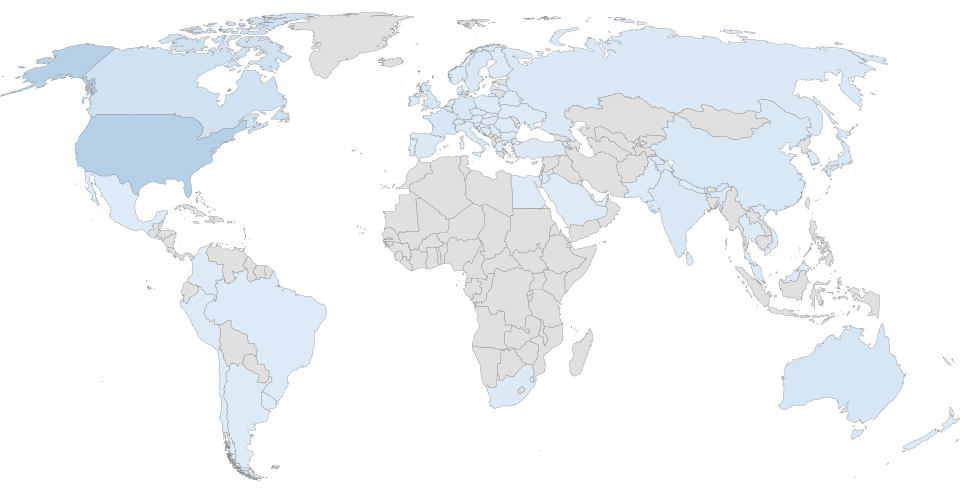
When zooming in on the Office Servers and Services MVP’s category, the awards per country is shown in the following heath map and table. Note that anonymous MVP’s are not taken into account:

image

Country Number Country Number Country Number
Argentina 2 (0%) India 12 (0%) Russia 9 (12%)
Australia 23 (-18%) Ireland 1 (-50%) Saudi Arabia 1 (100%)
Austria 2 (100%) Israel 1 (0%) Serbia 1 (0%)
Belarus 1 (100%) Italy 10 (-10%) Singapore 4 (0%)
Belgium 7 (0%) Japan 18 (-6%) Slovakia 1 (0%)
Bosnia-Herzegovina 2 (-34%) Jordan 1 (100%) Slovenia 2 (0%)
Brazil 4 (-56%) Korea 7 (-37%) South Africa 5 (0%)
Brunei Darussalam 1 (0%) Kuwait 1 (0%) Spain 6 (0%)
Bulgaria 1 (-50%) Latvia 1 (0%) Sri Lanka 5 (-38%)
Canada 38 (-14%) Macedonia F.Y.R.O 1 (-50%) Sweden 8 (-12%)
Chile 1 (-50%) Malaysia 2 (-34%) Switzerland 5 (-29%)
China 15 (-22%) Mexico 4 (0%) Thailand 1 (0%)
Colombia 2 (-34%) Nepal 1 (100%) The Netherlands 15 (25%)
Croatia 6 (20%) New Caledonia 1 (100%) Turkey 5 (25%)
Czech Republic 4 (100%) New Zealand 5 (0%) Ukraine 2 (0%)
Denmark 4 (0%) Norway 6 (20%) United Arab Emirates 3 (-40%)
Egypt 2 (0%) Pakistan 2 (0%) United Kingdom 25 (0%)
Finland 2 (0%) Palestine 1 (0%) United States 111 (5%)
France 16 (0%) Peru 2 (100%) Uruguay 1 (0%)
Germany 19 (26%) Poland 3 (0%) Vietnam 2 (-50%)
Greece 1 (0%) Portugal 4 (-20%) TOTAL 480 (-5%)
Hungary 4 (33%) Romania 2 (0%)
When looking at the changes over the last year (January 2017 – January 2018), the total number went down from 505 to 480 (-5%). As the Office Servers and Services category contains quite a few long-standing, former October or January MVP awardees, I’m keeping my fingers crossed for this year’s renewal cycle.


Security Updates for Exchange 2013 & 2016

Despite the quarterly wave of Cumulative Updates being imminent, CVE-2017-11932 and ADV170023 warranted a quick release of Security Update KB4045655 for current versions of Exchange 2013 and Exchange 2016.

This security update fixes a vulnerability in OWA, which could allow elevation of privilege or spoofing if an attacker sends an email that has a specially crafted attachment to a vulnerable Exchange server.

You can download the security updates here:

Be advised the update may leave your Exchange services in a disabled state, despite installing correctly. In those cases, reconfigure those services to Automatic and start them manually.

Also note that this security update overrides an earlier update, KB4036108, which might cause Calendar Sharing issues when split DNS is used.

Security updates are Cumulative Update level specific. Be advised that updates may carry the same name, e.g. the update for CU7 and the one for CU6 are both Exchange2016-KB4045655-x64-en.msp. I suggest adding some form of Cumulative Update identification to the file name when archiving it, e.g. Exchange2016-KB4045655-x64-en-CU7.msp.

As with any patch or update, I’d recommend to thoroughly test this in a test and acceptance environment first, prior to implementing it in production.


Exchange Updates – September 2017

Ex2013 LogoHoneymoon caused some backlog, and one of the things to post was that the Exchange Team released the September updates for Exchange Server 2013 and 2016. Like the previous Cumulative Updates for these Exchange versions, Exchange 2013 CU18 and Exchange 2016 CU7 require .NET Framework 4.6.2; NET Framework 4.7.1 is currently being tested (4.7 will be skipped), and support for 4.7.1 is expected for the December updates.

Version Build KB Article Download UMLP Schema Changes
Exchange 2016 CU7 15.1.1261.35 KB4018115 Download UMLP Yes
Exchange 2013 CU18 15.0.1347.2 KB4022631 Download UMLP No
  • KB 4040754 “Update UseDatabaseQuotaDefaults to false” error occurs when you change settings of user mailbox in Exchange Server 2016
  • KB 4040121 You receive a corrupted attachment if email is sent from Outlook that connects to Exchange Server in cache mode
  • KB4036108 Security update for Microsoft Exchange: September 12, 2017

Exchange 2013 CU18 fixes:

  • KB4040755 New health monitoring mailbox for databases is created when Health Manager Service is restarted in Exchange Server 2013
  • KB4040121 You receive a corrupted attachment if email is sent from Outlook that connects to Exchange Server in cache mode
  • KB4040120 Synchronization may fail when you use the OAuth protocol for authorization through EAS in Exchange Server 2013
  • KB4036108 Security update for Microsoft Exchange: September 12, 2017

Notes:

  • Exchange 2016 CU7 requires Forest Functionality Level 2008R2 or later.
  • Exchange 2016 CU7 includes schema changes, but Exchange 2013 CU18 does not. However, Exchange 2013 CU17 may introduce RBAC changes in your environment. Where applicable, use setup /PrepareSchema to update the schema or /PrepareAD to apply RBAC changes, before deploying or updating Exchange servers. To verify this step has been performed, consult the Exchange schema overview.
  • When upgrading your Exchange 2013 or 2016 installation, don’t forget to put the server in maintenance mode when required. Regardless, setup will put the server in server-wide offline mode post-analysis, before making actual changes.
  • Using Windows Management Framework (WMF)/PowerShell version 5 or later on anything earlier than Windows Server 2016 is not supported. Don’t install WMF5 on your Exchange servers running on Windows Server 2012 R2 or earlier.
  • NET Framework 4.7.1 is being tested by the Exchange Team, but .NET Framework 4.7.1 nor .NET Framework 4.7 are supported.
  • When using Exchange hybrid deployments or Exchange Online Archiving (EOA), you are required to stay at most one version behind (n-1).
  • If you want to speed up the update process for systems without internet access, you can follow the procedure described here to disable publisher’s certificate revocation checking.
  • Cumulative Updates can be installed directly, i.e. no need to install RTM prior to installing Cumulative Updates.
  • Once installed, you can’t uninstall a Cumulative Update nor any of the installed Exchange server roles.
  • The order in which you upgrade servers with Cumulative Updates is irrelevant.

Caution: As for any update, I recommend to thoroughly test updates in a test environment prior to implementing them in production. When you lack such facilities, hold out a few days and monitor the comments on the original publication or forums for any issues.