
 A short notice on an update received today for Outlook for iOS 2.09. This update adds the much requested feature of integrating Outlook for iOS with the (native) Contacts in iOS:
“Your Office 365 and Exchange Contacts can now be saved to the iOS Contacts app. This will allow you to easily see the name of a contact when you receive a call or text message from them. Head to your Advanced Settings to turn on this feature.”
This does away with the requirement of resorting to setups like having the iOS Mail app sync with your Office 365 or Exchange On-Premises account, just to sync those contacts with your device. To disable syncing contacts through the Mail app, go to Settings > Mail, Contacts, Calendars and click the account you wish to disable syncing contacts for. Then, disable syncing its Contacts by toggling its switch:

You will get a warning contacts synced through this contact will be removed from Contacts, but since we are going to use Outlook for this, you can proceed.
Next, open up the updated new Outlook app, and go to Settings. Click the account from which you want to sync contacts to your device, and select Advanced Settings. In there, you will find a new switch, Save Contacts to Device. Behind it is the number of contacts available on this account:
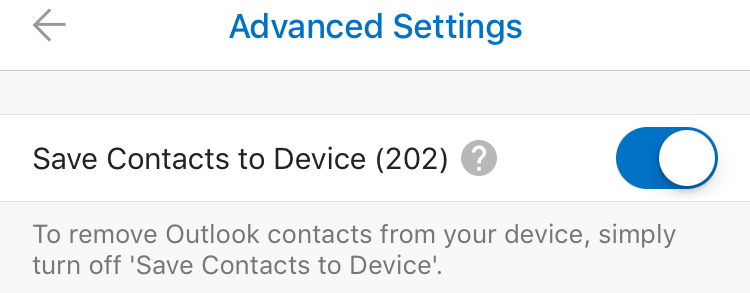
Toggle the switch to start syncing contacts directly from your Office 365 or Exchange On-Premises account to Contacts, giving the Outlook app permissions to access your Contacts when requested. After this, you’re ready to go.
Note that all synced contacts will contain a line in the Notes field, stating:
Exported from Microsoft Outlook (Do not delete) [outlook:..:..]
This is to indicate this is a synced contact, and you must not edit or remove it using the device, rather remove it from the originating source as it might get recreated or overwritten during synchronization.
Finally, the sync is one-way, so although you can edit properties on your phone through the Contacts app, they won’t be synced back to the originating source. Also, when editing properties through Contacts, those edits are not propagated to the People view in the Outlook app, as those are the contacts from your Office 365 / Exchange On-Premises accounts. This can be confusing, but having to set up an e-mail account just once with a one-way sync seems more efficient and less confusing to me than having to configure the Mail app only to get your contacts on your phone.
![rss[1]](https://i0.wp.com/eightwone.com/wp-content/uploads/2013/05/rss1.png?ssl=1)



 After Apple released

![imspeakingatdevconnections[1]](https://i0.wp.com/eightwone.com/wp-content/uploads/2015/09/imspeakingatdevconnections1-e1442186039661.jpg?resize=150%2C125&ssl=1) I am in Las Vegas at the moment for the
I am in Las Vegas at the moment for the