Today Microsoft released the (take a deep breath) Microsoft Forefront Protection 2010 for Exchange Server Best Practices Analyzer (v11.0), or FPE 2010 BPA for short. The FPE 2010 BPA examines servers running ForeFront Protection 2010 for Exchange Server and checks the system configuration as well as the product configuration. Any settings or combination of settings that do not conform to FPE 2010 best practices are reported, enabling administrators to easily identify and address possible issues.
I assume everbody knows how these BPAs work, but in case you don’t proceed as follows:
- Download the FPE 2010 BPA from this location;
- Install the ForeFront Server Protection Best Practices Analyzer (FPBPA) on a server containing ForeFront Security 2010 for Exchange Server;
- Use the default settings and have FPBPA retrieve updates from the internet when required;
- Start FPBPA. It will check for online updates;
- Click Select options for a new scan;
- Enter a scan label, i.e. Initial FPBPA Scan, and click Start Scanning. FPBPA will now scan your ForeFront environment;
- When Scanning Completed click View a report of this Best Practices scan.
 As you can see from the first issue, I still need to install the RTM 🙂 The second issue is about a non-configured critical error notification, i.e. it has no no e-mail recipient specified. The other two issues are about possible misconfiguration of the number of scan processes (as FPE 2010 BPA states, the recommended setting is twice the number of CPUs here).


 The Forefront Server Protection product team made new documentation available for Forefront Protection 2010 for Exchange Server, or FPE for short. The documents describe the big picture on how FPE protects your Exchange servers and how to develop a scanning strategy.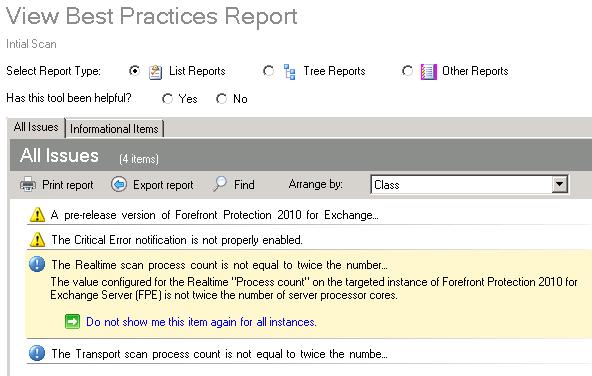
 EighTwOne (821)