In February, Microsoft released the initial public preview version of the Hybrid Agent. The purpose of the Hybrid Agent, also branded as the “Exchange Modern Hybrid Topology”, is to simplify the process of setting up and deploying Microsoft Exchange Hybrid for Exchange 2010 and later deployments, where full “classic” Exchange Hybrid is not an option.
It can also address scenarios where deploying the Hybrid Agent would satisfy organizational migration requirements. For example, moving mailboxes between Exchange Online and Exchange on-premises while providing rich-coexistence features, but without requiring (re)configuration of the publishing of Exchange services. Other functionality the Hybrid Agent doesn’t offer is mail transport. Future builds of the Hybrid Agent might introduce cross-premises functionality, such as Send As delegations as demonstrated at Microsoft Ignite last year.
This week, the Hybrid Agent Public reached General Availability status. In the following article for ENow, I discuss the major changes in the agent since the initial Preview release.
Update: Updated statistics based on award categories (not people) due to the number of multi-category awardees.
In previous years, I performed some comparisons on the MVP population after every award cycle. So, time to get some fresh statistics after July 2019 award cycle.
For comparison, I had a look at thepublic MVP statistics of July 3rd, 2018 against those of July 3rd, 2019, as the public MVP site was closed the first two days. From the numbers, it is clear that this cycle the number of MVPs went down again, from 3.030 last year, to 2.634 now (-13%).
The following table contains the changes per award category from July 2018 to July 2019:
Competence
Jul-18
Jul-19
Change
AI
58
84
45%
Business Applications
164
166
0%
Cloud and Datacenter Management
303
232
-23%
Data Platform
369
332
-10%
Enterprise Mobility
122
106
-13%
Microsoft Azure
444
409
-8%
Office Development
33
47
42%
Office Apps & Services
606
491
-19%
Developer Technologies
781
644
-17%
Windows and Devices for IT
87
57
-34%
Windows Development
186
119
-37%
TotalMVPs
3066
2634
-14%
Few notes:
The total number of MVP’s doesn’t equal the total number of awards, as people can be awarded in more than one category; there are 52 MVP’s with multiple award categories (one even in 3 categories).
Former single product categories, such as Access or OneNote, were moved under the Office Apps & Services category (which was rebranded from Office Servers & Services). Those numbers are merged for the 2018 column.
When comparing to earlier years, the award categories were restructured in 2017, e.g. Visual Studio and Development Technologies became Developer Technologies.
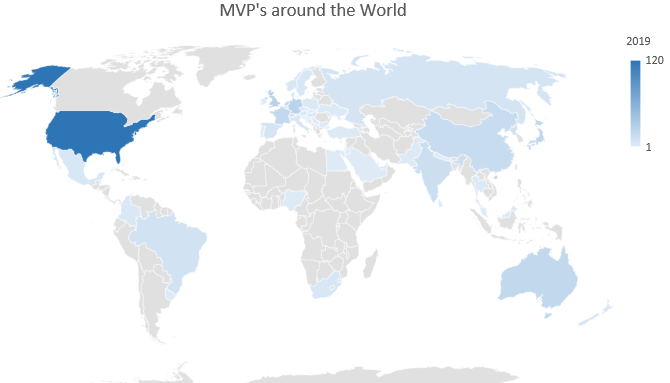
When zooming in on the Office Apps & Services category, the awards per country are shown below. Be advised that 26 are anonymous MVP’s or have profiles without location.
Country
Jul’18
Jul’19
Country
Jul’18
Jul’19
Country
Jul’18
Jul’19
ARE
1
2
GBR
23
28
POL
2
4
AUS
17
20
HRV
5
4
PRK
6
12
AUT
2
3
HUN
2
2
PRT
3
2
BEL
8
8
IND
12
13
RUS
5
8
BGR
1
2
IRL
1
1
SAU
1
1
BIH
1
1
ISR
1
SGP
3
3
BRA
2
10
ITA
8
6
SLV
1
CAN
28
31
JOR
1
1
SRB
1
1
CHE
4
2
JPN
11
22
SVK
1
1
CHN
14
16
LKA
4
1
SVN
1
2
COL
2
4
MEX
2
5
SWE
6
5
CRI
1
MKD
2
2
THA
1
3
CZE
3
2
MYS
1
1
TUR
4
2
DEU
17
25
NGA
1
1
TWN
3
DNK
2
6
NLD
13
21
UKR
1
2
EGY
1
1
NOR
5
6
URY
1
1
ESP
5
8
NPL
1
1
USA
89
120
FIN
2
3
NZL
4
6
ZAF
4
5
FRA
16
20
PAK
2
2
The countries Argentina, Chile, Latvia, Peru, Romania and Greece are no longer represented in the Office Apps & Services category, while Costa Rica, Israel, Taiwan and El Salvador are new to the table.
Month
Oct 2016
Jan 2017
Jun 2017
Jul 2017
Jun 2018
Jul 2018
Mar 2019
Jul 2019
OSS
538
505 (-7%)
532 (+5%)
449 (-16%)
490 (+2%)
383 (-21%)
622 (+62%)
491 (-22%)
Total
N/A
N/A
4134
3490 (-16%)
3815 (+2%)
3030 (-21%)
3205 (+6%)
2635 (-18%)
Above are the number of Office Apps & Services and total number of MVP’s over the last years. Do note that for March and July 2019 the former product categories are included in the Office Apps & Services category, hence why I included March to have a sense of the changes in the July cycle.
If you have questions or comments, please send them in the comments below.
With great honor and joy I can announce that I have been awarded the Microsoft Most Valuable Professional Award in the category Office Apps & Services.
Microsoft reports there are around 2.000 MVP awardees worldwide. Those awards are given to individuals in recognition of their contributions to the community, such as writing, speaking engagements, supporting people, code contributions or product feedback.
This is my 6th consecutive year as an MVP. Lots of kudos to the MVP leads and other involved in the monstrous task of reviewing and evaluating thousands of contributions for this award cycle.
Many thanks to the community, readers, followers, fellow MVP’s and friends, peers, product groups and other Microsoft employees for their encouragement, inspiration and support over all those years.
These updates contain the following important changes and notes (more information in the original article):
Reduced required permissions of Exchange in Active Directory.
Introduction of support for .NET Framework 4.8, with 4.7.2 becoming the minimum required version.
Introduction of Organization-level Authentication Policies.
Upcoming support for Modern Authentication for Exchange Hybrid deployments.
Controlled Public Folder visibility for Exchange 2019 & 2016.
Exchange 2019 CU2 fixes:
4502134 Can’t get all the emails when searching mailbox by using an end date that’s different from today in Exchange Server 2019
4502135 Correct the error message that you receive when installing Exchange Server 2019 in an organization that has Exchange Server 2010 installed
4502154 Providing information to administrators when auto forward limit is reached in Exchange Server 2019 and 2016
4502155 “The primary SMTP address must be specified when referencing a mailbox” error when you use impersonation in Exchange Server 2019 and 2016
4502156 Audit logs aren’t updated when “-WhatIf” is used as $false in the command in Exchange Server 2019 and 2016
4502157 The Find command not returning the HasAttachments element in Exchange Server 2019 and 2016
4502158 SyncFolderItems contains duplicated ReadFlagChange items in Exchange Server 2019 and 2016
4502131 “TLS negotiation failed with error UnknownCredentials” error after you update TLSCertificateName on Office 365 send connector in Exchange Server 2019 hybrid environment
4502132 Can’t reply to old emails after migration even though old legacyExchangeDN is set to migrated mailbox in Exchange Server 2019 and 2016
4502136 The response of FETCH (BODYSTRUCTURE) command of IMAP violates RFC 3501 in Exchange Server 2019 and 2016
4502140 Can’t preview an eDiscovery search when there are multiple domains in Exchange Server 2019 and 2016
4502141 Appointment that’s created by responding to an email message doesn’t show in any Outlook calendar views in Exchange Server 2019 and Exchange Server 2016
4502133 Can’t use Outlook on the web to reply a partner email through mutual TLS in Exchange Server 2019 and 2016
4488396 Can’t search any results in manually added shared mailbox in Outlook in Exchange Server 2019 and 2016
4488078 Public folder contact lists don’t show contact’s profile picture in Outlook on the web in Exchange Server 2019 and 2016
4499503 Heavy organizational forms traffic because of materialized restriction when organization forms library has more than 500 items in Exchange Server 2019 and 2016
4503027 Description of the security update for Microsoft Exchange Server 2019 and 2016: June 11, 2019
Exchange 2016 CU13 fixes:
4502154 Providing information to administrators when auto forward limit is reached in Exchange Server 2016
4502155 “The primary SMTP address must be specified when referencing a mailbox” error when using impersonation in Exchange Server 2016
4502156 Audit logs aren’t updated when “-WhatIf” is used as $false in the command in Exchange Server 2016
4502157 The Find command not returning the HasAttachments element in Exchange Server 2016
4502158 SyncFolderItems contains duplicated ReadFlagChange items in Exchange Server 2016
4502131 “TLS negotiation failed with error UnknownCredentials” error after updating TLSCertificateName on Office 365 send connector in Exchange Server 2016 hybrid environment
4502132 Can’t reply to old emails after migration even though old legacyExchangeDN is set to migrated mailbox in Exchange Server 2016
4502136 The response of FETCH (BODYSTRUCTURE) command of IMAP violates RFC 3501 in Exchange Server 2016
4502140 Can’t preview an eDiscovery search when there are multiple domains in Exchange Server 2016
4502141 Appointment that’s created by responding to an email message doesn’t show in any of Outlook calendar views in Exchange Server 2016
4502133 Can’t use Outlook on the web to reply a partner email through mutual TLS in Exchange Server 2016
4488396 Can’t search any results in manually added shared mailbox in Outlook in Exchange Server 2016
4488078 Public folder contact lists don’t show contact’s profile picture in Outlook on the web in Exchange Server 2016
4499503 Heavy organizational forms traffic due to materialized restriction when organization forms library has more than 500 items in Exchange Server 2016
4503027 Description of the security update for Microsoft Exchange Server 2019 and 2016: June 11, 2019
Exchange 2013 CU23 fixes:
4502131 “TLS negotiation failed with error UnknownCredentials” error after updating TLSCertificateName on Office 365 send connector in Exchange Server 2013 hybrid environment
4503028 Description of the security update for Microsoft Exchange Server 2013 and 2010: June 11, 2019
Notes:
These Cumulative Updates do not contain schema changes compared to their previous Cumulative Update. However, due to changes in the permissions architecture, you need to run setup /PrepareAD to implement these changes as well as apply any RBAC changes, before deploying or updating Exchange servers.
When upgrading from an n-2 or earlier version of Exchange, or an early version of the .NET Framework, consult Upgrade Paths for CU’s & .NET.
Don’t forget to put the Exchange server in maintenance mode prior to updating. Regardless, setup will put the server in server-wide offline mode post-analysis, before making actual changes.
When using Exchange hybrid deployments or Exchange Online Archiving (EOA), you are required to delay installing at most one version (n-1).
If you want to speed up the update process for systems without internet access, you can follow the procedure described here to disable publisher’s certificate revocation checking.
Cumulative Updates can be installed directly; no need to install RTM prior to installing Cumulative Updates.
Once installed, you can’t uninstall a Cumulative Update nor any of the installed Exchange server roles.
The order of installation shouldn’t matter with the “every server is an island” concept, yet recommended is to upgrade internet-facing, non-internet-facing servers first, followed by Edge Transports.
Caution:
As for any update, I recommend to thoroughly test updates in a test environment prior to implementing them in production. When you lack such facilities, hold out a few days and monitor the comments on the original publication or forums for any issues.
A quick note that an update was released for current Exchange versions as well as Exchange 2010 related to the following advisory:
ADV190018 Microsoft Exchange Server Defense in Depth Update
Unfortunately – or perhaps understandably – the advisory doesn’t present any more details than, ‘”Microsoft has released an update for Microsoft Exchange Server that provides enhanced security as a defense in depth measure.”.
Be advised that the Security Updates for Exchange 2013-2019 are Cumulative Update level specific. Unfortunately, the security update carries the same name for different CU’s, and you cannot apply the update for Exchange 2016 CU12 to Exchange 2016 CU11. I would suggest tagging the Cumulative Update in the file name when you store it, e.g. Exchange2016-KB4503027-x64-en_CU11.msp.
As with any patch or update, I’d recommend to apply this in a acceptance environment first, prior to implementing it in production.

 In February, Microsoft released the initial public preview version of the Hybrid Agent. The purpose of the Hybrid Agent, also branded as the “Exchange Modern Hybrid Topology”, is to simplify the process of setting up and deploying Microsoft Exchange Hybrid for Exchange 2010 and later deployments, where full “classic” Exchange Hybrid is not an option.

 Today, the Exchange Team
 EighTwOne (821)