 Note: For those that attended Jaap and my workshop on Monday, Managing Exchange On-Premises and Exchange Online using PowerShell, the slidedeck is available here and the sample code is available here.
Last weekend, I returned from one of the largest, independent conferences on Microsoft technologies, IT/DEV Connections. The conference, which took place in the city of Las Vegas, is spread over a 3-day period on popular topics, like Exchange, Windows, SQL or SharePoint, and has a track for Infrastructure as well as Development (hence the ‘IT/DEV’). Apart from the many speakers, most of them experienced Microsoft Valuable Professionals, Microsoft celebrities like Tim McMichael were also presenting sessions.
Like many conferences nowadays, IT/DEV Connections took off with several pre-conference workshops on Monday. One of these workshops was done by fellow Exchange MVP and countryman Jaap Wesselius and myself. We talked a whole day about ‘Managing Exchange On-Premises and Exchange Online using PowerShell’. The turn-up was above expectation, which is always nice, and we had good interaction with, and feedback from the audience. This made our session, from a presenter’s viewpoint, very worthwhile.
 Since I had no sessions after the workshop, I was free to attend sessions by fellow presenters. Tony Redmond kicked off with a keynote, analyzing the current landscape for Exchange and Office 365, and making references to sessions later that week, should people be interested in those topics. It’s also where you learn who is running what, and as it turned out most attendees are running Exchange 2010 or Exchange 2013 On-Premises, but with an increasing interest in Office 365.
During the week, apart from the excellent contents presented, I was very humbled to learn lots of presenters made references to several of my scripts, e.g.
This conference is also the place where Exchange MVP fellows Tony Redmond, Michael van Horenbeeck, Paul Cunningham and Jeff Guillet presented their 2nd edition of their book, ‘Office 365 for Exchange Professionals’. Congratulations to them reaching this milestone, looking at the non-stop amount of changes happening in the Office 365 environment. You can get your own copy of the updated book here.
It’s becoming a tradition that the last Exchange session of the conference is a ‘Ask the Experts’ panel session, where the audience can ask a panel of presenters questions, or where the current landscape for Exchange or Office 365 can be discussed. It’s a great way to close the conference, before everyone gets back to their corners of the world, back from the crazy city that is Las Vegas to reality.
 If you didn’t consider IT/DEV Connections before, you should. The conference is a must-visit, especially with Microsoft having consolidated MEC, MMS etc. in a single, huge event which is Ignite now. Connections is not small, but the more intimate setting allows you to catch up with peers more easily, have discussions over a pint, great catering, and without the need to max out your step counter. The Aria resort is very nice place to host this event, great for business with a pleasant conference area without too much of the distractions like the other hotels. If you plan on visiting next year, save the date: September 19-22, 2016!
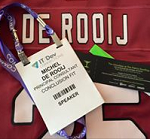
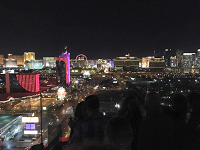
I also want to thank ENow for again hosting an epic Scheduled Maintenance party. Location this time was the Ghostbar at the 55th floor in Palms Resort, which gave an amazing view over the city of Las Vegas and the Strip. I wore my ENow-branded NFL jersey to the party, a gift from ENow last year. This lead to funny moments, as this is ENow’s event gear, and many people mistook me for an employee, thanking me when leaving the party.
Finally, here are some of the other Exchange Connections wrap-ups:

![rss[1]](https://eightwone.com/wp-content/uploads/2013/05/rss1.png) Note: This is an update of an article from January, 2010.
Note: This is an update of an article from January, 2010.


 EighTwOne (821)