
MEC 2022 Sessions Downloading


Update 9/29/2022: By popular request, I modified the Get-EventSession script so it is now able to also download MEC sessions (-Event MEC). See below for details.

A quick post for those that are looking for a simple way to download the Microsoft Exchange Community (MEC) Technical Airlift 2022 sessions for offline viewing, here’s a simple way to accomplish this:

  1. Get youtube-dl.exe here. Youtube-dl is a tool to download videos or playlists from Youtube.
  2. Get aria2c.exe here. Aria2c can be used to download media using multiple streams, reducing time it takes to download video content.
  3. Put the executables from both downloads in the same folder, and, using a a (PowerShell) command prompt, run the following:

.\youtube-dl.exe -o "C:\MEC2022\%(playlist_index)s-%(title)s.mp4" --external-downloader aria2c --external-downloader-args "-x 16 -k 1M" https://www.youtube.com/playlist?list=PLxdTT6-7g--2POisC5XcDQxUXHhWsoZc9

  • “C:\MEC2022” is the folder where the downloaded files will be stored. Change when needed. For file naming, variables are used with define the name of the downloaded files using a prefix of the sequence number (from the playlist) together with the title of the video (session).
  • –external-downloader tells youtube-dl to use specified download utility (aria2c) instead of its own engine. The external-downloader-args parameters define concurrency and chunk size.
  • The last part is the URL for the MEC 2022 playlist.

9/29/2022: Alternatively, you can now use Get-EventSession (version 3.7 and up) to download MEC sessions. The script will parse the information shared through the playlist, but some usual attributes are missing, but there also some new attributes, such as likes and views. To use the script to download MEC session videos:

Get-EventSession> .\Get-EventSession.ps1 -Event MEC -DownloadFolder c:\MEC20222 -Format 22 -Speaker 'Michel de Rooij'

Few notes:

  • As there are no session codes in the YouTube metadata, session code is set to equal the playlist index.
  • Speaker names will be extracted from the description when present.
  • The session timestamp will be the upload date of the video.
  • Likes, Views and Duration are YouTube specific properties returned.

Using views and likes, you can do cool things such as get a scoreboard of the Top 10 most viewed videos from MEC playlist:

.\Get-EventSession.ps1 -Event MEC -InfoOnly | Sort Views -desc | Select -First 10 Title,SpeakerNames, Views, Likes
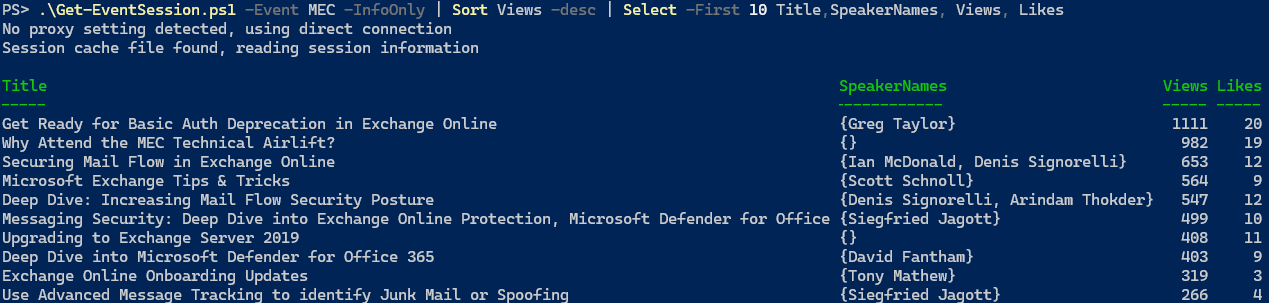
Note: If you do not specify format, YouTube videos will be downloaded in ‘best’ possible quality, which will be .webm by default. You can prevent this, and download 1080p movies, by specifying -Format 22.

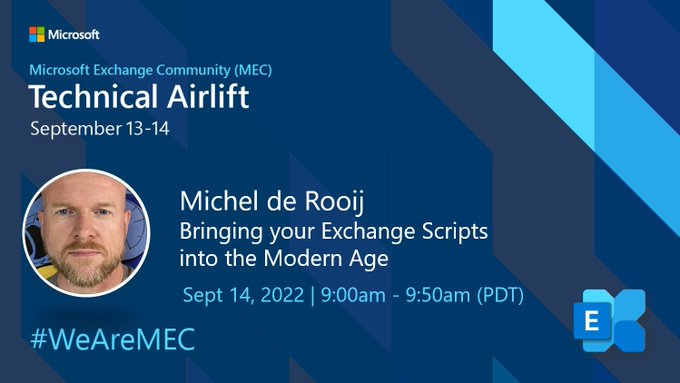
MEC: Bringing your Exchange Scripts into the Modern Age


Yesterday, I had the pleasure of presenting at the Microsoft Exchange Conference Community Technical Airlift 2022. I talked about the challenges that organizations are facing that use Exchange scripts in their work processes or run them scheduled unattended.

Some of the challenges I mentioned, apart from the upcoming demise of Basic Authentication, and resources to methodically assess and make the necessary changes, are:

  • Get your code more secure leveraging Certificate Based Authentication, especially for scheduled tasks.
  • Get current with the most recent version of the Exchange Online Management Module for PowerShell.
  • The same exercise with regards to AzureAD when using MSOnline or AzureAD modules, and the inevitable move to the PowerShell Graph SDK.

In the end I also quickly demonstrated how much easier and secure things can be when utilizing Azure Automation, which might especially appeal to organizations that want to totally get rid of any infrastructure for running jobs.

You can watch the presentation below. All sessions are you published on YouTube, and its playlist can be accessed at aka.ms/MEC2022.

The presentation as well as the deck and script used in the live demonstration can be retrieved from GitHub. The Analyse-ExoScript used in the demo can be found on GitHub as well, or look at the accompanying blog I wrote a while ago here.

Note that during MEC, it was announced that the next GA release of the Exchange Online Management module will be version 3. This jump is likely to prevent any confusion with earlier GA and preview releases. It was said the next GA release might be as early as next week, which should be good news for organizations who’s policy it is to not run Preview software in production environments.

If you have any questions, ask them in the comments or send me a message via the contact form.

MEC Airlift 2022 #WeAreMEC


It seems ages ago – 8½ years to be exact – that the most recent Microsoft Exchange Conference took place in Austin in 2014. Much has happened since then, Exchange Online became a thing and there seemed to be no need for Microsoft to host an Exchange themed conference any longer. All this while events around products such as SharePoint did not slow down a single bit.

Then the pandemic happened, and we went to zero in-person conferences. It did not take long online/virtual/digital conferences took off. But alas, no Exchange conference. Until 2022 arrived, and Microsoft announced continued commitment to Exchange on-premises. Now, early in the FY22/23, a free 2-day online event will take place on September 13th & 14th, the Microsoft Exchange Conference Community Technical Airlift 2022. Target audience are IT professionals working with Exchange Online/On-Premises as well people developing solutions that integrate with Exchange. While nothing comes close to the experience and value of an in-person event, MEC 2022 will take place online. I am guessing that if this event is a success, and there is enough content to talk about as well as interest, that might switch to becoming at least a hybrid event, with a mix of an in-person and online audience, similar to Microsoft Ignite this year.

The agenda for MEC 2022 looks very promising, with sessions from both the Exchange product group as well as some very smart people from the Exchange community. Not totally surprising, there are sessions on the demise of Basic Authentication and how to deal with that, hosted by Greg Taylor. Also have a look at Scott Schnoll’s famous Exchange Tips & Tricks, or Jeff Mealiffe talking about connectivity. The event kicks off with a welcome keynote with Perry Clarke and Rajesh Jha. You can still submit questions for this “Geek Out with Perry!” here.

Yours truly will also present at MEC, presenting “Bringing your Exchange Scripts into the Modern Age” on September 14th, 9:00am PDT. Note that MEC sessions will be recorded, and will be made available for on-demand viewing after the event, which is great in case you cannot attend sessions as they happen. You can still register for MEC at https://aka.ms/MECAirlift.

If I do not “see” you at MEC, there is also an opportunity to have an in-person chat next week in Atlanta, where I will be attending – not presenting as I missed the submit deadline – The Experts Conference, or just TEC. It seems you can still register, but Anyway, it is good to see Exchange themed events pick-up and confereces in general returning to a certain level of pre-pandemic numbers, as there is enough to talk about, discuss and learn from others.

Ignite 2019: Exchange & Related Sessions


ignite2019Note: If you are looking for the script to download Ignite contents, you can find it at the TechNet Gallery or Github.
It shouldn’t be a surprise to you, but this is the week of Ignite 2019 in Orlando, where Microsoft and other speakers will not only tell you about the latest and greatest, and how to implement recent products and use their technologies, but also draw more of the roadmap of things to come. Unfortunately, I won’t be attending Ignite (again), but similar to last year Microsoft will be live streaming keynotes, breakouts as well as theater sessions. So, you can watch stuff as it happens in the comfort of your own home or on-demand at a later time.

To access the catalog, including live streams, you can of course dive in the 1981 sessions located on the Ignite portal. Details on sessions, speakers etc. as well as filtering options are already present to help you pick what to watch, and recorded media will be added as it becomes available, including slidedecks.

For your convenience, I made a short list of sessions on Exchange Server, related technologies such as Outlook Mobile but also Teams and Groups, as well as some potentially interesting IT Pros sessions on Graph:

Session When Title Speakers
BRK2296 11/4/2019 2:15 PM Communication in Microsoft 365: Outlook and Teams integration opportunities Brandon Haist
THR2269 11/4/2019 3:00 PM Using Microsoft Teams: What’s new and how to get started Aya Tange, Jeremy Chapman
THR3039 11/4/2019 3:25 PM What’s new in the Office Customization Tool Chris Hopkins
BRK3095 11/4/2019 4:30 PM Understanding the importance of collaboration in modern work and the role O365 plays to unlock your team?s productivity Ronald Pessner, Patrick Gan, Dan Costenaro, Megan Dohnal
BRK2056 11/4/2019 4:30 PM Embrace Office 365 Groups: What’s new and what’s next Mike McLean, Venkat Ayyadevara
BRK2001 11/4/2019 4:30 PM What’s amazing and new in calendaring in Outlook Julia Foran
THR3084 11/4/2019 5:45 PM Microsoft 365 admin: Ask us anything Aaron Woo, Ben Appleby, Alice Appleton, Tim Heeney, Karissa Larson, Yeonsoo Kim
THR1131 11/4/2019 6:20 PM The solution to intranet adoption…Microsoft Teams Daniel Diefendorf
BRK3013 11/5/2019 9:00 AM Modern Exchange IT admin experiences Rahul Gupta, Eddie Savage
BRK1079 11/5/2019 10:15 AM Five hybrid cloud backup and disaster recovery mistakes to avoid Douglas Ko, Shawn Gifford, Carl Holzhauer, Julian Simpson
BRK3140 11/5/2019 10:15 AM Notes from the field: Successfully steering the government to Office 365 Michael Van Horenbeeck
BRK3012 11/5/2019 10:15 AM Exchange hybrid: Advanced scenarios, roadmap, and real-world stories! Andy Ryan, William Holmes
THR2016 11/5/2019 10:20 AM Outlook for Windows: What’s new and what’s next David Gorelik
THR3082 11/5/2019 10:55 AM Protect against phishing and other cyberthreats with Microsoft 365 Business David Bjurman-Birr
THR3083 11/5/2019 12:40 PM Office 365 Groups: Ask us anything Mike McLean, Venkat Ayyadevara, Kolvekar Loveleen Ramachandra, Nivedita Rajani, Salil Kakkar, Arunkumaran Varadharajan
THR2252 11/5/2019 1:50 PM How Microsoft manages its own employee Office 365 tenancy David Haam, David Johnson, Darren Moffatt
ADM50 11/5/2019 2:00 PM Managing across tenant boundaries in Office 365 Steve Silverberg, Robert Lowe
BRK2003 11/6/2019 9:00 AM Get ahead with Outlook mobile: Intelligent technology that helps you stay on top of your day Tali Roth, Michael Palermiti
MLS1035 11/6/2019 9:15 AM Microsoft Graph 101 for developers and IT professionals Yina Arenas, Jeremy Thake
THR3003 11/6/2019 10:55 AM New, fast, and reliable Exchange Online PowerShell cmdlets Tony Redmond
BRK3311 11/6/2019 11:30 AM Outlook mobile: The gold standard for secure communications in the enterprise Ross Smith, Lexi Torres
BRK2005 11/6/2019 12:45 PM Outlook for Mac – re-invented! Vivek Kumar, Alessio Roic
THR2270 11/6/2019 1:50 PM Microsoft Teams for IT admins: What’s new and what you need to know with Anne Michels Anne Michels, Jeremy Chapman
THR2007 11/7/2019 9:00 AM Stop organizing your own meetings ? Let Scheduler do it for you Warren Johnson
BRK3264 11/7/2019 10:15 AM Transform collaboration and fight shadow IT with Office 365 groups Arunkumaran Varadharajan, Sahil Arora
THR3033 11/7/2019 11:30 AM Reading SMTP headers like a boss Jeff Guillet
BRK2059 11/7/2019 11:30 AM Data residency with Office 365 datacenters Brian Day, Adriana Wood
THR2217 11/7/2019 12:05 PM Email is the easy part: Five pitfalls to avoid in tenant-to-tenant migrations Paul Robichaux
BRK3144 11/7/2019 1:00 PM The MVP guide to Office 365 security, Exchange Online edition Theresa Miller
BRK3142 11/7/2019 2:15 PM Things you never knew about Microsoft Teams that might be important some day Tony Redmond
BRK3312 11/7/2019 3:15 PM Office 365 email enhancements that makes your organization smart, safe, and secure Leena Sheth, Kevin Shaughnessy
BRK2104 11/7/2019 3:15 PM Your users are under attack! Strengthen your anti-phishing defense with these O365 ATP best practices Girish Chander
BRK2058 11/8/2019 9:00 AM Deploy Office 365 groups at scale to power Microsoft Teams, Outlook, Yammer, and SharePoint Salil Kakkar, Martina Grom
BRK2002 11/8/2019 9:00 AM There is a new Outlook on the web: See what’s new, fresh, and exciting David Meyers
BRK2090 11/8/2019 9:15 AM Will Microsoft Teams take over from email? Tony Redmond
BRK3248 11/8/2019 10:15 AM Securing Exchange Online from modern threats Brandon Koeller
BRK3257 11/8/2019 10:30 AM Leverage the cloud to strengthen your on-premises Active Directory security Charity Shelbourne, Mark Morowczynski
THR3034 11/8/2019 12:05 PM Twenty minutes to a secure environment Jeff Guillet

Note that the table above was constructed using the Get-EventSession script. I’ll be closely monitoring things this week to try to make sure it can retrieve Ignite contents as it gets published and cope with any changes in publishing as happened in recent years during the event.

Exchange Sessions @ Ignite 2018


ignite2018Among all the announcements of upcoming products and changes in the service, more details will also be revealed of Exchange Server 2019 and related products at Ignite next week. To those who are not able to attend, like yours truly: do not despair as Microsoft will be live streaming all keynote, breakout and community theater sessions.

The place to view those streams is through the Tech Community portal, and likely the session info pages will be used to embed the streams or provide links as they become available.

For this purpose, I made a short list of Exchange Server related sessions scheduled at Ignite 2018 for reference and easy access next week:

Session When Title Speakers
THR3024 9/24 3:00PM How to add MFA to your Exchange Online/on-premises mailboxes in 20 minutes or less Jeff Guillet
BRK2176 9/24 16:00 PM Welcome to Exchange Server 2019! Greg Taylor, Brent Alinger
BRK3148 9/25 10:45 AM Securing Exchange Online from modern threats Brandon Koeller
BRK3375 9/25 2:15 PM Notes from the field: How a large global bank moved to Office 365 Erik Knoppert, Michael Van Horenbeeck
BRK2165 9/25 3:15 PM What’s new in Groups in Outlook Ravin Sachdeva, Sri Ramya Mallipudi
THR3123 9/25 4:00 PM Getting stuff done: Solving Office 365 problems with PowerShell Tony Redmond
BRK3128 9/25 4:00 PM Outlook on the web: What’s new and why you should care Joey Masterson, Charlie Chung, Gabriel Valdez Malpartida, Cindy Kwan
THR3076 9/25 11:05 PM Azure Information Protection and Exchange Online – better together Michael Van Horenbeeck
BRK3129 9/26 9:00 AM Turbo charge your Exchange on-premises and hybrid environment: Notes from the field Steve Goodman
BRK3143 9/26 10:00 AM Hybrid Exchange: Making it easier and faster to move to the cloud Jeff Kizner
THR2129 9/26 11:20 AM Office 365: Five important lessons learned during a one million mailbox migration J. Peter Bruzzese
BRK2177 9/26 12:00 PM Outlook mobile for the enterprise Tali Roth, Michael Palermiti, David Pearson
THR3025 9/26 15:00 PM Preparing to move (or remove) those public folders to the cloud Michael Van Horenbeeck
BRK3130 9/26 16:00 PM Email search in a flash! Accelerating Exchange 2019 with SSDs Tobias Klima, Damon Gilkerson
BRK3146 9/27 9:00 AM What’s amazing and new in calendaring in Outlook! Julia Foran, Jennifer Lu, Will Holmes
BRK3145 9/27 10:00 AM Deploying Outlook mobile securely in the enterprise Ross Smith IV
THR2044 9/27 10:45 AM The top six PowerShell commands you need to know to manage Office 365 Steve Goodman
THR2392 9/27 11:00 AM Executive impersonators & fraudsters be gone! Using active defense & predictive artificial intelligence to secure your Office 365 email environment Vidur Apparao
BRK3131 9/27 12:45 PM Office 365: Marriages, divorces, and adoptions Steve Goodman
BRK3258 9/27 2:00 PM Panel discussion: Microsoft Exchange/Calendar/OWA Damon Gilkerson, Brent Alinger, Julia Foran, Jeff Kizner, Brandon Koeller, Joey Masterson, Brian Day, Robin Thomas
THR3024R 9/27 15:00 PM How to add MFA to your Exchange on-premises or Exchange Online mailboxes in 20 minutes or less (REPEAT) Jeff Guillet
THR2145 9/27 16:00 PM Why do we need to keep an Exchange Server on-premises when we move to the cloud? Brian Reid
BRK3279 9/28 9:00AM So long and thanks for all the (email) phish Brian Reid
BRK3147 9/28 12:00 PM Scott Schnoll’s Exchange and Office 365 tips and tricks Scott Schnoll

Note that the table above was constructed using the Get-EventSession script. That script has been updated recently so it can also download on-demand sessions when downloadable video contents aren’t available (e.g. Inspire). I’ll be closely monitoring next week to check if the script can cope with the way Ignite contents will be published.