Exchange 2010 Endpoint Mapper Issue & Firewall


While upgrading one of my existing Exchange 2010 lab machines from RTM to SP1, I encountered the following error message during the upgrade:

Error:
The following error was generated when "$error.Clear();
          if (!(get-service MSExchangeADTopology* | where {$_.name -eq "MSExchangeADTopology"}))
          {
            install-ADTopologyService
          }
        " was run: "There are no more endpoints available from the endpoint mapper. (Exception from HRESULT: 0x800706D9)".
There are no more endpoints available from the endpoint mapper. (Exception from HRESULT: 0x800706D9)

The message appeared at the stage of upgrading the Unified Messaging components. I had a look at the ExchangeSetup.log file and it contained the the following information:

[08/27/2010 10:08:13.0948] [2] Beginning processing install-UMService
[08/27/2010 10:08:14.0011] [2] [WARNING] An unexpected error has occurred and a Watson dump is being generated: There are no more endpoints available from the endpoint mapper. (Exception from HRESULT: 0x800706D9)
[08/27/2010 10:08:14.0027] [2] [ERROR] There are no more endpoints available from the endpoint mapper. (Exception from HRESULT: 0x800706D9)
[08/27/2010 10:08:15.0823] [1] The following 1 error(s) occurred during task execution:
[08/27/2010 10:08:15.0823] [1] 0.  ErrorRecord: There are no more endpoints available from the endpoint mapper. (Exception from HRESULT: 0x800706D9)
[08/27/2010 10:08:15.0823] [1] 0.  ErrorRecord: System.Runtime.InteropServices.COMException (0x800706D9): There are no more endpoints available from the endpoint mapper. (Exception from HRESULT: 0x800706D9)
at Interop.NetFw.INetFwRules.Add(NetFwRule rule)
at Microsoft.Exchange.Security.WindowsFirewall.ExchangeFirewallRule.Add()
at Microsoft.Exchange.Configuration.Tasks.ManageService.Install()
at Microsoft.Exchange.Management.Tasks.UM.InstallUMService.InternalProcessRecord()
at Microsoft.Exchange.Configuration.Tasks.Task.ProcessRecord()
at System.Management.Automation.CommandProcessor.ProcessRecord()

It seems the error is caused while trying to add a firewall rule, indicated by Interop.NetFw.INetFwRules.Add (INetFwRules is the rules collection of the built-in Windows Firewall).

I had a quick check with the firewall settings on the machine and it turned out the Windows Firewall was disabled. I figured that perhaps adding the rules failed because setup couldn’t communicate with the firewall service.

I enabled the Windows Firewall and this time the upgrade process went fine:

[08/27/2010 10:23:10.0988] [2] Beginning processing install-UMService
[08/27/2010 10:23:11.0145] [2] Ending processing install-UMService


RBAC Overview (RTM,SP1 Beta)


NOTE: The sheet has been updated after the release of SP1, a post containing a link to the updated sheet can be found here.

In an attempt to get more grip on and understanding of Exchange 2010’s Role Based Access Control, I created an Excel workbook for RBAC reference. Besides the default RBAC configuration of Exchange 2010 RTM and Exchange 2010 SP1 Beta, it also contains a list of differences found between the two setups.

Now for a quick word on how to use this thing.

The Exchange sheets contains RoleGroup, ManagementRoleAssignment, ManagementRole, ManagementRoleEntry and RoleEntry (cmdlet)  information. The ManagementRoleAssignment and ManagementRoleEntry are hidden columns, because they only contain values linking the two pieces of information next to them together. You can unhide these if you you, by selecting the sheet, right-clicking on it and selecting Unhide .

Now each row is a complete set of permissions, meaning it states a unique RoleEntry + Role + RoleGroup combination, meaning that RBAC by default grants that RoleEntry to that Role to that RoleGroup. The nice thing is that you can use Excel’s data filter to filter results and see what cmdlets are available to a certain RoleGroup or which RoleGroup or Roles can use a certain cmdlet.

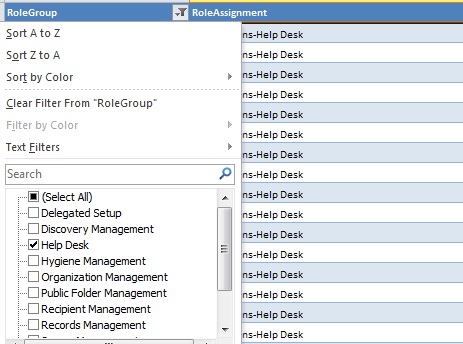
To use this function, select one of the Exchange sheets. On the top row containing the header you’ll notice a drop-down box. When clicking that drop-down box, it’ll show all entries in the table for that colum and various options like sorting. Notice that in front of the unique entries for in that colum is a checkbox. By checking or unchecking this you can apply or remove a filter on that colum. You can also combine filters. Use the “Select (All)” option lets you quickly (un)check all filtering options.

For example, by selecting only the RoleGroup “Help Desk”, you will see all entries for that RoleGroup:

Looking from the RoleEntry perspective, by filtering on a CmdLet, you can see what Roles and RoleGroups may perform a certain operation:

The 3rd sheet contains differences in RBAC configuration between Exchange 2010RTM and Exchange 2010 SP1 Beta. A green row with a “!>” indicates a new RBAC entry for SP1 Beta; a red one row with “<!” means the setting has been removed or became obsolete in 2010 SP1 Beta.

You can download the sheet RBAC_Overview_v11.xlsx from here. That isn’t the permanent location; I’m still looking for a location to host Excel files or ZIP files since WordPress won’t let me upload those. Also note that the file also contains information based on Exchange 2010 SP1 Beta which is subject to change in the final product.

Hope you find the RBAC information in this form useful. Feedback is appreciated (comment or e-mail).

Note: Whilst I was busy creating this workbook I noticed a guy from MS has already developed an Exchange 2010 RBAC Manager. You can use this not only to interactively browse the current RBAC configuration but you can also make changes. This excellent tool can be download here.

Exchange Help Files Updated


The Exchange Help (.CHM) files on the Microsoft Download Center have been updated for Exchange 2007 Sp3, Exchange 2010 and Exchange 2010 SP1 Beta. Handy if you’re on the road or in a data center without internet connection.

You can download the help files from the following locations:

Microsoft Exchange Server 2007 Service Pack 3 Help

Exchange 2010 Throttling Policies


Note: Parts of the following information are based on Exchange 2010 SP1 Beta and subject to change in the final product.

Exchange allows clients to connect in lots of ways. All these connections, e.g. Outlook/MAPI, ActiveSync, Outlook Anywhere, OWA or POP3, are handled by the Client Access Server. With improved scaling up possibilities of recent Exchange Server versions, meaning more users per server, the Client Access Server is expected to be handling more and more connections, without compromising performance or increasing response times.

In this regard recent Exchange versions are already doing a great job when compared to their predecessors, but how to guarantee availability of client resources to meet these demands?  Here is where the throttling policies come into play.

Throttling policies are used to restrict clients in the Exchange Server resources they can use. The purpose of these restrictions is to make sure a client can’t bring down an Exchange Server or disrupt services for other clients, intentionally or unintentionally, by exhausting resources. Thus, throttling will also help in lowering the impact of denial-of-service attacks.

Because the limit is enforced on clients, and clients can connect to their mailbox simultaneously using different components, throttling policies are applied to mailboxes. By default the mailbox attribute ThrottlingPolicy is not set, meaning the default throttling policy will be used. This policy is created during the setup of Exchange Server SP1. It is named “DefaultThrottlingPolicy_” followed by a GUID and contains the following settings:

Get-ThrottlingPolicy (SP1)

You’ll notice most MaxConcurrency parameters contain values while the other parameters don’t. Note that no value (or $null) means the settings is unthrottled. Now, before we go into detail on explaining these settings, I’ll give you first a little background information.

As you probably can see the policy itself is diverted in the several components (access methods if you will). Most of these components are represented in the settings using their acronym:

Acronym Component Description Note
Anonymous N/A Anonymous connections to user’s calendar New in SP1
EAS Exchange ActiveSync ActiveSync connections to  Exchange Server
EWS Exchange Web Services Exchange Web Services connections to Exchange Server including Unified Messaging users
IMAP IMAP4 IMAP4 connections to Exchange Server
OWA Outlook WebApp Outlook WebApp connections to Exchange Server
POP POP3 POP3 connections to Exchange Server
RCA RPC Client Access RPC Client Access Server connections to Exchange Server
CPA Cross Premise Access Cross premise connections to Exchange Server New in SP1

Each component can have one or more of the following parameters; which ones can be used depends on the component (there are some component specific settings, which we’ll mention later on):

Parameter Description
MaxConcurrency The number of maximum concurrent connections. The lifespan of a connection is from the moment of request until it closes or disconnects.
PercentTimeInAD % of 1 minute user can spend on AD queries
PercentTimeInCAS % of 1 minute user can spend on CAS requests
PercentTimeInMailboxRPC % of 1 minute user can spend on RPC requests

Note: Given this information, the values over 100 (%) for PercentTimeIn.. settings as shown in the output above seem a bit weird. This looks like a Beta issue (default values in RTM are $null = unthrottled).

Besides the common component – parameter combinations, there are also some component specific settings (we’ll leave the PowerShell ones to your imagination as they are of no use for ordinary users):

  • EASMaxDevices limits the number of active EAS partnerships per user;
  • EASMaxDeviceDeletesPerMonth limits the number of EAS partnerships a user can delete per month;
  • EWSMaxSubscriptions limits the number of Push and Pull subscriptions per CAS server;
  • EWSfastSearchTimeoutInSeconds determines the timeout for EWS searches;
  • EWSFindCountLimit caps the number of items returned for EWS searches;
  • MessageRateLimit limits the number of messages a user can submit;
  • RecipientRateLimit limits the number of recipients a user can address per 24 hour period;
  • ForwardeeLimit limits the number of recipients for Inbox forward/redirect actions.

Now to put this all to work you can use set-ThrottlingPolicy to modify an existing Throttling Policy or new-ThrottlingPolicy to create a new one. For example, if you want to modify the default throttling policy and set the maximum concurrency for ActiveSync to 5 you should execute the following in PowerShell:

Get-ThrottlingPolicy | where {$_.IsDefault -eq $true} | Set-ThrottlingPolicy –EASMaxConcurrency 5

A more practical example would be environments where Blackberry Enterprise Server (BES) is used. Due to the nature of how BES interacts with Exchange Server (BES proxies client requests using a single account), this might lead to reaching the default throttling limits resulting in Outlook error messages, e.g. Outlook can’t open folders or items. The culprit in this example is RCA or RPC Client Access with a default value of 20. A solution would be to create a seperate throttling policy for the BES proxy account with no RCA limit and to apply that policy to the BES account’s mailbox (BESAdmin), thus:

New-ThrottlingPolicy “BES Throttling Policy” –RCAMaxConcurrency $null
Set-Mailbox BESAdmin –ThrottlingPolicy “BES Throttling Policy”

Exchange 2010 RTM Rollup 4


Microsoft released Rollup 4 for Exchange Server 2010 RTM (KB982639). This update raises Exchange 2010 version number to 14.0.702.1.

Here’s the list of changes included in this rollup:

  • 979342 An attachment is not visible when an Exchange Server 2010 user opens a signed mail message by using Outlook 2003
  • 979517 You cannot send a message to a Dynamic Distribution Group in a mixed Exchange Server 2007 and Exchange Server 2010 environment
  • 979790 An IMAP4 client crashes when accessing an Exchange Server 2010 mailbox
  • 979801 An error message is generated in Exchange Server 2010 when you use Exchange Troubleshooting Assistant
  • 979810 You cannot connect an Exchange Server 2010 mailbox by using a MAPI client
  • 979848 Event ID 1066 is logged and you cannot move a mailbox from an Exchange Server 2003 server to an Exchange Server 2010 server
  • 979862 Event ID 4999 and Event ID 7031 are logged when you move a mailbox to an Exchange Server 2010 server
  • 979921 You cannot replicate a public folder from one Microsoft Exchange Server 2010 server to another, and Event ID 3079 is logged on the target server
  • 980149 The Add-MailboxDatabaseCopy command fails when it is used to add a database copy to a Database Availability Group in an Exchange Server 2010 environment
  • 980353 A MAPI application that is used to access Exchange Server 2010 mailboxes crashes when the application accesses an address book
  • 980354 “MAPI_E_INVALID_PARAMETER” error message when you copy email messages from an Exchange Server 2010 mailbox
  • 980364 Microsoft Exchange Transport service on an Exchange Server 2010 server crashes when a certain message is processed
  • 980701 An Exchange Server 2010 mailbox user receives a NDR error message when the user sends an email message to multiple internal users
  • 980852 The RpcClientAccess process on an Exchange Server 2010 server crashes when you access a mailbox by using a MAPI application
  • 981033 Error message when you expand the Microsoft Exchange On-Premises node in the EMC of Exchange Server 2010
  • 981961 Event ID 4033 is logged and the Free/Busy replication from an Exchange Server 2003 server to an Exchange Server 2010 server fails
  • 982209 Some embedded messages are corrupted when they are contained in a message that is sent from an Exchange Server 2010 mailbox address
  • 982378 A delegate receives only one meeting request when someone sends a meeting request to several principals in an Exchange Server 2010 RU1 or later environment
  • 982944 The msExchVersion attribute value of a user is stamped incorrectly after you run the Enable-MailUser cmdlet to mail-enable the user
  • 983200 The .xls file as an attachment is empty when you access an Exchange Server 2010 mailbox by using OWA
  • 983631 “redirect it to people or distribution list” rule does not work on an Exchange Server 2010 mailbox address
  • 2084061 A user intermittently fails to access an Exchange Server 2010 mailbox after the mailbox is moved

The last fix is interesting because we (me and Johan) are experiencing the issue during a cross-forest migration.

To download this rollup, click here. The Exchange versions, builds and dates table has been updated accordingly and can be found here.