A quick blog on security updates for Exchange Server 2016 and Exchange Server 2019 released September 8th. These fixes address the following vulnerability:
CVE-2020-16875: Exchange Memory Corruption Vulnerability A remote code execution vulnerability exists in Microsoft Exchange server due to improper validation of cmdlet arguments. An attacker who successfully exploited the vulnerability could run arbitrary code in the context of the System user. Exploitation of the vulnerability requires an authenticated user in a certain Exchange role to be compromised. The security update addresses the vulnerability by correcting how Microsoft Exchange handles cmdlet arguments.
The exploits can be fixed by single security update, which you can find in the table below per current Exchange version.
Be advised that these security updates are Cumulative Update level specific. You cannot apply the update for Exchange 2016 CU17 to Exchange 2016 CU16. Also, the security update download has the same name for different Cumulative Updates, and I would suggest tagging the file name with the CU level, e.g. Exchange2016-CU17-KB4577352-x64-en.msp.
Also, run the Security Update from an elevated command prompt, to prevent issues during installation. And on a final note, as with any patch or update, I’d recommend to apply this in a acceptance environment first, prior to implementing it in production.
With the emergency to facilitate working from home due to the Corona pandemic, many organizations were faced with a dilemma. When running Exchange 2013 or some even Exchange 2010 on-premises, and a desire to start using Microsoft Teams, organizations were confronted with the following requirements for integrating Microsoft Teams with Exchange on-premises (source):
Users with mailboxes hosted on-premises must be synchronized to Azure Active Directory.
Running Exchange 2016 Cumulative Update 3 or later on-premises.
OAuth needs to be configured (via Hybrid Configuration Wizard, or manual as MVP fellow Jaap blogged about here).
Recently, an additional requirement was added to explain that for delegates to schedule calendar meetings on behalf of another person, some additional steps are required (steps 2-3 mentioned here).
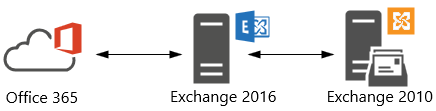
Now as you might know, Exchange 2010 does not support OAuth authentication. But, by putting Exchange 2016 in front of Exchange 2010, Exchange 2016 can be used for dealing with OAuth authentication, as well as dealing with client traffic as it can down-level proxy to Exchange 2010 for mailboxes hosted on those servers. Looking at these requirements, organizations might conclude that putting Exchange 2016 CU3 in front of their Exchange environment, and configuring OAuth would suffice the requirement to integrate Teams with their Exchange on-premises environment.
Alas, the additional requirement for full Teams integration is that the mailbox server hosting the mailbox should support REST API. Teams leverages Graph REST API calls to interact with mailboxes. In an Hybrid Exchange setup, on-premises mailboxes are identified, and related REST API calls will be directed at the on-premises REST endpoint, landing on your Exchange environment. The requirement for REST API support is something which is not explicitly stated in the Teams integration article, despite my earlier pull request.
It is however stated implicitly in an article on REST support in Hybrid Exchange or the original publication on REST API support in Exchange 2016 CU3 by the Exchange PG, two articles which you might easily have missed or forgotten about. Either way, it states that “All on-premises mailboxes that will use the REST APIs must be located on databases located on Exchange 2016 CU3 servers”.
Thus, with REST API support only being available per Exchange 2016 CU3, Teams will not fully integrate with mailboxes hosted on earlier versions of Exchange. Exchange 2016 can be used to offload OAuth when your mailbox is still on Exchange 2010 (which works fine for Exchange Web Services for Free/Busy, for example), but Exchange 2010 does not support REST API, and thus will never understand those ‘weird’ (proxied) requests landing on /api virtual directory, typical of REST API calls. Consequently, you will see AutodiscoverV2 and REST API calls greeted with a 404:
Typically, first thing users usually will notice missing is the Calendar integration:
Knowing this, the assumption could be that this combination doesn’t work at all, but as often the truth lies somewhere in the middle. You can use Teams when mailboxes are still hosted on pre-Exchange 2016 CU3, if you can live with the limitations. Below I have included a short overview of these, or other noteworthy items. The information is complementary to the How Exchange and Teams interact article. I hope it may help in discussions on what works and what doesn’t.
Disclaimer: Validated with mailbox hosted on Exchange 2010 with Exchange 2016 in front, OAuth and SkypeOnline AppId configured, and using Outlook 2016 C2R. Information may be subject to change. The list may not be conclusive; if you have any additional observations, please leave them in the comments.
Actions
Works
Comment
Create & View Meetings in Teams
No
No Calendar integration as this requires Outlook Calendar REST API. Visual clue is absence of the Calendar button.
Modify User Photo in Teams (client)
No
Doesn’t work when mailbox is hosted in Exchange on-premises.
Call History
Yes
History propagates to mailboxes hosted in Exchange on-premises in ‘Teams Calls’ folder.
Access Outlook Contacts
No
Works only with Exchange Online mailboxes.
Voicemail
Yes
May use & receive voice-mail, but can’t play from Teams.
Free/Busy status
Yes
Uses EWS.
Create & View/Update Teams Meetings from Outlook
Yes
Using default Teams Meeting add-in.
Create Teams Meetings from Outlook as Delegate
No
Teams Scheduler uses AutodiscoverV2 to discover delegate EWS endpoint, and fails. Outlook will display “Sorry, but we can’t connect to the server right now. Please try again later.”
View/Update Teams Meetings from Outlook as Delegate
Yes
EWS is used to fetch and update the calendar item.
MailTips in Teams
No
MailTips like Out of Office are not shown in Teams. MailTips work for Exchange 2016 CU3+.
Create & View Channel Meetings in Teams
No
Doesn’t work when mailbox is hosted in Exchange on-premises.
Share to Teams
No
Doesn’t work when mailbox is hosted in Exchange on-premises.
Of course, the better experience is to be had when your mailbox is hosted on Exchange 2016 CU3 or later (including Exchange 2019), or best when you simply host them in Exchange Online. However, given the circumstances and pressure from the organization to use Teams, that route might not be an option for everyone. Organizations may look at substantial investments in time and resources. In those cases, it might be good to know of alternative less preferable scenarios, and more important, any possible limitations you might encounter when taking a shortcut.
A quick blog on recently published security updates for Exchange Server 2013 up to Exchange Server 2019 and Exchange Server 2010 as well. These fixes address the following vulnerabilities:
CVE-2020-0692: Microsoft Exchange Server Elevation of Privilege Vulnerability
An elevation of privilege vulnerability exists in Microsoft Exchange Server. An attacker who successfully exploited this vulnerability could gain the same rights as any other user of the Exchange server. This could allow the attacker to perform activities such as accessing the mailboxes of other users. Exploitation of this vulnerability requires Exchange Web Services (EWS) to be enabled and in use in an affected environment. To exploit the vulnerability, an attacker would need to change parameters in the Security Access Token and forward it to a Microsoft Exchange Server, thereby allowing impersonation of another Exchange user. To address this vulnerability, Microsoft has changed the way EWS handles these tokens. This vulnerability does not apply to Exchange 2010.
CVE-2020-0688: Microsoft Exchange Memory Corruption Vulnerability
A remote code execution vulnerability exists in Microsoft Exchange Server when the server fails to properly create unique keys at install time. Knowledge of a the validation key allows an authenticated user with a mailbox to pass arbitrary objects to be deserialized by the web application, which runs as SYSTEM. The security update addresses the vulnerability by correcting how Microsoft Exchange creates the keys during install.
The CVE documents contain more details on the vulnerabilities. In addition, KB4536989 (Rollup 30) for Exchange 2010 and KB4536988 for Exchange 2013 also fixes the following issue:
KB4540267 MSExchangeDelivery.exe or EdgeTransport.exe crashes in Exchange Server 2013 and Exchange Server 2010
The exploits can be fixed by single security update, which you can find in the table below per current Exchange version.
Be advised that the Security Updates for Exchange 2013-2019 are Cumulative Update level specific. Unfortunately, the security update carries the same name for different CUs, and you cannot apply the update for Exchange 2016 CU15 to Exchange 2016 CU14. I would suggest tagging the Cumulative Update in the file name used, e.g. Exchange2016-CU15-KB4536987-x64-en.msp.
Also, run the Security Update from an elevated command prompt, to prevent issues during installation. And on a final note, as with any patch or update, I’d recommend to apply this in a acceptance environment first, prior to implementing it in production.
The Exchange Team released the quarterly Cumulative Updates for Exchange Server 2019 as well as Exchange 2016. One significant change with these updates is the requirement for .NET Framework 4.8, as announced earlier. Also, Exchange 2019 CU4 comes with an updated Exchange calculator. Links to the updates as well as a description of changes and fixes are described below.
4528696 Exchange PowerShell cmdlets take longer time to run in Exchange Server 2019
4528695 Event ID 4009 when using SubjectOrBodyMatchesPatterns on Edge server in Exchange Server 2019
4528694 Can’t open .ics file in Outlook on the web in Exchange Server 2019
4528692 “A parameter was specified that isn’t valid” error when creating transport rule in Exchange Server 2019
4523519 Set-SendConnector doesn’t work for Exchange Server in hybrid scenarios with Edge Server installed
4528688 Only one recipient shows when saving draft by using Exchange ActiveSync version 16.0 in Exchange Server 2019
4528693 Get-CalendarDiagnosticLog is proxied for queries within the same forest in Exchange Server 2019
4528687 NotificationClient logs aren’t purged and consume lots of disk in Exchange Server 2019
4528689 Outlook on the web shows MailTip when recipients equal the large audience size in Exchange Server 2019
4528690 Can’t move or delete folder in Outlook online mode if the destination has a folder with the same name in Exchange Server 2019
4532744 System.ArgumentNullException when you use Set-user to assign block legacy auth policy in Exchange Server 2019
4532747 Address list separation not working for a user without a mailbox in Exchange Server 2019
4523171 Description of the security update for Microsoft Exchange Server 2019, 2016, and 2013: November 12, 2019
Exchange 2016 CU15 fixes:
4515256 “The function cannot be performed…” error when you send a message that’s open for a long time in Exchange Server 2016
4528693 Get-CalendarDiagnosticLog is proxied for queries within the same forest in Exchange Server 2016
4523519 Set-SendConnector doesn’t work for Exchange Server in hybrid scenarios with Edge Server installed
4528690 Can’t move or delete folder in Outlook online mode if the destination has a folder with the same name in Exchange Server 2016
4528687 NotificationClient logs aren’t purged and consume lots of disk in Exchange Server 2016
4528689 Outlook on the web shows MailTip when recipients equal the large audience size in Exchange Server 2016
4528688 Only one recipient shows when saving draft by using Exchange ActiveSync version 16.0 in Exchange Server 2016
4528695 Event ID 4009 when using SubjectOrBodyMatchesPatterns on Edge server in Exchange Server 2016
4528694 Can’t open .ics file in Outlook on the web in Exchange Server 2016
4528692 “A parameter was specified that isn’t valid” error when creating transport rule in Exchange Server 2016
4515257 Hash mismatch is reported for Exchange DLLs in the bin directory of Exchange Server 2016
4528696 Exchange PowerShell cmdlets take longer time to run in Exchange Server 2016
4532747 Address list separation not working for a user without a mailbox in Exchange Server 2016
4523171 Description of the security update for Microsoft Exchange Server 2019, 2016, and 2013: November 12, 2019
Notes:
These Cumulative Updates do not contain schema changes compared to their previous Cumulative Update.
When upgrading from an n-2 or earlier version of Exchange, or an early version of the .NET Framework, consult Upgrade Paths for CU’s & .NET.
Don’t forget to put the Exchange server in maintenance mode prior to updating. Regardless, setup will put the server in server-wide offline mode post-analysis, before making actual changes.
When using Exchange hybrid deployments or Exchange Online Archiving (EOA), you are required to delay installing at most one version (n-1).
If you want to speed up the update process for systems without internet access, you can follow the procedure described here to disable publisher’s certificate revocation checking.
Cumulative Updates can be installed directly; no need to install RTM prior to installing Cumulative Updates.
Once installed, you can’t uninstall a Cumulative Update nor any of the installed Exchange server roles.
The order of installation shouldn’t matter with the “every server is an island” concept, yet recommended is to upgrade internet-facing, non-internet-facing servers first, followed by Edge Transports.
Caution:
As for any update, I recommend to thoroughly test updates in a test environment prior to implementing them in production. When you lack such facilities, hold out a few days and monitor the comments on the original publication or forums for any issues.
Note: KB4515832 supersedes KB4509409 and KB4509408.
Be advised that these Security Updates are Cumulative Update level specific. Unfortunately, the security update carries the same name for different CU’s, and you cannot apply the same update for Exchange 2016 CU13 to Exchange 2016 CU12. I would suggest tagging the Cumulative Update in the file name when you store it, e.g. Exchange2016-KB4515832-x64-en_CU11.msp.
As with any patch or update, I’d recommend to apply this in a
acceptance environment first, prior to implementing it in production.





 EighTwOne (821)