Rerelease of MS13-06/KB2874216 for Exchange 2013


Ex2013 LogoToday the rereleases of MS13-061 Security Fix for Exchange 2013 CU1 and Exchange 2013 CU2 saw daylight. This security update KB2874216 fixes the issue described in Microsoft Security Bulletin MS13-061 and supposedly fixes the issues found with the original release. After installing the v2 patch, the version will be upped 2 notches compared to the original patch.

As mentioned in an earlier article, security fixes are Cumulative Update level specific. In practice, this means there are two different versions of the security update patch file: one for CU1 and one for CU2.

Be advised both files carry the same file name, Exchange2013-KB2874216-v2-x64-en.msp. I suggest adding some form of Cumulative Update identification to the file name when you archive it, e.g. Exchange2013-KB2874216-v2-x64-en-CU2.msp.

As with any patch or update, I’d recommend to thoroughly test this in a test and acceptance environment first, prior to implementing it in production. If you don’t have the resources and risk management can agree, you might want to consider postponing implementation for a short period while monitoring for issues in the online.

You can download the security updates here:

Fix for MS13-061 breaking Exchange 2013 (Updated)


Ex2013 LogoUPDATE: The MS13-061 security update for Exchange 2013 CU1 & CU2 has been pulled until further notice. Microsoft recommends not installing MSI13-061 at the moment and disable Data Loss Prevention and WebReady as described in the Oracle Outside In Contains Multiple Exploitable Vulnerabilities section in the MS13-061 bulletin.

After some people reported issues after installing the MS13-061 (KB2874216) security update on Exchange 2013, it turns out MS13-061 breaks your installation of Exchange 2013 and you can experience the following symptoms:

  • The Microsoft Exchange Search Host Controller service is missing;
  • You see a new service named “Host Controller service for Exchange”;
  • Content index (CI) for mailbox databases shows Failed on affected server.

This is described in KB2879739 including the ‘workaround’, which is consists of three steps:

  1. Set HKLM\SOFTWARE\Microsoft\Search Foundation for Exchange\Data Directory to $exinstall\Bin\Search\Ceres\HostController\Data (REG_SZ), where $exinstall is the installation folder of your Exchange 2013 installation folder, e.g. C:\Program Files\Microsoft\Exchange Server\V15\Bin\Search\Ceres\HostController\Data;
  2. Set HKLM\SYSTEM\CurrentControlSet\Services\HostControllerService\DisplayName=”Microsoft Exchange Search Host Controller” (REG_SZ);
  3. Set HKLM\SYSTEM\CurrentControlSet\Services\HostControllerService\DependOnService=”http” (REG_MULTI_SZ);
  4. (Re)start the “Microsoft Exchange Search Host Controller” service.

For your convenience, I’ve create a small quick & dirty script as a potential time saver (as far as you can call a three-liner a script and don’t expect extensive error handling as well). This script Workaround-KB2879739.ps1 performs the steps described in the KB2879739 so you can run it right after deploying MS13-061 / KB2874216 on your Exchange 2013 server.

You can download the script here.

MS13-061 Security Fix for Exchange 2013 (updated)


Ex2013 LogoUPDATE: The MS13-061 security update for Exchange 2013 CU1 & CU2 has been pulled until further notice.If you have installed it, there are issues with it which can be fixed (link). Microsoft recommends not installing MSI13-061 at the moment and disable Data Loss Prevention and WebReady as described in the Oracle Outside In Contains Multiple Exploitable Vulnerabilities section in the MS13-061 bulletin.

Today the Exchange Team released the first Security Update for Exchange 2013. This security update KB2874216 fixes the issue described in Microsoft Security Bulletin MS13-061.

As mentioned in an earlier article, security fixes are Cumulative Update level specific. How that would turn out in practice remained to be seen at the time of writing that article, but at the moment it means there are two different versions of the security update, one patch file for CU1 and one for CU2 (or the re-release of CU2 actually, version 15.0.712.24 – more information on that here). I assume the .MSP format limits the ability to merge the two and let it make an intelligent decision on what to install.

Be warned that both files carry the same file name, I suggest adding some form of Cumulative Update identification to the file name when archiving it, e.g. Exchange2013-KB2874216-x64-en-CU2.msp.

As with any patch or update, I’d recommend to thoroughly test this in a test and acceptance environment first, prior to implementing it in production.

You can download the security updates here:

KB2750149 breaks WS2012 Fail-over Clustering Snap-In (Updated)


Windows Server 2012 RC LogoA quick heads-up on Windows Server 2012, Fail-over Clustering and KB2750149, an update for the .NET 4.5 Framework. This hotfix was released on the January 8th, 2013.

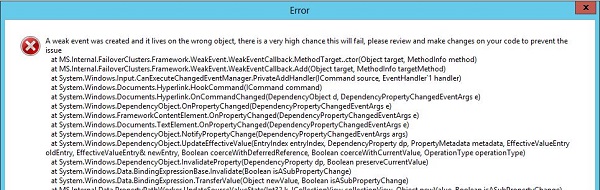
After installation, this hotfix will break the Windows Server 2012 Fail-Over Clustering MMC Snap-In, resulting an error when navigating stating:

A weak event was created and it lives on the wrong object, there is a very high chance this will fail, please review and make changes on your code to prevent the issue.

WS2012FCCapture

Microsoft is currently investigating the issue. Until then,it is advised not to apply KB2750149 on Windows Server 2012 Fail-over Clusters or uninstall it when you are experiencing the issue.

Note that the Windows Server 2012 Fail-over Cluster will keep working, as well as the related PowerShell cmdlets (another reason to start using the shell instead), it’s just that the cluster can’t be properly managed from the MMC.

Regarding Exchange 2013 DAG, which can be build on top of WS2012 Fail-over Clusters, you shouldn’t notice the issue because fiddling around in Fail-over Cluster Manager is a no-no for Exchange DAGs. Nevertheless, I’d recommend following the advisory and not install or uninstall the hotfix until further notice.

More information in this and this topic on the TechNet forums.

Update (23jan2013): Hotfix KB2803748 fixes the MMC crashing issue. It’s available through Windows Update or download it directly from here.

Caution: KB2506146 and KB2506143 (Updated)


powershellA quick word of caution on the following recently released updates:

  • KB2506143 is the WMF 3.0 update for Windows Server 2008 R2 SP1 and Windows 7 SP1;
  • KB2506146 is the WMF 3.0 update for Windows Server 2008 SP2.

These updates will install Windows Management Framework 3.0 which includes PowerShell 3.0. However, Exchange 2007 nor Exchange 2010 currently works with PowerShell 3.0 and installing these updates will render your system unusable, including workstations from where you run the Exchange Management Tools.

The related updates have been published recently as optional updates through Windows Update. However, depending on your patch management methodology (e.g. WSUS), these updates might be installed automatically (e.g. accept all).

Therefor, it is advised to block these updates from being installed on your Exchange 2007 or Exchange 2010 systems when possible; Exchange 2013 requires WMF 3.0 therefor this doesn’t apply to systems running Exchange 2013.

Note that PowerShell 3.0 compatibility is announced for Exchange 2010 SP3, which is scheduled for Q1 2013; compatibility with Exchange 2007 isn’t announced nor expected.

Credits to Exchange fellow Michael B. Smith for discovering this.

Update, December 14th, 2012: Microsoft has acknowledged the problem here.

Update, December 19th, 2012: Microsoft pulled the updates from Microsoft Update / WSUS. Note that Exchange wasn’t the only product affected; WMF 3.0 also breaks Sharepoint 2010 for instance. Needless to say, WMF 3.0 should also not be installed on systems containing Small Business Server.