Can’t Create Mailboxes in Remote Sites


Ex2013 LogoRecently I got an e-mail from someone who had problems creating mailboxes in a new environment. When trying to create a mailbox, he received a following message stating, “Load balancing failed to find a valid mailbox database.” Apparently, the Mailbox Resources Management Agent (a Cmdlet Extension Agent) could not find an eligible mailbox database candidate.

image

The MRMA uses the following selection process when picking a candidate for mailbox creation or moving:

  1. Create a list of all mailbox databases;
  2. Remove databases marked for exclusion;
  3. Remove databases out of the management scope;
  4. Remove databases from remote (AD) sites;
  5. Pick a random online, healthy database from the list.

This person had a DAG, two mailbox databases (MDB1, MDB2) and two sites (AMS and LON).

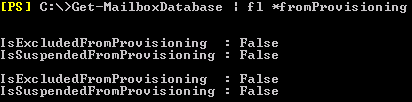
We first checked the more or less obvious, which is to see if databases are not excluded from the provisioning process, so we entered Get-MailboxDatabase | fl *FromProvisioning:

image

Databases seemed enabled for provisioning. We then checked the status of the active database copies:

image

The copies looked healthy, but we noticed all databases were mounted in a remote site (derived from the server name starting with LON; we’re working from AMS). Looking back at the database selection process, it explained why it probably didn’t work and since the active copies should be moved back to the preferred site AMS anyway we moved the active copies back:

image

After moving the active database copies back to the location where we were performing our cmdlets from solved things.

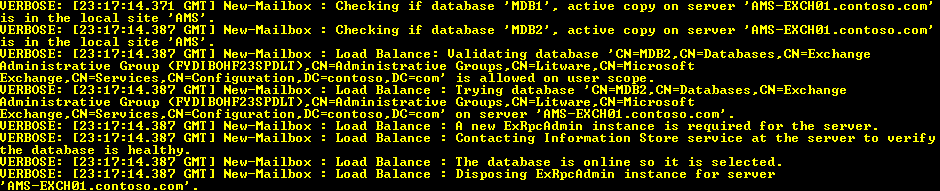
Note that we could have discovered the issue using the Verbose parameter with the cmdlet. For example, New-Mailbox in conjunction with Verbose will show the selection process. The following screenshot shows an unsuccessful selection process considering available databases:

image

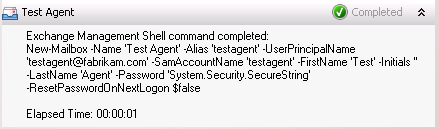
This screenshot shows a successful selection process.

image

More information on automatic mailbox distribution and controlling its behavior here.

NGN Exchange Event, Tips & Tricks Presentation


On October 31st, the NGN – a Dutch society for IT professionals – held its 3rd Exchange themed event, this time at The Reehorst in Ede (NL). Because of the recently released Exchange 2013 and all the news and related questions, we planned for a whole day of sessions and it was nice to see the turn up was nearly 100 IT professionals.

Since all people would still be on pre-2013 versions of Exchange, I figured a presentation using real-world Exchange 2010 Tips and Tricks might be more appropriate. I was glad a quick poll amongst the attendees showed a significant increase in Exchange 2010 deployments (around 80%) when compared to last year’s event, but as expected there’s still some Exchange 2007 and few Exchange 2003 out there.

I decided to stick with two deep-dive topics, which were Message Trackings Logs and Cmdlet Extension Agents. On those topics I went from basics to more advanced examples, hoping it would ignite people with no experience and people with experience could still pick up a thing or two.I’m still waiting for evaluation results, the only way to get feedback from these sessions apart from the occasional e-mail or tweet.

(picture by Dave Stork)

You can find my presentation here (partially Dutch) and the accompanying sample script on Message Tracking Logs here and the one on Cmdlet Extension Agents here (script); the ScriptingAgent.xml file can be downloaded here.

As always, these events are also a time to catch up with fellow Exchange people and discuss topics with attendees during the breaks. There were even Exchange fellows present who didn’t have a session, like Johan Veldhuis (MVP) and Maarten Piederiet (MCM); they did join in on the Q&A Panel.

The sessions and speakers were:

  • Introduction (Jaap Wesselius, MVP)
  • Building with Exchange 2013: Architecture (Dave Stork)
  • Exchange and Virtualisation (Jetze Mellema)
  • Exchange 2010 Tips & Tricks (Ashley Flentge, MCM & Michel de Rooij)
  • Exchange 2013 Coexistence and Migrations (Kay Sellenrode, MCM and MCA)
  • Exchange and Load Balancing (Jetze Mellema)
  • Q&A Panel

The NGN published all presentations in a single ZIP file which can be downloaded here. Unfortunately, NGN didn’t record the sessions so I can’t share those with you. They did record the Q&A Panel session; you can view it here (in Dutch):


PS: When you see references to “exchangedag”, like in the Twitter hashtag, you need to know “dag” means day in Dutch; it’s no form of professional deformation.

Cmdlet Extension Agents Part 2: Postconfiguring Mailboxes


Cmdlet Extension Agents Part 1: Automatic archive creation

Almost a year ago, I posted an article in which I tried to show the power of Cmdlet Extension Agents in Exchange 2010, or more specifically, the Scripting Agent. Unfortunately, the Cmdlet Extension Agents are often overlooked or ignored, despite customers having requirements to customize things immediately after creating a mailbox. Therefor, I decided to write another article on this topic, hoping people take up using Scripting Agents.

Now while you can also put all sorts of post-configuration tasks in provisioning scripts, using the Scripting Agent when possible has a big bonus, because those additional actions not only run when you run the cmdlet directly from the Exchange Management Shell but also when you run them indirectly by using the Exchange Management Console.

So, as this follow up of the previous article, in which I explained what the CmdLet Extension Agents are and how to utilize the Scripting Agent to automate tasks, I’ll show you another example of a Scripting Agent and quickly walk you through it, so you can experiment with it (first in a lab of course) and tune it to your own requirements.

In this example, we’ll disable ActiveSync and configure SingleItemRecovery when creating a new user with a mailbox or mailbox-enabling an existing user. Therefor, the cmdlets we’re going to customize are New-Mailbox and Enable-Mailbox.

Open up Notepad and create a file \bin\CmdletExtensionAgents\ScriptingAgentConfig.xml located in Env:ExchangeInstallPath, e.g. C:\Program Files\Microsoft\Exchange Server\V14\Bin\CmdletExtensionAgents, using the following contents:

Note: If you’ve already got a ScriptingAgentConfig.xml file, you need to integrate the following content.

<?xml version="1.0" encoding="utf-8" ?>
 <Configuration version="1.0">
 <Feature Name="Mailboxes" Cmdlets="New-Mailbox,Enable-Mailbox">
 <ApiCall Name="OnComplete">
   if($succeeded) {
     $Name= $provisioningHandler.UserSpecifiedParameters["Name"]
     Set-Mailbox $Name -SingleItemRecoveryEnabled $true
     Set-CASMailbox $Name -ActiveSyncEnabled $false
   }
 </ApiCall>
 </Feature>
 </Configuration>

As you can see, you’re not limited to 1 action or related cmdlets (*-Mailbox). A small explanation:

  • The Cmdlets specified in this feature extension dictates which cmdlets will be extended, in this case New-Mailbox and Enable-Mailbox;
  • OnComplete dictates that our script will fire when the cmdlet has finished;
  • We check for OnComplete parameter $succeeded, only configuring the mailbox when the preceding events were successful;
  • $provisioningHandler.UserSpecifiedParameters contains user provided parameters passed to the cmdlet. So, $provisioningHandler.UserSpecifiedParameters[“Name”] will return the value of –Name;
  • We set SingleItemRecovery to $true for the mailbox specified by $Name;
  • We disable ActiveSync client access for this mailbox as well.

As mentioned in part 1, distribute this XML file to all your Exchange servers in the local CmdletExtensionAgents folder. When you haven’t already enabled the Scripting Agent, do so by running the following cmdlet:

Enable-CmdletExtensionAgent “Scripting Agent”

Now, when we create a new mailbox or mailbox-enable an existing user:

image

.. you’ll see the SingleItemRecovery has been enabled and ActiveSync has been disabled for this mailbox by the scripting agent:

image

I recommend you start checking out the Scripting Agent if you haven’t already done so. You can use these examples as a starting point and work from there. More information on the Scripting Agent, alternative APIs etc. can be found here.

Thoughts on “Automatic E-mail Server Notifications in Exchange 2010”


In an article on MsExchange.org, Markus Klein elaborates on the reasons behind the changed message delivery notification (MDN) behavior in Exchange 2010. Examples of MDNs are read or delivery receipts or out of office messages. Issues may arise with MDNs because Exchange 2010 (and Exchange 2007) will use a blank sender address and not all e-mail systems can cope with that, making Exchange compliant with the related RFC. The article ends with workarounds to mitigate the issue. Here are my thoughts on that article.

The article refers to RFC2298, dated March 1998. However, MDNs are defined by RFC3798 of May 2004, which obsoletes RFC2298. Nevertheless, like Klein indicated, both RFCs dictate the following:

The envelope sender address (i.e., SMTP MAIL FROM) of the MDN MUST be null (<>), specifying that no Delivery Status Notification messages or other messages indicating successful or unsuccessful delivery are to be sent in response to an MDN.

The idea behind using a blank sender address is that e-mail systems will not return DSN messages, e.g. mailbox unavailable or disk quota exceeded, as a reply to an MDN, preventing potential message loops. However, there are some side-effects as not all e-mail systems or messaging hygiene products are RFC compliant. For example, the default setting of ForeFront Protection 2010 for Exchange is to block messages with an empty sender address. These products may simply block those messages, since blank senders could potentially be an indicator for spoofed messages. When you suspect such product to be causing the issue, check and reconfigure when appropriate.

The author continues the article by describing how to configure and troubleshoot routing of MDNs to the internet. The author shows how to enable and inspect the receive connector logs. Instead, I suggest monitoring the send connector logs when troubleshooting MDN delivery. Inspecting the send connector log files, you can get a clue on why MDN delivery fails and will see if Exchange is trying to deliver the MDN at all, and if so, the reason why. To enable send connector logging use the following cmdlet:

Set-SendConnector <ConnectorID> -ProtocolLoggingLevel verbose

The log files are generated in the “V14\TransportRoles\Logs\ProtocolLog\SmtpSend” folder below the location where you installed Exchange.

Finally, the author suggests the following workarounds:

  1. Use Outlook “out of office”
  2. Switch Relay Provider
  3. Implement Exchange Server Edge Roles

The first workaround is a less preferable option, as it’s configured per-user as a rule and rules, stored in the user’s mailbox, can’t easily be managed. When using the OOF option, administrators can, using the Get-MailboxAutoReplyConfiguration and Set-MailboxAutoReplyConfiguration cmdlets. Also, it makes the end user responsible for working around the issue. Meanwhile, despite this instruction, you can still expect lots of users to keep using the OOF function.

The second and third suggestions are non-options, since they don’t eliminate the issue and will only add a product and an extra hop to the e-mail route. Yes, you can switch to using a different SMTP relay or implement an Exchange Edge server which will accept MDN messages with an empty sender address. However, that may not be the final destination of the e-mail message, so the (unpredictable) MDN delivery issue remains. Nobody can guarantee that the e-mail system or message hygiene appliance at the recipient blocks blocks your OOF message with an empty sender address. You can read that between the lines of the PSS statement the author quotes as well:

The Exchange edge server will not reject the OOF message as the edge server will be incorporated into the Exchange organization. The HUB server will transfer the OOF messages in the address of OOF mailbox to the edge server and the edge server will then send the messages with empty return path e.g. blank sender, MAIL FROM: <> “null” to Internet.

Now, when the issue lies outside of your Exchange organization, e.g. the hosted message hygiene service or destination mail system, you might be left with no other option than to violate RFC3798 by adding a sender address. In Exchange this isn’t possible, but other e-mail gateways could help you with that. Note that when using a hosted message hygiene service or appliance for outbound messages, using a non-blank sender might be less of an issue since you’re offloading the delivery, compared to trying to deliver the message to the destination mail system yourself.

However, when opting to resort to these measures, I’d strongly suggest reconsidering sending out of office messages (or MDNs in general) outside of your Exchange organization, regardless of the sender. Spammers love confirmed e-mail addresses, so treasure your business e-mail addresses like you probably treat your own personal address.

Note that this blog isn’t to condemn the author of the discussed article, but to clarify things up since many people moving from Exchange 2003 to Exchange 2007 or Exchange 2010 may run into these behavioral differences. You’re invited to comment or share your opinions in the comments below.


Exchange Management Console & IE9 issue fixed


Finally, today the Exchange team made available a fix to solve the issues when using the Management Console of Exchange 2007 or 2010 in conjunction with Internet Explorer 9.

As you probably know, when using Internet Explorer 9 you can’t close the Exchange Management Console properly as it gives you the error “You must close all dialog boxes before you can close Exchange Management Console” having no dialogs open.

To solve this issue, you had to do the resort to measures like killing the EMC process using Task Manager.

To properly install the hotfix:

  1. Request hotfix ID 2624899 from support here. For a direct download link click here.
  2. Download and install MS11-081 (2586448). You can retrieve this update here.
  3. Install the hotfix ID 2624899.

Microsoft states it expects to incorporate this fix in a future update of Internet Explorer 9.

While releasing a fix for the IE9 issue is great after all these month, I can’t help but wonder why the fix has not been made public.