Outlook 2007 hotfix for Exchange 2010 Personal Archive support

Update: After fixing some issues (see here) the Outlook team re-released hotfix KB2412171 and made it available for direct download here or you can get it through Windows Update.

It seems the Office 2007 Cumulative Update for December 2010 (KB2479671) will contain support for the long awaited support for Exchange 2010 Personal Archives in Outlook 2007. Note that support is limited as not all functionality found in Outlook 2010 is present, but it is usable from a customer perspective.

After applying the Outlook 2007 hotfix (SP2 is a prerequisite), archive-enabled users can do the following:

  • Access and move messages to or from their personal archive;
  • Mailboxes for which you have full access permissions will be automatically added to your Outlook view (known as auto mapping of shared mailboxes) inspecting the msExchDelegateListLink attribute (more info on this at Steve Goodman’s blog here);
  • If you have full access permissions to an archive-enabled mailbox, that archive will be accessible and automatically displayed as well.
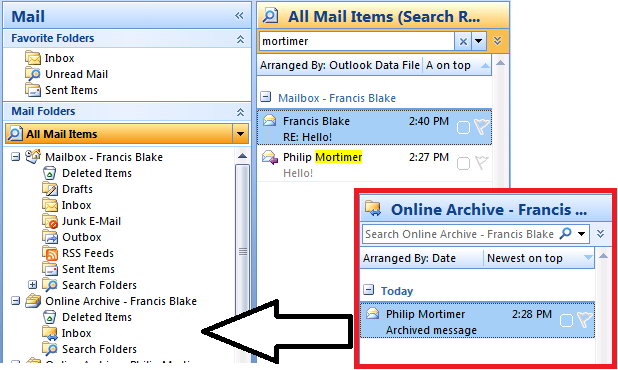
    In the screenshot below you’ll the the user’s mailbox (Francis Blake), his Personal Archive and he has full access permissions to Philip Mortimer’s mailbox, who is also archive-enabled:

image

Unfortunately, there are also a few things not implemented, e.g.

  • No support for archiving policies, meaning users won’t be able to override centrally configured retention and archiving policy settings using personal tags in Outlook. More info on archiving policies and personal tags here;
  • Not integral searches, meaning you need to search the mailbox or the personal archive seperately. Searching “all mail items” will not retrieve results from the personal archive, as shown in the screenshot below:
image

It is unknown if these omissions are going to be introduced in a later hotfix, as the initial hotfix for personal archives in Outlook 2007 was set for Q1/Q2 2011.

Be advised that this hotfix will enable personal archive functionality for the following product versions only:

  • Office Ultimate (Retail)
  • Office ProPlus (Volume License)
  • Office Enterprise (Volume License)
  • Outlook Standalone (Retail or Volume License)

Note that the Outlook 2007 update for archive support is still not mentioned on the cumulative update page as the cumulative update package has yet to be released. However, the KB article has been published (KB2458611). You can request and retrieve the individual hotfix here.

Thanks for Ankur Kothari (@ankbomb) from product management for the early update.

Enterprise Vault 9.0.1 released

A quick note on the official release of Symantec’s Enterprise Vault 9.0.1 (service pack 1 for Enterprise Vault 9.0), which introduces Outlook 2010 support. You can check out the release notes here.

The announcement with links to related documents can be found here. You can download the software from Symantec File Connect.

Enterprise Vault 9.0.1 early release client

Symantec made an early release available of the Enterprise Vault client 9.0.1. This version works against server 8.0.4 and 9.0 and is supported for Outlook 2003, 2007 and 2010 (x86 & x64). The full set (client and server) is scheduled for December.

You can read the announcement here. You can download the Vault 9.0.1 client from Symantec File Connect.

Update: It seems there’s a trial located here. Also, don’t forget to check for hotfixes which can be downloaded here.

Personal Archives not in all Office 2010 versions

Exchange fellow Jetze Mellema reported something interesting, which he blogged about here. Since you’re not all fluent in Dutch, I’ll blog about it too since it’s important to know when planning your upgrade to Exchange 2010 / Outlook 2010 or during customer engagements.

Until now, blogs mention Exchange 2010’s Personal Archive feature as something for which you’d only need an Exchange 2010 mailbox server (with an archive enabled mailbox)  in combination with Outlook WebApp (OWA) or Outlook 2010 with an Enterprise CAL.

Now, by mentioning “Outlook 2010” it sounds like you can use any version of Outlook 2010 for accessing Personal Archives. Unfortunately this isn’t true. The footnote of this article of the Office 2010 Resource Kit states the following:

Personal Archive is available only when you use Outlook 2010 as part of Microsoft Office Professional 2010 or Microsoft Office Professional Plus 2010 with a volume license.

This poses the question if this will be of influence on current Office 2007 users. As you probably know, the update to enable Personal Archives for Outlook 2007 users is expected 1st half of 2011. Does the above statement imply that only Office 2007 Professional users will be able to use Personal Archives after the update and are Office 2007 Standard users – like Office 2010 Standard users – left in the cold?

I’m afraid I don’t have an answer to that question yet, since there’s no information on that subject. I’ll keep you posted.

Outlook 2003 & Exchange 2010

Problems connecting Outlook 2003 to Exchange 2010 could turn out to be an unpleasant surprise after migrating to Exchange Server 2010 over the weekend. The problem is caused by Outlook 2003 not using encrypted RPC connections to the Exchange Server by default, and Exchange 2010 requiring  encrypted RPC connections (contrary to earlier Exchange versions). The solution is simple but you have several options; The way you should proceed not only depends on your situation but you also need to check the company’s security policies regarding communications encryption which might restrict your options.

Change how Outlook connects

Enabling RPC encryption in Outlook can be performed per configuration (Outlook profile) or using a Group Policy Object.To manual change the way Outlook connects:

  1. Open Control Panel > Mail > Show Profile > <Select Profile>
  2. Select Properties > E-mail Accounts > View or Change existing e-mail accounts
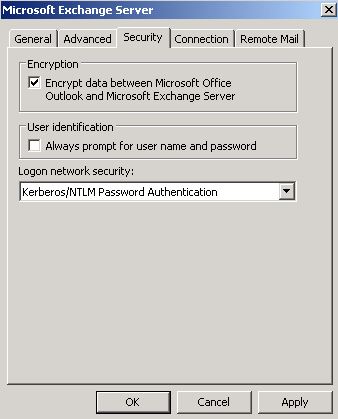
  3. Select Next > Microsoft Exchange Server > Change > More Settings > Microsoft Exchange Server > Security
  4. There, check Encrypt data between Microsoft Office Outlook and Microsoft Exchange Server
  5. Close everything with OK > Next > Finish > Close > OK.

You can also control the RPC encryption setting centrally for Outlook clients using the following registry value as part of a GPO:

HKEY_CURRENT_USER\Software\Policies\Microsoft\Office\11.0\Outlook\RPC
DWORD: EnableRPCEncryption
Value: 1

For a more detaild guide on implementing the Outlook profile change or implementing the GPO using an administrative template, consult KB2006508.

Change how Exchange 2010 accepts
To change the way Exchange 2010 accepts RPC connections, i.e. disable the RPC encryption requirement, you need to disable the RPC encryption for Exchange Server 2010 CAS servers (remember, in Exchange 2010 RPC connections are handled by the CAS server role), use the following cmdlet:

Set-RpcClientAccess –Server <Server Name> –EncryptionRequired $False