 Few days ago, the Exchange Team published their intentions for Exchange 2013 regarding update schemes (or as Microsoft calls it, servicing). While the article describes the policy with a Q&A section at the bottom, there are still some grey areas. In this blog, I’d like emphasize on some elements and point out those grey areas.
As you probably read before, with Exchange 2013 the Rollup packages will be replaced by Cumulative Updates (CU), a name change probably inspired by Lync’s Cumulative Update packages. But it’s more than just a name change and admins or people involved managing releases should become familiar with the new policy as it will have some features that you don’t want to get surprised by.
One of the major changes in my opinion is that there will be one team working on the product; code bases for on-premises Exchange and Exchange Online (Office 365) will brought up to par. A small change is that Microsoft will first implement – or dogfood – the Cumulative Update in their Office 365 environment after while it will be made available for on-premises or hybrid deployments. While this may improve the quality of the Cumulative Update, not all kinds of deployments will be tested so it’s no warranty. However, looking at the current situation with Office 365, it may put stress on Microsoft procedures as there are already big variations between the various regions regarding Exchange Online implementations as well as Exchange Online and the on-premises version.
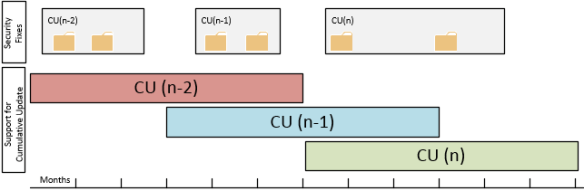 It’s the intention Cumulative Updates will be released on a quarterly basis. Each Cumulative Update will consist of a full installation set, so for example you can install Exchange 2013 Cumulative Update 2 straightaway whereas with Rollups you had to implement the Service Pack level prior to applying the related Rollup. So, this is a big convenience when for example installing greenfield scenarios or adding systems.
However, unlike Rollups you can’t uninstall a Cumulative Update once it has been installed. This could worry people, looking back at the qualify of some past Rollups which were pulled, rereleased and in some rare cases pulled and rereleased again. But since Microsoft will now implement Cumulative Updates first, bad Cumulative Updates will become Microsoft’s problem first, not yours as it seemed to few people with some of those Rollups.
Security updates will become Cumulative Update bound, meaning they are to be installed on a specific Cumulative Update. However, there can be two supported Cumulative Update “active” at a time, so I assume security updates can be installed on both (unless Microsoft will be making two versions of each security update). The next Cumulative Update will include security updates released since the previous Cumulative Update was released. However, it might be that security updates won’t make it in the a cumulative update because of the freeze period, the period before releasing the Cumulative Update when no more updates will be added, and one needs to wait for the Cumulative Update to be released or install the security update, wait for the Cumulative Update, install the Cumulative update and reinstall the security update, in which case you might prefer waiting for the Cumulative Update. Some might rushing (security) updates won’t harm you, but remember KB2624899 fixing the IE9/MMC issue, the initial EX2010SP2RU5 which caused DAG issues or KB2750149 which broke the WS2012 Fail-over Cluster snap-in and required KB2803748 to fix the issue. Yes, Microsoft will implement Cumulative Updates first but this will also raise the expectations set on Microsoft’s internal Quality Control enormously. They don’t want to end up in a situation releasing a faulty Cumulative Update to public, since it will be impossible to uninstall. Then again, nobody said Cumulative Updates would make the best practice of testing and accepting updates before implementing them in production environments obsolete.
A major change is that Cumulative Updates will be supported for 3 months after the next Cumulative Update is released. Because Cumulative Updates are to be released quarterly, this sets the support-window of a Cumulative Update (or plain, non-Cumulative Update) to 6 months. This may seem long, but I know a lot of companies will have an issue with this window because their test and acceptance periods easily transcends half a year, especially if schema updates are involved (yes, Cumulative Updates can require schema updates). And don’t forget about cases where customers adopted a building block model where they will need to test that Cumulative Update against their Operating System building block with all the additional components, like Anti-Virus, Backup agents or Management software involved.
Finally, an odd element in this scheme are the Service Packs of which Microsoft said they will be getting released. But where in the past only Service Packs could embed Active Directory schema updates, that’s also something a Cumulative Update might require, making Service Packs effectively an Über Cumulative Update.
Feel free to share your thoughts in the comments below.

 A quick post as the Exchange 2013 Cumulative Update 1 Help file (.CHM) file for offline usage has been released on the Microsoft Download Center.
 EighTwOne (821)