
Forefront Protection 2010 for Exchange Rollup 2


Microsoft released Hotfix Rollup 2 for Forefront Protection 2010 for Exchange Server (KB2420647).

Here’s the list of fixes included in this rollup:

  1. Out of memory state occurs when running a manual scan in Forefront Protection for Exchange
  2. The link provided by Forefront Protection for Exchange to request removal from the SpamHaus block list wrong
  3. Forefront Protection for Exchange does not display data in multiple console fields and mail cannot be sent externally
  4. When starting a Windows Server 2008 R2 server running Exchange and Forefront Protection for Exchange, startup times are exceptionally long
  5. Forefront Protection for Exchange falsely detects legitimate attachments as Corrupted Compressed files
  6. File filtering does not occur in Forefront Protection for Exchange
  7. A Forefront Protection for Exchange antivirus engine fails to load and mail is deleted
  8. Forefront Protection for Exchange quarantines a blank message when taking action on a subject line filter
  9. When installing FPE on Data Availability Group cluster (DAG), Domain Administrator privileges are required
  10. Messages cannot be scanned because the FSCController service in Forefront Protection for Exchange is stuck in a continuous loop
  11. “The Expiration Date is not valid” is returned when you try to enter a new expiration date in Forefront Protection for Exchange
  12. The Forefront Protection for Exchange Administrator console hangs for several minutes when you navigate to the Filter Lists section
  13. Cannot uninstall Forefront Protection for Exchange on a non-clustered server
  14. Transport Scan process is not safely aborted after an out-of-memory condition occurs
  15. The FSCTransportScanner.exe process in Forefront Protection for Exchange may stop responding, and this generates a Dr. Watson crash that references Bucket ID 1211603866
  16. Filter Lists display an incorrect scan action in the Forefront Protection for Exchange Administrator console
  17. FSCController.exe is reloaded many times whenever the Start-SignatureUpdate cmdlet is run on a cluster running Forefront Protection for Exchange
  18. Submission queues in Exchange 2007 or 2010 fill when making a configuration change in the Forefront through the administrator or through Power Shell

For more details on the fixes consult the related knowledge base article (KB2420647). You can download the Forefront Protection 2010 for Exchange Server Hotfix Rollup 2 here.
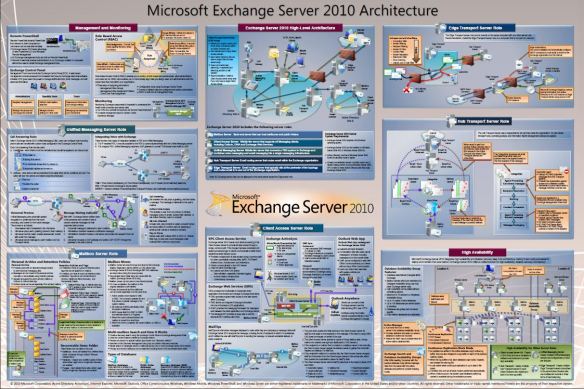

Exchange Server 2010 Architecture poster


Finally, the long awaited Exchange Server 2010 Architecture Poster is here!

This is similar to the Exchange 2007 Component Architecture poster and contains the architecture highlights and feature set of Microsoft Exchange Server 2010. This architecture poster is additional to the already published Microsoft Exchange Server 2010 Transport Server Role Architecture Diagrams which you could already get here.

You can download the Microsoft Exchange Server 2010 Architecture poster here.

ForeFront TMG SP1 Update 1 for Exchange 2010 SP1


The ForeFront team released Update 1 for Microsoft Forefront Threat Management Gateway (TMG) 2010 Service Pack 1.

Besides bug fixes and some added functionality, Update 1 also adds support for Exchange 2010 SP1. Because Exchange 2010 SP1 doesn’t support the get-antispamupdates cmdlet (see this post), implementing Exchange 2010 SP1 on servers in the Mail protection role (with Exchange – Edge server role – as well as ForeFront Protection for Exchange) leads to issues.

Update 1 fixes this issue. To make things confusing, the ForeFront team calls these cumulative updates Software Update or Update; what’s wrong Rollup? Be advised that the ForeFront Update page doesn’t mention the Update (yet), nor is the related knowledge base article published (kb2288910).

You can download ForeFront TMG SP1 Update 1 here. Note that currently only English is available, other languages are said to be made available soon.

Forefront Security for Exchange SP2 RU2


For people running ForeFront Security for Exchange SP2, Rollup 2 was released.

The related knowledgebase article kb2270641 mentions the following additional fixes:

  1. The FSCTransportScanner.exe process in Forefront Server Security for Exchange may stop responding, and this generates a Dr. Watson crash that references Bucket ID 1211603866
  2. The FSECCRService.exe process in Forefront Server Security for Exchange may stop responding, and this generates a Dr. Watson crash that references Bucket ID 1076269539
  3. Forefront Server Security for Exchange fails to write a crypto checkpoint in the RSA\Machine Keys folder
  4. The FSCController.exe process in Forefront Server Security for Exchange may stop responding, and this generates a Dr. Watson crash that references Bucket ID 1229588505
  5. The Forefront Security for Exchange GetEngineFile process crashes and Forefront is unable to perform a scan engine update
  6. Kaspersky scan engine in Forefront Security for Exchange does not update on a CCR cluster
  7. Forefront Security for Exchange does not install on Windows Server 2008 R2
  8. Forefront Security for Exchange now supports the Kaspersky 8 engine

For more details, consult the KB article. You can download FSE SP2 RU2 after submitting a hotfix request here.

Microsoft Forefront Protection 2010 for Exchange Rollup 1


Microsoft released Hotfix Rollup 1 for Forefront Protection 2010 for Exchange Server (KB2181692).

Here’s the list of fixes included in this rollup:

  1. There is a handle leak in FSCController when SQM is uploading data in Microsoft Forefront Protection for Exchange
  2. A Forefront Protection for Exchange scan engine update fails and generates Application Log errors
  3. Forefront Protection for Exchange replacing legitimate attachments with text files and quarantining legitimate mail
  4. Proxy credentials and UNC path settings for Forefront Protection for Exchange do not replicate to passive node during cluster failover
  5. Forefront Protection for Exchange is blocking all incoming mail
  6. A system state backup fails while attempting to perform anything other than a full backup on a server running Forefront Protection for Exchange
  7. Forefront Protection for Exchange filters email with attached .MSG files that contain a subject line ending with a file extension
  8. The Forefront Protection for Exchange client crashes when adding an IP address, or range, to either the IP Allow/Block List
  9. Forefront Protection for Exchange sends legitimate email to Exchange’s UNDELIVERABLE folder
  10. Store slows down and RPC request queue length rises when Forefront Protection for Exchange is running on Windows 2003 64-bit server
  11. FSCUtility fails if run on a non clustered server that the cluster service is installed but disabled on
  12. FPE detecting valid .xls or.csv file as Exceedingly nested
  13. Forefront Protection for Exchange does not send External Sender notifications
  14. The FSCManualScanner.exe process in Forefront Protection for Exchange terminates unexpectedly
  15. The FSECCRService.exe process in Forefront Protection for Exchange may stop responding generating a Dr. Watson crash that references Bucket ID 107626953990176: Customer experiences OOXML performance issues when scanning
  16. Customer experiences OOXML performance issues when scanning
  17. Dr. Watson reports a null reference exception in Microsoft.FSS.AntiSpam.dll (from Forefront Protection for Exchange); Bucket ID [838554094]
  18. Spam Reports may take an excessive amount of time to retrieve in Forefront Protection for Exchange
  19. A scan job in Forefront Protection for Exchange will not restart after hitting the MaxDisableWait time timeout threshold
  20. Forefront Protection for Exchange allows mail to go through unscanned if the MaxDisbaledWait time threshold is exceeded
  21. Forefront Protection for Exchange generates more Realtime Scan Timeout notifications than expected
  22. Sluggish or stopped mail flow resulting from the FSCTransportScanner process, within Forefront Protection for Exchange, crashing while scanning files with embedded object links.
  23. Forefront Protection for Exchange does not have a Skip/Detect action option for the MaxContainerScanTime action menu

For more details on the fixes consult the related knowledge base article (2181692). You can download the Forefront Protection 2010 for Exchange Server Hotfix Rollup 1 here.