Unknown's avatar

About Michel de Rooij

Michel de Rooij, with over 25 years of mixed consulting and automation experience with Exchange and related technologies, is a consultant for Rapid Circle. He assists organizations in their journey to and using Microsoft 365, primarily focusing on Exchange and associated technologies and automating processes using PowerShell or Graph. Michel's authorship of several Exchange books and role in the Office 365 for IT Pros author team are a testament to his knowledge. Besides writing for Practical365.com, he maintains a blog on eightwone.com with supporting scripts on GitHub. Michel has been a Microsoft MVP since 2013.

Exchange 2007 SP3 Rollup 2 & SP2 RU5


Today the Exchange Team released Rollup 2 for Exchange Server 2007 Service Pack 3 (KB2407025). This update raises Exchange 2007 version number to 8.3.137.3.

Here’s the impressive list of changes included in this rollup:

  • 972186 Some functions do not work if you install Security Configuration Wizard on a Windows Server 2008 SP2-based Exchange Server 2007
  • 979046 Attachments are empty when you save them by using OWA after you have applied the update of KB 958881 on an Exchange Server 2007
  • 980038 The Microsoft Exchange System Attendant service crashes intermittently in the Oabgen.dll module on an Exchange Server 2007 server
  • 981602 Event ID: 4999 is frequently generated in a mixed Exchange Server 2007 and Exchange Server 2003 environment
  • 982476 The Imap4.exe process crashes intermittently on an Exchange Server 2007 server
  • 982478 Notes URL links in a plain text message are not clickable when you open this message by using OWA in an Exchange Server 2007 environment
  • 2028675 The MSExchangeFDS.exe process occupies lots of memory if there are thousands of OABs created on an Exchange Server 2007 server
  • 2029086 Some characters of an email message are displayed in an incorrect text size when you access your mailbox by using OWA in Exchange Server 2007
  • 2032216 The Microsoft Exchange Information Store service crashes on an Exchange Server 2007 server when you start it or try to mount certain databases
  • 2121536 Exchange Server 2007 cannot index a message
    2201236 The “All Day” field is marked with “No” when you access a meeting request that has a duration time that is more than 24 hours by using a mobile client through ActiveSync in an Exchange Server 2007 environment
  • 2203212 Certain mailboxes cannot be moved from an Exchange Server 2007 server to an Exchange Server 2010 server
  • 2210042 A sub contact folder is still visible after you set the “PR_ATTR_HIDDEN” attribute to “True” in an Exchange Server 2007 environment
  • 2230824 The Microsoft.Exchange.POP3.exe process or the Microsoft.Exchange.Imap4.exe process may crash after you enable protocol logging for POP3 or IMAP4 on an Exchange Server 2007 server
  • 2249814 You receive misleading information when you run the “New-TestCasConnectivityUser.ps1” script on an Exchange Server 2007 server
  • 2263342 “The operation failed” error message in Outlook client when a user sends a recurring meeting request with an email message attachment in an Exchange Server 2007 SP2 environment
  • 2276439 The Microsoft.Exchange.IMAP4.exe process crashes when an IMAP4 client retrieves a meeting request that includes exception attachments in an Exchange Server 2007 environment
  • 2280234 “Your POP3 server has not responded in 60 seconds.” error message when a POP3 client connects to an Exchange Server 2007 Client Access server to access an Exchange Server 2003 mailbox
  • 2282570 “550 5.1.3” NDR message when an Exchange Server 2007 user sends an email message to a recipient
  • 2265306 The Exchange Information Store service stops responding when you perform a search operation on an Exchange Server 2007 mailbox in Outlook
  • 2282746 The “Private” sensitivity status of an occurrence of a recurring meeting request is lost when you edit the occurrence in OWA in an Exchange Server 2007 environment
  • 2286782 The response details are still included in the response email message when you set the “EnableResponseDetails” property to “False” in an Exchange Server 2007 environment
  • 2290105 A shared document cannot be open by using OWA after you install Exchange Server 2007 SP3 on an Exchange Server 2007 server
  • 2290159 The POP3 service crashes on an Exchange Server 2007 server
  • 2344372 You cannot move mailboxes to an Exchange Server 2007 server
  • 2362371 You receive a “Success” response when using the Test-Mailflow command on an invalid or nonexistent external email address in an Exchange Server 2007 environment
  • 2384754 “Unable to identify local server row in Replication state table for this FID” error message when you run the Information Store Integrity Checker tool on an Exchange Server 2007 server
  • 2387915 The ESEBack component does not support ETL tracing on an Exchange Server 2007 server
  • 2388057 The Exchange Transport service crashes on Exchange Server 2007 servers in a mixed Exchange Server 2007 and Exchange Server 2010 environment
  • 2394731 An HTML attachment of a shared mailbox cannot be saved when you set the “BypassOwaHTMLAttachmentFiltering” setting to “True” in an Exchange Server 2007 environment
  • 2424499 Exchange Server 2007 does not support to assign a mailbox with the “Send on behalf” permission of a security group in the EMC or in the EMS
  • 2427297 The created time and the modified time of an attachment are incorrect when you save an email message on an Exchange Server 2007 mailbox
  • 2430674 The “Leave message intact” method in a Folder Assistant rule does not work when you post an item by using OWA in an Exchange Server 2007 environment

In addition, the team also released Exchange 2007 SP2 Rollup 5 (KB2407132), which is a security fix only. The Exchange 2010 RTM RU5 update raises Exchange 2010 version number to 8.2.305.3.

When running ForeFront Protection for Exchange, make sure you disable ForeFront before installing the rollup and re-enabling it afterwards, otherwise the Information Store and Transport services may not start. You can disable ForeFront using fscutility /disable and enable it by using fscutility /enable afterwards.

For those still unaware, update rollups are cumulative, i.e. they contain fixes released in earlier update rollups for the same product level (RTM, SPx). This means you don’t need to install previous update rollups during a fresh installation but can start with the latest rollup published right away.

You can download Exchange 2007 SP3 Rollup 2 here; Exchange 2007 SP2 Rollup 5 can be downloaded here.
Outlook Web App Web Parts in Exchange 2010 SP1


After the introduction of Exchange 2010 RTM, many developers –especially on Sharepoint – complained that Microsoft had dropped Web Parts support. Web Parts are small pieces of (Exchange) content which you can incorporate in your own (Sharepoint) application or personalized web page using customized URLs. The source of this content can the mailbox of the authenticated user or other mailboxes to which that user has sufficient permissions.

For example, in Exchange 2007 you can access a web part showing your weekly Exchange calendar using the following URL:

https://ex2007/owa/?cmd=contents&module=calendar&view=weekly

Now in Exchange 2010 RTM this didn’t work anymore. Luckily, with SP1 Web Parts were reinstated. Calling a Web Part through an URL always starts with https://<FQDN>/owa, followed by one or more of the following parameters:

  • SMTP address – This overrides the mailbox to open by specifying the SMTP address associated with the mailbox you want to access, e.g. fblake@lab.local. This parameter always needs to be specified first as part of the location, i.e. it’s not a parameter;
  • cmd – Must be used present when not specifying a specific mailbox and it’s assigned value should be “contents”. This parameter makes sure the Web Part is shown and not the full OWA interface;
  • id (optional) – opens a specific folder by specifying its PR_ENTRY_ID value;
  • fpath (optional) – specifies mailbox folder to display starting from the root folder, e.g. projects/2010. Note that when you specify Inbox you might encounter issues because of user’s localization settings, i.e. “Postvak IN” (Dutch) instead of Inbox;
  • module (optional) – specifies one of the standard folders to open, preventing localization issues. Possible values are Inbox, Calendar, Contacts, Tasks or Publicfolders;
  • view (optional) – Configure the view depending on the folder. For example, for calendar you can specify monthly, weekly or daily; for Inbox view you can specify a few sort options.
  • d, m, y (optional) – Allows you to specify a date for the calendar view;
  • part (optional) – When specifying part=1, the Web Part will be shown using reduced UI to make it more compact.

Note that when constructing the URL you need to comply with URL encoding rules, so replace a space with %20 and a slash with %2f for example. More information on this subject here. Also, use “?” before the first parameter and “&” between any additional parameters.

Some examples:

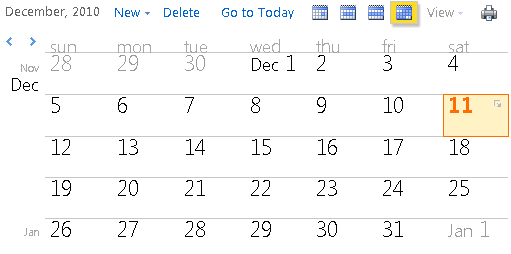
Open a monthly view of our calendar:
https://<FQDN>/owa/?cmd=contents&module=calendar&view=monthly

image

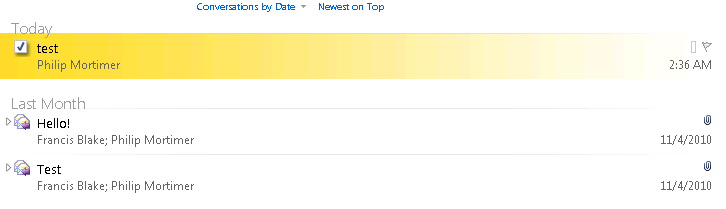
Open our Inbox:
https://<FQDN>/owa/?cmd=contents&module=inbox

image

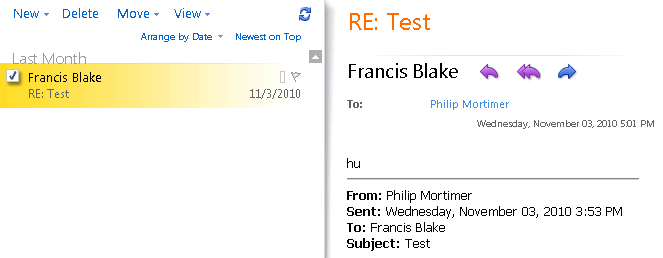
Open our inbox with a reduced UI (to fit it in smaller spaces):
https://<FQDN>/owa/?cmd=contents&module=inbox&part=1

image

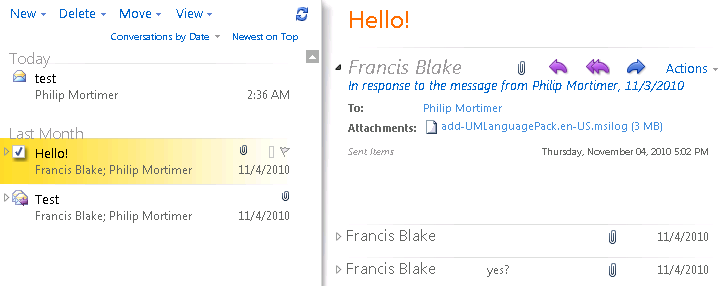
Access the Projects folder located in the root of another mailbox:
https://<FQDN>/owa/pmortimer@lab.local/?cmd=contents&fpath=projects

image

For those unfamiliar with this Web Part functionality, be sure to check it out as it allows you to easily integrate Exchange information in your application or website. More detailed information on using Outlook Web App Web Parts check here. For those running Exchange 2007, this information is located here (there are some minor differences).

Enterprise Vault 9.0.1 released


A quick note on the official release of Symantec’s Enterprise Vault 9.0.1 (service pack 1 for Enterprise Vault 9.0), which introduces Outlook 2010 support. You can check out the release notes here.

The announcement with links to related documents can be found here. You can download the software from Symantec File Connect.

Forefront Protection 2010 for Exchange Rollup 2


Microsoft released Hotfix Rollup 2 for Forefront Protection 2010 for Exchange Server (KB2420647).

Here’s the list of fixes included in this rollup:

  1. Out of memory state occurs when running a manual scan in Forefront Protection for Exchange
  2. The link provided by Forefront Protection for Exchange to request removal from the SpamHaus block list wrong
  3. Forefront Protection for Exchange does not display data in multiple console fields and mail cannot be sent externally
  4. When starting a Windows Server 2008 R2 server running Exchange and Forefront Protection for Exchange, startup times are exceptionally long
  5. Forefront Protection for Exchange falsely detects legitimate attachments as Corrupted Compressed files
  6. File filtering does not occur in Forefront Protection for Exchange
  7. A Forefront Protection for Exchange antivirus engine fails to load and mail is deleted
  8. Forefront Protection for Exchange quarantines a blank message when taking action on a subject line filter
  9. When installing FPE on Data Availability Group cluster (DAG), Domain Administrator privileges are required
  10. Messages cannot be scanned because the FSCController service in Forefront Protection for Exchange is stuck in a continuous loop
  11. “The Expiration Date is not valid” is returned when you try to enter a new expiration date in Forefront Protection for Exchange
  12. The Forefront Protection for Exchange Administrator console hangs for several minutes when you navigate to the Filter Lists section
  13. Cannot uninstall Forefront Protection for Exchange on a non-clustered server
  14. Transport Scan process is not safely aborted after an out-of-memory condition occurs
  15. The FSCTransportScanner.exe process in Forefront Protection for Exchange may stop responding, and this generates a Dr. Watson crash that references Bucket ID 1211603866
  16. Filter Lists display an incorrect scan action in the Forefront Protection for Exchange Administrator console
  17. FSCController.exe is reloaded many times whenever the Start-SignatureUpdate cmdlet is run on a cluster running Forefront Protection for Exchange
  18. Submission queues in Exchange 2007 or 2010 fill when making a configuration change in the Forefront through the administrator or through Power Shell

For more details on the fixes consult the related knowledge base article (KB2420647). You can download the Forefront Protection 2010 for Exchange Server Hotfix Rollup 2 here.

Bulk configuring & enabling OCS users


Not Exchange related, but something I’d like to share with you is a script to bulk configure and enable users for OCS with enterprise voice. In the process, the telephone numbers are also changed, since often the customer is moving to a new range of numbers as well.

The information was provided by the customer in an Excel sheet, which I exported to a CSV file. Since the script was to be run on an Windows Server 2003 box, I opted for a simple VB script, which you can find below.

A short explanation:

  • When the telephone number has a value, the user is configured for enterprise voice (intOptionFlags 896). If the telephone number is empty, the user is configured for IM and presence (intOptionFlags 256);
  • You can expand the sheet (CSV) with extra columns. When you need to create colums before the current ones, don’t forget to modify the index of the arrFields() references accordingly;
  • Change the OCSHomeServer to the proper pool value;
  • Change the OCSLocationProfile to the proper value;
  • Change the OCSPhoneContext to the proper value;
  • If you want to see what it will do first, set TestMode to True;
  • Use it in a lab environment first; test, test, test!

Note: If you have problems finding out the value of the OCSHomeServer, OCSLocationProfile or OCSPhoneContext settings, configure one user with the proper settings using ADUC, and inspect the values of those settings by using ADSIEdit or LDP.

users.csv

name;samaccountname;telephonenumber
Francis Blake;francis.blake;+31 (0) 30 123 45 11
Philip Mortimer;philip.mortimer;+31 (0) 30 123 45 22

OCSEnableUsers.vbs

'*--------------------------------------------------------------------------------
'* Name         : OCSEnableUsers
'* Created By   : Michel de Rooij
'* E-mail       : michel@eightwone.com
'* Date         : 20101118
'* Version      : 0.1
'*--------------------------------------------------------------------------------
'* Changes:
'* 0.1 Initial version
'*--------------------------------------------------------------------------------

On Error Resume Next

dim oConn, strQry, rs, objUser, strVal, objFSO, objFile, strLine, arrFields, i, line
dim strSAM, strTel
dim strServerURI, strLineURI, strSIP, strExtension, intOptionFlags

Const ADS_PROPERTY_APPEND = 3

Const OCSHomeServer     = "CN=LC Services,CN=Microsoft,CN=OCSPOOL1,CN=Pools,CN=RTC Service,CN=Services,CN=Configuration,DC=contoso,DC=com"
Const OCSLocationProfile= "CN={820ADF85-B64C-4F32-92F0-E4AA37267677},CN=Location Profiles,CN=RTC Service,CN=Services,CN=Configuration,DC=contoso,DC=com"
Const OCSPhoneContext   = "L0CDP.L1UDP@OCS2.contoso.com"

Const TestMode        = False

set oConn= createObject("Adodb.Connection")
oConn.provider = "AdsDSOObject"
oConn.open "ADs Provider"

set objFSO= createObject("Scripting.FileSystemObject")
set objFile= objFSO.OpenTextFile("users.csv", 1, True)

wscript.echo "RUNNING IN TESTMODE IS "& TestMode

line= 1
while not objFile.AtEndOfStream
 strLine= trim(objFile.readline)
 if Line> 1 Then
 arrFields= split(strLine, ";")
 strSAM= arrFields(1)
 strTel= normalizePhone( arrFields(2))
 strTelNew= replace( replace( arrFields(3), "(0)", ""), "  ", " ")

 wscript.echo strSAM&" "& strTel
 strQry= "<LDAP://dc=contoso,dc=com>;(samAccountName="& strSAM& ");adspath;subtree"
 set rs= oConn.execute( strQry)
 if rs.recordCount > 0 Then
 while not rs.EOF
 set objUser= getObject( rs.fields(0).value)
 wscript.echo "User found: "& objUser.distinguishedName
 wscript.echo "Previous Phone No: "& objUser.TelephoneNumber

 strSIP= "sip:"& objUser.mail
 strExtension= right( strTel, 3)
 strLineURI= "tel:"& strTel& ";ext="& strExtension
 strServerURI= "sip:"& strExtension& ";phone-context="& OCSPhoneContext

 If strTel= "" Then
 intOptionFlags= 256
 Else
 setAttr objUser, "msRTCSIP-Line", strLineURI
 setAttr objUser, "msRTCSIP-LineServer", strServerURI
 intOptionFlags= 896
 End If

' Set AD fields
 setAttr objUser, "telephoneNumber", strTelNew

 ' Set OCS props
 setAttr objUser, "msRTCSIP-UserEnabled", True
 setAttr objUser, "msRTCSIP-PrimaryHomeServer", OCSHomeServer
 setAttr objUser, "msRTCSIP-PrimaryUserAddress", strSIP
 setAttr objUser, "msRTCSIP-UserLocationProfile", OCSLocationProfile
 setAttr objUser, "msRTCSIP-OptionFlags", intOptionFlags

 addAttr objUser, "proxyAddresses", strSIP

 If Not TestMode Then
 objUser.SetInfo
 End If

 rs.moveNext

 wend
 Else
 wscript.echo "*** WARN: User not found in AD: "& strSAM
 End If

 Else
 ' Skip header
 End If
 line= line+ 1
wend 

objFile.close
set objFSO= Nothing

Function setAttr( objUser, strAttr, strVal)
 wscript.echo "Setting "& strAttr& " to "& strVal
 If TestMode Then
 ' ...
 Else
 objUser.put strAttr, strVal
 End If
End Function

Function addAttr( objUser, strAttr, strVal)
 wscript.echo "Adding "& strVal& " to "& strAttr
 If TestMode Then
 ' ...
 Else
 objUser.PutEx ADS_PROPERTY_APPEND, strAttr, array(strVal)
 End If
End Function

Function NormalizePhone( Tel)
 NormalizePhone= replace( replace( tel, " ", ""), "(0)", "")
End Function