Unknown's avatar

About Michel de Rooij

Michel de Rooij, with over 25 years of mixed consulting and automation experience with Exchange and related technologies, is a consultant for Rapid Circle. He assists organizations in their journey to and using Microsoft 365, primarily focusing on Exchange and associated technologies and automating processes using PowerShell or Graph. Michel's authorship of several Exchange books and role in the Office 365 for IT Pros author team are a testament to his knowledge. Besides writing for Practical365.com, he maintains a blog on eightwone.com with supporting scripts on GitHub. Michel has been a Microsoft MVP since 2013.

Exchange Updates – October 2018


Ex2013 LogoThe Exchange Team released the October update for Exchange Server 2016. You may notice the absence of Exchange 2013, which is now in extended support phase and thus won’t receive regular updates. This heads-up was also given together with the updates of June.

Version Build KB Download UMLP Schema?
Exchange 2016 CU11 15.1.1591.10 KB4134118 Download UMLP No

This update contain the following important changes and notes:

  • Exchange 2016 CU11 – as well as Exchange 2013 CU21 – are supported with .NET Framework 4.7.2; at least .NET Framework 4.7.1 is required for both.
  • Exchange 2016 CU13 (the June 2019 release, December will be skipped) will start requiring .NET Framework 4.7.2, similar to the release of Exchange 2019; Windows Server 2019 will contain .NET Framework 4.7.2.
  • Exchange 2016 requires installation of VC++ 2012 runtime prior to installation. Additionally, when installing the Mailbox role, VC++ 2013 runtime needs to be installed as well.

Exchange 2016 CU11 fixes:

  • 4076516 Email message body is garbled when the Russian version of Outlook is used in Exchange Server 2016
  • 4095967 CultureNotFoundException when you select an LCID 4096 language in Exchange Server 2016
  • 4456225 The image in a signature that’s created in Outlook on the web isn’t visible to external users in Exchange Server 2016
  • 4456226 Require SSL setting of MAPI virtual directory is reset after you install a cumulative update of Exchange Server 2016
  • 4456227 ActiveSync clients cannot connect or synchronizing is delayed in an Exchange Server environment
  • 4456228 Add an option to control UseAscReqNoToken through app configuration for Exchange Server 2016
  • 4456229 Irrelevant management role entries without parameters are displayed in Exchange Server 2016
  • 4456230 Component/protocol level bypass option for InternetWebProxy to avoid unnecessary proxy traffic within internal networks
  • 4456231 AdvancedDataGovernanceLogs is created on the D drive after deploying Exchange Server 2016
  • 4456232 Outlook on the web enters an authentication loop when you use device registration in Exchange Server 2016
  • 4456234 Email can’t be delivered when the subject has an unknown character set in Exchange Server 2016
  • 4456240 “CrimsonProbe has been poisoned repeatedly” error when migrating mailboxes to Exchange Server 2016
  • 4456243 Hashed lines shown in scheduling assistant when Exchange Server 2016 tries to retrieve free/busy information across untrusted forests
  • 4456244 Public folder forwards the new item that you create in Exchange Server 2016
  • 4456245 Event ID 4999 and NullReferenceException when the New-MailboxRestoreRequest and New-MailboxExportRequest cmdlets fail in Exchange Server 2016
  • 4456247 StoreDriver.config validation fails then meeting reminder can’t be set to “None” in Exchange Server 2016
  • 4456249 Message tracking logs can’t be fully indexed in Exchange Server 2016
  • 4456250 Users can download and view attachments that exceed the maximum attachment size setting in mobile device mailbox policy in Exchange Server 2016
  • 4456259 Exchange Server 2016 user can’t access a shared calendar from Exchange Server 2013
  • 4456233 UAPStatisticsLog and RecordReview are created on the D drive after you deploy Exchange Server 2016
  • 4459847 Can’t send S/MIME encrypted mail or update the S/MIME control from Outlook on the web in Exchange Server 2016

Notes:

  • Exchange 2016 CU11 does not contain schema changes compared to their previous Cumulative Update. However, they may introduce RBAC changes in your environment. Use setup /PrepareAD to apply RBAC changes, before deploying or updating Exchange servers.
  • When upgrading from an n-2 or earlier version of Exchange, or an early version of the .NET Framework, consult Upgrade Paths for CU’s & .NET.
  • Don’t forget to put the Exchange server in maintenance mode prior to updating. Regardless, setup will put the server in server-wide offline mode post-analysis, before making actual changes.
  • When using Exchange hybrid deployments or Exchange Online Archiving (EOA), you are required to stay at most one version behind (n-1).
  • If you want to speed up the update process for systems without internet access, you can follow the procedure described here to disable publisher’s certificate revocation checking.
  • Cumulative Updates can be installed directly; no need to install RTM prior to installing Cumulative Updates.
  • Once installed, you can’t uninstall a Cumulative Update nor any of the installed Exchange server roles.
  • The order in which you upgrade servers with Cumulative Updates is irrelevant.

Caution:

As for any update, I recommend to thoroughly test updates in a test environment prior to implementing them in production. When you lack such facilities, hold out a few days and monitor the comments on the original publication or forums for any issues.

Hybrid Configuration Wizard & F12


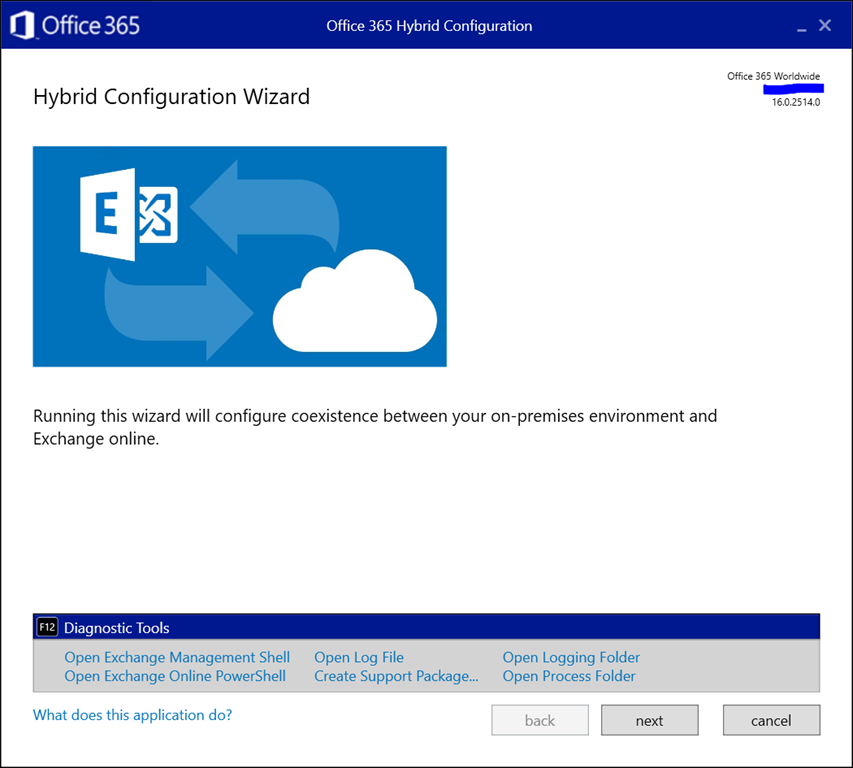
A small tip for those running the Exchange Hybrid Configuration Wizard. As announced at Ignite yesterday, a convenient feature was added to the HCW and is available now. Pressing F12 in the HCW will now open up a panel with shortcuts to the following tools and locations:

  • Exchange Management Shell
  • Exchange Online PowerShell
  • (current) Hybrid Configuration Wizard Log File
  • Create Support Package (to zip HCW logs for support)
  • Open Logging folder (of HCW)
  • Open Process Folder (of the HCW app)

Here is how it looks:

image

This might save you an occasional click or two.

Exchange Announcements @ Ignite


Ex2013 LogoUpdate Sep27th: Added Outlook 2013 to list of supported clients.

During Ignite 2018, details are announced to the public on Exchange Server 2019, Exchange Online, as well as Office 365 and related technologies. In this article I’ll try to summarize all the details in a readable format for your reference. The list is probably inconclusive; if you think anything is missing, let me know to I can update the article.

Exchange Server 2019

  • Distributed through Volume licensing only
    • Implication is that there will be no “Hybrid Server Key”
  • Release planned for later this year
  • Windows Server 2019 required
    • Windows Server Core recommended (security, smaller attack surface and disk footprint)
    • Exchange supports in-place upgrading of underlying operating system per Windows Server 2019.
  • Support for co-existence with n-2
    • Exchange Server 2016 and Exchange Server 2013.
    • Outlook 2013-Outlook 2019, Outlook 2016/Max and Outlook for Mac for Office 365.
  • Forest Functionality Level 2012R2 or later
  • Support for up to 48 CPU cores (Exchange 2016: 24)
  • Recommended minimum memory for Mailbox server 128GB, and 64GB for Edge Transport. Maximum memory is 256GB (Exchange 2016: 192GB). The reason for 128GB recommendation is that the .NET scaling benefits (see below) only work from around 100GB and up.
  • Page file 25% of installed memory (Exchange 2016: Maximized at 32GB).
  • .NET Framework 4.7.2, Visual C++ Redistributable and UCMA (Mailbox only)
  • Uses Server GC instead of Workstation GC for some IIS application pools. Better .NET memory management and improves CPU/memory scaling.
  • Will only use TLS 1.2 (there’s a transition mode supporting lower TLS versions, but for that all existing Exchange versions need to support 1.2 as well)
  • No more UM, options:
    • Move all users and mailboxes to Office 365
    • Migrate to Skype for Business Server 2019
    • Remain on Exchange 2016 (EOL 2026)
    • 3rd party VoiceMail solution
  • MetaCache Database uses storage tiering
    • Leverages SSD’s
    • Use SSD to spinning disk ratio 1:3
    • Caches indexes, mailbox folder structures and small items
    • Improves UX: faster logons, searches and small items retrieval
    • Allows for higher mailbox density per server (+20%
    • Utilize larger disks
  • Client Access Rules
    • Restrict external access to EAC and PowerShell
    • Evaluated at server level, so external connections need to hit Exchange 2019.
  • Additional perks for administration and end users
    • Remove-CalendarEvents to remove meetings from a person (e.g. leaver)
    • Recurring meetings will receive a default end date
    • Meetings can be restricted to prevent forwarding
    • Setting Out of Office in OWA allows for blocking calendar for that period, as well as decline current meetings and future meeting invites during that period.
  • Calculator and additional guidance on its way
  • On the Roadmap
    • On-premises Modern Authentication
    • Extending Client Access Rules to other protocols
    • Mailbox Encryption using Customer Keys
    • Monitoring and Analytics tools
    • Blocking legacy authentication methods
    • Removal of RPC/HTTP support (Outlook Anywhere)
    • Simplified Calendar Sharing

The Exchange Server 2019 documentation went live here. Some additional details were included in this list.

On another note: Greg Taylor gave an interview to Phoummala Schmitt (aka @ExchangeGodess) for Channel 9 on Exchange 2019. That replay can be watched here. Also, Scott Schnoll and JeffMealiffe as well as Greg Taylor and Ross Smith were interviewed by TheCube; those recordings can be watched here and here respectively.

Exchange Hybrid

  • Organization Configuration Transfer (OCT) version 2
    • Planned for October 2018
    • Adds the following to OCT v1 (current)
      • ActiveSync Device Access Rules
      • ActiveSync Organization Settings
      • Address Lists
      • DLP Policies
      • Malware Filter Policies
      • Policy Tips
      • Organization Config
    • Introduces conflict handling with review mode
    • Generates a script to undo changes
  • Exchange Hybrid deployment
    • Microsoft Hybrid Agent
    • Installed using HCW (‘Modern Hybrid’); ‘Classic Hybrid’ still an option
    • Hybrid Agent leverages Azure Application Proxy technology
      • Hybrid Proxy Service in the service will proxy requests between Exchange Online and Exchange on-premises.
      • No changes required to URLs or certificates
      • Hybrid Agent uses outbound connection only (port 80/443) to obfuscated unique URL (https://{GUID}.resource.{flow}.his.msappproxy.net. This URL is configured as TargetSharingEpr on the OrganizationalRelationship in Office 365
      • Running multiple agents is supported for availability and scaling
      • Outbound connections means less arrangements to make on (inbound) firewall rules (but another agent, like PTA, ADConnect Health Agent, regular Azure Application Proxy, to bypass security blockades may introduce other concerns)
    • Version 1 will support Free/Busy and MRSProxy and is in Private Preview now

The Exchange team published a quick blog on OCT and Hybrid Agent here.

Exchange Sessions @ Ignite 2018


ignite2018Among all the announcements of upcoming products and changes in the service, more details will also be revealed of Exchange Server 2019 and related products at Ignite next week. To those who are not able to attend, like yours truly: do not despair as Microsoft will be live streaming all keynote, breakout and community theater sessions.

The place to view those streams is through the Tech Community portal, and likely the session info pages will be used to embed the streams or provide links as they become available.

For this purpose, I made a short list of Exchange Server related sessions scheduled at Ignite 2018 for reference and easy access next week:

Session When Title Speakers
THR3024 9/24 3:00PM How to add MFA to your Exchange Online/on-premises mailboxes in 20 minutes or less Jeff Guillet
BRK2176 9/24 16:00 PM Welcome to Exchange Server 2019! Greg Taylor, Brent Alinger
BRK3148 9/25 10:45 AM Securing Exchange Online from modern threats Brandon Koeller
BRK3375 9/25 2:15 PM Notes from the field: How a large global bank moved to Office 365 Erik Knoppert, Michael Van Horenbeeck
BRK2165 9/25 3:15 PM What’s new in Groups in Outlook Ravin Sachdeva, Sri Ramya Mallipudi
THR3123 9/25 4:00 PM Getting stuff done: Solving Office 365 problems with PowerShell Tony Redmond
BRK3128 9/25 4:00 PM Outlook on the web: What’s new and why you should care Joey Masterson, Charlie Chung, Gabriel Valdez Malpartida, Cindy Kwan
THR3076 9/25 11:05 PM Azure Information Protection and Exchange Online – better together Michael Van Horenbeeck
BRK3129 9/26 9:00 AM Turbo charge your Exchange on-premises and hybrid environment: Notes from the field Steve Goodman
BRK3143 9/26 10:00 AM Hybrid Exchange: Making it easier and faster to move to the cloud Jeff Kizner
THR2129 9/26 11:20 AM Office 365: Five important lessons learned during a one million mailbox migration J. Peter Bruzzese
BRK2177 9/26 12:00 PM Outlook mobile for the enterprise Tali Roth, Michael Palermiti, David Pearson
THR3025 9/26 15:00 PM Preparing to move (or remove) those public folders to the cloud Michael Van Horenbeeck
BRK3130 9/26 16:00 PM Email search in a flash! Accelerating Exchange 2019 with SSDs Tobias Klima, Damon Gilkerson
BRK3146 9/27 9:00 AM What’s amazing and new in calendaring in Outlook! Julia Foran, Jennifer Lu, Will Holmes
BRK3145 9/27 10:00 AM Deploying Outlook mobile securely in the enterprise Ross Smith IV
THR2044 9/27 10:45 AM The top six PowerShell commands you need to know to manage Office 365 Steve Goodman
THR2392 9/27 11:00 AM Executive impersonators & fraudsters be gone! Using active defense & predictive artificial intelligence to secure your Office 365 email environment Vidur Apparao
BRK3131 9/27 12:45 PM Office 365: Marriages, divorces, and adoptions Steve Goodman
BRK3258 9/27 2:00 PM Panel discussion: Microsoft Exchange/Calendar/OWA Damon Gilkerson, Brent Alinger, Julia Foran, Jeff Kizner, Brandon Koeller, Joey Masterson, Brian Day, Robin Thomas
THR3024R 9/27 15:00 PM How to add MFA to your Exchange on-premises or Exchange Online mailboxes in 20 minutes or less (REPEAT) Jeff Guillet
THR2145 9/27 16:00 PM Why do we need to keep an Exchange Server on-premises when we move to the cloud? Brian Reid
BRK3279 9/28 9:00AM So long and thanks for all the (email) phish Brian Reid
BRK3147 9/28 12:00 PM Scott Schnoll’s Exchange and Office 365 tips and tricks Scott Schnoll

Note that the table above was constructed using the Get-EventSession script. That script has been updated recently so it can also download on-demand sessions when downloadable video contents aren’t available (e.g. Inspire). I’ll be closely monitoring next week to check if the script can cope with the way Ignite contents will be published.

Support Lifecycle changes for Office ProPlus & 2016 (a.o.)


Outlook 2013 IconIn a surprise – but welcomed – move, Microsoft announced yesterday that the office support lifecycle for Office 365 ProPlus on Windows 8.1 and Windows Server 2016 are extended to January 2023 (EOL of Windows 8.1) and October 2025 respectively. In addition, Office 2016 connectivity support for Office 365 services will be extended to October 2023 (was 2020).

Other announced changes in product support lifecycles were extending Windows 10 Enterprise & Education support from 18 to 30 months. Also, for Windows 7 Professional & Enterprise, paid security updates (Extended Security Updates) will be offered, and those Windows 7 ESU devices will be supported through January 2023 – parallel to Windows 8.1 – with Office 365 ProPlus.

The intention of these changes is to provide customers more flexibility in adopting modern desktops on the client end (i.e. Windows 10) and upgrade their Office suite, preferably to the susbscription-based ProPlus. The release cadence of the cloud has significant impact on organizations, which were told in February to keep in line with product releases as a lot of product support lifecycles were going to end in 2020.

Extending those dates not only gives them more flexibility to plan and upgrade, but also might prevent organizations to do only to the minimum, which is likely the reason many organizations are still on Windows 7 and why it took many organizations a long time to get rid of Windows XP.