Michel de Rooij, with over 25 years of mixed consulting and automation experience with Exchange and related technologies, is a consultant for Rapid Circle. He assists organizations in their journey to and using Microsoft 365, primarily focusing on Exchange and associated technologies and automating processes using PowerShell or Graph. Michel's authorship of several Exchange books and role in the Office 365 for IT Pros author team are a testament to his knowledge. Besides writing for Practical365.com, he maintains a blog on eightwone.com with supporting scripts on GitHub. Michel has been a Microsoft MVP since 2013.
If you are looking for a way to automate and simplify your Microsoft 365 administration tasks, PowerShell is a great option. However, PowerShell scripting is not without its challenges. Not proactively maintaining code can quickly become an issue because of the changes made to dependencies such as modules, as well as the cmdlets you use.
In an article I wrote for Practical 365, related to the presentation of the same name held at the The Experts Conference 2023 in Atlanta this year, I discuss some of the challenges administrators might encounter with PowerShell scripts. Also, I provide some guidance and point out a few tools that can assist with rewriting or refactoring code, i.e., updating code while keeping its external functionality.
The recommendation for the August updates was to disable the TokenCacheModule in IIS to mitigate an Elevation of Privilege issue in IIS. That issue is fixed with a Windows update for CVE-2023-36434. Thus, after installing this update for IIS, it is no longer recommended to disable TokenCacheModule. When you have disabled it after installing the August 2023 updates, you can enable it again using New-WebGlobalModule -Name "TokenCacheModule" -Image "%windir%\System32\inetsrv\cachtokn.dll", or use the CVE-2023-21709.ps1 script specifying the -Rollback switch to (re-)enable it on all of your Exchange servers.
Fixed Issues
Apart from security fixes, these Security Updates also correct the following issues:
Extended Protection causes Outlook for Mac to fail to download the OAB (use updated Extended Protection script)
Yes
Yes
Notes
Security updates are Cumulative Update level specific. You cannot apply the update for Exchange 2019 CU13 to Exchange 2019 CU12. When downloading, the security update will carry the same name for different Cumulative Updates, and I would suggest tagging the file name with the CU level when archiving it, e.g., Exchange2019-CU13-KBXXXXXX-x64-en.msp.
Similar to Cumulative Updates, Security Updates are cumulative, and you only need to install the latest SU for your CU.
If you have installed the Exchange Management Tools separately for managing your on-premises Exchange Servers or installed it after removal of the Last Exchange Server for recipient management, it is recommended to apply the Security Update.
On a final note, as with any patch or update, it is recommended to apply this in a test environment first prior to implementing it in production. However, it is not recommended to wait for regular maintenance cycles when it concerns security updates and follow a more agile approach; the ratings are an indication of the urgency.
The MTA-STS policy (MTA Strict Transport Security) is to prevent Man-In-The-Middle attacks by publishing authorized mail servers and prevent TLS downgrade attacks (Opportunistic TLS), when both parties support MTA-STS. MTA-STS is easier to implement over DANE with DNSSEC, which is expected to get inbound support in Exchange Online next year. Since I am using WordPress to host this blog, I was looking for ways to host the policy file for MTA-STS at the required location, as hosted WordPress does not offer this possibility.
There is documentation describing how to accomplish this using, for example, Azure Static Web Sites, but this requires an Azure subscription. There are also 3rd parties offering hosted MTA-STS, which are usually not free.
Then I stumbled upon the possibility of using a custom domain with GitHub pages, which can be used for this. So, here is a quick write-up on how to host your MTA-STS policy file on GitHub using GitHub Pages. This process could also be used when needed for hosting other files on GitHub.
Hosting MTA-STS Policy using GitHub Pages
Start by creating a new repository in GitHub. You can name it anything you want, but for the sake of the example, I called it mta-sts. Make sure it is public.
Next, we must create an empty file called .nojekyll in the repository. This file will instruct GitHub not to build pages, and just serve your files. So, Add file > Create new file, enter .nojekyll as Name your file and Commit changes.
Now, create the policy file that needs to be named mta-sts.txt in the .well-known folder file, select Add file > Create new file and enter .well-known/mta-sts.txt as the name of your file. This will also create the required folder. In the contents field, paste your policy. For example, the MTA-STS policy file when using only Exchange Online for receiving e-mail could look something like this:
When done, commit your changes to store the policy file on GitHub. For more information on the MTA-STS policy file definition, click here.
Next, we need to enable GitHub Pages for this repository. Go to Settings, and select the Pages tab. Under Branch, select the branch you want to publish, eg. main, and press Save. Note that GitHub Pages are served using a valid 3rd party certificate, which satisfies one of the requirements for MTA-STS.
New options should now appear on the GitHub Pages settings, one of which is Custom domain. If you decided to use a custom domain in the previous step, enter it here, eg. mta-sts.contoso.com, and click Save.
GitHub will start to check DNS for the presence of this domain. Time to head over to your ISP portal, and create the required records in DNS.
First, if you used a custom domain for hosting the MTA-STS policy, create a CNAME mta-sts record for your domain pointing to <user>.github.io or <org>.github.io, e.g.
mta-sts.contoso.com CNAME 3600 user.github.io
Next, create the DNS TXT _mta-sts record to indicate MTA-STS support, e.g.
Note that you need to update ‘id,’ usually with timestamp yyyymmddhhmm, whenever you make changes to the policy. This indicates to MTA-STS supporting hosts there has been a change on your end.
You are now set. After DNS some time for DNS to propagate changes, you can start verifying your configuration by browsing https://mta-sts.contoso.com/.well-known/mta-sts.txt, which should return your policy file without any certificate prompts. You can verify DNS and policy access using websites like MxToolbox or PowerDMARC. The example below was generated using EasyDMARC:
TLS Reporting
In addition to setting up MTA-STS, you can configure TLS Reporting (TLS-RPT). This will instruct supporting servers to report on TLS usage and mention certificate issues, for example. Note that these are reports on inbound messages, whereas Exchange Online offers information on outbound TLS usage. To set up TLS-RPT, configure a DNS TXT record _smtp._tls and specify a recipient for these reports, e.g.
The rua field contains the e-mail address where reports should be sent. You can process these reports in JSON format yourself or have one of the 3rd parties offering this service do this for you. The example below is generated by Dmarcian.
CVE-2023-21709 requires additional steps, which need to be performed after installing the August updates. These steps will remove the TokenCacheModule from IIS, preventing IIS (thus implicitly Exchange) from caching security tokens for password-authenticated sessions (Anonymous, BasicAuth, and Client Certificates) at a performance penalty as every request needs to get re-authenticated. Documentation on these steps, as well as a script to implement or undo these changes, can be found here.
Update October 10: Removal of TokenCacheModule is no longer recommended, as the vulnerability has been addressed in a Windows patch, CVE-2023-36434.
AES256 in Cipher Block Chaining mode
After installing these August updates, AES256-CBC will be the default encryption mode. In order to allow decrypting of Microsoft Purview Information Protection or Active Directory Rights Management Services, additional configuration is required. If you utilize RMS with Exchange on-premises, consult the steps in this KB article.
Issue with Non-English Operating Systems
The issue with the initial release of the August 2023 SU’s has been fixed in the V2 versions. Take note of the What-if table in the August SU V2 publication on how to proceed if you already installed V1 using the workaround. TLDR;:
If you installed V1 successfully (English OS), no action is needed, and installing V2 is optional (will only increase Exchange build numbers).
If you installed V1 on a non-English OS with the workaround, uninstall August SU V1, restart, install August SU V2, and clean up the workaround (dummy ‘Network Service’ account)
If you did not install V1 on a non-English OS or tried installing without success and re-enabled services using ServiceControl.ps1 -AfterPatch, install the August SU V2 update.
Right after the release of the Security Update, reports came in from customers with failed deployments for non-English operating systems. Installing the SU failed, leaving their Exchange server in a non-functional state as Exchange-related services were disabled. After Microsoft investigated the issue, it was found the SU installer uses the textual “Network Service” security principal during configuration. This does not work in other languages, where it needs to be the localized name, e.g. Netzwerkdienst (German) or SERVICE LOCAL (French). Using the well-known SID for this service principal (S-1-5-20), or using this to look up the actual name, would be the way to address this. This is also what the workaround in the support article is basically doing:
Restore the startup state of Echange services using $exscripts\ServiceControl.ps1 AfterPatch.
Creating a dummy “Network Service” account.
Manually add Full Control on the ACL of HKLM:\SOFTWARE\Microsoft\MSIPC\Server for the ‘real’ Network Service security principal, which is what the SU should be doing. Under this key is where licenses used for Azure Information Protection are stored.
While having a workaround helps, it is not very maintainable, which is why I expect Microsoft to publish an update for the Security Update. Also, the whole situation gives to think about the mindset of developers who apparently only test using English operating systems. With still significant on-premises Exchange presence in countries such as Germany and France, making code OS language-independent and having it tested could use improvement.
Fixed Issues
Apart from security fixes, these Security Updates also correct the following issues:
Security updates are Cumulative Update level specific. You cannot apply the update for Exchange 2019 CU13 to Exchange 2019 CU12. When downloading, the security update will carry the same name for different Cumulative Updates, and I would suggest tagging the file name with the CU level when archiving it, e.g., Exchange2019-CU13-KBXXXXXX-x64-en.msp.
Similar to Cumulative Updates, Security Updates are cumulative, and you only need to install the latest SU for your CU.
If you have installed the Exchange Management Tools separately for managing your on-premises Exchange Servers or installed it after removal of the Last Exchange Server for recipient management, it is recommended to apply the Security Update.
On a final note, as with any patch or update, I’d recommend applying this in a test environment first prior to implementing it in production. However, it is not recommended to wait for regular maintenance cycles when it concerns security updates and follow a more agile approach; the ratings are an indication of the urgency.
Another year, another Microsoft MVP award cycle. Happy and proud to report that yours truly received his 10th MVP Award. Thank you!
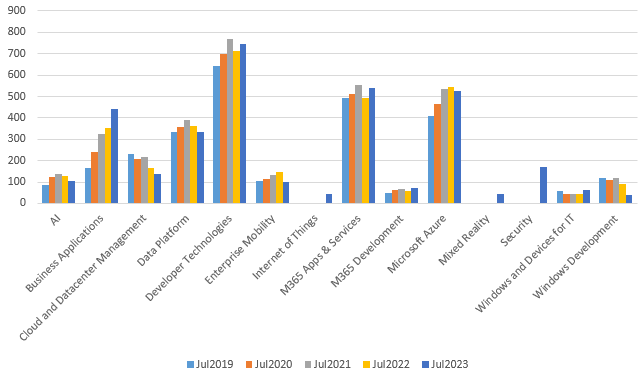
This is also a moment to have a quick peek at the MVP statistics. Below numbers are taken from the public MVP portal. Normally, notifications are sent out on July 1st, but this year we had a small delay. In anticipation of awardees also needing some time to accept their Non-Disclosure Agreement terms, these numbers are taken from July 18th. Comparing them to July of recent years should give an idea of the yearly trend, as people can get awarded every month. The yearly award cycle in July will logically see a drop.
Few points of attention:
Out of the 3.175 MVP’s published on the MVP portal, 142 do not disclose location, so those are not represented in below numbers.
New categories Security, Mixed Reality and Internet of Things were added.
New categories might result in MVP’s switching when those are a better indication of their community work.
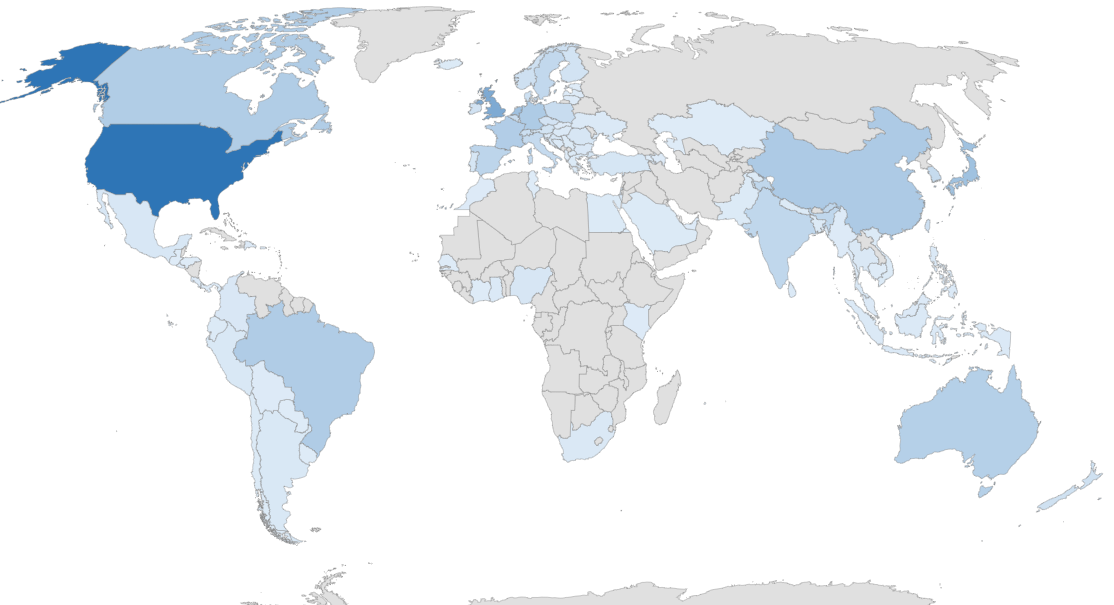
Overall, more countries are now represented in the program compared to last year.
Numbers do not reflect changes throughout the year. The drop from just before the award cycle, which showed 3.440 MVP’s, is not visible.
MVP Awardees per Category
The following table contains the awardees per award category from July of 2019 up to 2023, plus change percentage.
Expertise
Jul2019
Jul2020
%
Jul2021
%
Jul2022
%
Jul2023
%
AI
84
122
45%
138
13%
128
-7%
105
-18%
Business Applications
166
240
45%
323
35%
351
9%
442
26%
Cloud and Datacenter Management
232
209
-10%
219
5%
164
-25%
136
-17%
Data Platform
332
358
8%
392
9%
364
-7%
335
-8%
Developer Technologies
644
697
8%
770
10%
715
-7%
747
4%
Enterprise Mobility
106
113
7%
133
18%
149
12%
100
-33%
Internet of Things
0
0
0%
0
0%
0
0%
43
0%
M365 Apps & Services
491
512
4%
556
9%
492
-12%
541
10%
M365 Development
47
64
36%
69
8%
59
-14%
70
19%
Microsoft Azure
409
463
13%
534
15%
546
2%
526
-4%
Mixed Reality
0
0
0%
0
0%
0
0%
45
0%
Security
0
0
0%
0
0%
0
0%
171
0%
Windows and Devices for IT
57
43
-25%
42
-2%
45
7%
61
36%
Windows Development
119
110
-8%
120
9%
92
-23%
37
-60%
Award Count
2687
2931
9%
3296
12%
3105
-6%
3359
8%
MVP Count
2634
2849
8%
3223
13%
3023
-6%
3175
5%
Note: The difference between total number of awards and total number of MVP’s is because an MVP can be awarded in more than one category.
MVP Awardees per Country
The following table contains the awardees per country, plus change percentage compared to July last year.
Country
No.(change)
Country
No.(change)
Country
No.(change)
Albania
1 (0%)
Honduras
1 (100%)
Paraguay
1 (0%)
Argentina
13 (-14%)
Hong Kong
6 (100%)
Peru
13 (0%)
Armenia
0 (-100%)
Hungary
9 (0%)
Philippines
7 (-13%)
Australia
109 (-2%)
Iceland
4 (-20%)
Poland
60 (13%)
Austria
33 (13%)
India
81 (0%)
Portugal
21 (16%)
Azerbaijan
2 (100%)
Indonesia
8 (0%)
Puerto Rico
1 (0%)
Bahrain
1 (0%)
Ireland
34 (9%)
Romania
19 (11%)
Bangladesh
4 (-34%)
Israel
14 (7%)
Saudi Arabia
5 (0%)
Belgium
59 (7%)
Italy
66 (4%)
Senegal
1 (0%)
Bolivia
3 (0%)
Ivory Coast
1 (0%)
Serbia
5 (66%)
Bosnia and Herzegovina
7 (16%)
Japan
165 (0%)
Singapore
14 (0%)
Brazil
123 (-9%)
Kazakhstan
1 (0%)
Slovakia
2 (0%)
Bulgaria
10 (0%)
Kenya
3 (300%)
Slovenia
6 (-25%)
Cambodia
1 (0%)
Korea
65 (10%)
South Africa
11 (-27%)
Canada
121 (-5%)
Latvia
3 (-25%)
Spain
89 (14%)
Chile
4 (-20%)
Lithuania
2 (0%)
Sri Lanka
9 (-31%)
China
131 (24%)
Luxembourg
1 (0%)
Sweden
76 (0%)
Colombia
14 (0%)
Macedonia
5 (0%)
Switzerland
50 (25%)
Costa Rica
2 (-34%)
Malaysia
6 (-25%)
Taiwan
46 (12%)
Croatia
15 (-7%)
Malta
0 (-100%)
Thailand
11 (10%)
Czech Republic
30 (-4%)
Mauritius
0 (-100%)
Netherlands
167 (12%)
Denmark
45 (18%)
Mexico
17 (-11%)
Togo
1 (100%)
Dom. Republic
6 (-15%)
Morocco
2 (-50%)
Tunisia
1 (-50%)
Ecuador
4 (100%)
Myanmar
2 (-34%)
Turkey
21 (10%)
Egypt
4 (0%)
Nepal
4 (-20%)
Ukraine
9 (-25%)
El Salvador
2 (0%)
New Zealand
40 (0%)
UAE
2 (-60%)
Estonia
1 (-50%)
Nicaragua
1 (100%)
UK
258 (8%)
Finland
31 (10%)
Nigeria
18 (50%)
USA
472 (1%)
France
119 (8%)
Norway
44 (12%)
Uruguay
1 (0%)
Germany
129 (4%)
Pakistan
5 (-17%)
Uzbekistan
2 (200%)
Ghana
7 (0%)
Palestine
1 (0%)
Venezuela
1 (100%)
Greece
5 (25%)
Panama
1 (0%)
Vietnam
5 (0%)
Guatemala
1 (-50%)
If you have questions or comments, please leave them in the comments below.







 EighTwOne (821)