Unknown's avatar

About Michel de Rooij

Michel de Rooij, with over 25 years of mixed consulting and automation experience with Exchange and related technologies, is a consultant for Rapid Circle. He assists organizations in their journey to and using Microsoft 365, primarily focusing on Exchange and associated technologies and automating processes using PowerShell or Graph. Michel's authorship of several Exchange books and role in the Office 365 for IT Pros author team are a testament to his knowledge. Besides writing for Practical365.com, he maintains a blog on eightwone.com with supporting scripts on GitHub. Michel has been a Microsoft MVP since 2013.

The UC Architects Podcast Ep29


iTunes-Podcast-logo[1]We’re glad to announce the availability of episode 29 of The UC Architects podcast.

This episode is hosted by Pat Richard, who’s joined by John Cook, Serkan Varoglu, Dave Stork and Tom Arbuthnot. Special guest is Iain Smith.

Topic of this episode are:

  • Microsoft buys Nokia
  • New MVPs / MCSMs
  • Lync 2013 Call Pickup Group Manager
  • Lync Server 2013 Certificate Authentication and Passive Authentication Support for Lync 2013 Mobile Applications
  • Update that enables the “operator assistance” feature during a PSTN dial-in conference in a Lync Server 2013 environment
  • Microsoft Lync Deployment Checklist
  • Lync 2013 Support Added to System Center Advisor
  • Visualize Lync usage for your business with new reports
  • AOL Announces Direct Federation With Microsoft Lync and UC Federation Plans for AIM
  • Microsoft Lync Room System Administrative Web Portal
  • Department of Defense employees now able to use Microsoft Lync 2013 to connect to information network
  • Lync 2013 Client September 2013 CU Released: New Spell Check, Tray Icon Back
  • Lync 2013 CU October 2013 (support for Windows Server 2012 R2; breaks font in LSCP)
  • October 2013 CU for LPE devices (transfer to voicemail option)
  • Microsoft Lync Server 2013 Protocol Workloads Poster
  • Review of headsets
  • Announcing the Release of the Lync Server Networking Guide v2
  • Office 365 Mail Flow Troubleshooter
  • How to Block OWA 2010 and 2013 for External Users
  • Exchange Server Deployment Assistant

More information on the podcast including references and a link to download the podcast here or you can subscribe to the podcasts using iTunes, Zune or use the RSS feed.

About
The UC Architects is a bi-weekly community podcast by people with a passion for Unified Communications; our main focus is on Exchange, Lync or related subjects.

Slow Mailbox (Migration) Throughput and HP NIC Drivers


Hewlett-Packard_logo-web[1]A small post on an issue I recently encountered when doing preparations for a mailbox migration. The system was an HP Proliant DL370 G6 system, prepared and configured with the OS and Exchange by the customer’s IT department.

Things looked OK and we were going to perform some test migrations to get an throughput estimation for this configuration  to help us organize migration batches. To our dismay, speeds were way lower than we were used to see with similar configurations; mailboxes were migrated with an average speed of 7-8 MB/min, where we used to see something in the 50-120 range.

A quick look on the performance monitor didn’t show anything out of the ordinary, except for very low downstream network throughput. With the servers (the original Exchange server as well as the new one) being on the same subnet and physically next to each other, networking components were also not deemed suspect (other servers on same switch were not experiencing this issue).

I then tried something simple: copying near 100 MB of files from the source Exchange server to the new one. It went at an ridiculous slow speed of 60-80 KB/s. Copying those same files from the new server to the source server was instantly. I verified this against a vacant server on the same switch; copying from and to the source Exchange server on that server was instant, both up- and downstream.

So, if SMB was having trouble getting packets across, that could explain the slow mailbox migration speeds. Attention shifted to the networking configuration on the new Exchange server, which was equipped with a HP NC375i Integrated Quad Port Multifunction Gigabit Server Adapter. I checked the driver version of one of the NC375i’s instances through Network Connections > Properties (of instance) > Configure > Driver (tab). It reported QLogic Corp. driver 4.7.17.926 (qlxgnd64.sys) was used.

After some searching on HP’s support site I discovered an advisory which could apply to my situation as it applies to the same qlxgnd64.sys driver version 4.7.17.926: c03734205, “Advisory: HP NC Network Adapters – Certain HP NC-Series Network Adapters May Experience Very Slow Bandwidth During Large File Transfers on Windows Server 2008 and Windows Server 2008 R2”.

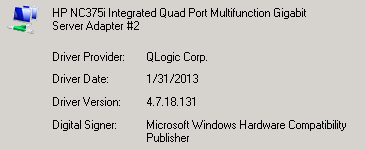
The advisory gives the option to either keep the driver and disabling Large Receive Offload (LRO) or to upgrade to driver version 4.7.18.131. We choose the latter:

image

After upgrading the driver, we moved a mailbox and and throughput speeds were within the expected range again as we found out when producing a quick stats report using the cmdlet (Exchange 2010):

Get-MoveRequest | Where { $_.Status -eq "Completed" } | Get-MoveRequestStatistics | Select DisplayName,TotalMailboxSize,TotalMailboxItemCount,@{n="Speed MB/min"; e={ [int]($_.BytesTransferred.ToMB() / $_.TotalInProgressDuration.TotalMinutes) }}

image

In my opinion, it’s another fine example of the value of testing and validating your configuration and any amendments you make before putting them in production and be cautious with what I call “blindly updating” of system components such as drivers or driver packs (e.g. HP’s SPP or Service Pack for ProLiant).

If you don’t have the luxury of a test- and acceptance environment, just as with Service Packs, Rollups and Cumulative Updates, have a waiting period and check the vendor’s support site for any reported issues before implementing updates yourself; according to this discussion on the HP support forum, the issue with the 4.7.17.926 QLogic driver existed for quite some time.

The UC Architects Podcast Ep28


iTunes-Podcast-logo[1]We’re glad to announce the availability of episode 28 of The UC Architects podcast. This is a special episode recorded with a live audience during DevConnections 2013 in Las Vegas.

This episode is hosted by Steve Goodman, Johan Veldhuis, and Michael van Horenbeeck. Special guests are Tony Redmond, Greg Taylor (Microsoft), Jeff Mealiffe (Microsoft) and John Rodriguez (Microsoft).

Topics discussed in this special episode are:

  • MEC is back  – registration is now open, so get signing up! What might await those thinking of going? And with MEC, is there still a gap in the market for conferences like Exchange Connections?
  • Where is the place for on-premises Exchange long-term and how does this affect the Exchange-centric IT pro? What kind of skills will they need in 2-5 years time?
  • Is there a need for top level training and certification for Exchange?
  • Product quality – Is is Exchange a victim of it’s own success?
  • Exchange in the public cloud. Amazon Web Services have released a guide on deploying Exchange on AWS. Does this give more choice to organizations?
  • Questions from the audience

More information on the podcast including references and option to play or download the podcast directly through here or you can subscribe to the podcasts using iTunes, Zune or use the RSS feed.

About
The UC Architects is a bi-weekly community podcast by people with a passion for Unified Communications; our main focus is on Exchange, Lync or related subjects.

2013 Microsoft MVP Award


I am pleased to announce that as of today, I am the recipient of the 2013 Microsoft MVP Award for Exchange Server:

image

MVP awards are given to individuals by Microsoft in recognition of their contributions to the technical community, such as this blog, forums or our very own The UC Architects podcast.

I’d like to take this opportunity to thank my readers, followers, fellow MVPs (always wanted to say that) and of course the Microsoft employees that have encouraged, helped and supported me over years.

My MVP profile can be found here.

IOS 7.0: To Block or Not to Block? (updated)


iPhone iOSWith the meeting and log flooding issues caused by certain IOS 6.x versions still fresh in memory, one may prefer to adopt a more conservative strategy when it comes to new IOS releases interacting with your Exchange infrastructure – or any mobile OS for that matter.

After Apple released IOS 7.0 this week, some shops consider blocking or quarantining this version until it’s been approved after proper testing and monitor online communities for potential issues during a small waiting period.

In an earlier article, I mentioned how to accomplish (temporarily) blocking IOS 6.x on Exchange 2010 or TMG; here’s how to achieve this for IOS 7.0 on current platforms:

To distinguished IOS 7.0 from earlier versions, you need to check the DeviceOS field as returned by Get-ActiveSyncDevice (Exchange 2010) or Get-MobileDevice (Exchange 2013). For example, here’s how to return current partnered EAS devices:

#Exchange 2010:
Get-ActiveSyncDevice | Where {$_.DeviceOS -like"IOS 7.0*"}

#Exchange 2013:
Get-MobileDevice | Where {$_.DeviceOS -like "IOS 7.0*"}

To block or quarantine IOS 7.0 devices you can utilize Exchange’s Allow/Block/Quarantine (ABQ) mechanism using the New-ActiveSyncDeviceAccessRule cmdlet in conjunction with the DeviceOS, DeviceModel or UserAgent string. When using DeviceOS, it requires specifying the full device OS string, which can vary per device or IOS.

For example, when the DeviceOS is iOS 7.0 11A465 (meaning build 11A465) or 7.0.1 11A470a, the cmdlet for setting up the quarantine rule would be (for blocking replace Quarantine with Block):

New-ActiveSyncDeviceAccessRule -QueryString “iOS 7.0 11A465″ -Characteristic DeviceOS -AccessLevel Quarantine
New-ActiveSyncDeviceAccessRule -QueryString “iOS 7.0.1 (11A470a)″ -Characteristic DeviceOS -AccessLevel Quarantine 

For the exact strings consult Get-ActiveSyncDevice/Get-MobileDevice output.

For examples of alternative blocking methods using TMG or F5, check this article. More information on ABQ here. Note that users utilizing the OWA for iPhone or iPad apps won’t be blocked after implementing this measure.

Be advised there are already reports of issues with iOS 7.0 such as substantial reduction of battery life and slow devices. What’s far worse is that you can also bypass the lock screen, similar to the lock screen glitch in IOS 6.1.3. L’histoire se répète.

Update (21Sep): According to reports, iOS 7 allows you to make calls despite the lock. How’s that for a potential corporate smart phone.

Update (26sep): Apple has released security update iOS 7.0.2 (build 11A501, all devices) which fixes the lock screen glitch. Another good reason to block earlier iOS 7.0 / 7.0.1 versions, only allowing iOS 7.0.2 devices to retrieve company data.