Unknown's avatar

About Michel de Rooij

Michel de Rooij, with over 25 years of mixed consulting and automation experience with Exchange and related technologies, is a consultant for Rapid Circle. He assists organizations in their journey to and using Microsoft 365, primarily focusing on Exchange and associated technologies and automating processes using PowerShell or Graph. Michel's authorship of several Exchange books and role in the Office 365 for IT Pros author team are a testament to his knowledge. Besides writing for Practical365.com, he maintains a blog on eightwone.com with supporting scripts on GitHub. Michel has been a Microsoft MVP since 2013.

Exchange 2013 CU1 ETA: April 2nd


Ex2013 LogoToday the Exchange Team announced postponing the release of Exchange 2013 Cumulative Update 1 for a few more days. Originally, CU1 was scheduled for Q1 2013, but the date has been set now at April 2nd, 2013.

While it may sound disappointing when you’re waiting for Exchange 2013 RTM CU1, it makes sense to postpone it a bit. As the team indicated,the time is used to add functionality required for coexistence scenarios with Exchange Server 2010 which otherwise had to be put in an update for Exchange 2010 Client Access servers. I expect people to be less happy as Exchange 2010 Service Pack 3 was heralded as the Exchange 2010 product level for coexistence support with Exchange 2013 (running CU1).

Also, looking at time frames involved with testing and accepting updates in production environments, I personally applaud this decision as putting that code in Exchange 2013 at the cost of a few days may in the end be faster than adding that code to Exchange Server 2010, requiring customers to initiate test an acceptance tracks for production updates.

So, until further notice we’ll have to wait just a few more additional days to see what Cumulative Update 1 will bring us.

New-MoveRequest fails with “Database .. doesn’t exist”


Exchange 2010 LogoA quick write up on something which you might encounter when trying to move mailboxes across forests. Often, operators don’t always have full access permissions in both environments and rely on provided accounts or delegated permissions to execute the move.

Suppose you’re in the target environment and are asked to migrate mailboxes cross-forest from a previous version of Exchange to Exchange 2010. One of the first steps would be to run the Prepare-MoveRequest.ps1 script to prepare the target object and populate it with Exchange-related attributes from the source environment.

You then come at a point in such a migration, after running Active Directory Migration Tool – ADMT and perhaps some additional tweaks, when you need to actually move the user’s mailbox. So, you enter for example:

$cred= Get-Credentials
New-MoveRequest –Identity UserX –RemoteLegacy –TargetDatabase DB1 -RemoteGlobalCatalog SourceDC –RemoteCredential $cred –TargetDeliveryDomain maildomain.com

Mailbox move request are being queued but for some mailboxes you may encounter the following error message: “Database xxxxx-xxxx-xxxx-xxxx-xxxxx doesn’t exist”. That error message may get you worrying, but let’s investigate.

image

We’re in the target environment and the source environment is running a legacy version of Exchange so setting up a remote PowerShell session and using Get-MailboxDatabase <GUID> is not an option. All roads lead to Rome when querying Active Directory, but in this case let’s load up our trusty LDP to look up that GUID; it should map to a database in the source environment.

In LDP, use Connection > Connect and enter the name of a remote domain controller, like the one specified as RemoteGlobalCatalog, in our example RemoteDC. Then, use Bind providing the credentials you used with RemoteCredential.

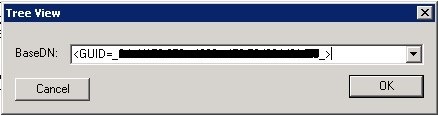
Next, select View > Tree and use <GUID=xxxxx-xxxx-xxxx-xxxx-xxxxx> as BaseDN (replace those x’s with the GUID reported by the failing New-MoveRequest and make sure you include those less and greater than symbols).

CantMoveLookup

Now, normally the database object with that GUID and its properties will be returned. If not, something is probably wrong with the permissions on the mailbox, directly or indirectly. Depending on whether you’re able to migrate other users from the same database, server up to the organization, you can rule out if it’s a per-mailbox issue, database permission issue etc.

This proves that as always, preparation is everything. Therefor, prior to migration be sure to check or correct effective permissions on mailboxes to prevent any surprises in that area when you’re actually migrating.

Note that the permission ACLs on a mailbox needs to be in a so-called non-canonical order. To fix this, you may find the FixMailboxSD utility helpful. More information on the importance of canonical ordering of mailbox permissions in Exchange here.

The UC Architects Podcast Ep18


iTunes-Podcast-logo[1]Thanks to some speedy editing by Johan Veldhuis, the 18th episode of The UC Architects podcast is now online. This episode is hosted by Steve Goodman who’s joined by John Cook, Justin Morris, Serkan Varoglu, Tim Harrington, Ståle Hansen and yours truly.

Amongst the topics discussed in this episode are:

  • Lync Conference Roundup
  • UC Architects featured by Windows IT Pro
  • Lync Updates
  • Lync Deployment Script by Tommy Clarke and Stale Hansen
  • Office 365 Wave 15 GA
  • Exchange, Lync and Office 2013 Ignite
  • MEC 2014 Announcement
  • JetStress 2013
  • Exchange Deployment Assistant 2010 SP2 / 2013
  • PST Capture Tool v2
  • Exchange 2013 Unattended Install Script
  • Exchange Reports tool

More information on the podcast including references and a link to download the podcast directly here or you can subscribe to the podcasts using iTunes, Zune or use the RSS feed.

About
The UC Architects is a bi-weekly podcast on Unified Communications mainly focused on the Microsoft domain, i.e. Exchange, Lync or related subjects.

Jetstress 2013


Ex2013 LogoIn the list of expected products to accompany Exchange 2013, Microsoft today released JetStress 2013, version 15.0.651.0.

Jetstress is your tool of choice to check the performance and stability of your storage design under load. It simulates Exchange I/O behaviour using Exchange 2013 patterns allowing you to verify dimensioning and validate performance expectations from a database perspective.

Capture

To run JetStress 2013 you need:

  • .NET Framework 4.5
  • ESE.DLL, ESEPerf.dll, ESEPerf.ini, ESEPerf.hxx (copy these from an Exchange 2013 installation source)

Note: The installer currently installs a shortcut named “Exchange JetStress 2010”, but it really is JetStress 2013.

You can download the Jetstress 2013 here.

The UC Architects Podcast Ep17


iTunes-Podcast-logo[1]The 17th episode of The UC Architects podcast is online. This episode is hosted by Pat Richard who’s joined by John Cook, Ståle Hansen, Tom Arbuthnot, Johan Veldhuis and yours truly.

Amongst the topics discussed in this episode are:

  • Lync User Management Tool;
  • Lync Mac Update 14.0.4;
  • Lync Jan2013 Update;
  • Lync Wi-Fi Whitepaper;
  • Polycom CX500/CX600/CX3000 Update;
  • Lync Conference;
  • Lync Connectivity Analyzer;
  • Set-CsLync2013Prereqs.ps1 Script;
  • Surface Pro;
  • MSCM Beta Program;
  • Update strategy for Exchange;
  • iOS 6.x Calendar Issues.

You can download the podcast directly here or you can subscribe to the podcasts using iTunes, Zune or use the RSS feed.

About the Podcast
The UC Architects is a bi-weekly podcast on Unified Communications in the Microsoft domain, i.e. Exchange and Lync, or related subjects.