
Unknown's avatar

About Michel de Rooij

Michel de Rooij, with over 25 years of mixed consulting and automation experience with Exchange and related technologies, is a consultant for Rapid Circle. He assists organizations in their journey to and using Microsoft 365, primarily focusing on Exchange and associated technologies and automating processes using PowerShell or Graph. Michel's authorship of several Exchange books and role in the Office 365 for IT Pros author team are a testament to his knowledge. Besides writing for Practical365.com, he maintains a blog on eightwone.com with supporting scripts on GitHub. Michel has been a Microsoft MVP since 2013.

ActiveSync, Intermediate Certificates and You


Recently, a customer called with ActiveSync issues. They had installed the certificate with the proper Subject and SAN entries on the Exchange server, but were unable to synchronize their Windows Phone 7 devices with Exchange 2010; iPhone and Android device encountered no issues.

A quick run of the Exchange Remote Connectivity Analyzer (ExRCA) showed the following:

Capture1 - Ano

As ExRCA discovered, not all certificates of the certificate chain were offered by the server. A quick inspection of the certificate showed the following certification path:

CertChain

In this example, the certificate authority (CA), GlobalSign, uses an intermediate CA, GlobalSign Domain Validation CA – G2, to delegate the process of creating UC certificates. Consequence is that the certificate of the root CA, in this example GlobalSign, as well as the certificate of the intermediate CA, here , must be present on the device or should be offered when setting up the connection so the client can validate them.

Inspection of the Exchange server showed that the intermediate certificate was properly installed on the Exchange server, after the customer imported the Personal Information Exchange File (.pfx) file, provided by the CA as part of the certificate package, which contained all certificates in the chain: root CA, intermediate CA and the UC certificate.

CertIntermediate

Then, investigation moved to the reverse proxy, in this case ISA Server 2006 SP1. It turned out the intermediate certificate on the ISA server, or rather the lack of it, was causing the issue. The customer had imported the individual UC certificate on the ISA server. Because the ISA server didn’t contain the intermediate certificate, it couldn’t send it to the client as part of the certificate chain. After importing the intermediate certificate on the ISA server, ActiveSync started working.

Generally speaking, Windows Mobile or Windows Phone devices don’t contain intermediate certificates so be sure to install them on your Exchange servers as well as on your reverse proxies. Checking and validating intermediate certificates is a client thing and in this case the intermediate CA was available on the non-Windows Phone devices which explained the difference in behavior between Windows Phone, iPhone and Android devices.

Note that, depending on your situation, you may have never seen the above issue before. |This could be the case when you’ve been using certificates directly provided a root CA so far. When selecting your CA, this might be something to take into account as not all mobile devices behave identical as you’ve seen. Also, although lifetime of root and intermediate certificates is quite long, it is something you should manage properly in your environment as you have to an additional certifiate to watch (which might expire or be revoked). Also, depending on volume and mobile costs, sending down extra traffic through the wire/air could be something to take into account. If you don’t think this could be an issue because certificates are relatively small, there’s a reason Mini OWA’s so popular in some regions. Distributing certificates to clients might become a better alternative in those circumstances.

Finally, I want to recommend the excellent SSL Certificate Management & Troubleshooting Tool, provided by DigiCert. It cannot only indicate potential certificate issues like these, or wrongly imported certificates (e.g. user store instead of computer store), but also fix them. As an alternative to ExRCA, you could use the online SSLchecker provided here.
Exchange PST Capture Tool released


It took a while, but today the Exchange Team released the long awaited Microsoft Exchange PST Capture Tool (initial version 14.3.16.4). The tool can be used to discover and inject PST files in an Exchange 2010 Exchange Online mailbox or archive.

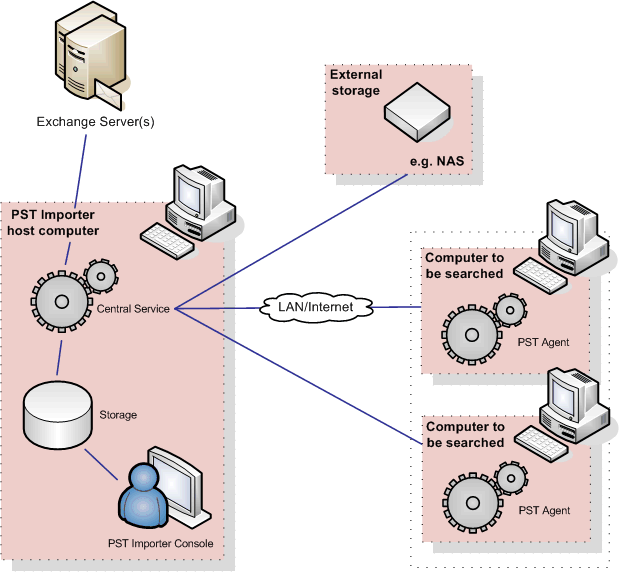
The tool was originally from Red Gate and known as PST Importer. It’s architecture consists of three components: the central service, (optional) agents for PST discovery, registration and collecting PST files and an administrative console (image by Red Gate):

The online documentation can be found here.

Note that although it’s only supported for Exchange 2010 and Exchange Online, you can use it with Exchange 2007; it’s only untested (and probably unsupported) with that product.

You can read the official announcement here; you can download the tool and the agents here.

Exchange 2007 SP3 Update Rollup 6


Today the Exchange Team released Rollup 6 for Exchange Server 2007 Service Pack 3 (KB2608656). This update raises Exchange 2007 version number to 8.3.245.2.

Here’s the list of changes included in this rollup:

  • 2289607  The week numbers displayed in OWA do not match the week numbers displayed in Outlook for English users and French users in an Exchange Server 2007 environment
  • 2498852  “0x80041606” error message when you perform a prefix search by using Outlook in online mode in an Exchange Server 2007 environment
  • 2499841  An arrow icon does not appear after you change the email message subject by using OWA in an Exchange Server 2007 SP3 environment
  • 2523695  A “System.ArgumentOutOfRangeException” exception occurs when you click the “Scheduling Assistant” tab in Exchange Server 2007 OWA
  • 2545080  Users in a source forest cannot view the free/busy information of mailboxes in a target forest when the cross-forest Availability service is configured between two Exchange Server 2007 forests
  • 2571391  Applications or services that depend on the Remote Registry service may stop working in an Exchange Server 2007 environment
  • 2572010  The Microsoft Exchange Information Store service may crash after you run the Test-ExchangeSearch cmdlet in an Exchange Server 2007 environment
  • 2575360  A new feature is available to automatically stop the Microsoft Exchange Information Store service when a time-out is detected in an Exchange Server 2007 SP3 environment
  • 2591655  A journaling report remains in the submission queue when an email message is delivered successfully in an Exchange Server 2007 environment
  • 2598980  The PidLidClipEnd property of a recurring meeting request has an incorrect value in an Exchange Server 2007 environment
  • 2616427   An Outlook Anywhere client loses connection when a GC server restarts in an Exchange Server 2007 environment
  • 2617784  Journal reports are expired or lost when the Microsoft Exchange Transport service is restarted in an Exchange Server 2007 environment
  • 2626217   Certain changes to address lists may not be updated in an Exchange Server 2007 environment
  • 2629790   The Exchange IMAP4 service may stop responding on an Exchange Server 2007 Client Access server when users access mailboxes that are hosted on Exchange Server 2003 servers
  • 2633801   The SCOM 2007 SP1 server cannot alert certain issues in an Exchange Server 2007 organization
  • 914533  The Microsoft Exchange Information Store service may stop responding on an Exchange Server 2007 server
  • 976977  The scroll bar does not work in OWA when there are more than 22 all-day event calendar items in an Exchange Server 2007 user’s calendar
  • 2641312  The update tracking information option does not work in an Exchange Server 2007 environment
  • 2653334  The reseed process is unsuccessful on the SCR passive node when the circular logging feature is enabled in an Exchange Server 2007 environment
  • 2656040  An Exchange Server 2007 Client Access server may respond slowly or stop responding when users try to synchronize the Exchange ActiveSync devices with their mailboxes
  • 2658613  The “PidLidClipEnd” property of a no ending recurring meeting request is set to an incorrect value in an Exchange Server 2007 environment

When running ForeFront Protection for Exchange, make sure you disable ForeFront before installing the rollup and re-enable it afterwards, otherwise the Information Store and Transport services may not start. You can disable ForeFront using fscutility /disable and enable it using the fscutility /enable command.

Note that update rollups are cumulative, i.e. they contain fixes released in earlier update rollups for the same product level (RTM, SP). This means you don’t need to install previous update rollups during a fresh installation but can start with the latest rollup.

You can download Exchange 2007 SP3 Rollup 6 here.

ForeFront TMG SP2 Rollup 1


A short blog on the ForeFront team releasing Rollup 1 for Microsoft Forefront Threat Management Gateway (TMG) 2010 Service Pack 2.

This Rollup fixes a “Bad Request” issue when accessing OWA through Forefront TMG. For a full list of changes, consult knowledgebase article kb2649961.

Note that along the lines of products like Exchange, cumulative updates for ForeFront TMG are now also called Rollup instead of Software Update or Update.

You can request ForeFront TMG SP2 RU1 directly from support here.

Configuring initial Exchange database


Something which I still see many Administrators do, right after installing Exchange 2010, is renaming the mailbox database or relocating the database or logs files that were created during the setup of Exchange 2010.

To configure the initial mailbox database name, the location of the initial mailbox database (and catalog) files or its log files, you can incorporate the following parameters in your setup command line:

  • MdbName is the name of the initially created mailbox database, e.g. MDB01
  • DbFilePath is the full path of the initially created mailbox database file, e.g. E:\MDB01DB\MDB01.edb
  • LogFolderPath is the folder used to store the database log files, e.g. D:\MDB01LOG
    Note that you must use the complete filename of the edb file, including the .edb extension. Also, you don’t need to create the folders; Exchange will do that for you during setup.

So, to setup Exchange with a custom initial mailbox database name and non-default locations of database and log files, you can use the following command line for example:

setup /mode:install /roles:c,h,m,t /mdbname:MDB01 /DbFilePath:E:\MDB01DB\MDB01.edb /LogFolderPath:D:\MDB01LOG

Of course, these parameters are nice to incorporate in your scripted setup to deploy multiple servers.
