 Update June, 29th: Reports of issues with PF after installing RU4 here (comments section). Exchange fellow Paul Cunningham reproduced a PF issue which can lead to data loss. More about this on his blog here. Once again I emphasize to properly test updates prior to implementing in production. Although I’m aware of possible budget constraints, not having a proper test environment in fact means you have no production environment.
Today the Exchange Team released Rollup 4 for Exchange Server 2010 Service Pack 1 (KB2509910). This update raises Exchange 2010 version number to 14.1.323.1.
After the rollup 3 debacle, I’d recommend to thoroughly test rollup 4 in a test and acceptance environment prior to implementing it in production.
Here’s the big list of changes included in this rollup:
-
2537099 “80040154” error message when you try to configure external Client Access namespaces on an Exchange Server 2010 server
-
2536700 Outlook stops responding when you try to copy a folder to its subfolder by using Outlook in online mode in an Exchange Server 2010 SP1 environment
-
2536517 The Microsoft Exchange RPC Client Access service crashes intermittently on an Exchange Server 2010 server
-
2536494 It takes a long time to return results when you perform an Advanced Find search on a mailbox by using Outlook in online mode in an Exchange Server 2010 SP1 environment
-
2535648 The EMC takes a long time to open in an Exchange Server 2010 environment
-
2535130 Performance in Outlook or in OWA decreases when you use IMAP4 to access the contacts folder in an Exchange Server 2010 environment
-
2535105 There is no option to disable the Availability service in an Exchange Server 2010 environment
-
2533543 Event ID 2153 is logged on each database availability group member in an Exchange Server 2010 environment
-
2533538 You cannot look up the free/busy information of a user who is located on an Exchange Server 2010 organization from another Exchange Server 2010 organization
-
2533451 A RBAC role assignee can unexpectedly run the “Update-FileDistributionService” command on an Exchange Server 2010 server that is outside the role assignment scope
-
2519359 “Changes to the rule cannot be saved.” error message when you try to create a reply rule by using Outlook in an Exchange Server 2010 environment
-
2518850 You cannot receive email messages on a mobile phone by using ActiveSync in an Exchange Server 2010 environment
-
2517088 Public folder conflict resolution does not work as usual in an Exchange Server 2010 environment
-
2515259 “The items could not be copied.” error message when you run the Get-MailboxSearch cmdlet in an Exchange Server 2010 SP1 environment
-
2514709 Event ID 1001 after you successfully the install Exchange Server 2010 Unified Messaging server role
-
2514574 The Exchange RPC Client Access service crashes in an Exchange Server 2010 environment
-
2513723 The “New-MailboxImportRequest” cmdlet does not import all messages in a .pst file in the ANSI format in an Exchange Server 2010 environment
-
2512023 “GetUserOofSettings”, “SetUserOofSettings” and “GetUserAvailability” operations do not support Exchange Impersonation on the Exchange Server 2010 SP1 schema
-
2511897 You cannot send an email message to a mailbox for a brief period when you move the mailbox by using online move in an Exchange Server 2010 environment
-
2507463 You cannot move a mailbox that contains a corrupted Search Folder in an Exchange Server 2010 environment
-
2506820 The free/busy information does not display of a user whose mailbox is located on an Exchange Server 2003 server
-
2506049 The hierarchy of a new public folder database on an Exchange Server 2010 SP1 server is not replicated
-
2505968 The EdgeTransport.exe process crashes when you apply a rule that contains a bad email address in an Exchange Server 2010 environment
-
2504453 You cannot retrieve statistical information about a public folder by using the “Get-PublicFolderStatistics” cmdlet in an Exchange Server 2010 SP1 environment
-
2503337 Comments of your meeting response message is missing when you decline a meeting request in an Exchange Server 2010 environment
-
2501070 A RBAC role assignee can stop queue processing on an Exchange Server 2010 Hub Transport server or an Exchange Server 2010 Edge Transport server that is outside the role assignment scope
-
2500903 A space is missing in the subject line of a “Tentative” meeting response in an Exchange Server 2010 environment
-
2500648 “There are no items to show in this view.” error message when you try to view a folder in Outlook in an Exchange Server 2010 environment
-
2495167 You cannot recover a deleted public folder by using Outlook or MFCMAPI in an Exchange Server 2010 environment
-
2495010 The EdgeTransport.exe process consumes 100% CPU usage on an Exchange Server 2010 Edge Transport server or an Exchange Server 2007 Edge Transport server
-
2493393 You cannot use ECP to perform a wipe on a mobile phone in an Exchange Server 2010 SP1 environment
-
2492068 “The item cannot be saved to this folder.” error message when try to post an item to a mail-disabled public folder in an Exchange Server 2010 SP1 environment
-
2491354 You cannot view the free/busy information of users in a mixed Exchange Server 2007 and Exchange Server 2010 environment
-
2490134 A deferred delivery email message is not delivered by using Outlook 2007 in online mode in an Exchange Server 2010 environment
-
2489964 An update enables range 0x-0x1F characters in the display name of an Exchange Server 2010 user account
-
2489938 The “Connect-ExchangeServer” function does not change the target Exchange server in Exchange Server 2010
-
2489130 A RBAC role assignee can unexpectedly change mailbox properties that are outside the management role group scope in an Exchange Server 2010 environment
-
2488643 Outlook downloads duplicated POP3 email messages in an Exchange Server 2010 environment
-
2479188 The iCal parts of an email message contain invalid entries when they are sent from an Exchange Server 2003 mailbox to an Exchange Server 2010 mailbox
-
2477273 The DomainController parameter does not work when you use the “MoveMailbox.ps1” script to move mailboxes in an Exchange Server 2010 environment
-
2471964 A NDR is sent to the sender when you move an email message to a personal folder file in an Exchange Server 2010 SP1 or a later version environment
-
2467619 A user who manages a distribution group cannot remove another user whose mailbox is disabled in an Exchange Server 2010 environment
-
2465292 “MAPI_E_FAILONEPROVIDER (0x8004011D)” error message when you access an Exchange Server 2010 mailbox by using a MAPI application
-
2446908 ESE event descriptions are missing in Event Viewer when the Eseutil utility is called on an Exchange Server 2010 SP1 server
-
2394554 An email message is not delivered if it contains unsupported encoded characters in the subject line in an Exchange Server 2010 environment
-
2491951 You cannot install Exchange Server 2010 SP1 if the NetBIOS domain name of the domain controller contains an ampersand (&) character
-
2507066 Administrator audit logging is disabled unexpectedly during an Exchange Server 2010 SP1 installation
When running ForeFront Protection for Exchange, make sure you disable ForeFront before installing the rollup and re-enable it afterwards, otherwise the Information Store and Transport services may not start. You can disable ForeFront using fscutility /disable and enable it using the fscutility /enable command.
For the correct procedure on how to update a DAG and its members, check here.
Note that update rollups are cumulative, i.e. they contain fixes released in earlier update rollups for the same product level (RTM, SPx). This means you don’t need to install previous update rollups during a fresh installation but can start with the latest rollup available right away.
You can download Exchange 2010 SP1 Rollup 4 here.


 When migrating users from Exchange 2003 to Exchange 2010, you get to a point where you actually want to move all those Exchange 2003 mailboxes. When you have a decent environment and a lot of mailboxes are involved, you perhaps may want to move those mailboxes in a more phased, batch-oriented fashion.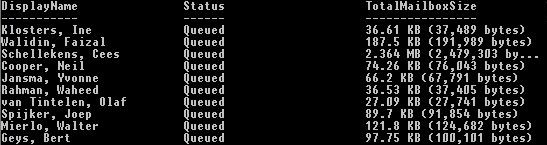




 EighTwOne (821)