Fix for Dutch “Global Addresslist” issue w/Exchange 2010 SP2


Today Microsoft released a fix (kb2677598) for a small cosmetic imperfection which shows up when using Outlook Web Access in Dutch, after installing Service Pack 2 on Exchange 2010.

Instead of showing up “Mail”, OWA displayed “Globale Adreslijst” (Global Addresslist) which might be confusing to end users.

To implement the hotfix, you need to apply the , dated 20 Feb, 2012, on your Exchange 2010 SP2 Client Access Servers.

You can download the Microsoft Exchange Server 2010 SP2 Language Pack Bundle (219 MB) here.

(Thanks to Jetze for the heads-up).

Exchange 2010 SP2 Rollup 1


Today the Exchange Team released Rollup 1 for Exchange Server 2010 Service Pack 2 (KB2645995). This update raises Exchange 2010 version number to 14.2.283.3.

Here’s the huge list of changes included in this rollup:

  • 2465015  You cannot view or download an image on a Windows Mobile-based device that is synchronized with an Exchange Server 2010 mailbox
  • 2492066  An automatic reply message is still sent after you clear the “Allow automatic replies” check box for a remote domain on an Exchange Server 2010 server
  • 2492082  An Outlook 2003 user cannot view the free/busy information of a resource mailbox in a mixed Exchange Server 2010 and Exchange Server 2007 environment
  • 2543850  A GAL related client-only message rule does not take effect in Outlook in an Exchange Server 2010 environment
  • 2545231  Users in a source forest cannot view the free/busy information of mailboxes in a target forest in an Exchange Server 2010 environment
  • 2549255  A meeting item displays incorrectly as multiple all-day events when you synchronize a mobile device on an Exchange Server 2010 mailbox
  • 2549286  Inline contents disposition is removed when you send a “Content-Disposition: inline” email message in an Exchange Server 2010 environment
  • 2556113  It takes a long time for a user to download an OAB in an Exchange Server 2010 organization
  • 2557323  Problems when viewing an Exchange Server 2003 user’s free/busy information in a mixed Exchange Server 2003 and Exchange Server 2010 environment
  • 2563245  A user who has a linked mailbox cannot use a new profile to access another linked mailbox in an Exchange Server 2010 environment
  • 2579051  You cannot move certain mailboxes from an Exchange Server 2003 server to an Exchange Server 2010 server
  • 2579982  You cannot view the message delivery report of a signed email message by using Outlook or OWA in an Exchange Server 2010 environment
  • 2585649  The StartDagServerMaintenance.ps1 script fails in an Exchange Server 2010 environment
  • 2588121  You cannot manage a mail-enabled public folder in a mixed Exchange Server 2003 and Exchange Server 2010 environment
  • 2589982  The cmdlet extension agent cannot process multiple objects in a pipeline in an Exchange Server 2010 environment
  • 2591572  “Junk e-mail validation error” error message when you manage the junk email rule for a user’s mailbox in an Exchange Server 2010 environment
  • 2593011  Warning 2074 and Error 2153 are logged on DAG member servers in an Exchange Server 2010 environment
  • 2598985  You cannot move a mailbox from a remote legacy Exchange forest to an Exchange Server 2010 forest
  • 2599434  A Public Folder Calendar folder is missing in the Public Folder Favorites list of an Exchange Server 2010 mailbox
  • 2599663  The Exchange RPC Client Access service crashes when you send an email message in an Exchange Server 2010 environment
  • 2600034  A user can still open an IRM-protected email message after you remove the user from the associated AD RMS rights policy template in an Exchange Server 2010 environment
  • 2600289  A user in an exclusive scope cannot manage his mailbox in an Exchange Server 2010 environment
  • 2600943  EMC takes a long time to return results when you manage full access permissions in an Exchange Server 2010 organization that has many users
  • 2601483  “Can’t open this item” error message when you use Outlook 2003 in online mode in an Exchange Server 2010 environment
  • 2604039  The MSExchangeMailboxAssistants.exe process crashes frequently after you move mailboxes that contain IRM-protect email messages to an Exchange Server 2010 SP1 mailbox server
  • 2604713  ECP crashes when a RBAC role assignee tries to manage another user’s mailbox by using ECP in an Exchange Server 2010 environment
  • 2614698  A display name that contains DBCS characters is corrupted in the “Sent Items” folder in an Exchange Server 2010 environment
  • 2616124  Empty message body when replying to a saved message file in an Exchange Server 2010 SP1 environment
  • 2616230  IMAP4 clients cannot log on to Exchange Server 2003 servers when the Exchange Server 2010 Client Access server is used to handle proxy requests
  • 2616361  Multi-Mailbox Search fails if the MemberOfGroup property is used for the management scope in an Exchange Server 2010 environment
  • 2616365  Event ID 4999 when the Store.exe process crashes on an Exchange Server 2010 mailbox server
  • 2619237  Event ID 4999 when the Exchange Mailbox Assistants service crashes in Exchange 2010
  • 2620361  An encrypted or digitally-signed message cannot be printed when S/MIME control is installed in OWA in an Exchange Server 2010 SP1 environment
  • 2620441  Stop-DatabaseAvailabilityGroup or Start-DatabaseAvailabilityGroup cmdlet fails when run together with the DomainController parameter in an Exchange Server 2010 environment
  • 2621266  An Exchange Server 2010 database store grows unexpectedly large
  • 2621403  “None” recipient status in Outlook when a recipient responds to a meeting request in a short period of time in an Exchange Server 2010 environment
  • 2628154  “The action couldn’t be completed. Please try again.” error message when you use OWA to perform an AQS search that contains “Sent” or “Received” in an Exchange Server 2010 SP1 environment
  • 2628622  The Microsoft Exchange Information Store service crashes in an Exchange Server 2010 environment
  • 2628693  Multi-Mailbox Search fails if you specify multiple users in the “Message To or From Specific E-Mail Addresses” option in an Exchange Server 2010 environment
  • 2629713  Incorrect number of items for each keyword when you search for multiple keywords in mailboxes in an Exchange Server 2010 environment
  • 2629777  The Microsoft Exchange Replication service crashes on Exchange Server 2010 DAG members
  • 2630708  A UM auto attendant times out and generates an invalid extension number error message in an Exchange Server 2010 environment
  • 2630967  A journal report is not sent to a journaling mailbox when you use journaling rules on distribution groups in an Exchange Server 2010 environment
  • 2632206  Message items rescanned in the background in an Exchange Server 2010 environment
  • 2633044  The Number of Items in Retry Table counter displays an incorrect value that causes SCOM alerts in an Exchange Server 2010 SP1 organization
  • 2639150  The MSExchangeSyncAppPool application pool crashes in a mixed Exchange Server 2003 and Exchange Server 2010 environment
  • 2640218  The hierarchy of a new public folder database does not replicate on an Exchange Server 2010 SP1 server
  • 2641077  The hierarchy of a new public folder database does not replicate on an Exchange Server 2010 SP1 server
  • 2642189  The RPC Client Access service may crash when you import a .pst file by using the New-MailboxImportRequest cmdlet in an Exchange Server 2010 environment
  • 2643950  A seed operation might not succeed when the source mailbox database has many log files in a Microsoft Exchange Server 2010 DAG
  • 2644047  Active Directory schema attributes are cleared after you disable a user’s mailbox in an Exchange Server 2010 environment
  • 2644264  Disabling or removing a mailbox fails in an Exchange Server 2010 environment that has Office Communications Server 2007, Office Communications Server 2007 R2 or Lync Server 2010 deployed
  • 2648682  An email message body is garbled when you save or send the email message in an Exchange Server 2010 environment
  • 2649727  Client Access servers cannot serve other Mailbox servers when a Mailbox server encounters a problem in an Exchange Server 2010 environment
  • 2649734  Mailbox replication latency may occur when users perform a Multi-Mailbox Search function against a DAG in an Exchange Server 2010 environment
  • 2649735  Warning of undefined recipient type of a user after the linked mailbox is moved from an Exchange Server 2007 forest to an Exchange Server 2010 forest
  • 2652849  The MailboxCountQuota policy is not enforced correctly in an Exchange Server 2010 hosting mode
  • 2665115  Event ID 4999 is logged on an Exchange Server 2010 Client Access server (CAS)

When running ForeFront Protection for Exchange, make sure you disable ForeFront before installing the rollup and re-enable it afterwards, otherwise the Information Store and Transport services may not start. You can disable ForeFront using fscutility /disable and enable it using the fscutility /enable command.

You can download Exchange 2010 SP2 Rollup 1 here.

ActiveSync, Intermediate Certificates and You


Recently, a customer called with ActiveSync issues. They had installed the certificate with the proper Subject and SAN entries on the Exchange server, but were unable to synchronize their Windows Phone 7 devices with Exchange 2010; iPhone and Android device encountered no issues.

A quick run of the Exchange Remote Connectivity Analyzer (ExRCA) showed the following:

Capture1 - Ano

As ExRCA discovered, not all certificates of the certificate chain were offered by the server. A quick inspection of the certificate showed the following certification path:
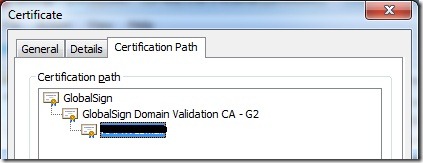
CertChain

In this example, the certificate authority (CA), GlobalSign, uses an intermediate CA, GlobalSign Domain Validation CA – G2, to delegate the process of creating UC certificates. Consequence is that the certificate of the root CA, in this example GlobalSign, as well as the certificate of the intermediate CA, here , must be present on the device or should be offered when setting up the connection so the client can validate them.

Inspection of the Exchange server showed that the intermediate certificate was properly installed on the Exchange server, after the customer imported the Personal Information Exchange File (.pfx) file, provided by the CA as part of the certificate package, which contained all certificates in the chain: root CA, intermediate CA and the UC certificate.

CertIntermediate

Then, investigation moved to the reverse proxy, in this case ISA Server 2006 SP1. It turned out the intermediate certificate on the ISA server, or rather the lack of it, was causing the issue. The customer had imported the individual UC certificate on the ISA server. Because the ISA server didn’t contain the intermediate certificate, it couldn’t send it to the client as part of the certificate chain. After importing the intermediate certificate on the ISA server, ActiveSync started working.

Generally speaking, Windows Mobile or Windows Phone devices don’t contain intermediate certificates so be sure to install them on your Exchange servers as well as on your reverse proxies. Checking and validating intermediate certificates is a client thing and in this case the intermediate CA was available on the non-Windows Phone devices which explained the difference in behavior between Windows Phone, iPhone and Android devices.

Note that, depending on your situation, you may have never seen the above issue before. |This could be the case when you’ve been using certificates directly provided a root CA so far. When selecting your CA, this might be something to take into account as not all mobile devices behave identical as you’ve seen. Also, although lifetime of root and intermediate certificates is quite long, it is something you should manage properly in your environment as you have to an additional certifiate to watch (which might expire or be revoked). Also, depending on volume and mobile costs, sending down extra traffic through the wire/air could be something to take into account. If you don’t think this could be an issue because certificates are relatively small, there’s a reason Mini OWA’s so popular in some regions. Distributing certificates to clients might become a better alternative in those circumstances.

Finally, I want to recommend the excellent SSL Certificate Management & Troubleshooting Tool, provided by DigiCert. It cannot only indicate potential certificate issues like these, or wrongly imported certificates (e.g. user store instead of computer store), but also fix them. As an alternative to ExRCA, you could use the online SSLchecker provided here.

Exchange PST Capture Tool released


It took a while, but today the Exchange Team released the long awaited Microsoft Exchange PST Capture Tool (initial version 14.3.16.4). The tool can be used to discover and inject PST files in an Exchange 2010 Exchange Online mailbox or archive.

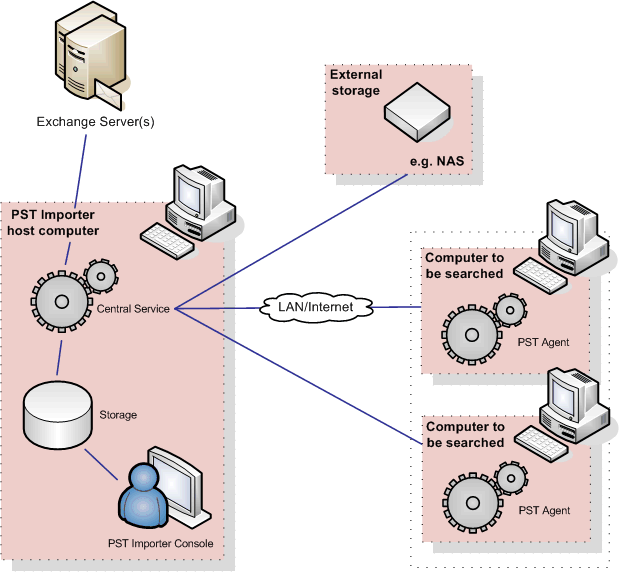
The tool was originally from Red Gate and known as PST Importer. It’s architecture consists of three components: the central service, (optional) agents for PST discovery, registration and collecting PST files and an administrative console (image by Red Gate):

The online documentation can be found here.

Note that although it’s only supported for Exchange 2010 and Exchange Online, you can use it with Exchange 2007; it’s only untested (and probably unsupported) with that product.

You can read the official announcement here; you can download the tool and the agents here.

Exchange 2007 SP3 Update Rollup 6


Today the Exchange Team released Rollup 6 for Exchange Server 2007 Service Pack 3 (KB2608656). This update raises Exchange 2007 version number to 8.3.245.2.

Here’s the list of changes included in this rollup:

  • 2289607  The week numbers displayed in OWA do not match the week numbers displayed in Outlook for English users and French users in an Exchange Server 2007 environment
  • 2498852  “0x80041606” error message when you perform a prefix search by using Outlook in online mode in an Exchange Server 2007 environment
  • 2499841  An arrow icon does not appear after you change the email message subject by using OWA in an Exchange Server 2007 SP3 environment
  • 2523695  A “System.ArgumentOutOfRangeException” exception occurs when you click the “Scheduling Assistant” tab in Exchange Server 2007 OWA
  • 2545080  Users in a source forest cannot view the free/busy information of mailboxes in a target forest when the cross-forest Availability service is configured between two Exchange Server 2007 forests
  • 2571391  Applications or services that depend on the Remote Registry service may stop working in an Exchange Server 2007 environment
  • 2572010  The Microsoft Exchange Information Store service may crash after you run the Test-ExchangeSearch cmdlet in an Exchange Server 2007 environment
  • 2575360  A new feature is available to automatically stop the Microsoft Exchange Information Store service when a time-out is detected in an Exchange Server 2007 SP3 environment
  • 2591655  A journaling report remains in the submission queue when an email message is delivered successfully in an Exchange Server 2007 environment
  • 2598980  The PidLidClipEnd property of a recurring meeting request has an incorrect value in an Exchange Server 2007 environment
  • 2616427   An Outlook Anywhere client loses connection when a GC server restarts in an Exchange Server 2007 environment
  • 2617784  Journal reports are expired or lost when the Microsoft Exchange Transport service is restarted in an Exchange Server 2007 environment
  • 2626217   Certain changes to address lists may not be updated in an Exchange Server 2007 environment
  • 2629790   The Exchange IMAP4 service may stop responding on an Exchange Server 2007 Client Access server when users access mailboxes that are hosted on Exchange Server 2003 servers
  • 2633801   The SCOM 2007 SP1 server cannot alert certain issues in an Exchange Server 2007 organization
  • 914533  The Microsoft Exchange Information Store service may stop responding on an Exchange Server 2007 server
  • 976977  The scroll bar does not work in OWA when there are more than 22 all-day event calendar items in an Exchange Server 2007 user’s calendar
  • 2641312  The update tracking information option does not work in an Exchange Server 2007 environment
  • 2653334  The reseed process is unsuccessful on the SCR passive node when the circular logging feature is enabled in an Exchange Server 2007 environment
  • 2656040  An Exchange Server 2007 Client Access server may respond slowly or stop responding when users try to synchronize the Exchange ActiveSync devices with their mailboxes
  • 2658613  The “PidLidClipEnd” property of a no ending recurring meeting request is set to an incorrect value in an Exchange Server 2007 environment

When running ForeFront Protection for Exchange, make sure you disable ForeFront before installing the rollup and re-enable it afterwards, otherwise the Information Store and Transport services may not start. You can disable ForeFront using fscutility /disable and enable it using the fscutility /enable command.

Note that update rollups are cumulative, i.e. they contain fixes released in earlier update rollups for the same product level (RTM, SP). This means you don’t need to install previous update rollups during a fresh installation but can start with the latest rollup.

You can download Exchange 2007 SP3 Rollup 6 here.