Exchange 2010 SP1 Update Rollup 6


Today the Exchange Team released RU6 for Exchange Server 2010 Service Pack 1 (KB2608646). This update raises Exchange 2010 version number to 14.1.355.2.

Here’s the list of changes included in this rollup:

  • 2431609  An update is available that updates the message of a retention policy in OWA for Exchange Server 2010
  • 2449266  EWS drops the TCP connection to the EWS client application without any error message in a Microsoft Exchange Server 2010 environment
  • 2480474  A Users do not receive quota warning messages after applying SP1 for Exchange 2010
  • 2514820  An incoming fax message is not delivered to the recipient in an Exchange Server 2010 SP1 environment
  • 2521927  Disabling the Exchange ActiveSync Integration feature for OWA does not take effect in OWA Premium clients in an Exchange Server 2010 environment
  • 2528854  The Microsoft Exchange Mailbox Replication service crashes on a computer that has Exchange Server 2010 SP1 installed
  • 2535289  The Microsoft Exchange Information Store service crashes occasionally when you run an antivirus application on an Exchange Server 2010 Mailbox server
  • 2536313  Slow message delivery and mailbox access for journaling mailboxes on an Exchange Server 2010 server
  • 2544246  You receive a NRN of a meeting request 120 days later after the recipient accepted the request in an Exchange Server 2010 SP1 environment
  • 2548246  The Microsoft Exchange Information Store service crashes occasionally when a folder view is corrupted on an Exchange Server 2010 mailbox server
  • 2549183  “There are no objects to select” message when you try to use the EMC to specify a server to connect to in an Exchange Server 2010 SP1 environment
  • 2549289  A RBAC role assignee can unexpectedly run the Add-MailboxPermission command or the Remove-MailboxPermission command on an Exchange Server 2010 server that is outside the role assignment scope
  • 2555851  A mailbox does not appear in certain address lists after you run commands on the mailbox in an Exchange Server 2010 SP1 environment
  • 2559814  A user cannot add or remove delegates from a mailbox by using Outlook in an Exchange Server 2010 environment
  • 2561514  Exchange Server 2003 user cannot view the free/busy information of a user in a different federated organization
  • 2563860  You cannot create a new mailbox database if you already have 1000 mailbox databases in an Exchange Server 2010 environment
  • 2567409  Certain free/busy messages are not replicated from an Exchange Server 2010 server to an Exchange Server 2003 server
  • 2571791  Retention policies are applied to Contact items unexpectedly in an Exchange Server 2010 environment
  • 2572052  Certain properties of a recurring meeting request from external email accounts are missing in an Exchange Server 2010 SP1 environment
  • 2575005  You cannot start the EMC or the EMS in an Exchange Server 2010 Service Pack 1 environment
  • 2578631  Certain users cannot send email messages to a mail-enabled public folder in an Exchange Server 2010 environment
  • 2579172  Items that are deleted or moved still appear in the original folder when you use Office Outlook in online mode to access an Exchange Server 2010 mailbox
  • 2579671  No results returned when you use the ExpandGroup method in EWS to retrieve a list of members of a Dynamic Distribution Group in an Exchange Server 2010 environment
  • 2582095  The SmtpMaxMessagesPerConnection property of a send connector is not replicated to the subscribed Edge Transport server in an Exchange Server 2010 environment
  • 2600835  The RPC Client Access service crashes when you delete an attachment of an item by using Outlook in online mode in an Exchange Server 2010 SP1 environment
  • 2601701  The memory usage of the MSExchangeRepl.exe process keeps increasing when you perform a VSS backup on Exchange Server 2010 databases
  • 2616127  “0x80041606” error code when you use Outlook in online mode to search for a keyword against a mailbox in an Exchange Server 2010 environment
  • 2617126  The Store.exe process crashes when you send an email message that has attachments in an Exchange Server 2010 SP1 environment
  • 2627769  Some time zones in OWA are not synchronized with Windows in an Exchange Server 2010 environment

Note that update rollups are cumulative, i.e. they contain fixes released in earlier update rollups for the same product level (RTM, SPx). This means you don’t need to install previous update rollups during a fresh installation but can start with the latest rollup available right away.

I’d recommend to thoroughly test this rollup in a test and acceptance environment first, prior to implementing it in production.

Note that when running ForeFront Protection for Exchange, you need to stop all ForeFront services before installing the rollup. While not entirely perfect, this is a welcome improvement over earlier rollups, where you had to disable and re-enable ForeFront using fcsutility /disable and fcsutility /enable respectively.

For the correct procedure on how to update a DAG and its members, check here.

You can download Exchange 2010 SP1 Rollup 6 here.

Exchange Management Console & IE9 issue fixed


Finally, today the Exchange team made available a fix to solve the issues when using the Management Console of Exchange 2007 or 2010 in conjunction with Internet Explorer 9.

As you probably know, when using Internet Explorer 9 you can’t close the Exchange Management Console properly as it gives you the error “You must close all dialog boxes before you can close Exchange Management Console” having no dialogs open.

To solve this issue, you had to do the resort to measures like killing the EMC process using Task Manager.

To properly install the hotfix:

  1. Request hotfix ID 2624899 from support here. For a direct download link click here.
  2. Download and install MS11-081 (2586448). You can retrieve this update here.
  3. Install the hotfix ID 2624899.

Microsoft states it expects to incorporate this fix in a future update of Internet Explorer 9.

While releasing a fix for the IE9 issue is great after all these month, I can’t help but wonder why the fix has not been made public.

Exchange 2010 Mailbox Role Calculator 17.8


Today the Exchange Team released a minor update to the Exchange 2010 Mailbox Role Calculator, bringing it to version 17.8.

Enhancements and Bug Fixes since version 17.2:

  • Added RAID-6 types 4+2 and 8+2;
  • Added 10, 20, and 40 processor core options;
  • Added 3TB disk capacity;
  • Script changes:
    • Removed option to remove first database;
    • Revised Diskpart script to format using 64K unit size.
  • Fixed the “Recommended databases per DAG” calculation formula to take into account symmetrical design multiples when the “Calculated Number of Databases for Symmetrical Distribution” is greater than the maximum of databases that can be deployed within the DAG;
  • Fixed the validation check for when you select more database copies than available servers.  As a result, when this scenario is presented, the calculator will no longer provide results;
  • Fixed “Calculated Number of Supported Databases / DAG” formula to round down to nearest whole number;
  • Fixed distribution calculation to allow more copies and servers;
  • Fixed “RAID Storage Architecture / SDC Server” to show the optimal RAID configuration for the SDC servers as opposed to the PDC servers;
  • Fixed formula issue for number of databases in the environment for standalone scenarios.

You can download the calculator here. For more information please consult the changeblog or usage instructions.

Loadbalancing, ActiveSync and Affinity


Recently, a client was experiencing load issues on the Exchange 2010 Client Access Servers. The client also had installed a hardware load balancer to balance client traffic.

While investigating the PAL results, the ActiveSync connections chart showed a significantly unbalanced number of ActiveSync connections between the CAS servers.

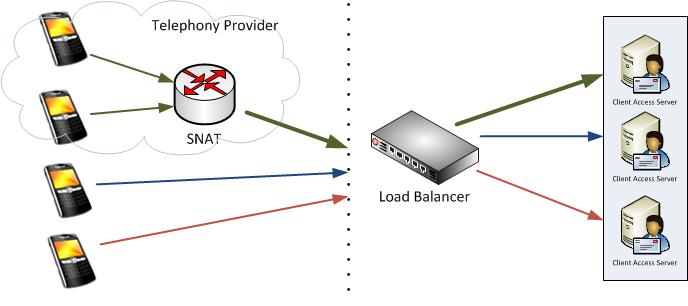
It turned out the client had load balanced all client traffic using Source IP affinity for all protocols. This means each client gets assigned the same CAS server, based on the client’s IP address. While this may sound reasonable, for ActiveSync this may not be optimal. Reason is that most mobile telephony providers use some form of NAT translation for their clients, resulting in these devices to appear having the same IP address.

When organizations standardize on a NAT utilizing mobile telephony provider, the problem might emerge sooner as all of their mobile clients will be assigned to the same Client Access Server.

In the picture above you’ll see the top two mobile devices are being NAT’ed. When the top device connects to the Exchange environment, it gets assigned the 1st CAS server based on its IP address. When the 2nd mobile device connects, the load balancer sees the same IP address after which it will direct that traffic to 1st CAS server as well.

While affinity is not required for ActiveSync, it is recommended since for each newly appointed CAS server, the notification subscription to the mailbox to be informed of updates would have to be recreated. Of course, this would result in a performance penalty and increased latency. Another option would be Session ID, but some EAS clients unnecessarily create a new SSL session ID.

After switching affinity from Client IP to Authorization HTTP Header the ActiveSync clients spread out more evenly. When using Authorization HTTP Header affinity, the load balancer uses the base64 encoded credentials as part of the http client request, e.g.

POST http://mail.eightwone.com/Microsoft-Server-ActiveSync/default.eas?Cmd=Sync&..
..
Authorization: Basic YW55IGNhcm5hbCBwbGVhc3VyZS4=

After switching affinity for ECP as well (should be Cookie or Session ID), the load issues were gone.

Where in the past mobile clients were insignificant to Outlook clients when compared in numbers, the ongoing consumerization of IT movement results in an increasing mobile client population. The number of ActiveSync users may easily outweigh the number of Outlook clients, as many users use a phone or tablet (or both) in addition to Outlook, if they use Outlook at all.

Exchange 2007 SP3 Update Rollup 5


Today the Exchange Team released Rollup 5 for Exchange Server 2007 Service Pack 3 (KB2602324). This update raises Exchange 2007 version number to 8.3.213.1.

Here’s the list of changes included in this rollup:

  • 981820  New X-headers of a message item do not appear when the message item is retrieved by IMAP4 or by POP3 in an Exchange Server 2007 SP2 environment
  • 2292150  A deleted hyperlink remains in the HTML source of an email message if you create the email message by using OWA in an Exchange Server 2007 environment
  • 2411423  The Msftefd.exe process constantly consumes up to 100 percent of CPU resources when your mailbox language is set to German on an Exchange Server 2007 server
  • 2450078  The sent time in an email message body is incorrect when you reply or forward the email message by using an EWS application in an Exchange Server 2007 environment
  • 2451415  “There was a problem logging onto your mail server” error message when you use a POP3 client to access a mailbox in an Exchange Server 2007 SP3 environment
  • 2536652  EdgeTransport.exe randomly stops responding on a Hub Transport server after you configure public folder replication in Exchange Server 2007
  • 2536695  “Some items cannot be deleted” error message when you try to delete or modify an email message in a public folder in an Exchange Server 2007 environment
  • 2536697  DBCS characters in a rule name are converted to question marks after you move a mailbox from Exchange Server 2003 to Exchange Server 2007
  • 2537783  The EdgeTransport.exe process crashes occasionally after you install Update Rollup 2 for Exchange Server 2007 SP3
  • 2538958  Extended Protection Warning Displayed in Exchange Management Console and Exchange Management Shell After Installing RU2 for Exchange 2007 SP3
  • 2554575  Items accumulate in the MRM submission folder when managed folder assistant journal items in an Exchange Server 2007 environment
  • 2556751  The EdgeTransport.exe process crashes when processing certain email messages on an Exchange Server 2007 Hub Transport server
  • 2557304  The Store.exe process may consume excessive CPU resources and memory resources intermittently when a user opens a calendar item by using OWA in an Exchange Server 2007 SP3 environment

When running ForeFront Protection for Exchange, make sure you disable ForeFront before installing the rollup and re-enable it afterwards, otherwise the Information Store and Transport services may not start. You can disable ForeFront using fscutility /disable and enable it using the fscutility /enable command.

Note that update rollups are cumulative, i.e. they contain fixes released in earlier update rollups for the same product level (RTM, SPx). This means you don’t need to install previous update rollups during a fresh installation but can start with the latest rollup available right away.

You can download Exchange 2007 SP3 Rollup 5 here.