Ignite 2015 Session Download Script


ignite ButtonYesterday was the first day of Ignite, and Exchange fellow Tony Redmond put up a nice summary of the first day, keynoted included, here.

For those not attending Microsoft Ignite, attending different sessions or not able to enter a session because the room was full, Microsoft publishes Ignite sessions on Channel 9. Because you may want to watch sessions offline, some people created scripts to retrieve all session videos and slidedecks.

Here is a slightly modified script, originally from Claus Nielsen, to download all Microsoft Ignite 2015 videos and slidedecks as the become available on Channel9. You can select sessions based on category or speaker, which helps narrowing down the contents offered at Ignite to sessions you are interested in. The script also allows you to download other session videos and decks, for example from Build 2015 or last year’s TechEd NA.

You can download the script from the TechNet Gallery here.

Microsoft Ignite 2015 Countdown


ignite ButtonIn only 2 weeks, the Microsoft Ignite event will be held at Chicago, USA. With the demise of Microsoft Exchange Conference, this is the major Microsoft conference this year. Its the place where people involved with Exchange will get updated on next version of Exchange. It is also the place to be informed in related areas, such as Office 365, Office 2016 or Azure, or catch up with your peers.

Microsoft recently revealed a small glimpse of what’s coming in Exchange 2016, such as modern attachments in OWA, which will allow you to send links to attachments stored on OneDrive for Business instead of embedding them in the message.  The article not only provides teasers as Exchange on-premises will – hopefully – be brought more up to par with the Exchange Online offering. It will also give many people peace of mind as there will be another version of Exchange on-premises.

In just 3 days, a whopping number of 82 sessions related to Exchange or Exchange Online will be held, so creating a schedule could be challenging. I expect these sessions t to reveal a lot more details on Exchange 2016 and its new features or enhancements. Million dollar question: will the IOPS requirement again change significantly? Be advised that the schedule is still not 100% fixed, so check back often for updates or plan for alternative sessions.

I am sure Microsoft will make this new consolidated conference a success. For those attending or presenting, I wish you a great time in Chicago at Ignite or one of the side events or at one of the many parties such as ENow’s Scheduled Maintenance. Unfortunately, I will not be attending Microsoft Ignite. For myself or others looking for session contents, Microsoft stated Ignite sessions will be recorded and be made available within 48 hours.

On another note, I will be at IT/DEV Connections later this year in Las Vegas. With Jaap Wesselius, I will be hosting a workshop on ‘Managing Exchange Online and Exchange On-Premises using Powershell’. If you plan to visit another conference this year, be sure to consider Connections, which will be held from September 14th-17th in Las Vegas, USA. Connections is independent, will have lots of sessions on Exchange on-premises as well as Office 365 topics. Sessions will be hosted by well-known speakers from the industry.

The UC Architects Podcast Ep47


iTunes-Podcast-logo[1]Episode 47 of The UC Architects podcast is now available,which was recorded at the Norwegian Lync Day. This episode is hosted by Steve Goodman, who is joined by John A Cook and StĂĄle Hansen. Editing was done by Andrew Price.

Some of the topics discussed in this episode are:

  • Outlook for iOS and Android
  • Microsoft Ignite Session Catalog
  • Blocking Outlook App for iOS & Android
  • Planning and Migrating a Small Organization from Exchange 2003 to Exchange 2013
  • AWS Quick Start Reference Deployment – Exchange Server 2013
  • Considering an Exchange 2013 DAG without AAP?
  • Using a Microsoft Azure VM as a DAG witness server: Exchange 2013 Help
  • Securing Exchange and Lync 2013 with Multi-Factor Authentication
  • Exchange Server 2010 Reaches the End of Mainstream Support
  • Office for Android
  • Azure AD Improvements
  • Amazon Workmail
  • Setting up a multi-forest Azure AD Sync deployment
  • Office 365 Exchange Online Message Size Onboarding Limit Increased to 150mb
  • Drive Shipping and Network Based Data Import for Office 365
  • Skype for Business Video Interoperability Server (VIS)
  • Cumulative Update 10 for Lync Server 2013 released December 31, 2014
  • Fix for Google Chrome, stability
  • Lync 2013 Standard Automatic APP CU 10 December 2014
  • Lync SDN For Dummies – Part 2.1
  • Lync Admin Tools (free): make configuration, administrative and troubleshooting of Lync easier
  • Video calling between Skype and Lync is temporarily disabled
  • What’s New in Skype4B: SILK is default codec for P2P sessions Synchronize Lync Presence with Skype – Lync Exchange – UC Blog
  • Lync Dude: Simple Understanding of Lync Windows Fabric  Failover
  • Lync and Skype video calling is coming to your Android and iOS Devices
  • Passive Auth for Lync 2013 Android mobile client
  • Events

More information on the podcast including references and a link to download the podcast here or you can subscribe to the podcasts using iTunes, Zune or use the RSS feed.

About
The UC Architects is a bi-weekly community podcast by people with a passion for Unified Communications; our main focus is on Exchange, Lync or related subjects.

EighTwOne 2014 Stats


stats chartOi! A tad late as I was enjoying a trip and celebrating New Year in the beautiful country of Brazil, but happy new year to all dear readers and followers.

The start of a new year gives opportunity to reflect on the past year which has been quite busy, apart from writing blog posts and creating and supporting scripts:

Looking at 2015, it will see the daylight of Ignite, the MOAME (Mother Of All Microsoft Events), and merger of events like MEC, LyncConf, TENA, SPC and MMS which will be held from May 4 – 8 in Chicago.

It promises to be an interesting year for Exchange On-Premises, with Microsoft’s cloud-first, mobile-first strategy, and Exchange Online / Office 365 as well. The next version of Exchange (’16’) it expected to be announced at Ignite, and it will become clear which features, new or currently available via Office 365, will make it to the next version of Exchange ‘on-premises’, and which ones will not. With the next version of Windows Server (’10’) expected end of 2015, it is very likely that Exchange ’16’ will require Windows Server 2012 R2 (or 2012) or Windows Server ’10’, adding support for Windows Management Framework 5 (PowerShell). Note that WMF5 might become available as an individual component, before the release of Windows Server ’10’. If things follow earlier OS/WMF dependencies for Exchange, the combination of Windows Server 2012 R2 with WMF5 is highly unlikely to become a supported combination for hosting Exchange.

There is also lots of development towards Azure, looking at the recent support for hosting your File-Share Witness on an Azure VM. This option, originally announced as a ‘possible feature’ in the works for CU2 back at TechEd North America 2013, introduces an interesting alternative for site fail-over scenarios.

Some stats of 2014:

Apart from the Archives, Versions, Builds and Dates, Schema Versions and Toolkit pages, these were the Top Posts (yes, Exchange 2010 is still a strong lead through search engines):

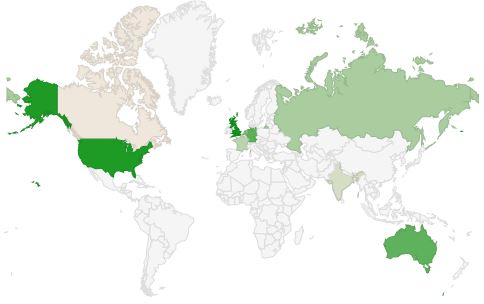
statscountries2014

Top 5 Visitor Countries:

  • United States (95,660)
  • United Kingdom (28,733)
  • Germany (22,730)
  • Australia (14,986)
  • Netherlands (14,242)

Top 5 Referrers:

  • social.technet.microsoft.com (TechNet forum)
  • blogs.technet.com (Technet blogs)
  • exchangeserverpro.com (Paul Cunningham)
  • experts-exchange (community)
  • community.spiceworks.com (community)

Top 5 Search Terms:

  • exchange target address hybrid query
  • kb2506143
  • powershell ise for exchange
  • msexcheseparamcachesizemax
  • exchange versions

Exchange 2010 Server Role Requirements Calculator 20.9


Exchange 2010 LogoAlmost 1,5 year after, the Exchange Team released an update for the Exchange 2010 Server Role Requirements Calculator. The updated version is 20.9 and contains minor bug fixes over the previous version.

Fixes since version 20.8:

  • Additional fixes on CAS/HT CPU calculations formulas
  • Disabled Distribution tab for Active/Active Single DAG model
  • Added Distribution tab warning that only one of the two DAGs is shown
  • Fixed RAID disk calculation for A/A scenario and lagged copies

You can download the calculator here. For more information please consult list of changes here or view usage instructions here.