Issues with July Updates of Windows


bandaidLast Update July 19th: Corrected Update information.

About a week ago, Microsoft released the July Updates for Windows systems. Unfortunately, something must have gone wrong in quality control, because people were reporting all sorts of issues, mostly related to IIS and Exchange servers.

The issue is created at the operating system level, probably due to changes in networking as mentioned in the July update notes. Therefor, symptoms can be experienced on systems running Exchange Server 2016 or even back to Exchange Server 2007.

Some of the symptoms are:

  • The World Wide Web Publishing Service – W3SVC – won’t come up, remains in a “stopping” state, but cannot fully stop or it cannot be restarted.
  • Exchange Transport and SMTP services becomes unresponsive or stops, causing mail flow issues (Source).

The issues were serious enough to have the Exchange PG publish a notice.

Meanwhile, Microsoft has released a superseding update for Windows Server 2016, and updates for older operating systems. However, looking at the information provided with updates for older operating systems, there are fixes for the original security updates, and (previews of) Monthly Rollups for the July updates. Replacements and updates may manifest themselves in Windows Update only after installing the original – faulty – update, meaning you might have to go through more than one Windows Update cycle (and possibly reboot) for the updates to become visible and installable. This applies to the Monthly Rollups as well.

The table below contains information on the original rollups and updates, the update you need to apply, and the type of update.

Operating System Original Update Update Type Comments
Windows Server 2016 KB4338814 KB4345418 Monthly Rollup Replacement
Windows Server 2012 R2 KB4338815 KB4338831 Monthly Rollup Replacement
KB4338824 KB4345424 Security Update Update for v1
Windows Server 2012 KB4338830 KB4338816 Monthly Rollup Replacement
KB4338820 KB4345425 Security Update Update for v1
Windows Server 2008 R2 KB4338823 KB4345459 Security Update Update for v1
KB4338818 KB4338821 Monthly Rollup Replacement
Windows Server 2008 KB4295656 KB4345397 Security Update Update for v1

Finally, apart from adopting a less aggressive updating strategy, this again shows unfortunately that having a separate production environment next to your test environment is no frivolous luxury.

KB2750149 breaks WS2012 Fail-over Clustering Snap-In (Updated)


Windows Server 2012 RC LogoA quick heads-up on Windows Server 2012, Fail-over Clustering and KB2750149, an update for the .NET 4.5 Framework. This hotfix was released on the January 8th, 2013.

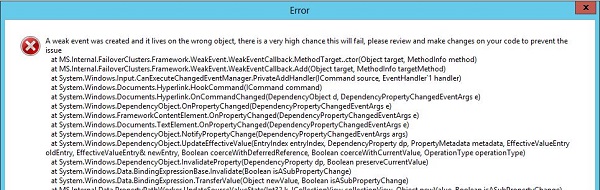
After installation, this hotfix will break the Windows Server 2012 Fail-Over Clustering MMC Snap-In, resulting an error when navigating stating:

A weak event was created and it lives on the wrong object, there is a very high chance this will fail, please review and make changes on your code to prevent the issue.

WS2012FCCapture

Microsoft is currently investigating the issue. Until then,it is advised not to apply KB2750149 on Windows Server 2012 Fail-over Clusters or uninstall it when you are experiencing the issue.

Note that the Windows Server 2012 Fail-over Cluster will keep working, as well as the related PowerShell cmdlets (another reason to start using the shell instead), it’s just that the cluster can’t be properly managed from the MMC.

Regarding Exchange 2013 DAG, which can be build on top of WS2012 Fail-over Clusters, you shouldn’t notice the issue because fiddling around in Fail-over Cluster Manager is a no-no for Exchange DAGs. Nevertheless, I’d recommend following the advisory and not install or uninstall the hotfix until further notice.

More information in this and this topic on the TechNet forums.

Update (23jan2013): Hotfix KB2803748 fixes the MMC crashing issue. It’s available through Windows Update or download it directly from here.

Windows Server 2012 RC Version and Levels


A quick post on the possible schema version and functional levels introduced with the release of Windows Server 2012 RC.

The schema version of a Windows Server 2012 Release Candidate forest is 56 (was 52 in the Windows “8” Beta). For more information on Active Directory schema versions and how to read this information, consult the AD Schema Versions page here.

Also, the msDS-Behavior-Version attribute of Windows Server 2012 domain controllers is set to 5, which is the same number as the Windows “8” beta version number. For more information on Active Directory Functional Levels and how to read this information, consult the AD Functional Levels page here.

Windows Server 2012 RC (Update)


A quick heads-up on today’s release of the much-anticipated Windows Server 2012 Release Candidate (Datacenter). The RC build number is 8400 (beta was 8250).

You can download the x64 ISO or VHD through here.

The Windows Server 2012 Release Candidate is available in Chinese (Simplified), Chinese (Traditional), English, French, German, Japanese, Korean, Portuguese (Brazil), Russian, Spanish, Swedish, and Turkish. The VHD is available in English.

Some documentation to get you started:

More documentation related to Windows Server 2012 RC here.

Other related releases:

Note: Like with all pre-release bits: it’s not recommended to use this in your production environment, so use them in a lab or testing environment only.

Windows Server 8 & Consumer Preview Betas (Updated)


A quick heads-up on today’s release of the much-anticipated Windows “8” beta:

Windows Server “8” Beta
This is the next release of Windows Server, Windows Server “8” and is available for x64 architectures only. You can download Windows Server “8” Beta ISO or VHD here.

Windows Server “8” RSAT for Windows 8 Consumer Preview
The Remote Server Administration Tools (RSAT) for Windows 8 Consumer Preview enable you to manage Windows Server “8” Beta from computer running Windows 8 Consumer Preview. You can download the Windows Server “8” Server Remote Administration Tools for Windows 8 Consumer Preview here.

Windows 8 Consumer Preview
This is the desktop client OS available for x64 and x86 architectures. You can download the Windows 8 Consumer Preview here.

Some (online) documentation which you might find useful:

The Windows “8” operating systems are available English, French, German, Japanese or Simplified Chinese. Like with all beta bits, it’s not recommended to use this in your production environment so use them in a lab or testing environment only.

Update: From an Exchange perspective, it may be worth mentioning that the Windows 8 Customer Preview contains a simple built-in Mail application supports Autodiscover and the Exchange ActiveSync (EAS) protocol. The client will show up in the “Mobile Phones” list in OWA (they might need to relabel that in the next Rollup). The Mail app in the Customer Preview reports as “DeviceUserAgent : WindowsMail/16.2.3237.0215”. Wiping your Windows 8 client isn’t possible, but the e-mail account with all the related data will be removed instead, which isn’t consistent with the expected “Mobile Devices” behaviour in my opinion. I also wonder what your security officer will think of this when you’re running the Mail app on a Windows 8 tablet, e.g. Slate. Exchange fellow Dave Stork has done some more research including screenshots for your reading pleasure here.