Exchange Updates – December 2016


Ex2013 LogoToday, the Exchange Team released the December updates for Exchange Server 2013 and 2016, as well as Exchange Server 2010 and 2007.

Changes introduced in Exchange Server 2016 CU4 are an updated OWA composition window, and on Windows Server 2016, KB3206632 needs to be present before CU4 can be deployed. This KB fixes – among other things – the problem with DAG members experiencing crashing IIS application pools. Be advised that the KB3206632 update for Windows Server 2016 is a whopping 1 GB. You can download this update here.

The biggest change for Exchange Server 2013 is support for .NET 4.6.2. Be advised organizations running Exchange 2016 or 2013 on .NET 4.6.1 should start testing with and planning to deploy .NET 4.6.2, as the March updates will require .NET 4.6.2, which is currently still optional.

Both Cumulative Updates introduce an important fix for indexing of Public Folder when they were in the process of being migrated. To ensure proper indexing, it is recommended to move public folder mailboxes to a different database so they will get indexed properly.

The Cumulative Updates also include DST changes, which is also contained in the latest Rollups published for Exchange 2010 and 2007.

For a list of fixes in these updates, see below.

Exchange 2016 CU4 15.1.669.32 KB3177106 Download UMLP
Exchange 2013 CU15 15.0.1263.5 KB3197044 Download UMLP
Exchange 2010 SP3 Rollup 16 14.3.339.0 KB3184730 Download
Exchange 2007 SP3 Rollup 22 8.3.502.0 KB3184712 Download
  • KB 3202691 Public folders indexing doesn’t work correctly after you apply latest cumulative updates for Exchange Server
  • KB 3201358 Set-Mailbox and New-Mailbox cmdlets prevent the use of the -Office parameter in Exchange Server 2016
  • KB 3202998 FIX: MSExchangeOWAAppPool application pool consumes memory when it recycles and is marked as unresponsive by Health Manager
  • KB 3208840 Messages for the health mailboxes are stuck in queue on Exchange Server 2016
  • KB 3186620 Mailbox search from Exchange Management Shell fails with invalid sort value in Exchange Server 2016
  • KB 3199270 You can’t restore items to original folders from Recoverable Items folder in Exchange Server 2016
  • KB 3199353 You can’t select the receive connector role when you create a new receive connector in Exchange Server 2016
  • KB 3193138 Update to apply MessageCopyForSentAsEnabled to any type of mailbox in Exchange Server 2016
  • KB 3201350 IMAP “unread” read notifications aren’t suppressed in Exchange Server 2016
  • KB 3209036 FIX: “Logs will not be generated until the problem is corrected” is logged in an Exchange Server 2016 environment
  • KB 3212580 Editing virtual directory URLs by using EAC clears all forms of authentication in Exchange Server 2016

Exchange 2013 CU15 fixes:

  • KB 3198092 Update optimizes how HTML tags in an email message are evaluated in an Exchange Server 2013 environment
  • KB 3189547 FIX: Event ID 4999 for a System.FormatException error is logged in an Exchange Server 2013 environment
  • KB 3198046 FIX: The UM mailbox policy is not honored when UM call answering rules setting is set to False in an Exchange Server 2013 environment
  • KB 3195995 FIX: Event ID 4999 with MSExchangerepl.exe crash in Exchange Server 2013
  • KB 3208886 Send As permission of a linked mailbox is granted to a user in the wrong forest in Exchange Server 2013
  • KB 3188315 Messages are stuck in outbox when additional mailboxes are configured in Outlook on Exchange Server 2013
  • KB 3202691 Public folders indexing doesn’t work correctly after you apply latest cumulative updates for Exchange Server
  • KB 3203039 PostalAddressIndex property isn’t returning the correct value in Exchange Server 2013
  • KB 3198043 Shadow OAB downloads don’t complete in Exchange Server 2013
  • KB 3208885 Microsoft.Exchange.Store.Worker.exe process crashes after mailbox is disabled in Exchange Server 2013
  • KB 3201966 MSExchangeOWAAppPool application pool consumes excessive memory on restart in Exchange Server 2013
  • KB 3209041 FIX: An ActiveSync device becomes unresponsive until the sync process is complete in an Exchange Server environment
  • KB 3209013 FIX: The LegacyDN of a user is displayed incorrectly in the From field in the Sent Items folder on an ActiveSync device
  • KB 3209018 FIX: Results exported through the eDiscovery PST Export Tool never finishes in an Exchange Server environment
  • KB 3199519 Inconsistent search results when email body contains both English and non-English characters in Exchange Server 2013
  • KB 3211326 “ConversionFailedException” error when emails are sent on the hour in Exchange Server 2013

Notes:

  • Exchange 2016 CU4 doesn’t incldue schema changes compared to CU4, however, Exchange 2016 CU4 as well as Exchange 2013 CU15 may introduce RBAC changes in your environment. Where applicable, use setup /PrepareSchema to update the schema or /PrepareAD to apply RBAC changes, before deploying or updating Exchange servers. To verify this step has been performed, consult the Exchange schema overview.
  • When upgrading your Exchange 2013 or 2016 installation, don’t forget to put the server in maintenance mode when required. Do note that upgrading, before installing the Exchange binaries, setup will put the server in server-wide offline-mode.
  • Using Windows Management Framework (WMF)/PowerShell version 5 on anything earlier than Windows Server 2016 is not supported. Don’t install WMF5 on your Exchange servers running on Windows Server 2012 R2 or earlier.
  • When using Exchange hybrid deployments or Exchange Online Archiving (EOA), you are allowed to stay at least one version behind (n-1).
  • If you want to speed up the update process for systems without internet access, you can follow the procedure described here to disable publisher’s certificate revocation checking.
  • Cumulative Updates can be installed directly, i.e. no need to install RTM prior to installing Cumulative Updates.
  • Once installed, you can’t uninstall a Cumulative Update nor any of the installed Exchange server roles.
  • The order of upgrading servers with Cumulative Updates is irrelevant.

Caution: As for any update, I recommend to thoroughly test updates in a test environment prior to implementing them in production. When you lack such facilities, hold out a few days and monitor the comments on the original publication or TechNet forum for any issues.

The UC Architects Podcast Ep61


iTunes-Podcast-logo[1]Episode 61 of The UC Architects podcast is now available. This episode is hosted by Pat Richard, who is joined by Tom Arbuthnot and Stale Hansen. Editing was done by Andrew Price.

Topics discussed in this episode are:

Top Stories 

  • Microsoft Teams released to preview

Office 365

  • Office 365 and Azure now available from U.K. datacenters

Lync/Skype for Business

  • SfB Response Group; Exchange UM holidays – multi-add, multi-assign, import from CSV and CAL
  • Australian RGS/Response Groups Holiday Sets for 2016/2017
  • Holiday set editor
  • Response Group Timeframe Editor Powershell GUI
  • Skype for Business Cloud Connector Edition: Release 1.4.1
  • Skype for Business, Bandwidth Calculator Version 2.70
  • Add a Skype Menu Item for Meet Now Dedicated (Anthony Caragol)
  • Skype for Business Online Multi-Region, Automated Meeting Migration and Exchange Server Voicemail
  • Video Based Screen Sharing (VbSS) comes to iOS and Android Mobile SfB Clients
  • Certificate Expiry Checklist
  • Two new posters for SharePoint 2016 and Skype for Business architectural models
  • Running #Polycom Trio with #Skype4B? Make sure to upgrade to the latest 5.4.3AD release
  • CustomInvite by Modality
  • VMware Horizon VDI Skype for Business Support Tech Preview Q1 2017
  • Outlook Skype for Business “Contacts” folder doesn’t sync with Skype for Business contacts
  • Update to Hybrid Handbook 2.1
  • Free Skype for Business Online Network Assessment Tool from Microsoft, Hands On

You can download the podcast here or you can subscribe to the podcasts using iTunes, Zune or use the RSS feed.

About
The UC Architects is a community podcast by people with a passion for Unified Communications; our main focus is on Exchange, Skype for Business or related subjects.

Advisory: Hold off deploying Exchange 2016 CU3 on WS2016 for now


Ex2013 LogoLast Update: December 13th, 2016: The Windows team published an update for Windows Server 2016, which should fix the issue with DAG members crashing when restarted. The related article is KB3206632, and you can download it here. Be advised, the Windows Server 2016 update – which also fixes other issues – is nearly 1 GB!

About one month ago, Exchange Server 2016 Cumulative Update 3 was released which supported deployment on Windows Server 2016. However, recently issues are being reported on various communities as well in related blog comments, where Exchange 2016 became unstable, symptoms being randomly crashing IIS application pools (which says nothing about the root cause).

Microsoft acknowledged there is an issue with Exchange Server 2016 CU3 on Windows Server 2016:

If you attempt to run Microsoft Exchange 2016 CU3 on Windows Server 2016, you will experience errors in the IIS host process W3WP.exe. There is no workaround at this time. You should postpone deployment of Exchange 2016 CU3 on Windows Server 2016 until a supported fix is available.

So, be advised to hold off to deploying Exchange 2016 on Windows Server 2016 until further notice.

Update: The Exchange Team has also posted a notice that an update is in the works, and to delay further Exchange 2016 deployments on Windows Server 2016 until this delay has been made available. No ETA on the update yet.

IT/DEV Connections 2016 Wrap-Up


IMG_2130Note: For those that attended Jaap and my workshop on Monday, Advanced PowerShell Management of Office 365, the EXO slidedeck is available here, and the sample code is available here. Session slidedecks or handouts available through the app or Connections site.
Last Monday, I returned from the largest, independent conference on Microsoft technologies, IT/Dev Connections. Well, that should have been Sunday, but technical issues with the airplane and lack of options to fly back to The Netherlands the same day resulted in an extended stay, but that’s something for another story. IT/Dev Connections is a 3-day conference, consisting of 6 tracks holding a total of ~280 sessions. Like previous editions, the event again took place in the nice resort that is Aria, Las Vegas.

Almost traditionally, the is a pre-conference day where workshops are given. One of these workshops was Advanced PowerShell Management of Office 365, done by Jaap Wesselius and yours truly. The turn-up was good, even considering we had some though competition this year from workshops such as PowerShell Masterclass and Office 365 IT/Dev Connections Power Camp. Again it was my only session, so I had the rest of the week ‘off’ to attend sessions by fellow presenters.

GEWK4725

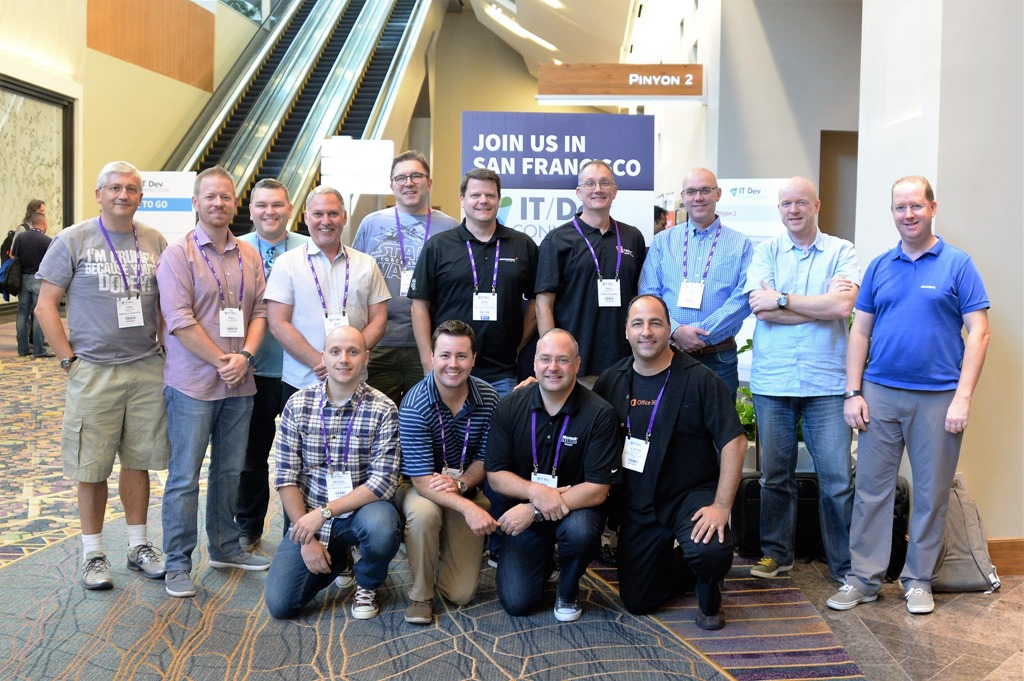
Left to right: Tony Redmond, Paul Cunningham, Gareth Grudger, Jeff Guillet, Michael van Horenbeeck, Konrad Sagala, Andrew Higginbotham, Gary Steele, Ingo Gegenwarth, Paul Robichaux, J. Peter Bruzzese, Jaap Wesselius, Michel de Rooij and Sigi Jagott.

Picking sessions for wasn’t an easy task this year. For Office 365 / Exchange (On-Premises) and PowerShell minded professionals, there were a multitude of sessions to choose from, and many times you discovered they were given the same time slot. The app was a big help picking sessions, and to be honest the app was a big improvement over last year’s app – kudos to Penton there. It could also be used to retrieve handouts, which made it easier to follow the contents presented by clicking through it on your own screen.


Wednesday saw an interesting ‘Bamboozle the Exchange Experts’. People from the Exchange Product Group were flown in for Connections to answer audience questions. During this session, none other than Greg Taylor, Ross Smith IV, Brian Day, David Espinoza, and Jeff Mealiffe took part in the panel, and Tony Redmond took it upon him to be the MC. It was not only insightful and interactive, it was fun, and the PG seemed to enjoy it as well.

If you are considering attending this event next year – and you should – know that with an attendance of ~1200 people (guesstimate), and apart from the fact that it’s independent and sessions are done by experienced people from the field, it also excels in that it is big enough to matter, yet small enough to hold an intimate feel to it. Compared to Ignite, one could say that there is less walking involved – or congestion, no full room issues, way better food and thus an overall better experience. Now if you plan on attending (or trying to get a speaking engagement – yes you, Maarten) for IT/Dev Connections 2017, and as the group shot above gives away, be aware Penton has decided to move the event for next year to San Francisco. So save the date: October 23-26, the Hilton, San Francisco (Union Square)!

Special thanks to Penton for having me, ENOW for hosting yet another great Scheduled Maintenance party at the Ghostbar, Quadrotech for finally being able to catch up, CodeTwo for having me for an interview.

Finally, here are some of the other IT/DEV Connections 2016 wrap-ups:

Office Servers and Services MVPs


It’s been a while since I made an overview of the number of Exchange MVPs around the world. With the recent reorganization of the MVP program, lots of product-related MVP awards were merged in container titles. For example, the former Exchange or Lync Server MVPs are now part of the Office Servers and Services MVP, making it nearly impossible to differentiate per expertise unless classifying individual MVPs.

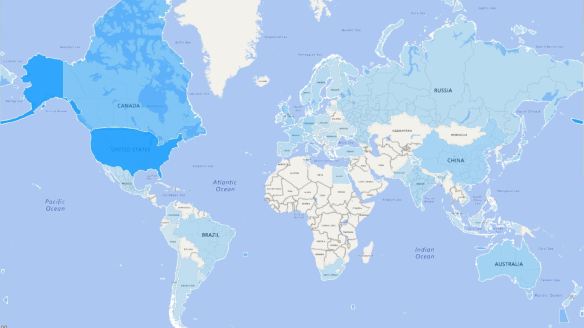
ossmvpsmap20161003

The graphic displays distribution of Office Servers and Services MVPs over the world, per October 2016. The information is collected from the public MVP site, and while some MVPs remain anonymous (curious, as awardees are in principle active community members), it’s clear some regions are still under-represented.

Below are the numbers used to create the above map.

(Unknown) 45 Hungary 3 Russia 8
Argentina 3 India 13 Serbia 1
Australia 24 Indonesia 2 Singapore 4
Austria 1 Ireland 2 Slovakia 1
Belgium 7 Israel 2 Slovenia 2
Bosnia-Herzegovina 3 Italy 9 South Africa 4
Brazil 10 Japan 20 Spain 7
Bulgaria 2 Korea 11 Sri Lanka 5
Canada 49 Kuwait 1 Sweden 10
Chile 2 Latvia 1 Switzerland 9
China 21 Macedonia 2 Taiwan 2
Colombia 3 Malaysia 3 Netherlands 14
Costa Rica 1 Mexico 4 Tunisia 1
Croatia 4 New Zealand 6 Turkey 4
Czech Republic 2 Norway 5 Ukraine 1
Denmark 4 Pakistan 2 United Arab Emirates 5
Egypt 2 Palestine 1 United Kingdom 24
Finland 2 Peru 1 United States 106
France 19 Philippines 2 Uruguay 1
Germany 18 Poland 2 Vietnam 4
Greece 1 Portugal 5
Guatemala 1 Romania 2  TOTAL  538