Exchange 2013 Cumulative Update 8


Ex2013 LogoToday, Cumulative Update 8 for Exchange Server 2013 was released by the Exchange Team (KB3030080). This update raises Exchange 2013 version number to 15.0.1076.9.

This Cumulative Update introduces changes in the following areas:

  • Calendar and Contact Modern Public Folders favorites added in Outlook are now accessible in OWA.
  • Batch Migration of Public Folders to 2013 improves migration throughput and PF migration experience.
  • Increased support limits for Public Folders with Exchange on-premises deployments (500,000 for co-existence, or 1,000,000 for CU8-only deployments). Number of supported PF mailboxes stands at 100 though, with a per-PF mailbox limit of 100,000 Public Folders.
  • Supported EAS clients are now redirected to Office 365 upon successful Hybrid migration.

Next to DST corrections, this Cumulative Update introduces the following fixes:

  • 3045301 SMTP is not transported over TLS 1.1 or TLS 1.2 protocol in an Exchange Server 2013 environment
  • 3040681 MapiExceptionTimeout error during a hierarchy synchronization process of multiple public folders in Exchange Server 2013
  • 3037417 Outlook cannot download an OAB file in an Exchange Server 2013 environment that mixes Exchange Server 2010
  • 3037291 Can’t add members to Outlook contact group by using MAPI over HTTP
  • 3036952 Mailbox quota warning messages are not sent out after you migrate from Exchange Server 2010 to Exchange Server 2013
  • 3036374 Incorrect NDR size limit message is displayed for German localization in an Exchange Server 2013 environment
  • 3036365 “The specified address is not recognized or does not exist” error message in an Exchange Server 2013 environment
  • 3032153 Recurring events in Calendar over DST are not adjusted on all ActiveSync devices in all Exchange Server environments
  • 3031133 Default folders are duplicated after you migrate mailboxes to Exchange Server 2013
  • 3031069 Mails are spoofed in Office 365 or in an Exchange Server 2013 environment
  • 3030629 Outlook cannot open a shared folder on which a group you attend has the Reviewer permission in Exchange Server 2013
  • 3018518 Garbled text in the Japanese “From” field in a forwarded DBCS message
  • 3016440 Public folder mailbox quarantined
  • 3012266 Update to increase availability address spaces to 200 in Exchange Server 2013
  • 3011579 SaveChanges fails and generates a MAPI_E_NOT_FOUND error message on a large message body in Exchange 2013 CU6
  • 3006861 “The SMTP address has no mailbox associated with it” error when you access a user’s mailbox by using EWS application
  • 3003974 Improved support for MSG files in an Exchange Server 2013 environment where OPENTEXT products are used
  • 2988060 Cannot see the auditing results for an HttpModule-based extension for MAPI over HTTP protocol in Exchange Server 2013
  • 2986941 “An Active Directory error 0x51 occurred” error when you run the “Setup /PrepareAD” command from a DC in Exchange 2013
  • 2961741 Exchange Server 2013 delegated setup fails when the setup account is a member of Domain Admins

Notes:

  • When using Exchange hybrid deployments or Exchange Online Archiving (EOA), you are required to stay current.
  • Previously released CU7 introduced changes to prevent restoration of pre-CU7 databases. Pre-CU7 users are advised to perform a full backup post-upgrade to CU7 or later.
  • Previously released CU7 added support for hierarchies containing 250,000 modern public folders. Consult this article for co-existence scenarios.
  • Previously released CU5 introduced OAB architectural changes which are documented here. If you are affected, it is recommended to update CAS servers prior to Mailbox servers.

This Cumulative Update does not include schema or Active Directory changes when compared to Cumulative Update 7. If you have deployed a version earlier than CU7, make sure you run PrepareSchema /PrepareAD.  If you want to speed up the Cumulative Update installation process, you can temporarily disable certificate revocation checking as described here.

Note that Cumulative Updates can be installed directly, i.e. no need to install RTM or Service Packs prior to installing Cumulative Updates. Note that once installed, you can’t uninstall a Cumulative Update nor any of the installed Exchange server roles. The order of upgrading servers is irrelevant, unlike with previous generations of Exchange.

Finally, and I can’t emphasize this enough: For any Hotfix, Rollup, Service Pack or Cumulative Update, I’d recommend to thoroughly test this in a test and acceptance environment first, prior to implementing it in production. When you lack such facilities, hold out a week or two and monitor the comments on the release article or TechNet forum for any issues.

You can download Exchange 2013 Cumulative Update 8 here; UM Language Packs can be found here.

Role-based Access Control


security officer RBACIt has been over 5 years (wait, what?) since I wrote an article on Role-based Access Control, or RBAC, in Exchange 2010. At that time, RBAC was a big architectural change in Exchange 2010 over Exchange 2007.

Present day, RBAC is still a much neglected topic in many Exchange organizations. It must be said that most organization can happily live with the default RBAC configuration. They have no need to dive in this versatile model to set up granular permissions in their organization. In bigger organizations, this configuration can also easily become quite complex.

For TechTarget I started writing few articles on the topic of RBAC, starting with the base components. There you can find Part 1, Part 2, and Part 3.

Book: Pro Exchange 2013 SP1 PowerShell Administration


As some of you may have noticed, it has been a bit more quiet here than it used to be. Well, the reason for that, after several months of collaborative hard work, blood, sweat and tears, is finally here (and in stores just in time for the Holidays): A book titled Pro Exchange 2013 Service Pack 1 PowerShell Administration!

2013pa

Together with fellow Exchange MVP Jaap Wesselius, we will talk you through topics such as:

  • Deployment and co-existence scenarios.
  • The Client Access Server role and topics such as namespaces, certificates, load balancing, and publishing.
  • The Mailbox Server role and topics such as managing mailboxes, distribution lists and recipients, message transport
  • High availability topics like Database Availability Groups and Client Access and Transport availability.
  • Message Hygiene using the Edge Transport server role and anti-spam features.
  • Backup, Restore and Disaster Recovery, including the backup-less’ Native Data Protection scenario.
  • Unified Messaging features and integration with IP telephony solutions such as Microsoft Lync Server.
  • Compliance features like In-Place Archiving and MRM, In-Place Discovery, In-Place Hold, Data Loss Prevention including fingerprinting, and auditing.
  • Role-Based Access Control model and Split Permissions model for organizations that require this.
  • Office 365 and Exchange Online (EXO) scenarios, federating organizations, directory synchronization, ADFS and Multi-Factor Authentication, as well as basic tasks like onboarding and offboarding mailboxes.

Our 600+ page book will take a PowerShell-first approach when talking about Exchange Server 2013. You can order the book from Amazon here.

I have also added it to the book page here, which also contains other useful books when you want to learn about Exchange or related technologies like PowerShell, Active Directory or Lync Server.

Exchange 2013 Cumulative Update 7


Ex2013 LogoToday, Cumulative Update 7 for Exchange Server 2013 was released by the Exchange Team (KB2986485). This update raises Exchange 2013 version number to 15.0.1044.25.

Note: Customers that run backups of their Exchange databases are advised to upgrade to CU7 and perform a post-upgrade full backup. This is due to a race condition which could prevent proper restoration of pre-CU7 Exchange databases.

This Cumulative Update contains a security update to fix a potential elevation of privilege issue (bulletin MS14-075), as well as the following fixes:

  • 3004235 Exchange Server meetings in Russian time zones as well as names of time zones are incorrect after October 26, 2014
  • 3012655 New-MailboxImportRequest causes unreadable characters when you import an ANSI format .pst file of Russian language
  • 3012652 CalendarProcessing cmdlet does not generate delegate permissions to universal security groups in Exchange Server 2013
  • 3009631 Advanced Find against the Sent Items folder in Outlook returns no result in Exchange Server 2013
  • 3009612 Outlook Web App shows organization details on the contact card beyond the scope of user ABP in Exchange Server 2013
  • 3009291 Shared mailbox cannot be opened in Outlook in an Exchange Server 2013 environment that has multiple domains
  • 3008453 Cannot edit or delete forms from the organizational forms library in Exchange Server 2013
  • 3008438 User who is trying to Log on to Exchange Admin Console is logged in to OWA instead
  • 3006672 Move request fails if the IsExcludedFromProvisioning option is true in Exchange Server 2013
  • 3005391 Exchange Server 2013 Cumulative Update 5 breaks free|busy lookup from Exchange Online to Exchange Server 2007
  • 3003986 RejectMessageReasonText in transport rule appears in the user section of a DSN in Exchange Server 2013
  • 3001217 TLS 1.0 is hardcoded for SMTP traffic encryption in Exchange Server 2013
  • 3001037 Distribution group cannot send email messages to a mail enabled public folder in an Exchange Server 2013 environment
  • 2999031 A cross-forest mailbox move from Exchange Server 2007 to Exchange Server 2013 finishes with CompletedWithWarnings status
  • 2998144 New-MoveRequest cmdlet with RemoteLegacy parameter cannot perform a cross-forest mailbox move
  • 2988553 Add-ADPermission and Remove-ADPermission can be run outside the management scope in Exchange Server 2013
  • 2981538 Exchange Control Panel crashes when you proxy from Exchange 2013 to Exchange 2010
  • 3014051 Cannot migrate mailboxes in a multiple domains environment in Exchange Server 2013
  • 3012986 ContentIndexRetryQueueSize value for a passive node never drops to zero in Exchange Server 2013 Cumulative Update 6
  • 3004011 Sound alerts do not work in Outlook Web App when new email or calendar notification is received in Exchange Server 2013
  • 3003580 Event ID 4999 and 4401 when the Microsoft Exchange Replication service crashes in Exchange Server 2013
  • 3003518 “550 5.7.1” NDR when you send messages to external recipients in an Exchange Server 2013 hybrid environment
  • 3003068 Cannot see online archive mailbox after you upgrade to Exchange Server 2013 Cumulative Update 6
  • 3000944 Subfolders under the Deleted Items folder are not visible in Outlook in an Exchange Server 2013 environment
  • 2997847 You cannot route ActiveSync traffic to Exchange 2007 mailboxes after you upgrade to Exchange 2013 CU6
  • 2997355 Exchange Online mailboxes cannot be managed by using EAC after you deploy Exchange Server 2013 CU6
  • 2997209 Exchange Server 2013 databases unexpectedly fail over in a co-existence environment with Exchange Server 2007
  • 2995263 OAB cannot be rebuilt if the .flt file is larger than two GB in Exchange Server 2013
  • 2994216 PublicFolderMoveRequest deletes all read or unread state in target mailbox for each user in Exchange Server 2013
  • 2993871 Resource Booking Assistant crashes after you upgrade to Exchange Server 2013 Cumulative Update 5
  • 2983216 Category setting on an item in Outlook jumps the selection to the top of the list in an Exchange Server 2013 environment
  • 2931223 MAPI virtual directory is missing from Default Web Site node

Notes:

  • When using Exchange hybrid deployments or Exchange Online Archiving (EOA), you are required to stay current.
  • CU7 adds support for hierarchies containing 250,000 modern public folders. Consult this article for co-existence scenarios.
  • Be advised of OAB architectural changes introduced with CU5 which are documented here. If you are affected, it is recommended to update CAS servers prior to Mailbox servers.
  • If you have installed the Interim Update to fix Hybrid Configuration Wizard, you can install the Cumulative Update over it – there is no need to uninstall the IU prior to installing CU6.

This Cumulative Update includes schema and AD changes, so make sure you run PrepareSchema / PrepareAD. After updating, the schema version will be 15312. If you want to speed up the process, you can temporarily disable certificate revocation checking as described here.

Note that Cumulative Updates can be installed directly, i.e. no need to install RTM or Service Packs prior to installing Cumulative Updates. Note that once installed, you can’t uninstall a Cumulative Update nor any of the installed Exchange server roles. The order of upgrading servers is irrelevant, unlike with previous generations of Exchange.

Finally, and I can’t emphasize this enough: For any Hotfix, Rollup, Service Pack or Cumulative Update, I’d recommend to thoroughly test this in a test and acceptance environment first, prior to implementing it in production. When you lack such facilities, hold out a week or two and monitor the comments on the release article or TechNet forum for any issues.

You can download Exchange 2013 Cumulative Update 7 here; UM Language Packs can be found here.

Exchange 2013 Server Role Requirements Calculator 6.6


Ex2013 LogoNote: Shortly after publishing, a minor update was made in to fix circular referencing in the sheet.

Next to an updated Exchange 2010 Server Role Requirements calculator, the Exchange team published an update for the Exchange 2013 Server Role Requirements Calculator as well. The new version number is 6.5.

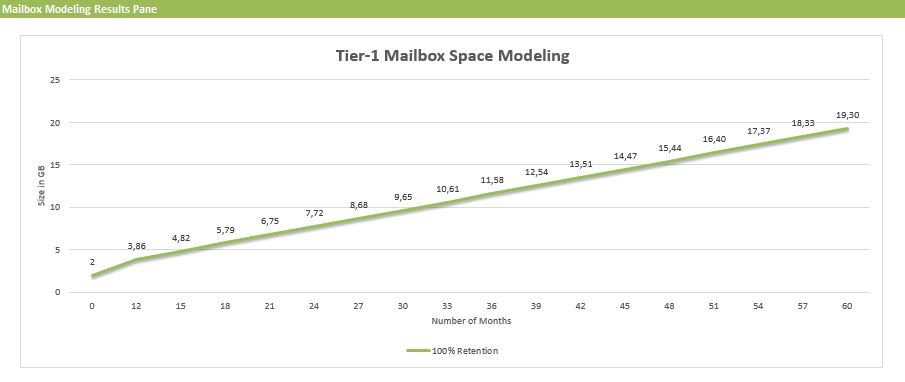
This new version includes a nice new feature, courtesey of Excel, which will plot mailbox usage using the provided input. You can find this chart on the Mailbox Space Modeling tab.

msm

Changes since version 6.5:

  • Fixed circular logic issue with initial mailbox size calculation

Changes since version 6.3:

  • New: The calculator now includes mailbox space modeling graphs that extrapolates (for each mailbox tier) the projected amount of time it will take to consume the mailbox quota.
  • Fixed “Number of Exchange Data Volumes per Server” to support more than 50 volumes.
  • Optimized memory sizing for FAST which reduces memory requirements for small mailbox server designs.
  • Added the ability to specify multiple AutoReseed volumes per DAG server to calculator and scripts.
  • Fixed 3 database/volume layout scenario involving 100 copies/server.
  • Fixed rounding error in calculating number of databases/volume in “2 Volumes / Backup Set”
  • Log isolation is now a calculated property to align with best practices guidance.
  • Changed “Disk” to “Vol” in left column of Distribution tab to align with scenarios that do not involve JBOD configurations.
  • Added additional processor core options.
  • Fixed JBOD storage design results table to accurately account for Restore Disk capacity being set to “–” and for differences between PDC and SDC Restore Disk capacity settings.
  • Fixed Backup Requirements worksheet to expose Weekly Full backups correctly.
  • Various comment changes/corrections.

You can download the calculator here. For more information, please consult the list of changes here or Read Me here.